Loopback Angular Example: Todo

Ref: https://github.com/strongloop/loopback-example-angular

Clone the example

Go to the dir

Use npm to install the dependencies

Run node server with ‘node .’. But I got this error:

SOLUTION: Sorry, I got this problem because I run another node sever in another and I forgot to turn it off. After making sure only one node server running, everything run well!

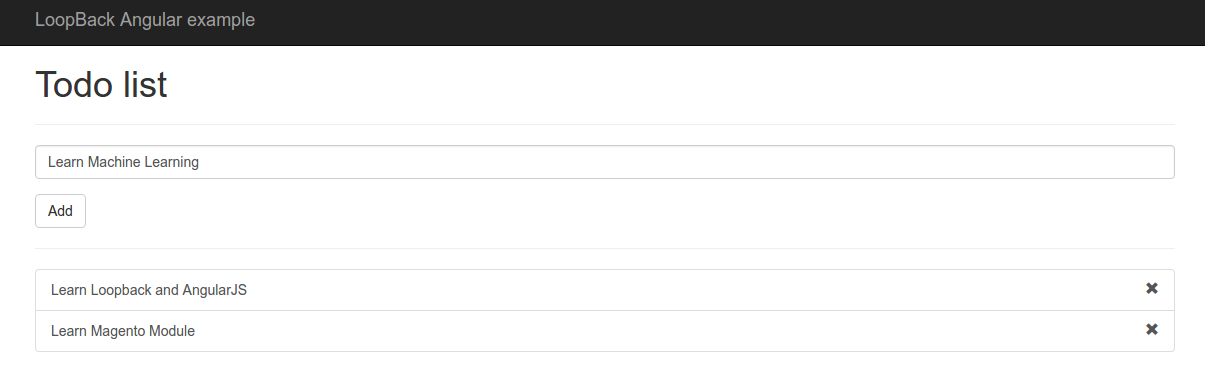
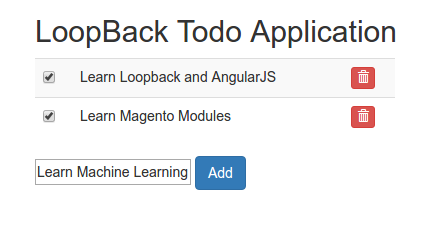
Open your browser then type http://localhost:3000/ or http://localhost:3000/index.html. Here is the result and try to add a few list.NEXT: HOW TO STORE THE LIST IN DB???
StrongLoop Looback And AngularJS First Tutorial

Ref: Loopback and AngularJs first tutorial.

Make sure you already installed node/nodejs and npm on your system

Then start installing Strongloop framework

Wait until it’s finished. Then I go to my default directory for node project.

Use ‘slc’ command to create a new project. My first node project name is ‘todo’. Type ‘slc loopback todo’:

Then, as instructed, go to ‘todo’ directory

then create a model

At the end if there is no more property needed, type ENTER twice!
The last, Run the node server:

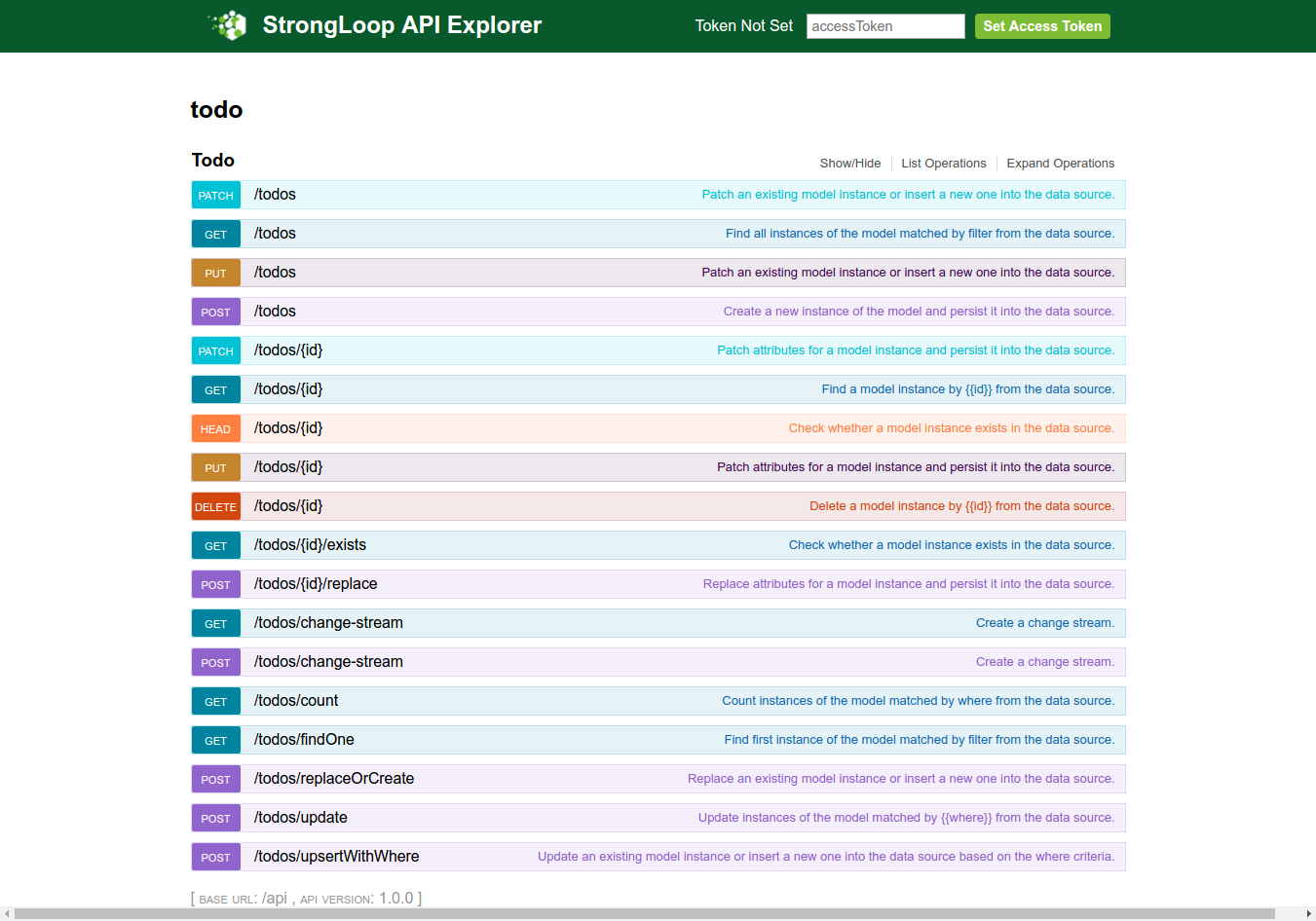
Use your browser to see the action:
http://localhost:3000/

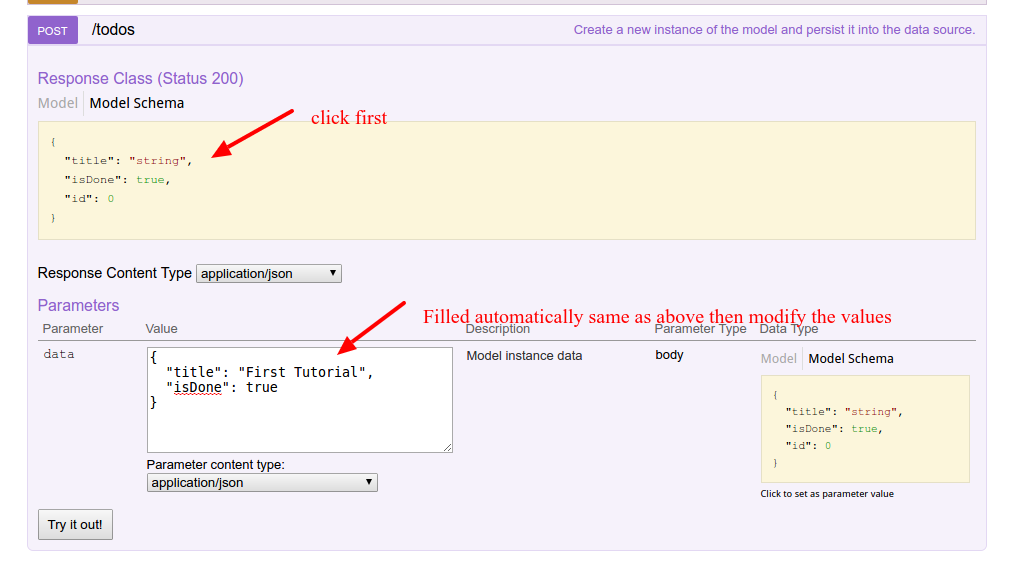
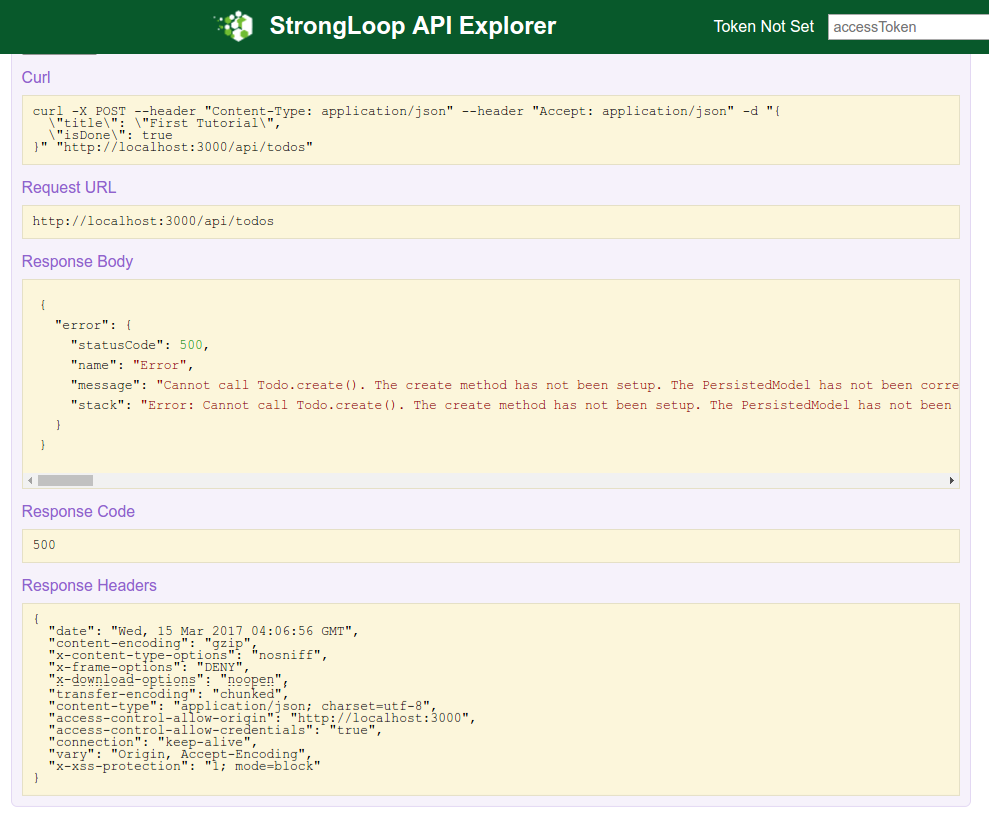
http://localhost:3000/explorer/:Lest try to create a new post. Click ‘POST’ from the above explorer or http://localhost:3000/explorer/#!/Todo/Todo_createThen click ‘Try out!’ button. Here is the response:I also got the error in my terminal.

Let the error from now because we haven’t setup a datasource to store our data yet. We’ll fix this later. UPDATE: READ SETUP OUR DATASOURCE! AT THE END OF THIS ARTICLE.
NOTE: I ALSO CREATED THE OTHER LOOPBACK APP ‘todo1’ WITH Loopback 3 AND app ‘notes’ (A project containing a basic working example, including a memory database)

SO THE DATASOURCE ALREADY SETUP AND I’D NOT GET THE ABOVE ERROR ANYMORE. I DID THE SAME THING FOR ‘todo2’ AND Loopback 2.x.

BUT WHAT I DONT LIKE IS IT’D CREATE ALSO ‘notes’ REST BESIDE ‘todo’ REST. SO I PREFER TO SETUP MY OWN DATASOURCE FROM SCRATCH. PLEASE READ AT THE END OF THIS ARTICLE TO DO THAT!
The REST backend is ready but we need to instruct the ExpressJs backend on how to serve our static content. In the server folder locate the middleware.json file and modify the ‘files’ object in it like show below.

From now on all the files in the client folder will be served as static content.

AngularJS
We need install angularjs and the dependencies in /client/lib directory. Create a new file .bowerrc in the todo project root then write this piece of code in it.

Then use ‘bower’ to install angular and the others.

NOTE: at the beginning, I failed to execute the above code with this error

I tried this solution: (ref:https://github.com/bower/bower/issues/2260)

Before I tried ‘sudo bower update -a’, ‘sudo bower init –allow-root’, etc but no avail.
Okay. Now the angular, etc already installed in /client/lib/ directory. Please check the directory to make sure.
To test the angularjs in action, create a new html file ‘index.html’ in /client/ directory. Here is the content:

Open it in your browser: http://localhost:3000/index.html
Here is the result:

we will use the Loopback AngularJS client to create a service, compatible with the angular-resource module, to access the backend API.
Create a ‘js’ folder into the client folder and then type the command ‘lb-ng server/server.js client/js/lb-services.js’ in the console.

Check ‘lb-services.js’ in /client/js/ dir.
Now create another file called ‘app.js’ into the same ‘js’ folder.

In the app.js file we injected the ‘lbServices’ and defined three function (add, delete and update) for the basic CRUD operations. As you can see we used all the method exposed by the service created with the ‘lb-ng’ tool to interact with the backend. Most of this methods return a $promise that we used as callback to modify the client model.

The last thing in order to make this tutorial complete is to rewrite the index.html to suite our  application needs. Open the index.html previously created and paste the code below into it.

IT IS NOT FINISHED YET! SETUP OUR DATASOURCE!
Now we want to connect it to a datasource, MySQL!. read: Connect your API to a data source. Here are the steps:
1. Use scaffolding ‘slc’ to define the datasource. datasource name is ‘mysqlID’

2. Check the setting created in /server/datasources.json
SORRY, ONLY ADMIN CAN SHOW THIS!
3. Create the database ‘loopback’ (utf8-general-ci) and table ‘Todo’ manually (via phpmyadmin). For the table ‘Todo’, Here are the fields:
id int, primary, auto increment,
title varchar(50),
isDone boolean
4. Don’t forget to hook the datasource ‘mysqlID’ in /server/model-config.json like this:

NOTE: TO ADD ANOTHER TABLE IN /server/model-config.json, PLS DO LIKE THIS (FOR EXAMPLE WE WANT TO ADD A TABLE ‘User’):

SOMETHING LIKE THIS. PLS LEARN THE OTHERS PARAMS LIKE ‘$promise’ and ‘$resolved’.
5. If the node server still run, stop it then run it again to refresh the changes. Open your browser: http://localhost:3000/index.html. Here is the looks

Laravel Tips & Tricks

View (Template)

  1. How to show the data in the blade template (like var_dump function)?
    Solution:

    use ‘dd’ instead of var_dump. but var_dump also can be used to replace dd!
  2. How to concatenate strings?
    Solution: Use ‘.’ like in PHP
  3. How to check if variable is empty (null)?
    Solution: Use ‘is_null()’ like in PHP

     
  4. How to find out the array key/index in foreach loop
    Solution:

    Use ‘key=>value’ pair in foreach loop
  5. How to link to the css files in /public/css/ directory?
    Solution: Use ‘URL:asset()’ like this


Model

Controller

  1. How to use Eloquent Query (select, join, group by, etc)
    Solution: Use ‘DB::table’
    To use specific command like ‘GROUP_CONCAT’, use ‘DB::raw()’
    Don’t put ‘get()’ at the end of the query if the blade template use ‘render’ but use ‘paginate()’ instead


My Booking App

Source: (local) http://localhost/works/laravel/mybooking/public/
(from) https://github.com/prehire/php-23093023909ad09a09

TASK:
NOTE: I do this without using because it’s heavier for my laptop. I can use vagrant later but need to set some configuration. Please read Laravel Homestead VirtualBox Vagrant.

  1. Copy the available local ‘php-23093023909ad09a09’ directory then paste to be ‘mybooking’. If you dont have the source code of ‘php-23093023909ad09a09’, then clone from https://github.com/prehire/php-23093023909ad09a09 then rename it to ‘mybooking’
  2. Go to the directory ‘mybooking’ then use composer to install the dependency packages.
  3. Because I want to use SQLite, so modify .env to use SQLite

    Also modify /config/database.php to make sure these settings:

    Also make sure the sqlite database ‘homework_database.sqlite’ is in /database/ directory!
  4. Set the files permission for these directories:

     
  5. Test the app for the first time http://localhost/works/laravel/mybooking/public/. Here is how it looksmybooking-front-firstIt only shows Homework (http://localhost/works/laravel/mybooking/public/), Booking (http://localhost/works/laravel/mybooking/public/booking), Customer (http://localhost/works/laravel/mybooking/public/customer) and Cleaner (http://localhost/works/laravel/mybooking/public/cleaner).
  6. OK. It’s time for the task description!
    Summary
    We are a local home cleaning company called Homework. Today we are keeping track of all our bookings using a spreadsheet and we want to move it into a web application. Our main goal with this project is to make it possible for customers to schedule a booking online. I’ve already created the scaffolding of the app for you and now I need you to add some functionality to it. This should take you about 1-2 hours, but you have up to 4 hours to complete it.
    Deliverables
    1. All models and columns should have validation as described in the model spec below, plus any common-sense validation you’ll put on new models.
    2. We need to split the site in to Admin-only and Customer-only. Right now all the admin functionality is exposed to the world.
    3. Currently we operate in 10 cities, but plan to expand quickly. We need a way to admin the list of cities we operate in and the ability to add to the list. You should create a new table to do this.
    4. On the admin cleaner form we need a way to select the cities a cleaner works in. This should be a checkbox list populated by the list of the cities we operate in. You may need to create a new table to store this data.
    5. We need a way for customers to signup and schedule a booking all on one form. To accomplish this you will need to do the following:
    – Make the site root a customer-facing form designed for customers to sign up and book a cleaner.
    – On this form, capture all the data needed to create a customer in the database (first name, last name, phone number).
    – If the customer already exists in the database (use phone number to determine this) use the existing record instead of creating a new one. You should probably add a validation to enforce this.
    – Let the customer select what city they are in from the cities table created earlier.
    – Let the customer specify a date and time when they would like their house cleaned.
    – When the user submits the form, look for cleaners that work in the specified city that do not have any bookings that conflict with the time specified.
    – If you can find an available cleaner, create the booking and display the name of the cleaner assigned to the booking.
    – If you can’t find an available cleaner, tell the user that we could not fulfill their request.
    6. Write tests for the parts of the application you feel need it the most.
    7. When you are done, please zip up the entire root directory including your SQLite database and vendor files — do not cherry-pick folders.
    Restrictions
    1. Do NOT switch the database from SQLite to MySQL.
    2. If you create a password-protected account, use credentials “admin@admin.com” and password “admin”.Existing Models
    1. customer
    – first_name (required)
    – last_name (required)
    – phone_number (optional)
    2. booking
    – customer (required, enforce referential integrity)
    – cleaner (required, enforce referential integrity)
    – date (required)
    3. cleaner
    – first_name (required)
    – last_name (required)
    – quality_score (required, must be a number between 0.0 and 5.0)
    Setup
    https://github.com/prehire/php-23093023909ad09a09Summary
    The following deliverables are not required but are nice-to-haves. If you choose to implement them, it should take around 1 hour but you must complete this section within 3 hours. You can complete any number of the bonus deliverables: you don’t need to complete all of them.Bonus Deliverables
    1. Use a free theme to make the application look a little better, especially the pages seen by our customers.
    2. Add security to the admin pages on our site. Customers and cleaners do not need to be able to login at the moment.
    3. The cleaner form should have one additional field: ’email’
    o Email should be required
    0 Check that it is a valid email address
    4. When a new booking is created, email the cleaner with information on the booking and customer.
    5. The Customer Show view should show all associated bookings below the form and link to them.
    6. The Cleaner Show view should show all associated bookings below the form and link to them.
    7. When you are done, please zip up the whole app directory with dependencies and upload it below.
  7. Step by step the task completion!
    “2. We need to split the site in to Admin-only and Customer-only. Right now all the admin functionality is exposed to the world.”. For the Admin-only page, It’d need a login. But it not needed for Customer-only page! So we’re going to show the homepage for customer and also the login link for the admin!
    Use ‘Auth’ to create the login/register scaffolding

    NOTE: This will modify ‘app.blade.php’ in /resources/views/layouts/ directory and would mess the web looks. But no worry. We’d fix this later!
    Then modify ‘web.php’ in /routes/ like this:

    Then create ‘HomeController’ in ‘Home’ directory:

    You’ll see ‘HomeController.php’ in /app/Http/Controllers/Home/ directory!
    NOTE: You can remove ‘HomeController.php’ file in /app/Http/Controllers/ directory created by Auth scaffoldiing!
    Then add a new function ‘index’ in the new controller. Here is the controller content look

    Then create a new directory ‘home’ in /resources/views/ and a new blade template ‘index.blade.php’ in the new directory. Here is the temporary content of the file

    I also need to modify ‘app.blade.php’ in /layouts/ directory so we can fix the web layout and the login (and register) link can be showed up. We also need to add some bootstrap links for the CSS and Javascript/JQuery. Here is the modification in app.blade.php

    OK. Here is the homepage looksmybooking-front-2Then try to add a new user (customer) by clicking the register link (http://localhost/works/laravel/mybooking/public/register). Then add a new user with Name: ‘Admin’, email: ‘advcha@admin.com’ and password: ‘admin123’. This is a ‘fake admin’ user!. Not actual admin user. We’re going to add the real admin later. (NOTE: I think also I need to differentiate the login/register page for the customer and cleaner. May be add an option if the user want to be a customer or a cleaner!)
    Now we can login with the name. But where is the links to Booking, Customer and Cleaner? Here is how to show them up. Modify ‘app.blade.php’ again, then put the links like this:

    Here is the looksmybooking-front-3Okay. but the links still can be clicked properly. We need to add some routes in /routes/web.app like this:

    So create a new directory ‘Admin’ in /app/Http/Controllers/ then move BookingController.php, CleanerController.php and CustomerController.php into the new directory.
    Then (don’t forget) to modify the namespace in those three files to

    Now we can put the routes for the links in ‘app.blade.php’ like this:

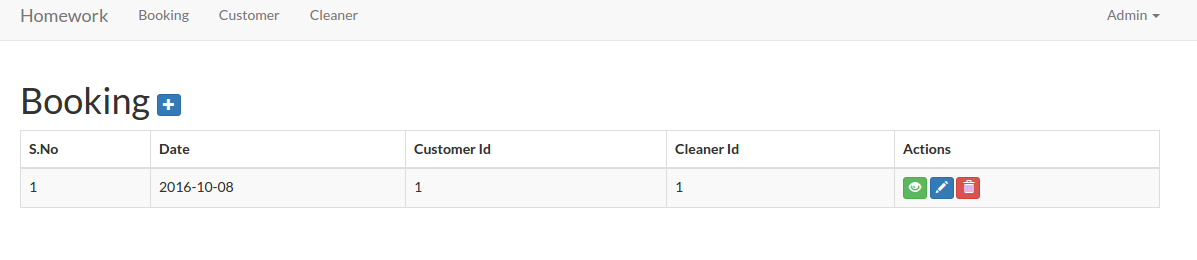
    Now we’ve completed the links! You can see the working urls like Booking (http://localhost/works/laravel/mybooking/public/admin/booking), Customer (http://localhost/works/laravel/mybooking/public/admin/customer) and Cleaner (http://localhost/works/laravel/mybooking/public/admin/cleaner). Here is the example for the admin booking page.mybooking-admin-bookingBut there is another thing we need to pay attention for the above links. If we’re logged out, the above links and the urls should not be displayed and opened. Here we need to employ the middleware auth for each the controllers files (BookingController.php, CleanerController.php and CustomerController.php) in ‘__construct’ function like this:

    Now if we open the url (for example:  http://localhost/works/laravel/mybooking/public/admin/customer) without login first, we’d be redirected to the login page!
    <IF YOU HAVE MORE TIME, PLS DO THIS. BUT IT’D TAKE MANY WORKS AND TIME!!!>
    To make the view structures tidier, we need to create a new directory ‘admin’ in /resources/views/ then move these directories ‘booking’, ‘customer’ and ‘cleaner’ into it. Then don’t forget to modify the ‘index’ function in our three controller files to refer to the new location:

    Also do the same thing for others functions like ‘create’, ‘edit’ and ‘show’. Dont forget to modify also almost all the blade template for them!!! for example: /admin/customer/index.blade.php, modify the urls like url(‘/customer/create’) to url(‘/admin/customer/create’) and the others same urls in the file!!!
    </IF YOU HAVE MORE TIME, PLS DO THIS. BUT IT’D TAKE MANY WORKS AND TIME!!!>
    CRUD
    To make CRUD works for them, I need to modify also some functions in the controller files to redirect to the correct route. For example for CustomerController.php, modify the redirect to ‘admin/customer’ for ‘store’, ‘update’ and ‘destroy’ functions. Do the same thing for Booking and Cleaner controllers! Also modify the blade templates!
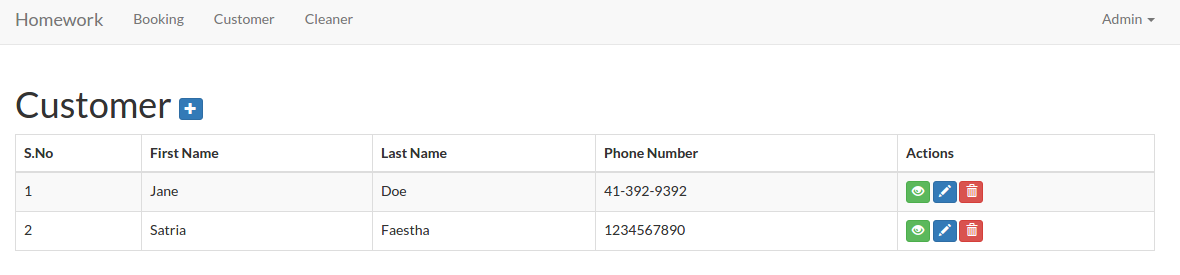
    Here is the look for the admin customer (http://localhost/works/laravel/mybooking/public/admin/customer)
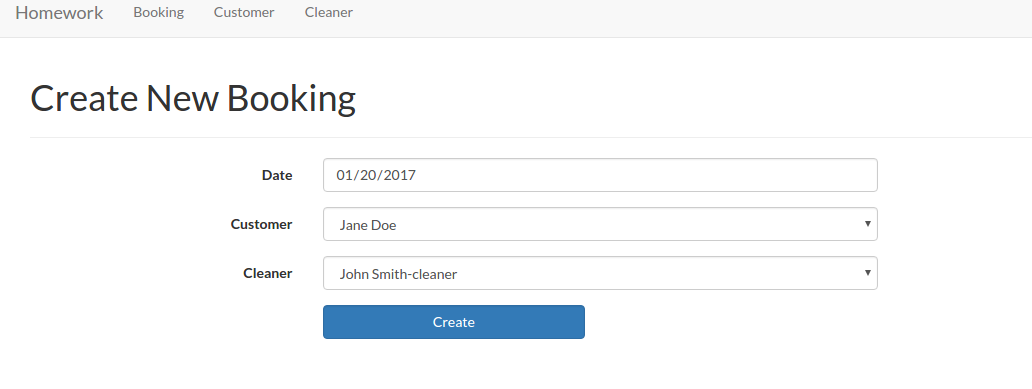
    mybooking-admin-customerI think I’ve completed the Admin page. NO!! WAIT!! How about the Admin page for Booking??? The Booking form need CustomerId, CleanerId and Date. On the create form, currently the Ids need to be typed manually, I want to change it to a select box to avoid any error like undefined Id. OK. First, modify ‘BookingController.php’ in /app/Http/Controllers/Admin/ to retrieve the customers and cleaners data

    Then modify ‘create.blade.php’ in /resources/views/admin/booking/ to display the selection of the customers and the cleaners

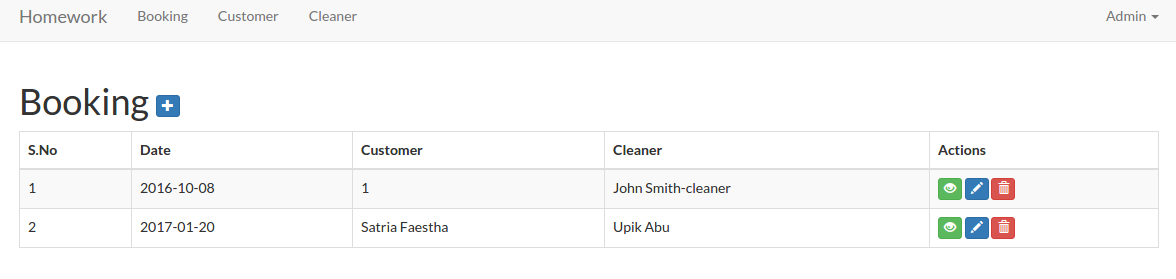
    mybooking-booking-admin-createWe need also change the booking table in /resources/views/admin/booking/index.blade.php to show the names instead of the ids. First, modify the model ‘Booking.php’ in /app/ directory to add relation with customer and cleaner models

    Then modify ‘index’ function in /app/Http/Controllers/Admin/BookingController.php to retrieve also the customer and cleaner data

    Now in /resources/views/admin/booking/index.blade.php, we can show the names instead of the ids

    Here is the looksmybooking-booking-admin-indexFor the booking edit function, we only need to do a small changes. In /app/Http/Controllers/Admin/BookingController.php, modify ‘edit’ function to pass also the customer and the cleaner data

    Then modify /resources/views/admin/booking/edit.blade.php to display the customer and the cleaner options

    NOTE: If any customer or the cleaner is not exists (may be because it’s already deleted) in the selection, the selection SHOWS THE FIRST OPTION NOT NULL. IT CAN BE MISLEADING AS IF THE FIRST OPTION IS SELECTED. HOW TO HANDLE THIS???
    Now I’m going to work on the Customer page (homepage). The current homepage (http://localhost/works/laravel/mybooking/public/home) content still show the ugly text ‘Hello My Customer!’. Please modify the home template ‘app.blade.php’ in /resources/views/layouts/ to make it tidier. especially in the body tag, add class ‘container’ to wrap the content:

    Then add a form and a few text input in /resources/views/home/index.blade.php. So it’ll be like this:

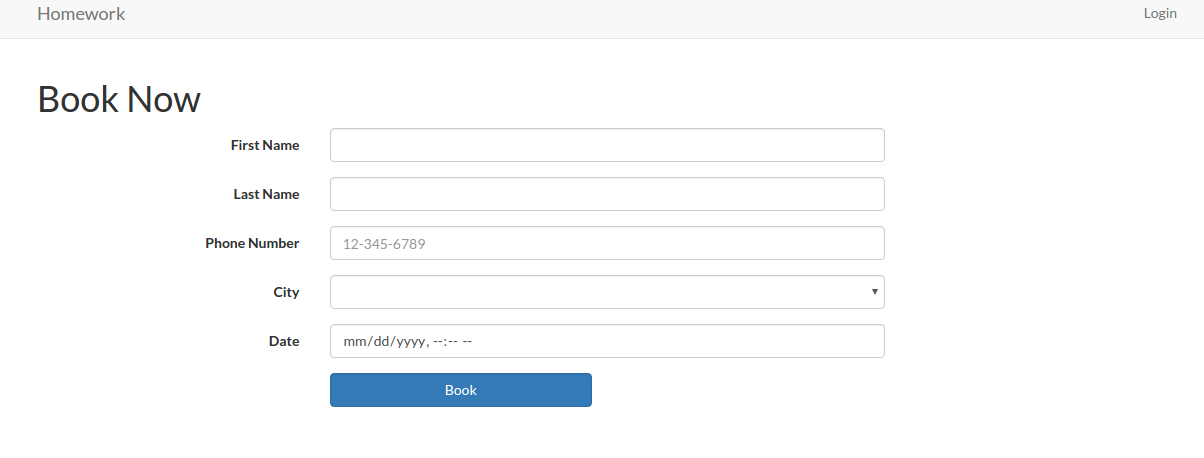
    mybooking-book-frontThe layout looks same with the customer form for adding a new one. But this moment leave it as is. We’re going to change it later with some new features. For the front end booking, it’ll go to ‘/home/book/’ url to save the inputs. We need to add this to our route in /routes/web.php

    Then modify /app/Http/Controllers/Home/HomeController.php to add a new function ‘book’ to store the data into the customer table.

    The ‘book’ function is pretty same with ‘store’ function in CustomerController.php file.
    OK. The Next task: “3. Currently we operate in 10 cities, but plan to expand quickly. We need a way to admin the list of cities we operate in and the ability to add to the list. You should create a new table to do this.”
    First we need to create a new model ‘City’. Use artisan to do this job

    A new file ‘City.php’ would be in /app/ directory. Here is the content

    I’m going to add some variables into the file to represent the table name, the primary key and so on. So it’d be like this:

    Then we need to create a new table ‘cities’ via ‘migration’ command

    NOTE: If you get an error like this

    it means you need to set the file permission of ‘storage’ directory to 777 in order to let the migration command to create a new file

    Here is the migration file created (2017_01_14_044005_create_cities_table.php in /database/migrations/)

    In ‘up’ function, I need to add a new field ‘city_name’ with ‘string’ type. So it’d be like this

    Then do create the new table ‘cities’ via ‘migrate’ command

    NOTE: I got a confusing error the first time when tried to execute ‘migrate’ command. Here is the error

    I JUST DIDN’T REALIZE MY PHP VERSION VIA TERMINAL IS VERSION 7.0! SO I USE ‘php5.6’ INSTEAD AN IT’S WORKS! IT SEEMS I HAVEN’T CONFIGURED THE PDO FOR SQLITE ON PHP 7.0.
    NOTE: ‘migration’ command ONLY RUN ON THE NEW FILE. IT’D NOT RUN THE FILES ALREADY MIGRATED!
    Now create a new controller ‘CityController’ in ‘Admin’ directory

    The new file ‘CityController.php’ would be in /app/Http/Controllers/Admin/ directory!. Here is the content

    Here we want some functions/methods for CRUD the city data. The function much similar within the others controllers like Cleaner. Here it is

    Then modify our routes in /routes/web.php for this ‘city’

    The last step is to create the blades templates for this ‘city’. Create a new directory ‘city’ in /resources/views/admin/. Then create some files ‘index.blade.php’, ‘create.blade.php’, ‘edit.blade.php’ and ‘show.blade.php’. The content of the files are pretty similar with Cleaner! Just modify some details like change ‘cleaner’ to ‘city’ and the others things. Also don’t forget to add ‘City’ menu in /resources/views/layouts/app.blade.php

    http://localhost/works/laravel/mybooking/public/admin/citymybooking-city-admin2The next task: “4. On the admin cleaner form we need a way to select the cities a cleaner works in. This should be a checkbox list populated by the list of the cities we operate in. You may need to create a new table to store this data.”.
    Here I need to create a new table ‘cleaner_cities’. This new table would store the cleaner id and the city id values. Then I also need to modify the form input of the cleaner to include the cities they can work in (they can select more than one city). Then store the selection in the new table ‘cleaner_cities’. Same solution with the above, we need to create a new model ‘CleanerCity’. Use artisan to do this job

    Then modify /app/CleanerCity.php file to add a few variables like cleaner_id and city_id. So it’d be like this:

    Then we need to create a new table ‘cleaner_cities’ via ‘migration’ command

    Then modify ‘up’ function in the migration file created (2017_01_14_070618_create_cleaner_cities_table.php in /database/migrations/)

    Use ‘migrate’ command to create the new table

    Then modify the model ‘Cleaner.php’ to add ‘City’ and ‘CleanerCity’ model

    Then modify ‘CleanerController.php’ in /app/Https/Controllers/Admin/ directory. For example at ‘create’ function, we need to show up the cities checkboxes. So pass the ‘city’ data in the function

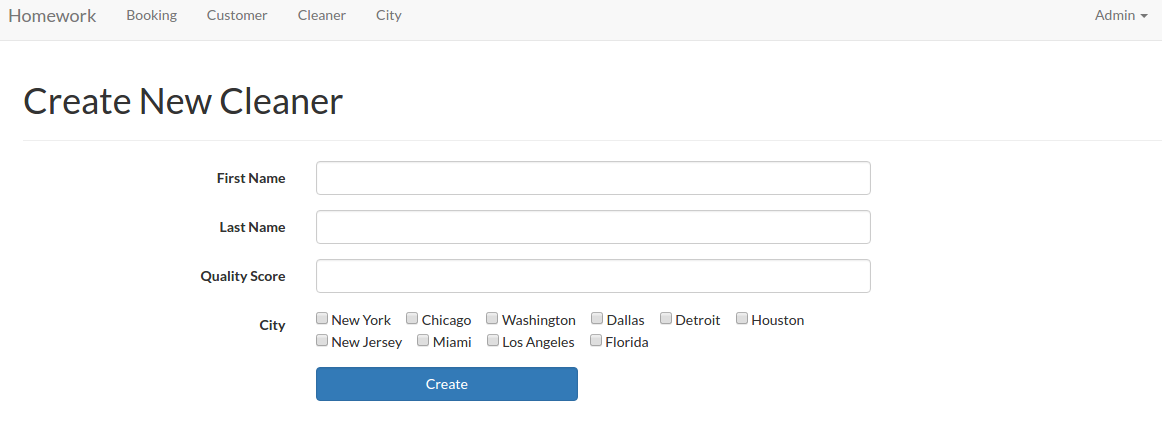
    Then modify ‘create.blade.php’ in /resources/views/admin/cleaner/ directory to display the checboxes

    Here I need to add a class ‘chk_city’ to manage the checkboxes display (side by side). I need to create a new css file ‘style.css’ in /public/css/ directory. Here is the css content

    Also I need to add the css link in /resources/views/layouts/app.blade.php file

    OK. Here is the looks (http://localhost/works/laravel/mybooking/public/admin/cleaner/create)mybooking-cleaner-admin-createOK. To make sure the create cleaner function work properly, modify ‘store’ function in /app/Http/Controllers/Admin/CleanerController.php like this:

    So this function also check the input if already exist or not then also insert the cleaner_id and city_id into ‘cleaner_cities’ table!
    We can do the same thing for ‘edit’ and ‘update’ function. Modify ‘edit’ and ‘update’ function in /app/Http/Controllers/Admin/CleanerController.php like this

    The ‘update’ function is more complicated. If there is no city selected, remove all the cities if exist in the cleaner_cities related to the cleaner_id. If some cities selected and same within the table, just leave it. But if different cities are selected, add the new cities and remove the unselected ones.
    Then modify also /resources/views/admin/cleaner/edit.blade.php to show the selected/unselected cities

    Now, we want to display the cities also on the cleaner table. So modify ‘index’ function in /app/Http/Controllers/Admin/CleanerController.php like this:

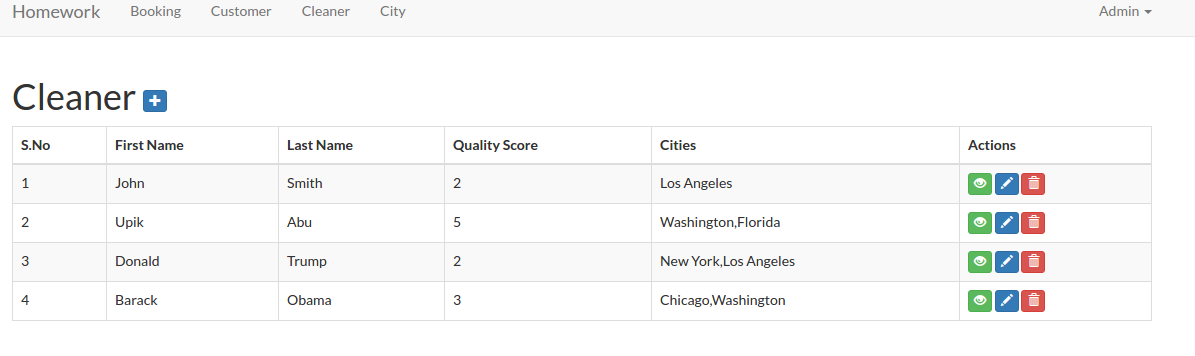
    Then modify /resources/views/admin/cleaner/index.blade.php to display the cities

    Here is the looks:mybooking-cleaner-admin-indexThe last thing for the ‘show’ function. Modify the function to get the cities then pass it to the view

    Then modify /resources/views/admin/cleaner/show.blade.php, to display the cities

    COMPLETED!
    The next task: “5. We need a way for customers to signup and schedule a booking all on one form. To accomplish this you will need to do the following:
    – Make the site root a customer-facing form designed for customers to sign up and book a cleaner.
    – On this form, capture all the data needed to create a customer in the database (first name, last name, phone number).”
    We already have it. Please look http://localhost/works/laravel/mybooking/public/home. Also look the two routes for this in /routes/web.php

    Look the function ‘index’ and ‘book’ (We’ll get it done at the next task) in /app/Http/Controllers/Home/HomeController.php.
    “- If the customer already exists in the database (use phone number to determine this) use the existing record instead of creating a new one. You should probably add a validation to enforce this.”
    Modify /app/Http/Controllers/Home/HomeController.php at ‘book’ function like this:

    Here we add a check and validation if a phone number entered is already exist in the customer table. If so, please give a message about it. Here is the lookmybooking-front-customer
    “- Let the customer select what city they are in from the cities table created earlier.”
    Modify /app/Http/Controllers/Home/HomeController.php to add the city data and pass it to the view

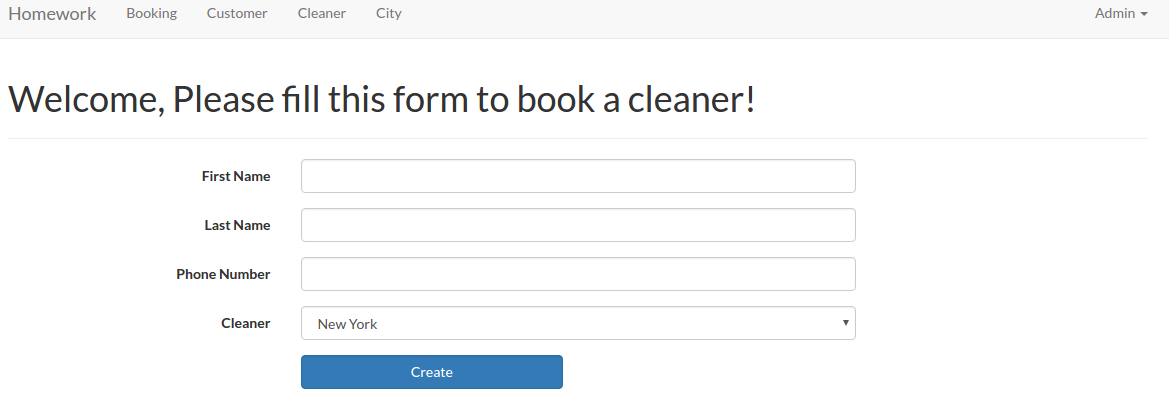
    Then show the city selection in /resources/views/home/index.blade.php file

    Here is the new looks:mybooking-front-customer-cityWe’ll do the rest after working on the below task!
    “- Let the customer specify a date and time when they would like their house cleaned.”
    Put like this to show the datetime inputs in /resources/views/home/index.blade.php file

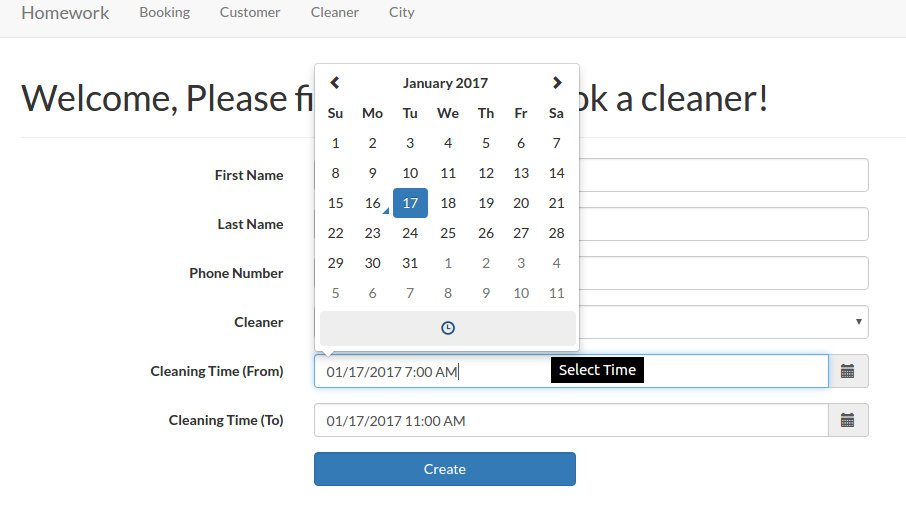
    I added two datetime input here: Cleaning Time (From) and Cleaning Time (To). I can’t use ‘Form::date’ here because I need ‘Datetime’ not just ‘Date’. I have to use datetimepicker from bootstrap. To make sure the dropdown of the datetime work properly, I have to add/import ‘bootstrap-datetimepicker’ libraries in /resources/views/layouts/app.blade.php file

    Here is the looksmybooking-front-datetimeThen I need to create a new model ‘CityCleaningTime’ to store the city id and the cleanings time.

    Then modify ‘CityCleaningTime.php’ file

    Then do migration to create the migration file

    Then do migrate to create the new table ‘citycleaningtimes’.

    NOTE: I did some mistakes about the migration file and the migrate. First I forgot to put ‘customer_id’ in the migration file. I realized it after I created the new table. I updated the migration file and did the migrate but I got a message ‘Nothing to migrate.’  Because I was in a hurry, I deleted the migration file so I thought I can create a new one. But when I wanted to create the new migration file, I got this error:

    To solve this problem, I have to type this ‘composer dump-autoload’:

    Then did the migration again. After fixing the file, I wanted to create the table again. But, of course, the same table is already exists!

    I tried to fix this mistake by doing the ‘migrate:rollback’

    But I got another error

    Then I created again (manually) the old migration file (copy and paste the new migration file then rename it!). I did the rollback again. but here is another error:

    After some thought, I have to remove (or move it to another directory) the new migration file and let the old one (the above name!). Then did the rollback again. SUCCESS! Fixed the old migration file by adding ‘customer_id’ then did the migrate again. SUCCESS!
    OK. HERE IS THE IMPORTANT LESSON, IF I FOUND AN ERROR/NOT COMPLETED IN MY LAST MIGRATE/MIGRATION FILE, DO THE ROLLBACK IF THE TABLE IS ALREADY CREATED! DONT REMOVE THE MIGRATION FILE!.
    “- When the user submits the form, look for cleaners that work in the specified city that do not have any bookings that conflict with the time specified.
    – If you can find an available cleaner, create the booking and display the name of the cleaner assigned to the booking.
    – If you can’t find an available cleaner, tell the user that we could not fulfill their request.”
  8. First, add a free theme like bootstrap or materialize css.

Cleaner Booking

Source: https://github.com/ricardoandrietta/cleaner_booking
and https://github.com/MasterHans/HomeWork (better!)

Installation:

  1. Clone the app

     
  2. Go to the new directory ‘cleaner_booking’ then use composer to install the dependencies

     
  3. Here i use sqlite (pls see /config/database.php file) as a default database

    and here is the configuration in the same file.

    The database ‘homework_database.sqlite’ in /database/ directory!
    NOTE: To open .sqlite file manually, I need to install ‘sqlitebrowser’ (ref:http://askubuntu.com/questions/805219/how-to-properly-view-a-sqlite-file-using-sqlite)

    The application menu in Programming -> SQLite database browser
  4. Modify the files permission in /storage/ and /bootstrap/ AND ALSO /database (because it need to update the sqlite database!) directories

    OR I CAN MODIFY /config/database.php on the ‘connection’ like this:

    Change ‘database_path’ to ‘storage_path’ (ref: http://stackoverflow.com/questions/30382554/sqlite-unable-to-open-database-file-laravel-windows)
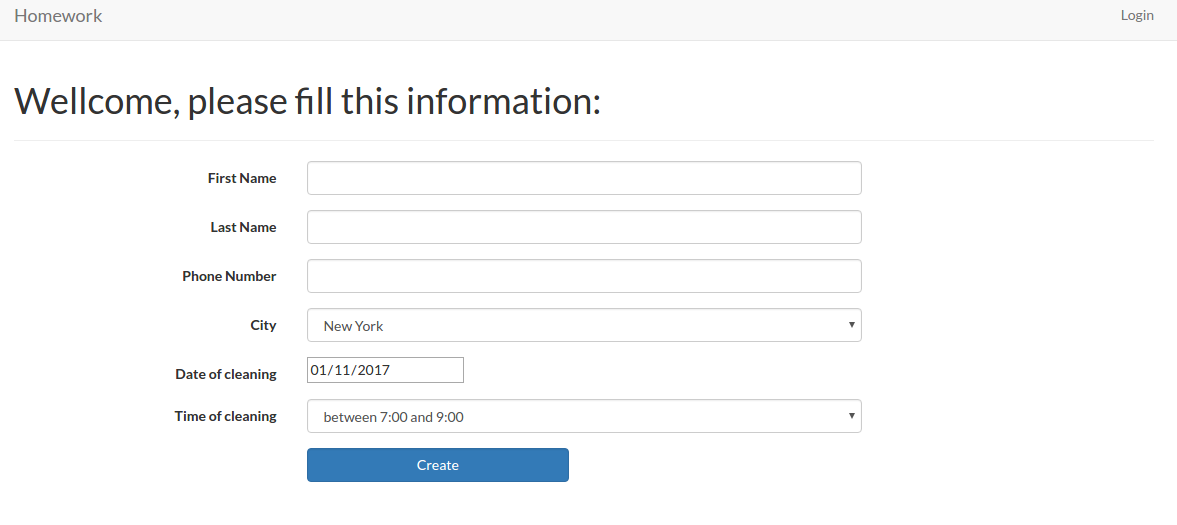
  5. Test the app (refer to the below errors if exist!) http://localhost/works/laravel/cleaner_booking/public/cleaner-booking-frontand http://localhost/works/laravel/HomeWork/public/homehomework-frontFor registering an user: http://localhost/works/laravel/cleaner_booking/public/register. use user: ‘Admin’, email: ‘advcha@yahoo.com’ and password: ‘admin123’
    Admin Customer: http://localhost/works/laravel/HomeWork/public/admin/customer
    Admin Cleaner: http://localhost/works/laravel/HomeWork/public/admin/cleaner
    Admin Booking: http://localhost/works/laravel/HomeWork/public/admin/booking
    Admin City: http://localhost/works/laravel/HomeWork/public/admin/city
    Admin Time selection: http://localhost/works/laravel/HomeWork/public/admin/time-gaps
  6. Errors:

    Solution:
    I’ve tried many suggestion from here: https://www.digitalocean.com/community/questions/how-to-enable-extension-pdo-in-ubuntu-14-04. I checked if php5-mysql package is installed or not

    It’s installed. From this link https://www.drupal.org/docs/7/system-requirements/what-is-pdo, I modified my php.ini (sudo gedit /etc/php/5.6/apache2/php.ini), I added these two lines

    Then I checked my php info in http://localhost/info.php. The PDO MySQL is exist! But The above error still persist!.
    This link http://stackoverflow.com/questions/2852748/pdoexception-could-not-find-driver?rq=1 finally make it works. I need to install sqlite and php5-sqlite (for php 5.6) or php-sqlite3 (for php7)

    Check phpinfo, PDO SQLITE (pdo_sqlite) should be existed!
    Restart Apache server!

    Another error when trying to register: http://localhost/works/laravel/HomeWork/public/register

    Solution:

    BUT GOT ANOTHER ERROR:

    Solution: see #4 –> modify /database/ permission or modify /config/database.php
    Also modify .env file and remove ‘DB_…’ related setting but change


  7. TASK SUMMARY!
    For https://github.com/MasterHans/HomeWork
    Summary
    We are a local home cleaning company called Homework. Today we are keeping track of all our bookings using a spreadsheet and we want to move it into a web application. Our main goal with this project is to make it possible for customers to schedule a booking online. I’ve already created the scaffolding of the app for you and now I need you to add some functionality to it. This should take you about 1-2 hours, but you have up to 4 hours to complete it.
    Deliverables
    1. All models and columns should have validation as described in the model spec below, plus any common-sense validation you’ll put on new models.
    2. We need to split the site in to Admin-only and Customer-only. Right now all the admin functionality is exposed to the world.
    3. Currently we operate in 10 cities, but plan to expand quickly. We need a way to admin the list of cities we operate in and the ability to add to the list. You should create a new table to do this.
    4. On the admin cleaner form we need a way to select the cities a cleaner works in. This should be a checkbox list populated by the list of the cities we operate in. You may need to create a new table to store this data.
    5. We need a way for customers to signup and schedule a booking all on one form. To accomplish this you will need to do the following:
    – Make the site root a customer-facing form designed for customers to sign up and book a cleaner.
    – On this form, capture all the data needed to create a customer in the database (first name, last name, phone number).
    – If the customer already exists in the database (use phone number to determine this) use the existing record instead of creating a new one. You should probably add a validation to enforce this.
    – Let the customer select what city they are in from the cities table created earlier.
    – Let the customer specify a date and time when they would like their house cleaned.
    – When the user submits the form, look for cleaners that work in the specified city that do not have any bookings that conflict with the time specified.
    – If you can find an available cleaner, create the booking and display the name of the cleaner assigned to the booking.
    – If you can’t find an available cleaner, tell the user that we could not fulfill their request.
    6. Write tests for the parts of the application you feel need it the most.
    7. When you are done, please zip up the entire root directory including your SQLite database and vendor files — do not cherry-pick folders.
    Restrictions
    1. Do NOT switch the database from SQLite to MySQL.
    2. If you create a password-protected account, use credentials “admin@admin.com” and password “admin”.Existing Models
    1. customer
    – first_name (required)
    – last_name (required)
    – phone_number (optional)
    2. booking
    – customer (required, enforce referential integrity)
    – cleaner (required, enforce referential integrity)
    – date (required)
    3. cleaner
    – first_name (required)
    – last_name (required)
    – quality_score (required, must be a number between 0.0 and 5.0)

    Setup
    https://github.com/prehire/php-23093023909ad09a09
    For https://github.com/ricardoandrietta/cleaner_booking.
    Summary
    The following deliverables are not required but are nice-to-haves. If you choose to implement them, it should take around 1 hour but you must complete this section within 3 hours. You can complete any number of the bonus deliverables: you don’t need to complete all of them.Bonus Deliverables
    1. Use a free theme to make the application look a little better, especially the pages seen by our customers.
    2. Add security to the admin pages on our site. Customers and cleaners do not need to be able to login at the moment.
    3. The cleaner form should have one additional field: ’email’
    o Email should be required
    0 Check that it is a valid email address
    4. When a new booking is created, email the cleaner with information on the booking and customer.
    5. The Customer Show view should show all associated bookings below the form and link to them.
    6. The Cleaner Show view should show all associated bookings below the form and link to them.
    7. When you are done, please zip up the whole app directory with dependencies and upload it below.

Booking application developed on Laravel platform

Source: https://github.com/juanmvega/my-booking
Tutorial: Laravel Tutorial

  1. Clone the app

    Check the files in /laravel/my-booking/ directory!
  2. Go to the the directory and use composer to install the dependencies

    ‘Vendor’ directory is already exist! so the dependencies are already downloaded!
  3. Create a new database ‘demo_data’ via phpmyadmin
  4. Create a new table ‘demo_data’
  5. Edit .env file to add the database setting
    SORRY, ONLY ADMIN CAN SHOW THIS!
  6.  Modify the files permission in /storage/ and /bootstrap/ directories
  7. Test the app in http://localhost/works/laravel/my-booking/public/rooms
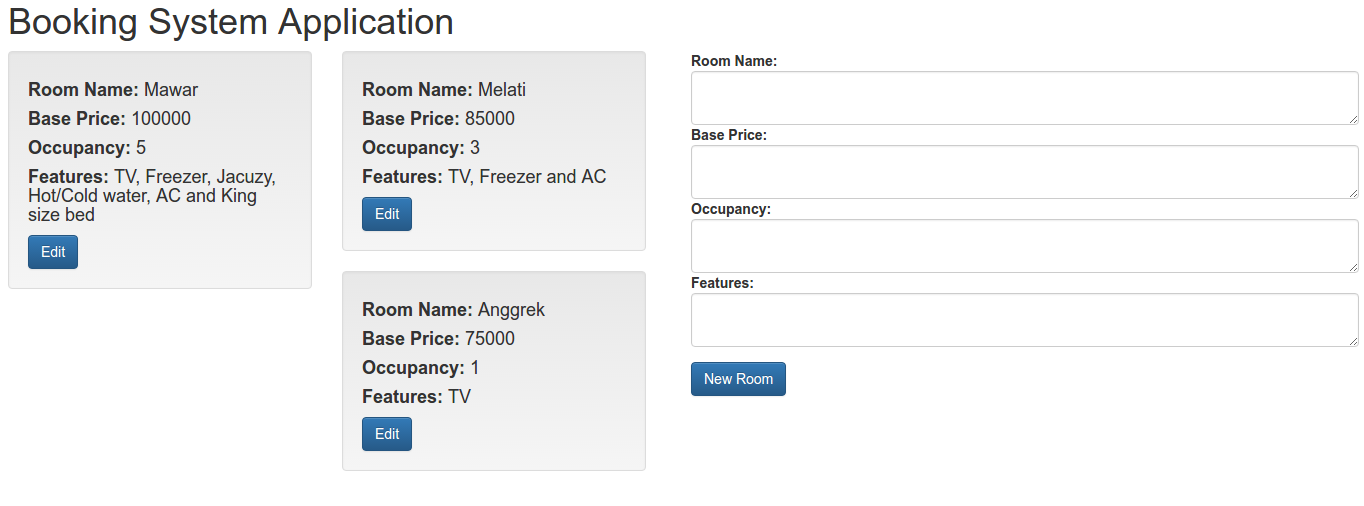
    WORKS!!!my-booking-front
  8. Something still not correct. in /resources/views/layout/layout.blade.php, I still have to add jQuery library because bootstrap need jQuery!

    Also I have to change many links on many blade files (index.blade.php, create.blade.php, show.blade.php, edit.blade.php) that those not correct. Change from ‘/laravel/’ to ‘/works/laravel/my-booking/’. Also change from ‘http://tutorials.juanmvega.com/laravel/’ to ‘/works/laravel/my-booking/’.

Ruby On Rails: Introduction

Here I ‘m going to extend my previous testapp. Also learn more about ruby on rails file structure. Ref: http://www.belajarrubyonrails.com/2012/12/membuat-aplikasi-rails-sederhana-say.html

Extend Controller.
Create a new controller ‘home_controller.rb’ in /app/controllers/ directory. Here is the content:


Extend View.
Create a new directory ‘home’ in /app/views/ directory. Then create a new file ‘index.html.erb’ in the new directory. Here is the content:

Then remove ‘index.html’ file in /public/directory (I DONT FIND IT!!!)

Routes.
Modify ‘routes.rb’ file in /config/ directory. Set the default route to our testapp.

Then start the rails server (rails s) and open it in http://localhost:3000/. It should show this text:


I want to show Date and Time on my browser. Modify ‘home_controller.rb’ like this:

Then modify ‘index.html.erb’ to show the date time:

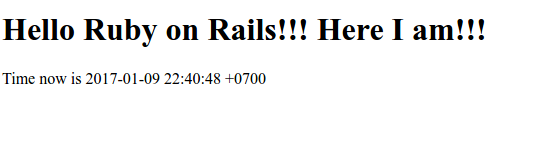
OK. Start the server and open it on the browser. It should be something like this:show-datetime-testapp


Ruby On Rails Installation on Ubuntu 14.04

Source: Installing Ruby on Rails on Ubuntu 14.04 – 15.10 and Install Ruby on Rails · Ubuntu Linux.

Installation:

  1. Install Ruby Version Manager (RVM). I already had ‘curl’, so import the rvm.io public key in the server system.


  2. Then download the RVM installer with curl and execute it (by piping the curl output to bash):

    KEEP IN MIND THIS LINE

    I need to execute ‘source /home/teddy/.rvm/scripts/rvm’ to build the RVM environment and to save the settings of this environment into current shell.

    NOT (ref: Error message: -bash: /etc/profile.d/rvm.sh: No such file or directory)

     
  3. Install the Ruby dependencies with the RVM command below:

    For the first time, I got some errors like this:

    SOLUTION: ref: Error installing Ruby on Ubuntu 14.04
    I have to fix/remove some failed ubuntu repository. From ‘sudo apt-get update’, I got these repositories error:

    After fixing them (see the above link), it’s working fine

     
  4. Check for available Ruby versions
    The following command lists the available ruby versions:

    I’m going to install the latest stable ruby version 2.3.3 because ruby 2.4.0-rc1 still in release candidate.
  5. Install Ruby Version
    Using RVM makes the independent management of ruby versions an easy process. The command listed below installs the Ruby version 2.3.3.

     
  6. Default Ruby Version must be Set up
    In order for the applications to use Ruby, the default ruby version needs to be set. The following command sets Ruby 2.3.3 as default version.
  7. Confirm ruby version installed

    We’ve just finished installing ‘Ruby’. Now we’re going to install ‘Rails’
  8. Installing Rails
    Rails can be easily installed with the Ruby gem installer.
  9. Check the rails version
    Execute the following command to check the rails version and to see if rails has been installed successfully.

    I just installed the latest rails (version 5.0.1). To install certain version (like version 4.2.5), install rails like this:

     
  10. Create a test app ‘testapp’ in Document/rubyonrails/ directory


  11. Go into the ‘testapp’ then start the rails server

     
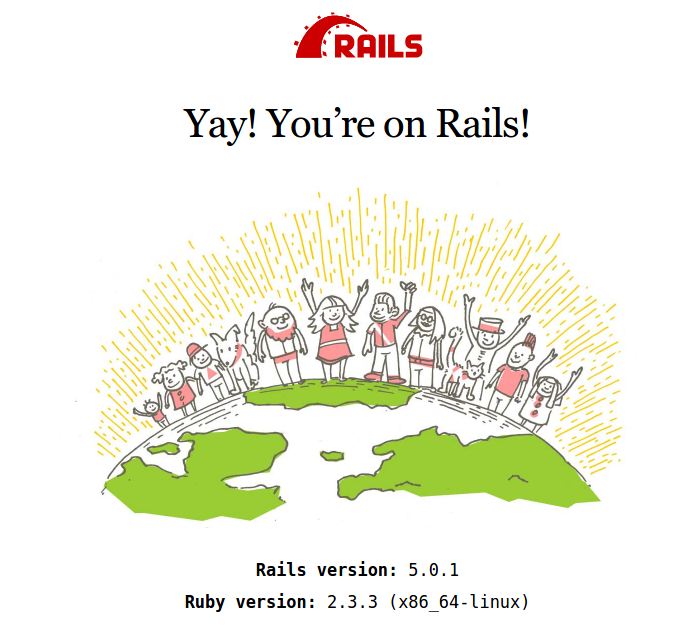
  12. Open it on your browser http://localhost:3000/. If nothing wrong, here is the looksfront-page-testapp

Opdracht 2 Auction

Source: https://github.com/davidcassedie/webdev-opdracht2.int (laravel5.1 PRETTY GOOD)

Installation:

  1. Clone from https://github.com/davidcassedie/webdev-opdracht2.int

     
  2. Then go to ‘webdev-opdracht2.int’ directory
  3. Install required components:
  4. Create a database ‘opdracht2’ via phpmyadmin
  5. Edit/create .env file and set the database configuration
  6. Migrate the required tables
  7. generate the new key
  8. set file permission to 777 for /storage

     
  9. Test it http://localhost:8000/

    NOTE: FOR THE OTHERS ROUTES LIKE http://localhost:8000/auth/register, I GOT BLANK PAGE. THIS IS BECAUSE IN MANY BLADES PAGE IN /resources/views/ (FOR EXAMPLE: /auth/register.blade.php), I FOUND THIS LINE

    CAUSE THE ERROR. SO FOR SAVING TIME, I JUST COMMENTED THE LINE

    PLS DO THIS FOR ALL THE BLADES PAGES CONTAIN THE ABOVE LINE! (IF I HAVE TIME I’D INSPECT WHY /reusable/spotlight.blade.php SHOWS THE ERROR)!!!
    TO SHOW PHP DEBUG IN LARAVEL, PUT

    AT THE BEGINNING OF /app/Http/routes.php FILE!
    BUT IT SHOWED WEIRD ERROR:

    ALSO IT’S IMPORTANT TO SET A FEW REQUIRED INITIAL DATA IN THE DATABASE LIKE FOR ‘countries’ (just input ‘code’: ‘NL’, ‘name’: ‘Nederland’) AND ‘auctionstyles’ (‘name’: ‘Classics’).
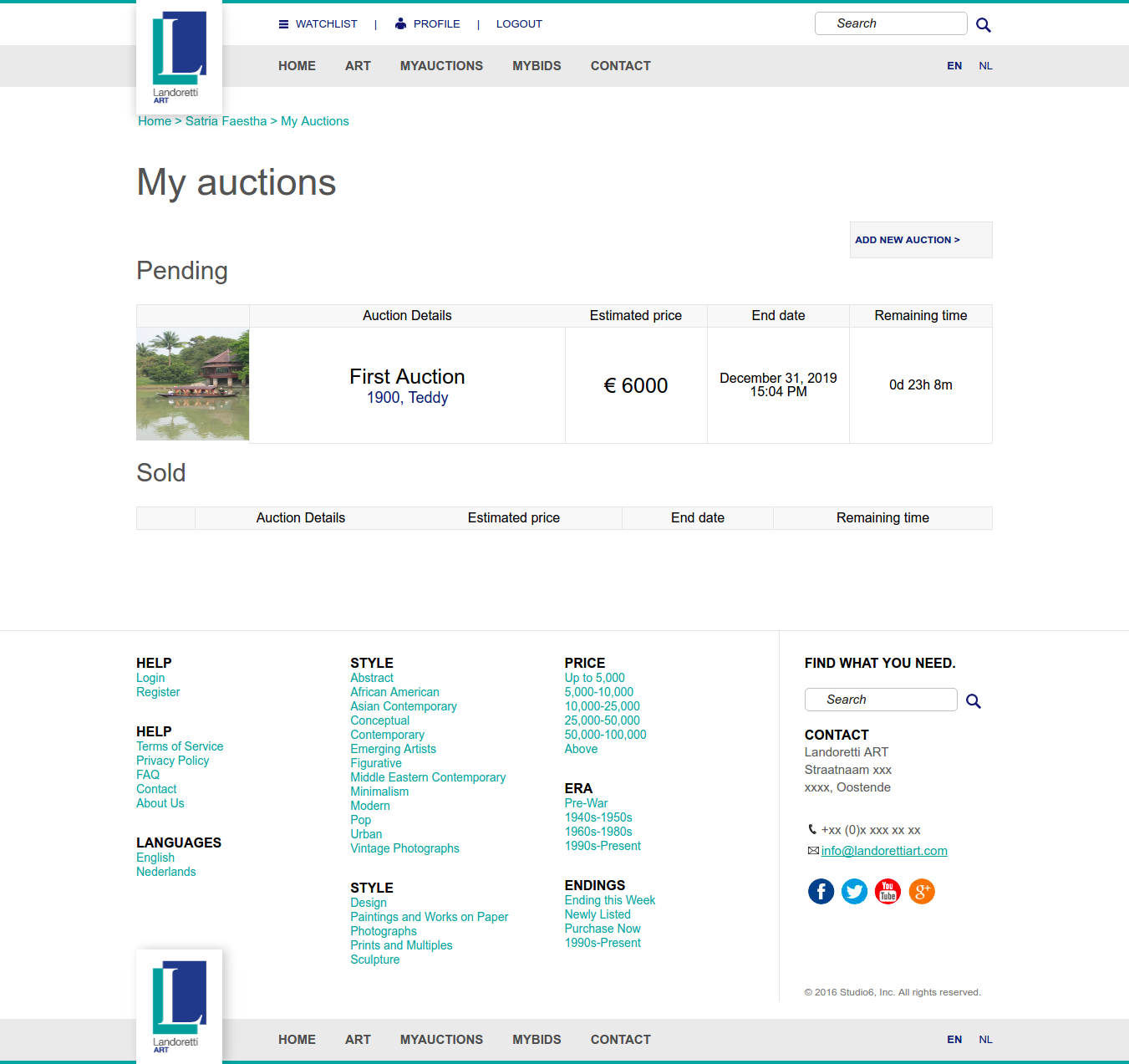
    OK. IT SHOULD OKAY NOW. REGISTER FIRST THEN ADD A NEW AUCTION. Here is the screen from http://localhost:8000/myauctionswebdev-opdracht2-int

Laravel Auction

Source: https://github.com/ddichov/PHP (Laravel 4.1. IT SEEMS OLD FASHION & NOT GOOD)

Installation:

  1. Dwonload in zip file from https://github.com/ddichov/PHPThen just get the common laravel directory and rename to ‘laravel-auction’
  2. Install required components:
  3. Create a database ‘laravel_auction’ via phpmyadmin
  4. Set a few configuration settings in /app/config/app.php like

    and the database (Laravel 4 dont use .env file to store the database setting) in /app/config/database.php

     
  5. generate the new key

     
  6. set file permission to 777 for /app/storage

     
  7. Migrate the tables to the database
  8. Open it http://localhost/works/laravel/laravel-auction/public/laravel-auction