READ: https://www.digitalocean.com/community/tutorials/how-to-install-ruby-on-rails-with-rbenv-on-ubuntu-22-04
INSTALL RUBY ENVIRONMENT MANAGER RBENV
NOTE: NEED TO REMOVE THE CURRENT DEFAULT INSTALLED RUBY BY UBUNTU 22.04
|
1 2 |
sudo apt-get remove ruby sudo apt update |
INSTALL RBENV
|
1 2 3 4 5 6 7 8 9 10 11 12 13 14 15 16 17 18 19 20 21 22 23 24 25 26 27 28 |
sudo apt install git curl libssl-dev libreadline-dev zlib1g-dev autoconf bison build-essential libyaml-dev libreadline-dev libncurses5-dev libffi-dev libgdbm-dev curl -fsSL https://github.com/rbenv/rbenv-installer/raw/HEAD/bin/rbenv-installer | bash echo 'export PATH="$HOME/.rbenv/bin:$PATH"' >> ~/.bashrc echo 'eval "$(rbenv init -)"' >> ~/.bashrc source ~/.bashrc type rbenv rbenv is a function rbenv () { local command; command="${1:-}"; if [ "$#" -gt 0 ]; then shift; fi; case "$command" in rehash | shell) eval "$(rbenv "sh-$command" "$@")" ;; *) command rbenv "$command" "$@" ;; esac } |
CHECK THE RBENV VERSION
|
1 2 |
satria@teddy:~$ rbenv -v rbenv 1.2.0-87-ge8b7a2 |
INSTALL RUBY WITH RUBY BUILD
CHECK AVAILABLE VERSION
|
1 2 3 4 5 6 7 8 9 10 11 12 13 |
satria@teddy:~$ rbenv install -l 3.0.6 3.1.4 3.2.3 3.3.0 jruby-9.4.6.0 mruby-3.3.0 picoruby-3.0.0 truffleruby-23.1.2 truffleruby+graalvm-23.1.2 Only latest stable releases for each Ruby implementation are shown. Use `rbenv install --list-all' to show all local versions. |
INSTALL RUBY 3.2.2 (ACCORDING SHARETRIBE https://github.com/sharetribe/sharetribe)
|
1 2 3 4 5 6 7 8 9 10 11 12 13 |
satria@teddy:~$ rbenv install 3.2.2 ==> Downloading ruby-3.2.2.tar.gz... -> curl -q -fL -o ruby-3.2.2.tar.gz https://cache.ruby-lang.org/pub/ruby/3.2/ruby-3.2.2.tar.gz % Total % Received % Xferd Average Speed Time Time Time Current Dload Upload Total Spent Left Speed 100 19.5M 100 19.5M 0 0 3885k 0 0:00:05 0:00:05 --:--:-- 4189k ==> Installing ruby-3.2.2... -> ./configure "--prefix=$HOME/.rbenv/versions/3.2.2" --enable-shared --with-ext=openssl,psych,+ -> make -j 8 -> make install ==> Installed ruby-3.2.2 to /home/satria/.rbenv/versions/3.2.2 NOTE: to activate this Ruby version as the new default, run: rbenv global 3.2.2 |
MAKE IT GLOBAL
|
1 |
satria@teddy:~$ rbenv global 3.2.2 |
RUBY VERSION
|
1 2 |
satria@teddy:~$ ruby -v ruby 3.2.2 (2023-03-30 revision e51014f9c0) [x86_64-linux] |
RUBY GEMS
INSTALL BUNDLER
|
1 2 3 4 5 6 7 8 |
satria@teddy:~$ echo "gem: --no-document" > ~/.gemrc satria@teddy:~$ gem install bundler Fetching bundler-2.5.6.gem Successfully installed bundler-2.5.6 1 gem installed A new release of RubyGems is available: 3.4.10 → 3.5.6! Run `gem update --system 3.5.6` to update your installation. |
GEM ENVIRONMENT TO FIND OUT WHERE THE GEMS ARE INSTALLED
|
1 2 |
satria@teddy:~$ gem env home /home/satria/.rbenv/versions/3.2.2/lib/ruby/gems/3.2.0 |
INSTALL RAILS
|
1 2 3 4 |
satria@teddy:~$ gem install rails ... Successfully installed rails-7.1.3.2 41 gems installed |
REHASH AND CHECK RAILS VERSION
|
1 2 3 4 |
satria@teddy:~$ rbenv rehash satria@teddy:~$ rails -v Rails 7.1.3.2 |
INSTALL SHARETRIBE
READ: https://github.com/sharetribe/sharetribe
https://sangram.hashnode.dev/self-hosted-sharetribe-go-community-edition-on-ubuntu
CLONE FROM GITHUB THEN GO TO THE DIR
|
1 2 3 |
satria@teddy:~/Documents/projects$ git clone https://github.com/sharetribe/sharetribe.git satria@teddy:~/Documents/projects$ cd sharetribe/ |
NOTE: BEFORE INSTALLING THE BUNDLE, PLS INSTALL MYSQL LIB
|
1 |
sudo apt-get install libmysqlclient-dev |
IF NOT, YOU’D GET THIS ERROR
|
1 2 3 4 |
An error occurred while installing mysql2 (0.5.4), and Bundler cannot continue. Make sure that `gem install mysql2 -v '0.5.4' --source 'https://rubygems.org/'` succeeds before bundling. |
INSTALL THE BUNDLE
|
1 |
satria@teddy:~/Documents/projects/sharetribe$ bundle install |
INSTALL NODE MODULES
|
1 |
npm install && ( cd client && npm install ) |
CREATE database.yml
|
1 |
cp config/database.example.yml config/database.yml |
THEN FILL THE DB USER AND PASSWORD.
NOTE: DON’T CREATE THE DB MANUALLY VIA PHPMYADMIN!
CREATE config.yml
|
1 |
cp config/config.example.yml config/config.yml |
CREATE AND INITIALIZE DB
|
1 2 3 4 5 6 7 8 9 10 11 12 13 14 15 16 17 18 19 20 21 22 23 24 25 26 27 28 29 30 31 32 33 34 35 36 37 38 39 40 41 42 43 44 45 46 47 48 49 50 51 52 53 54 55 56 57 |
satria@teddy:~/Documents/projects/sharetribe$ bundle exec rake db:create db:structure:load Calling `DidYouMean::SPELL_CHECKERS.merge!(error_name => spell_checker)' has been deprecated. Please call `DidYouMean.correct_error(error_name, spell_checker)' instead. /home/satria/.rbenv/versions/3.2.2/lib/ruby/gems/3.2.0/gems/oj-3.13.11/lib/oj/oj.so: warning: undefining the allocator of T_DATA class Oj::Cache DEPRECATION WARNING: The factory_girl gem is deprecated. Please upgrade to factory_bot. See https://github.com/thoughtbot/factory_bot/blob/v4.9.0/UPGRADE_FROM_FACTORY_GIRL.md for further instructions. (called from <top (required)> at /home/satria/Documents/projects/sharetribe/config/application.rb:20) WARN DEPRECATION WARNING: Initialization autoloaded the constants ApplicationRecord, ErrorsHelper, ApplicationHelper, DeletePerson, Person::ToView, Person, Person::OmniauthService, Maintenance, and UUIDUtils. Being able to do this is deprecated. Autoloading during initialization is going to be an error condition in future versions of Rails. Reloading does not reboot the application, and therefore code executed during initialization does not run again. So, if you reload ApplicationRecord, for example, the expected changes won't be reflected in that stale Class object. `config.autoloader` is set to `classic`. These autoloaded constants would have been unloaded if `config.autoloader` had been set to `:zeitwerk`. In order to autoload safely at boot time, please wrap your code in a reloader callback this way: Rails.application.reloader.to_prepare do # Autoload classes and modules needed at boot time here. end That block runs when the application boots, and every time there is a reload. For historical reasons, it may run twice, so it has to be idempotent. Check the "Autoloading and Reloading Constants" guide to learn more about how Rails autoloads and reloads. (called from <main> at /home/satria/Documents/projects/sharetribe/config/environment.rb:26) DEBUG (0.2ms) CREATE DATABASE `sharetribe_development` DEFAULT CHARACTER SET `utf8` Created database 'sharetribe_development' DEBUG (0.2ms) CREATE DATABASE `sharetribe_test` DEFAULT CHARACTER SET `utf8` Created database 'sharetribe_test' WARN DEPRECATION WARNING: Using `bin/rails db:structure:load` is deprecated and will be removed in Rails 7.0. Configure the format using `config.active_record.schema_format = :sql` to use `structure.sql` and run `bin/rails db:schema:load` instead. (called from load at /home/satria/.rbenv/versions/3.2.2/bin/rake:25) DEBUG ActiveRecord::InternalMetadata Load (0.3ms) SELECT `ar_internal_metadata`.* FROM `ar_internal_metadata` WHERE `ar_internal_metadata`.`key` = 'environment' LIMIT 1 DEBUG TRANSACTION (0.2ms) BEGIN DEBUG ↳ config/initializers/demoji.rb:9:in `block in create_or_update' DEBUG ActiveRecord::InternalMetadata Create (0.3ms) INSERT INTO `ar_internal_metadata` (`key`, `value`, `created_at`, `updated_at`) VALUES ('environment', 'development', '2024-02-22 03:23:09', '2024-02-22 03:23:09') DEBUG ↳ config/initializers/demoji.rb:9:in `block in create_or_update' DEBUG TRANSACTION (1.0ms) COMMIT DEBUG ActiveRecord::InternalMetadata Load (0.4ms) SELECT `ar_internal_metadata`.* FROM `ar_internal_metadata` WHERE `ar_internal_metadata`.`key` = 'schema_sha1' LIMIT 1 DEBUG TRANSACTION (0.2ms) BEGIN DEBUG ↳ config/initializers/demoji.rb:9:in `block in create_or_update' DEBUG ActiveRecord::InternalMetadata Create (0.2ms) INSERT INTO `ar_internal_metadata` (`key`, `value`, `created_at`, `updated_at`) VALUES ('schema_sha1', '627924824863850e763d293bb006a8638f0b5083', '2024-02-22 03:23:09', '2024-02-22 03:23:09') DEBUG ↳ config/initializers/demoji.rb:9:in `block in create_or_update' DEBUG TRANSACTION (1.1ms) COMMIT DEBUG ActiveRecord::InternalMetadata Load (0.7ms) SELECT `ar_internal_metadata`.* FROM `ar_internal_metadata` WHERE `ar_internal_metadata`.`key` = 'environment' LIMIT 1 DEBUG TRANSACTION (0.5ms) BEGIN DEBUG ↳ config/initializers/demoji.rb:9:in `block in create_or_update' DEBUG ActiveRecord::InternalMetadata Create (0.8ms) INSERT INTO `ar_internal_metadata` (`key`, `value`, `created_at`, `updated_at`) VALUES ('environment', 'test', '2024-02-22 03:23:11', '2024-02-22 03:23:11') DEBUG ↳ config/initializers/demoji.rb:9:in `block in create_or_update' DEBUG TRANSACTION (1.3ms) COMMIT DEBUG ActiveRecord::InternalMetadata Load (0.7ms) SELECT `ar_internal_metadata`.* FROM `ar_internal_metadata` WHERE `ar_internal_metadata`.`key` = 'schema_sha1' LIMIT 1 DEBUG TRANSACTION (0.5ms) BEGIN DEBUG ↳ config/initializers/demoji.rb:9:in `block in create_or_update' DEBUG ActiveRecord::InternalMetadata Create (0.7ms) INSERT INTO `ar_internal_metadata` (`key`, `value`, `created_at`, `updated_at`) VALUES ('schema_sha1', '627924824863850e763d293bb006a8638f0b5083', '2024-02-22 03:23:11', '2024-02-22 03:23:11') DEBUG ↳ config/initializers/demoji.rb:9:in `block in create_or_update' DEBUG TRANSACTION (1.3ms) COMMIT |
MAKE SURE THE SPHINX SEARCH ALREADY INSTALLED. IF NOT, INSTALL IT
|
1 2 3 4 5 6 7 |
satria@teddy:~/Documents/projects/sharetribe$ sudo add-apt-repository ppa:builds/sphinxsearch-rel22 satria@teddy:~/Documents/projects/sharetribe$ sudo apt-get update satria@teddy:~/Documents/projects/sharetribe$ sudo apt-get install sphinxsearch satria@teddy:~/Documents/projects/sharetribe$ sudo service sphinxsearch start |
THEN RUN SPHINX INDEX
|
1 2 3 4 5 6 7 8 9 10 11 12 13 14 15 16 17 18 19 20 21 22 23 24 25 26 27 28 29 30 31 32 33 34 35 36 |
satria@teddy:~/Documents/projects/sharetribe$ bundle exec rake ts:index ... (called from <main> at /home/satria/Documents/projects/sharetribe/config/environment.rb:26) Generating configuration to /home/satria/Documents/projects/sharetribe/config/development.sphinx.conf DEBUG Delayed::Backend::ActiveRecord::Job Destroy (0.3ms) DELETE FROM `delayed_jobs` WHERE (handler LIKE ('--- !ruby/object:ThinkingSphinx::Deltas::%') AND locked_at IS NULL AND locked_by IS NULL AND failed_at IS NULL) Sphinx 2.2.11-id64-release (95ae9a6) Copyright (c) 2001-2016, Andrew Aksyonoff Copyright (c) 2008-2016, Sphinx Technologies Inc (http://sphinxsearch.com) using config file '/home/satria/Documents/projects/sharetribe/config/development.sphinx.conf'... WARNING: key 'enable_star' was permanently removed from Sphinx configuration. Refer to documentation for details. WARNING: key 'enable_star' was permanently removed from Sphinx configuration. Refer to documentation for details. indexing index 'custom_field_value_core'... collected 0 docs, 0.0 MB total 0 docs, 0 bytes total 0.003 sec, 0 bytes/sec, 0.00 docs/sec indexing index 'custom_field_value_delta'... collected 0 docs, 0.0 MB total 0 docs, 0 bytes total 0.001 sec, 0 bytes/sec, 0.00 docs/sec indexing index 'listing_core'... collected 0 docs, 0.0 MB collected 0 attr values sorted 0.0 Mvalues, 100.0% done total 0 docs, 0 bytes total 0.001 sec, 0 bytes/sec, 0.00 docs/sec indexing index 'listing_delta'... collected 0 docs, 0.0 MB collected 0 attr values sorted 0.0 Mvalues, 100.0% done total 0 docs, 0 bytes total 0.001 sec, 0 bytes/sec, 0.00 docs/sec skipping non-plain index 'custom_field_value'... skipping non-plain index 'listing'... total 4 reads, 0.000 sec, 0.0 kb/call avg, 0.0 msec/call avg total 28 writes, 0.000 sec, 1.3 kb/call avg, 0.0 msec/call avg |
START SPHINX DAEMON
|
1 2 3 4 5 6 7 8 9 10 11 12 13 14 15 16 17 18 19 20 |
satria@teddy:~/Documents/projects/sharetribe$ bundle exec rake ts:start ... Check the "Autoloading and Reloading Constants" guide to learn more about how Rails autoloads and reloads. (called from <main> at /home/satria/Documents/projects/sharetribe/config/environment.rb:26) Sphinx 2.2.11-id64-release (95ae9a6) Copyright (c) 2001-2016, Andrew Aksyonoff Copyright (c) 2008-2016, Sphinx Technologies Inc (http://sphinxsearch.com) using config file '/home/satria/Documents/projects/sharetribe/config/development.sphinx.conf'... WARNING: key 'enable_star' was permanently removed from Sphinx configuration. Refer to documentation for details. WARNING: key 'enable_star' was permanently removed from Sphinx configuration. Refer to documentation for details. listening on all interfaces, port=3563 precaching index 'custom_field_value_core' precaching index 'custom_field_value_delta' precaching index 'listing_core' precaching index 'listing_delta' precached 4 indexes in 0.005 sec Started searchd successfully (pid: 44881). |
INSTALL FOREMAN
|
1 2 3 4 5 6 |
satria@teddy:~/Documents/projects/sharetribe$ gem install foreman Fetching foreman-0.87.2.gem Successfully installed foreman-0.87.2 1 gem installed satria@teddy:~/Documents/projects/sharetribe$ rbenv rehash |
START IT
|
1 2 3 4 5 6 7 8 |
satria@teddy:~/Documents/projects/sharetribe$ foreman start -f Procfile.static ... 10:38:18 rails-client-assets.1 | Error: Wanted npm version 9.5.1 (9.5.1) 10:38:18 rails-client-assets.1 | To install npm, run `npm install -g npm@9.5.1` 10:38:18 rails-client-assets.1 | exited with code 1 10:38:18 system | sending SIGTERM to all processes 10:38:18 rails.1 | terminated by SIGTERM 10:38:18 rails-server-assets.1 | terminated by SIGTERM |
ERROR: INSTALL NPM 9.5.1
|
1 |
satria@teddy:~/Documents/projects/sharetribe$ npm install -g npm@9.5.1 |
START AGAIN
|
1 2 3 4 5 6 7 8 9 10 11 |
satria@teddy:~/Documents/projects/sharetribe$ foreman start -f Procfile.static ... 10:46:13 rails-client-assets.1 | Error: Wanted node version 18.16.0 (18.16.0) 10:46:13 rails-client-assets.1 | To install node, run `nvm install 18.16.0` or see https://nodejs.org/ 10:46:13 rails-server-assets.1 | node: 16.15.1 10:46:13 rails-server-assets.1 | Error: Wanted node version 18.16.0 (18.16.0) 10:46:13 rails-server-assets.1 | To install node, run `nvm install 18.16.0` or see https://nodejs.org/ 10:46:14 rails-client-assets.1 | exited with code 1 10:46:14 system | sending SIGTERM to all processes 10:46:14 rails-server-assets.1 | exited with code 1 10:46:14 rails.1 | terminated by SIGTERM |
ERROR: INSTALL NVM 18.16.0
|
1 |
satria@teddy:~/Documents/projects/sharetribe$ nvm install 18.16.0 |
START AGAIN (OK)
|
1 2 3 4 5 6 7 8 9 10 11 12 13 |
satria@teddy:~/Documents/projects/sharetribe$ foreman start -f Procfile.static ... 10:47:08 rails.1 | Check the "Autoloading and Reloading Constants" guide to learn more about how 10:47:08 rails.1 | Rails autoloads and reloads. 10:47:08 rails.1 | (called from <main> at /home/satria/Documents/projects/sharetribe/config/environment.rb:26) 10:47:08 rails.1 | Puma starting in single mode... 10:47:08 rails.1 | * Puma version: 5.6.7 (ruby 3.2.2-p53) ("Birdie's Version") 10:47:08 rails.1 | * Min threads: 0 10:47:08 rails.1 | * Max threads: 5 10:47:08 rails.1 | * Environment: development 10:47:08 rails.1 | * PID: 47558 10:47:08 rails.1 | * Listening on http://0.0.0.0:5000 10:47:08 rails.1 | Use Ctrl-C to stop |
OPEN IT ON THE BROWSER
|
1 |
http://0.0.0.0:5000/ |
THEN SETUP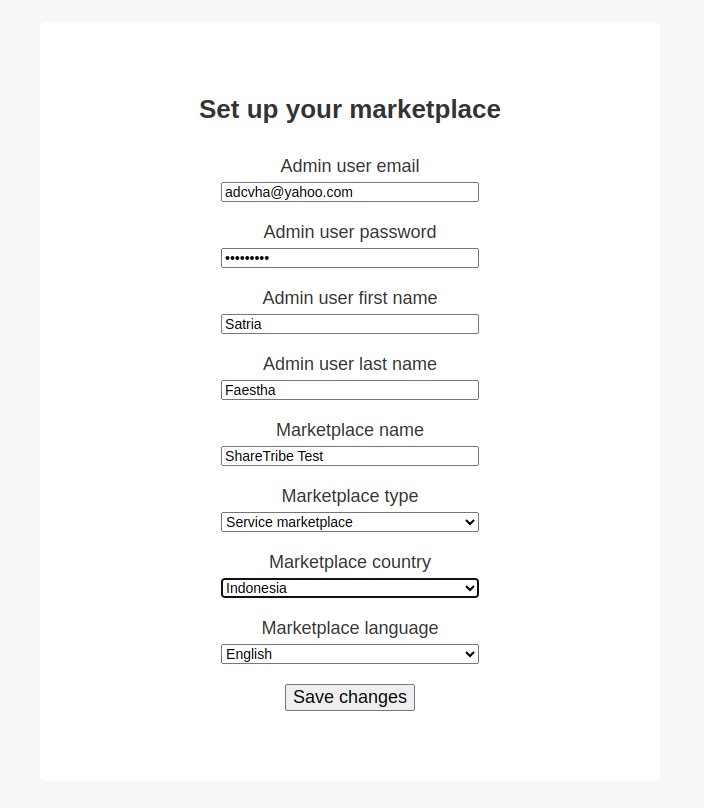
password: Teddy@123 XXX
THEN AFTER THE SAVE, OPEN AGAIN
http://0.0.0.0:5000/
OR
http://sharetribe-test.lvh.me:5000/
SOMEHOW I CAN’T LOGIN WITH THE ABOVE EMAIL. SO I NEED TO CREATE A NEW USER FROM THE SITE. THEN MANUALLY CHANGE ‘people’ TABLE AND SET IT AS ADMIN
|
1 |
UPDATE `people` SET `is_admin` = '1' WHERE `people`.`community_id` = 6 AND `people`.`username` = 'satriaf1'; |
SO THE ADMIN NOW:
user: satriaf@gmail.com
pass: Teddy123
NOTE: TO START THE RAILS SERVER, PLS GO TO THE sharetribe DIRECTORY THEN RUN IT (WITH PORT 5000)
|
1 |
satria@teddy:~/Documents/projects/sharetribe$ rails s -b 0.0.0.0 -p 5000 |
THEN OPEN THE LOCAL SITE ABOVE (http://0.0.0.0:5000/ OR http://sharetribe-test.lvh.me:5000/)
IF YOU DON’T RUN THE RAILS SERVER, YOU’D GET MESSAGE ‘This site can’t be reached’ ON YOUR BROWSER
SET UP PAYMENT ON SHARETRIBE
https://publish.yexperiment.com/post/156715320289/sharetribe-with-paypal-payments-the-lost