Ref: http://askubuntu.com/questions/750498/mysql-5-5-update-to-mysql-5-7
Here is what I’ve done:
DON’T FORGET TO BACKUP YOUR DATABASE FIRST! Pls read : http://myprojects.advchaweb.com/index.php/2017/03/18/script-to-backup-each-mysql-database-in-separate-files/
- Download MySQL Apt Repository from https://dev.mysql.com/downloads/repo/apt/. Currently the file name is ‘mysql-apt-config_0.8.3-1_all.deb’.
- Install it:
1sudo dpkg -i mysql-apt-config_0.8.3-1_all.deb - Then I’d got this screen
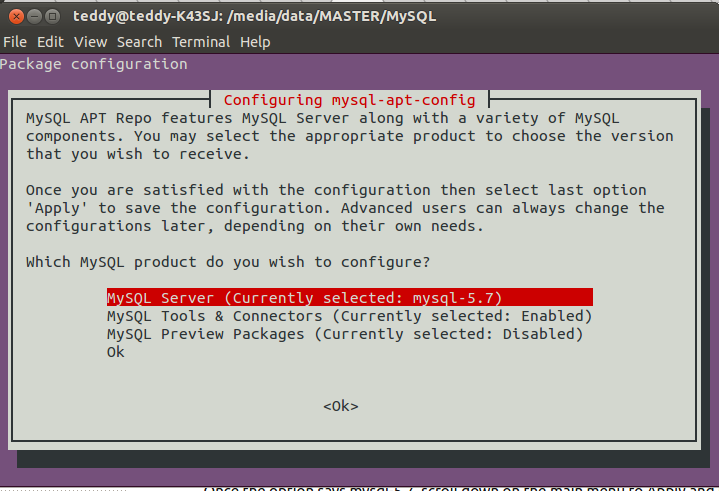 Select ‘MySQL Server (Currently selected: mysql-5.7)’ then ‘ok’.
Then I’d got the second screen.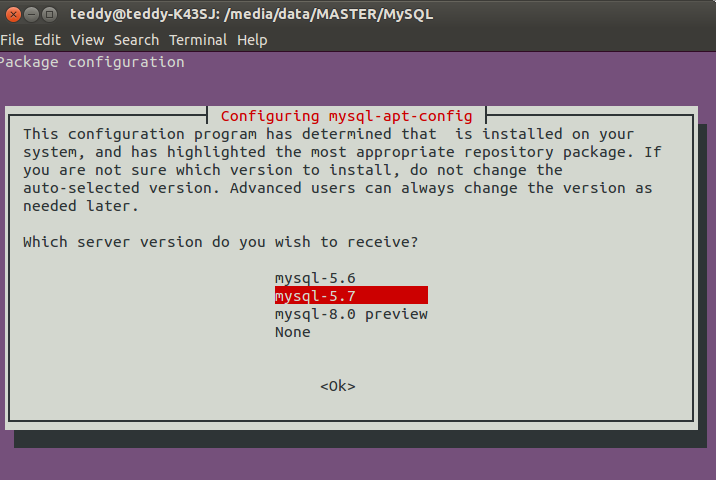 Select ‘mysql-5.7’ then ‘ok’. Then if you get to the first screen again, just select ‘Ok’ and ‘ok’. The screen would be closed.
 - Update my ubuntu system
1sudo apt-get update - install the MySQL-server package, which now contains MySQL 5.7
1sudo apt-get install mysql-server
- Now upgrade all mysql databases
1sudo mysql_upgrade -u root -p
- Now restart mysql server
12345678teddy@teddy-K43SJ:/media/data/MASTER/MySQL$ sudo service mysql restart* Stopping MySQL Community Server 5.7.17...* MySQL Community Server 5.7.17 is stopped* Re-starting MySQL Community Server 5.7.17No directory, logging in with HOME=/..* MySQL Community Server 5.7.17 is started
- Check mysql server version
1teddy@teddy-K43SJ:/media/data/MASTER/MySQL$ mysql --versionmysql Ver 14.14 Distrib 5.7.17, for Linux (x86_64) using EditLine wrapper
- Everything run well. At the phpmyadmin, I found the max upload size is 2M. I can modify this value in php.ini file (‘upload_max_filesize’).
To find out where is the configuration file location for mysql, pls do like this:
1/usr/sbin/mysqld --help --verbose
It’d show pretty long output, but I can found the line like this:
12Default options are read from the following files in the given order:/etc/my.cnf /etc/mysql/my.cnf ~/.my.cnf