Joomla!: Looking for an experienced back end developer for ongoing projects

urlhttps://www.upwork.com/jobs/_~013b998cbfc2e13d03/

Details:

Looking for an experienced/skilled Joomla! back end developer for an ongoing longterm project which will include many sub-projects.

Your job will be:
• Developing new Joomla! Extensions from the scratch
• Extending our existing Joomla! Extensions with new features
• Fixing bugs in our existing Joomla! Extensions

You must bring the following skills:
• PHP
• MVC
• MySQL
• Javascript/jQuery
• HTML/Css
• Joomla 3+
• Virtuemart 3+

We do NOT looking for someone who:
• just created some Joomla! websites with existing extensions & themes
• unexperienced Joomla! developers


Client Budget: Hourly

Client Name:

Bid: $18.75/hr (Net: $15/hr)

Cover Letter:

Hello,

I am a PHP and Joomla expert. I also proficient on MySQL, Javascript/jQuery and HTML/CSS. I have strong knowledge on OOP and MVC concepts. I can develop/modify joomla websites and develop/modify the joomla modules, components and extensions. I have an experience to work on a Joomla website and Virtuemart component as the shopping cart platform. The website url is https://www.mitchellmccabe.com.au/. I worked on many things like modified the virtuemart component and settings (Customers information, checkout process, the email confirmation, SEO, etc), fixing the social media problems, fixing the website slider, etc.

I am happy to discuss further regarding your requirement.

Kind Regards,

Satria F

Are you familiar with: • developing Joomla! Extensions from the scratch? • fixing bugs in existing Joomla! Extensions? • SVN/Subversion??
I am familiar with Joomla components, modules and extensions. I also can fix joomla problems. I used to use subversion/svn a long time ago and I need a little time to refresh my memory but now I am familiar with another version controll, github.
REST API OAuth PHP Client Best Practice and Dissection

  1. WooCommerce REST API PHP Client Library
    “A PHP wrapper for the WooCommerce REST API. Easily interact with the WooCommerce REST API using this library.”
    PHP Client: https://github.com/kloon/WooCommerce-REST-API-Client-Library
    It still supports the OAuth 1 one-legged (use consumer key and secret for the authentication), limited OOP, no test
    Tutorial: https://www.skyverge.com/blog/using-woocommerce-rest-api-introduction/
    https://www.skyverge.com/blog/using-woocommerce-rest-api-orders-endpoint/ (complete with curl and Http implementations and samples result)
    Great tutorial to use/extend woocommerce: https://www.skyverge.com/blog/category/tutorials/woocommerce-tutorials/.

Update PPA For PHP, Change PHP CLI Version

BEWARE! THIS WOULD MAKE YOUR LOCALHOST NOT WORKING LIKE WEB APP, PHPMYADMIN, ETC. NEED TO BACKUP YOUR DATA FIRST!

I need to update the PPA for php from ppa:ondrej/php5-5.6 to ppa:ondrej/php because the earlier ppa already deprecated. Here is the step for PPA migration to ppa:ondrej php. Continue reading “Update PPA For PHP, Change PHP CLI Version”

WordPress 4.6 bug: Button Add Media Not Working – SOLVED

WordPress 4.6 bug: Button Add Media Not Working on CHROME BUT WORKS FINE ON FIREFOX. WHY?
Also ‘Insert/Edit Link’ miss the ‘Gear’ icon.

pls check this link if it’s useful: https://wordpress.org/support/topic/problems-with-45-upgrade-add-media-not-working/page/2/

SOLVED! Updating WordPress to 4.6.1 version fixed this issue!

Change The Background Color Of WordPress Visual Editor To Black

I want to change the background color of my wordpress visual editor from white to black. I like black color for my wordpress background because I think it is easier to read (for me), energy-saving and it don’t make my eye irritated if I am reading for a long time. I am using the twenty sixteen theme and I already changed the background color to black (the font is white, of course). My articles mostly about the technical IT like programming, new tecnology and tutorial. When I am dealing with some phrases that I need to be emphasized, I like to make them colorful so I can read easier and make it different with the others. The problem I encountered was the WordPress visual editor. The default color was white. So when I changed the color of some words on the white background visual editor, I felt different when I saw it on the black wordpress page. It was not easy to change it like the wordpress page did. I can’t mess style.css to do this job. From this stackoverflow link http://wordpress.stackexchange.com/questions/25355/how-do-you-change-the-visual-editors-background-color, I know how to accomplish my goal. Here are the steps:

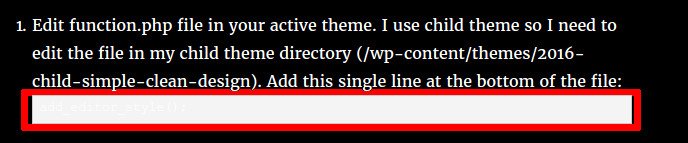
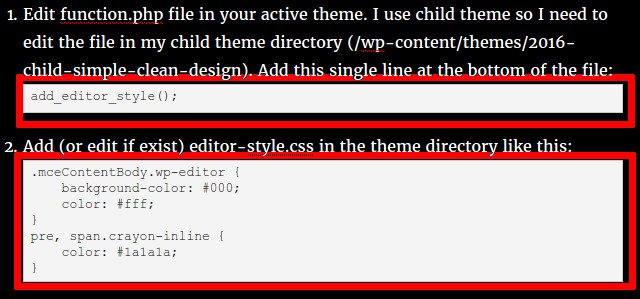
  1. Edit function.php file in your active theme. I use child theme so I need to edit the file in my child theme directory (/wp-content/themes/2016-child-simple-clean-design). Add this single line at the bottom of the file:
  2. Add (or edit if exist) editor-style.css in the theme directory like this:

    The first four lines is enough to change the background of the visual editor to black. The last three lines is about the change the color on the crayon syntax highlighting plugin. We need to change the default color on the plugin from white to black (#1a1a1a) because the plugin use white background and we already change the font color to white also! at this case we would not see our code! crayon-white so change the font color to black. crayon-black OK. that is it! Enjoy.