Ref: https://github.com/swoole/swoole-docs/blob/master/get-started/installation.md
Install from pecl
|
1 2 3 4 5 6 7 8 9 10 11 12 13 14 15 16 17 18 19 20 21 22 23 24 |
teddy@teddy:~$ sudo pecl install swoole [sudo] password for teddy: WARNING: channel "pecl.php.net" has updated its protocols, use "pecl channel-update pecl.php.net" to update downloading swoole-4.4.5.tgz ... Starting to download swoole-4.4.5.tgz (1,426,083 bytes) .........................................................................................................................................................................................................................................................................................done: 1,426,083 bytes 391 source files, building running: phpize Configuring for: PHP Api Version: 20170718 Zend Module Api No: 20170718 Zend Extension Api No: 320170718 enable sockets supports? [no] : yes enable openssl support? [no] : yes enable http2 support? [no] : yes enable mysqlnd support? [no] : yes building in /tmp/pear/temp/pear-build-rootIVbbu7/swoole-4.4.5 ... Build process completed successfully Installing '/usr/include/php/20170718/ext/swoole/config.h' Installing '/usr/lib/php/20170718/swoole.so' install ok: channel://pecl.php.net/swoole-4.4.5 configuration option "php_ini" is not set to php.ini location You should add "extension=swoole.so" to php.ini |
Then include the extension “extension=swoole.so” in php.ini file. For php-fpm, the php.ini file in “/etc/php/7.2/fpm/php.ini”
|
1 |
sudo gedit /etc/php/7.2/fpm/php.ini |
then add this new line:
|
1 2 3 |
... extension=swoole.so ... |
Save then restart php7.2-fpm service
|
1 |
sudo service php7.2-fpm restart |
look it up phpinfo() result. It should show like this: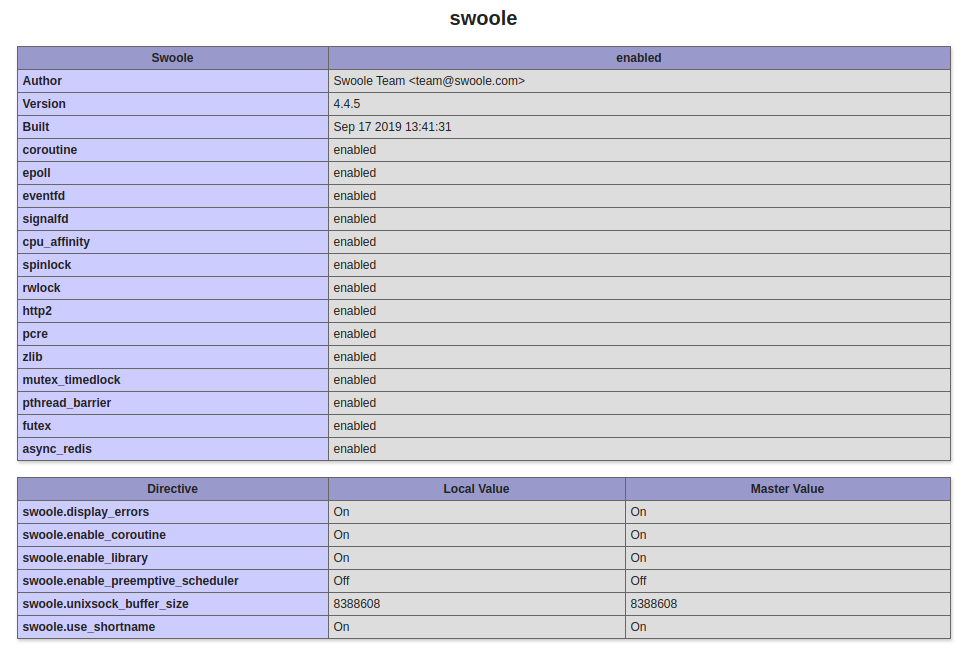 Pls do the same thing for php cli. the php.ini file for php cli in “/etc/php/7.2/cli/php.ini”. So edit the file and add a new line for the extension “extension=swoole.so”. Check the extension is loaded on the terminal:
|
1 2 |
teddy@teddy:~$ php -m | grep swoole swoole |
Note: I tried to do this via terminal
|
1 2 3 |
php -i | grep php.ini # check the php.ini file location sudo echo "extension=swoole.so" > php.ini # add the extension=swoole.so to the end of php.ini php -m | grep swoole # check if the swoole extension has been enabled |
But it didn’t work. The extension is not loaded so I put it manually in the php.ini for cli.
NOTE: IT NEED TO DISABLE ‘xdebug’ EXTENSION. CHECK IF xdebug IS ACTIVE/ENABLED:
|
1 2 3 4 5 6 |
teddy@teddy:~$ php -i | grep xdebug /etc/php/7.2/cli/conf.d/20-xdebug.ini, extension 'xdebug' detected xdebug xdebug support => enabled ... |
IF IT IS ENABLED, THEN MODIFY ‘/etc/php/7.2/cli/conf.d/20-xdebug.ini’ FILE TO DISABLE xdebug BY ADDING ‘;’ IN FRONT OF THE LINE LIKE THIS:
|
1 |
;zend_extension=xdebug.so |
IF xdebug IS ENABLED WHEN THE SERVER IS RUNNING, IT’D SPIT THIS WARNING:
|
1 2 3 4 5 6 |
teddy@teddy:~/Documents/works/swoole$ php server.php PHP Warning: Swoole\Server::start(): Using Xdebug in coroutines is extremely dangerous, please notice that it may lead to coredump! in /home/teddy/Documents/works/swoole/server.php on line 21 PHP Stack trace: PHP 1. {main}() /home/teddy/Documents/works/swoole/server.php:0 PHP 2. Swoole\Server->start() /home/teddy/Documents/works/swoole/server.php:21 ... |
TEST SWOOLE
ref: https://github.com/swoole/swoole-docs/blob/master/get-started/examples/tcp_server.md
Create a new file server.php
|
1 2 3 4 5 6 7 8 9 10 11 12 13 14 15 16 17 18 19 20 21 |
<?php // Create the server object and listen 127.0.0.1:9501 $server = new swoole_server("127.0.0.1", 9501); // Register the function for the event `connect` $server->on('connect', function($server, $fd){ echo "Client : Connect.\n"; }); // Register the function for the event `receive` $server->on('receive', function($server, $fd, $from_id, $data){ $server->send($fd, "Server: " . $data); }); // Register the function for the event `close` $server->on('close', function($server, $fd){ echo "Client: {$fd} close.\n"; }); // Start the server $server->start(); |
Run the php in a terminal
|
1 |
teddy@teddy:~/Documents/works/swoole$ php server.php |
then open another terminal and type ‘telnet 127.0.0.1 9501’
|
1 2 3 4 |
teddy@teddy:~$ telnet 127.0.0.1 9501 Trying 127.0.0.1... Connected to 127.0.0.1. Escape character is '^]'. |
The first terminal would print ‘Client : Connect’
|
1 2 |
teddy@teddy:~/Documents/works/swoole$ php server.php Client : Connect. |
You can connect with another new terminal.
To close the connection in the second terminal, press Ctrl + ] then type close in telnet>
|
1 2 3 4 5 6 7 8 9 10 11 |
teddy@teddy:~$ telnet 127.0.0.1 9501 Trying 127.0.0.1... Connected to 127.0.0.1. Escape character is '^]'. Server: hello Server: hello ^] telnet> close Connection closed. |
The first terminal would give response like this:
|
1 2 3 4 |
teddy@teddy:~/Documents/works/swoole$ php server.php Client : Connect. Client : Connect. Client: 1 close. |
Create web server
ref: https://github.com/swoole/swoole-docs/blob/master/get-started/examples/http_server.md
create a new file ‘http_server.php’
|
1 2 3 4 5 6 7 8 9 10 11 12 13 |
<?php // Create the http server object $http_server = new swoole_http_server("127.0.0.1", 9503); // Register the event of request $http_server->on('request', function($request, $response){ var_dump($request->get, $request->post); $response->header("Content-Type", "text/html;charset=utf-8"); $response->end("<h1>Hello Swoole " . rand(1000, 9999) . "</h1>"); }); // Start the server $http_server->start(); |
then run the server via terminal
|
1 |
teddy@teddy:~/Documents/works/swoole$ php http_server.php |
Open it via web browser: http://127.0.0.1:9503/
It should show this message:
|
1 |
Hello Swoole 8267 |