Ref: https://dotnet.microsoft.com/download/linux-package-manager/ubuntu16-04/sdk-current
Register Microsoft key and feed
Before installing .NET, you’ll need to register the Microsoft key, register the product repository, and install required dependencies. This only needs to be done once per machine.
Open a terminal and run the following commands:
|
1 2 3 4 5 6 7 8 9 |
teddy@teddy:~$ wget -q https://packages.microsoft.com/config/ubuntu/16.04/packages-microsoft-prod.deb teddy@teddy:~$ sudo dpkg -i packages-microsoft-prod.deb [sudo] password for teddy: Selecting previously unselected package packages-microsoft-prod. (Reading database ... 341156 files and directories currently installed.) Preparing to unpack packages-microsoft-prod.deb ... Unpacking packages-microsoft-prod (1.0-3) ... Setting up packages-microsoft-prod (1.0-3) ... |
Install the .NET SDK
Update the products available for installation, then install the .NET SDK.
In your terminal, run the following commands:
|
1 2 3 4 5 6 7 8 9 10 11 12 13 14 15 16 17 18 19 20 21 22 23 24 25 26 27 28 29 30 31 32 33 34 35 36 37 38 39 40 41 42 43 44 45 46 47 48 49 50 51 52 53 54 55 56 57 58 59 60 61 62 63 64 65 66 67 68 69 70 71 72 73 74 75 76 77 78 79 80 81 82 83 84 85 86 87 88 89 90 91 92 93 94 95 96 97 98 99 100 101 102 |
teddy@teddy:~$ sudo apt-get install apt-transport-https --> I GOT AN ERROR! teddy@teddy:~$ sudo apt-get update teddy@teddy:~$ sudo apt-get install dotnet-sdk-2.2 Reading package lists... Done Building dependency tree Reading state information... Done The following packages were automatically installed and are no longer required: exuberant-ctags geany-plugin-addons geany-plugin-autoclose geany-plugin-automark geany-plugin-codenav geany-plugin-commander geany-plugin-ctags geany-plugin-defineformat geany-plugin-doc geany-plugin-extrasel geany-plugin-gendoc geany-plugin-geniuspaste geany-plugin-insertnum geany-plugin-keyrecord geany-plugin-latex geany-plugin-lineoperations geany-plugin-lipsum geany-plugin-lua geany-plugin-macro geany-plugin-miniscript geany-plugin-numberedbookmarks geany-plugin-overview geany-plugin-pairtaghighlighter geany-plugin-pg geany-plugin-pohelper geany-plugin-prettyprinter geany-plugin-prj geany-plugin-projectorganizer geany-plugin-sendmail geany-plugin-shiftcolumn geany-plugin-spellcheck geany-plugin-tableconvert geany-plugin-treebrowser geany-plugin-updatechecker geany-plugin-vc geany-plugin-workbench geany-plugin-xmlsnippets geany-plugins-common libctpl2 libssh2-1 libtidy5 libzip5 php7.2-sqlite3 python-cliapp python-markdown python-ttystatus python-yaml qtdeclarative5-controls-plugin qtdeclarative5-dialogs-plugin Use 'sudo apt autoremove' to remove them. The following additional packages will be installed: aspnetcore-runtime-2.2 dotnet-host dotnet-hostfxr-2.2 dotnet-runtime-2.2 dotnet-runtime-deps-2.2 liblttng-ust-ctl2 liblttng-ust0 liburcu4 The following NEW packages will be installed: aspnetcore-runtime-2.2 dotnet-host dotnet-hostfxr-2.2 dotnet-runtime-2.2 dotnet-runtime-deps-2.2 dotnet-sdk-2.2 liblttng-ust-ctl2 liblttng-ust0 liburcu4 0 upgraded, 9 newly installed, 0 to remove and 0 not upgraded. Need to get 135 MB of archives. After this operation, 396 MB of additional disk space will be used. Do you want to continue? [Y/n] Y Get:1 http://kambing.ui.ac.id/ubuntu xenial/universe amd64 liburcu4 amd64 0.9.1-3 [47,3 kB] Get:2 http://kambing.ui.ac.id/ubuntu xenial/universe amd64 liblttng-ust-ctl2 amd64 2.7.1-1 [72,2 kB] Get:3 https://packages.microsoft.com/ubuntu/16.04/prod xenial/main amd64 dotnet-runtime-deps-2.2 amd64 2.2.5-1 [2.604 B] Get:4 https://packages.microsoft.com/ubuntu/16.04/prod xenial/main amd64 dotnet-host amd64 2.2.5-1 [36,5 kB] Get:5 https://packages.microsoft.com/ubuntu/16.04/prod xenial/main amd64 dotnet-hostfxr-2.2 amd64 2.2.5-1 [144 kB] Get:6 http://kambing.ui.ac.id/ubuntu xenial/universe amd64 liblttng-ust0 amd64 2.7.1-1 [127 kB] Get:7 https://packages.microsoft.com/ubuntu/16.04/prod xenial/main amd64 dotnet-runtime-2.2 amd64 2.2.5-1 [20,3 MB] Get:8 https://packages.microsoft.com/ubuntu/16.04/prod xenial/main amd64 aspnetcore-runtime-2.2 amd64 2.2.5-1 [22,9 MB] Get:9 https://packages.microsoft.com/ubuntu/16.04/prod xenial/main amd64 dotnet-sdk-2.2 amd64 2.2.300-1 [91,5 MB] Fetched 135 MB in 55s (2.420 kB/s) Selecting previously unselected package liburcu4:amd64. (Reading database ... 341161 files and directories currently installed.) Preparing to unpack .../liburcu4_0.9.1-3_amd64.deb ... Unpacking liburcu4:amd64 (0.9.1-3) ... Selecting previously unselected package liblttng-ust-ctl2:amd64. Preparing to unpack .../liblttng-ust-ctl2_2.7.1-1_amd64.deb ... Unpacking liblttng-ust-ctl2:amd64 (2.7.1-1) ... Selecting previously unselected package liblttng-ust0:amd64. Preparing to unpack .../liblttng-ust0_2.7.1-1_amd64.deb ... Unpacking liblttng-ust0:amd64 (2.7.1-1) ... Selecting previously unselected package dotnet-runtime-deps-2.2. Preparing to unpack .../dotnet-runtime-deps-2.2_2.2.5-1_amd64.deb ... Unpacking dotnet-runtime-deps-2.2 (2.2.5-1) ... Selecting previously unselected package dotnet-host. Preparing to unpack .../dotnet-host_2.2.5-1_amd64.deb ... Unpacking dotnet-host (2.2.5-1) ... Selecting previously unselected package dotnet-hostfxr-2.2. Preparing to unpack .../dotnet-hostfxr-2.2_2.2.5-1_amd64.deb ... Unpacking dotnet-hostfxr-2.2 (2.2.5-1) ... Selecting previously unselected package dotnet-runtime-2.2. Preparing to unpack .../dotnet-runtime-2.2_2.2.5-1_amd64.deb ... Unpacking dotnet-runtime-2.2 (2.2.5-1) ... Selecting previously unselected package aspnetcore-runtime-2.2. Preparing to unpack .../aspnetcore-runtime-2.2_2.2.5-1_amd64.deb ... Unpacking aspnetcore-runtime-2.2 (2.2.5-1) ... Selecting previously unselected package dotnet-sdk-2.2. Preparing to unpack .../dotnet-sdk-2.2_2.2.300-1_amd64.deb ... Unpacking dotnet-sdk-2.2 (2.2.300-1) ... Processing triggers for libc-bin (2.23-0ubuntu10) ... Processing triggers for man-db (2.7.5-1) ... Setting up liburcu4:amd64 (0.9.1-3) ... Setting up liblttng-ust-ctl2:amd64 (2.7.1-1) ... Setting up liblttng-ust0:amd64 (2.7.1-1) ... Setting up dotnet-runtime-deps-2.2 (2.2.5-1) ... Setting up dotnet-host (2.2.5-1) ... Setting up dotnet-hostfxr-2.2 (2.2.5-1) ... Setting up dotnet-runtime-2.2 (2.2.5-1) ... Setting up aspnetcore-runtime-2.2 (2.2.5-1) ... Setting up dotnet-sdk-2.2 (2.2.300-1) ... This software may collect information about you and your use of the software, and send that to Microsoft. Please visit http://aka.ms/dotnet-cli-eula for more information. Welcome to .NET Core! --------------------- Learn more about .NET Core: https://aka.ms/dotnet-docs Use 'dotnet --help' to see available commands or visit: https://aka.ms/dotnet-cli-docs Telemetry --------- The .NET Core tools collect usage data in order to help us improve your experience. The data is anonymous and doesn't include command-line arguments. The data is collected by Microsoft and shared with the community. You can opt-out of telemetry by setting the DOTNET_CLI_TELEMETRY_OPTOUT environment variable to '1' or 'true' using your favorite shell. Read more about .NET Core CLI Tools telemetry: https://aka.ms/dotnet-cli-telemetry Configuring... -------------- A command is running to populate your local package cache to improve restore speed and enable offline access. This command takes up to one minute to complete and only runs once. Processing triggers for libc-bin (2.23-0ubuntu10) ... |
OK. Check the dotnet version (dotnet –version) or more complete info (dotnet –info):
|
1 2 |
teddy@teddy:~$ dotnet --version 2.2.300 |
|
1 2 3 4 5 6 7 8 9 10 11 12 13 14 15 16 17 18 19 20 21 22 23 24 25 26 |
teddy@teddy:~$ dotnet --info .NET Core SDK (reflecting any global.json): Version: 2.2.300 Commit: 73efd5bd87 Runtime Environment: OS Name: ubuntu OS Version: 16.04 OS Platform: Linux RID: ubuntu.16.04-x64 Base Path: /usr/share/dotnet/sdk/2.2.300/ Host (useful for support): Version: 2.2.5 Commit: 0a3c9209c0 .NET Core SDKs installed: 2.2.300 [/usr/share/dotnet/sdk] .NET Core runtimes installed: Microsoft.AspNetCore.All 2.2.5 [/usr/share/dotnet/shared/Microsoft.AspNetCore.All] Microsoft.AspNetCore.App 2.2.5 [/usr/share/dotnet/shared/Microsoft.AspNetCore.App] Microsoft.NETCore.App 2.2.5 [/usr/share/dotnet/shared/Microsoft.NETCore.App] To install additional .NET Core runtimes or SDKs: https://aka.ms/dotnet-download |
Create First DotNet App
ref: https://dotnet.microsoft.com/learn/dotnet/hello-world-tutorial/create
|
1 2 3 4 5 6 7 8 9 10 11 12 13 14 15 16 17 18 19 20 21 22 23 24 25 26 27 28 |
teddy@teddy:~$ cd Documents/dotnet/ teddy@teddy:~/Documents/dotnet$ dotnet new console -o myFirstApp Welcome to .NET Core! --------------------- Learn more about .NET Core: https://aka.ms/dotnet-docs Use 'dotnet --help' to see available commands or visit: https://aka.ms/dotnet-cli-docs Telemetry --------- The .NET Core tools collect usage data in order to help us improve your experience. The data is anonymous and doesn't include command-line arguments. The data is collected by Microsoft and shared with the community. You can opt-out of telemetry by setting the DOTNET_CLI_TELEMETRY_OPTOUT environment variable to '1' or 'true' using your favorite shell. Read more about .NET Core CLI Tools telemetry: https://aka.ms/dotnet-cli-telemetry ASP.NET Core ------------ Successfully installed the ASP.NET Core HTTPS Development Certificate. To trust the certificate run 'dotnet dev-certs https --trust' (Windows and macOS only). For establishing trust on other platforms refer to the platform specific documentation. For more information on configuring HTTPS see https://go.microsoft.com/fwlink/?linkid=848054. Getting ready... The template "Console Application" was created successfully. Processing post-creation actions... Running 'dotnet restore' on myFirstApp/myFirstApp.csproj... Restore completed in 131.32 ms for /home/teddy/Documents/dotnet/myFirstApp/myFirstApp.csproj. Restore succeeded. |
The dotnet command creates a new application of type console for you. The -o parameter creates a directory named myFirstApp where your app is stored, and populates it with the required files. The cd myFirstApp command puts you into the newly created app directory.
|
1 |
teddy@teddy:~/Documents/dotnet$ cd myFirstApp/ |
The main file in the myFirstApp folder is Program.cs. By default, it already contains the necessary code to write “Hello World!” to the Console.
|
1 2 3 4 5 6 7 8 9 10 11 12 |
using System; namespace myFirstApp { class Program { static void Main(string[] args) { Console.WriteLine("Hello World!"); } } } |
Run your app
In your terminal, run the following command:
|
1 2 |
teddy@teddy:~/Documents/dotnet/myFirstApp$ dotnet run Hello World! |
Congratulations, you’ve built and run your first .NET app!
Edit your code
Open Program.cs in any text editor (e.g. Notepad) and add a new line of code below the one that prints “Hello World!”, like the following:
|
1 2 3 4 |
... Console.WriteLine("The current time is " + DateTime.Now); Console.WriteLine("Hello World!"); ... |
Save the Program.cs file, and run your code again.
|
1 2 3 |
teddy@teddy:~/Documents/dotnet/myFirstApp$ dotnet run The current time is 6/26/19 2:12:49 PM Hello World! |
Create First ASP.Net App
ref: https://dotnet.microsoft.com/learn/web/aspnet-hello-world-tutorial/create
Create your app
In your terminal, run the following commands:
|
1 2 3 4 5 6 7 8 9 10 11 12 13 14 15 |
teddy@teddy:~$ cd Documents/dotnet/ teddy@teddy:~/Documents/dotnet$ dotnet new webApp -o myFirstWebApp --no-https The template "ASP.NET Core Web App" was created successfully. This template contains technologies from parties other than Microsoft, see https://aka.ms/aspnetcore-template-3pn-210 for details. Processing post-creation actions... Running 'dotnet restore' on myFirstWebApp/myFirstWebApp.csproj... Restore completed in 557.04 ms for /home/teddy/Documents/dotnet/myFirstWebApp/myFirstWebApp.csproj. Restore succeeded. teddy@teddy:~/Documents/dotnet$ cd myFirstWebApp/ teddy@teddy:~/Documents/dotnet/myFirstWebApp$ |
Run your app
In your terminal, run the following command:
|
1 2 3 4 5 6 7 8 9 10 11 12 13 |
teddy@teddy:~/Documents/dotnet/myFirstWebApp$ dotnet run : Microsoft.AspNetCore.DataProtection.KeyManagement.XmlKeyManager[0] User profile is available. Using '/home/teddy/.aspnet/DataProtection-Keys' as key repository; keys will not be encrypted at rest. info: Microsoft.AspNetCore.DataProtection.KeyManagement.XmlKeyManager[58] Creating key {9da6f12d-a4f8-43e7-bbf7-dd404ac6e97e} with creation date 2019-06-27 07:05:47Z, activation date 2019-06-27 07:05:47Z, and expiration date 2019-09-25 07:05:47Z. warn: Microsoft.AspNetCore.DataProtection.KeyManagement.XmlKeyManager[35] No XML encryptor configured. Key {9da6f12d-a4f8-43e7-bbf7-dd404ac6e97e} may be persisted to storage in unencrypted form. info: Microsoft.AspNetCore.DataProtection.Repositories.FileSystemXmlRepository[39] Writing data to file '/home/teddy/.aspnet/DataProtection-Keys/key-9da6f12d-a4f8-43e7-bbf7-dd404ac6e97e.xml'. Hosting environment: Development Content root path: /home/teddy/Documents/dotnet/myFirstWebApp Now listening on: http://localhost:5000 Application started. Press Ctrl+C to shut down. |
Then open it on your web browser: http://localhost:5000/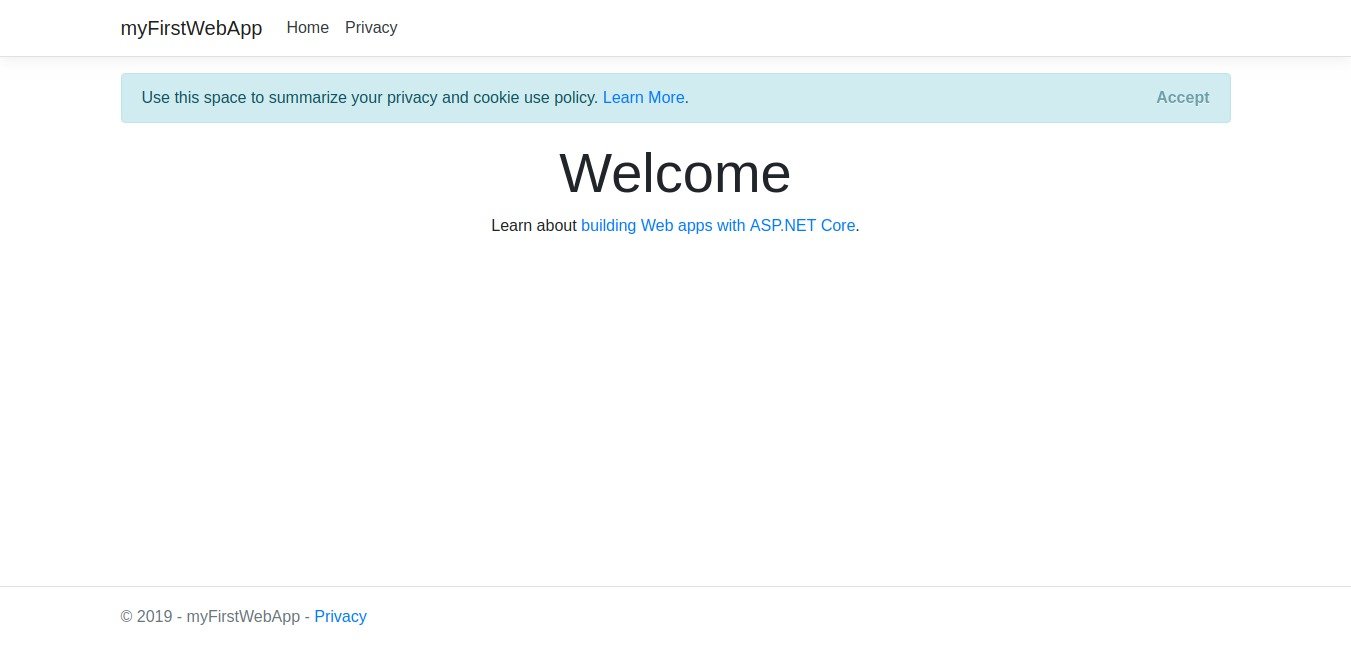 Edit your code
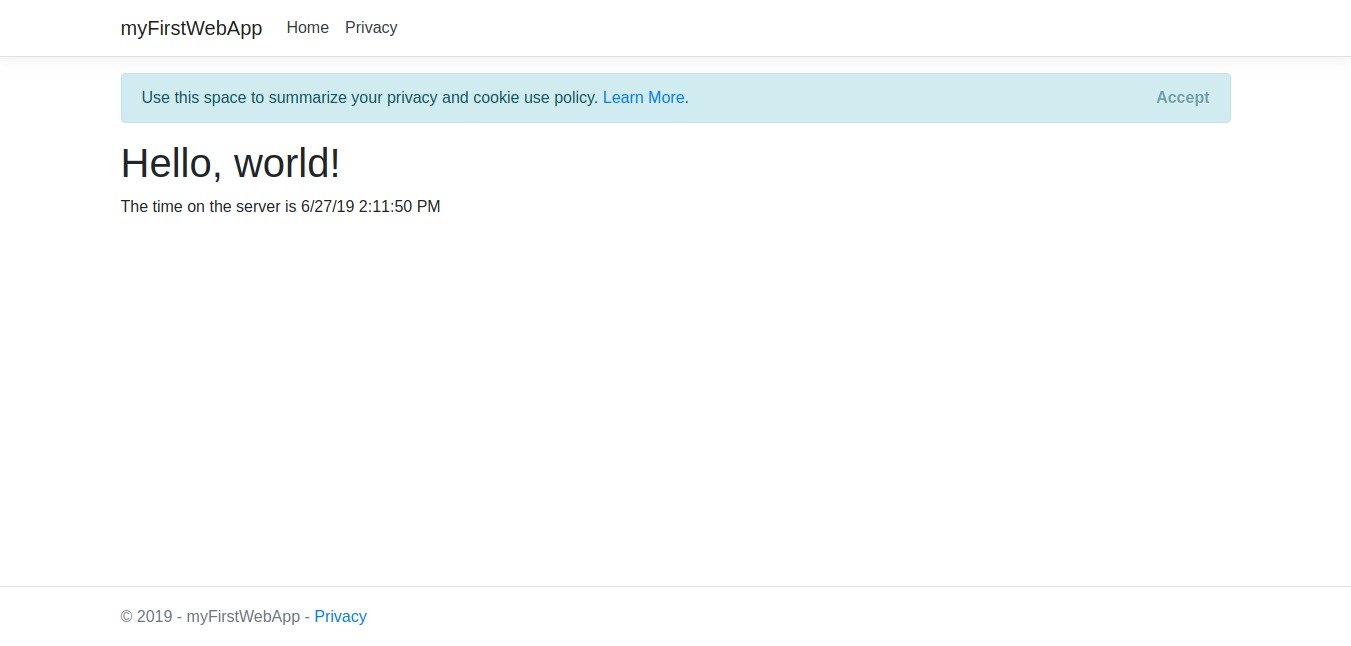
Open Pages/Index.cshtml in any text editor and replace all of the code with the following:
|
1 2 3 4 5 6 7 8 |
@page @model IndexModel @{ ViewData["Title"] = "Home page"; } <h1>Hello, world!</h1> <p>The time on the server is @DateTime.Now</p> |
Save the file then refresh the browser to see the change: