Reference: http://www.pyimagesearch.com/2016/08/10/imagenet-classification-with-python-and-keras/
François Chollet pushed three Keras models (VGG16, VGG19, and ResNet50) online — these networks are pre-trained on the ImageNet dataset, meaning that they can recognize 1,000 common object classes out-of-the-box.
we can now easily apply VGG16, VGG19, and ResNet50 using Keras and Python to our own applications.
ImageNet is actually a project aimed at labeling and categorizing images into almost 22,000 categories based on a defined set of words and phrases. At the time of this writing, there are over 14 million images in the ImageNet project.
- Install keras and tensorflow backend
list the package needed
12345678910111213141516(opencv_keras_tf) teddy@teddy-K43SJ:~$ pip freezeappdirs==1.4.0h5py==2.6.0Keras==1.2.2numpy==1.12.0olefile==0.44packaging==16.8Pillow==4.0.0protobuf==3.0.0pyparsing==2.1.10PyYAML==3.12scikit-learn==0.18.1scipy==0.18.1six==1.10.0tensorflow==0.11.0Theano==0.8.2 - Clone the deep-learning-models repository
Then, to gain access to VGG16, VGG19, and the ResNet50 architectures and pre-trained weights, you need to clone the deep-learning-models repository from GitHub:
123456(opencv_keras_tf) teddy@teddy-K43SJ:~$ git clone https://github.com/fchollet/deep-learning-modelsCloning into 'deep-learning-models'...remote: Counting objects: 47, done.remote: Total 47 (delta 0), reused 0 (delta 0), pack-reused 47Unpacking objects: 100% (47/47), done.Checking connectivity... done.
Then go into the dir ‘deep-learning-models’
12(opencv_keras_tf) teddy@teddy-K43SJ:~$ cd deep-learning-models/(opencv_keras_tf) teddy@teddy-K43SJ:~/deep-learning-models$
Notice how we have four Python files. The resnet50.py , vgg16.py , and vgg19.py files correspond to their respective network architecture definitions.
The imagenet_utils file, as the name suggests, contains a couple helper functions that allow us to prepare images for classification as well as obtain the final class label predictions from the network. - Write some Python code to classify image contents utilizing Convolutional Neural Networks (CNNs) pre-trained on the ImageNet dataset.
To start, open up a new file, name it ‘test_imagenet.py’ , and insert the following code:
12345678910111213141516171819202122232425262728293031323334353637383940414243444546474849# import the necessary packagesfrom keras.preprocessing import image as image_utilsfrom imagenet_utils import decode_predictionsfrom imagenet_utils import preprocess_inputfrom vgg16 import VGG16import numpy as npimport argparseimport cv2# construct the argument parse and parse the argumentsap = argparse.ArgumentParser()ap.add_argument("-i", "--image", required=True,help="path to the input image")args = vars(ap.parse_args())# load the original image via OpenCV so we can draw on it and display# it to our screen laterorig = cv2.imread(args["image"])# load the input image using the Keras helper utility while ensuring# that the image is resized to 224x224 pxiels, the required input# dimensions for the network -- then convert the PIL image to a# NumPy arrayprint("[INFO] loading and preprocessing image...")image = image_utils.load_img(args["image"], target_size=(224, 224))image = image_utils.img_to_array(image)# our image is now represented by a NumPy array of shape (3, 224, 224),# but we need to expand the dimensions to be (1, 3, 224, 224) so we can# pass it through the network -- we'll also preprocess the image by# subtracting the mean RGB pixel intensity from the ImageNet datasetimage = np.expand_dims(image, axis=0)image = preprocess_input(image)# load the VGG16 networkprint("[INFO] loading network...")model = VGG16(weights="imagenet")# classify the imageprint("[INFO] classifying image...")preds = model.predict(image)(inID, label) = decode_predictions(preds)[0]# display the predictions to our screenprint("ImageNet ID: {}, Label: {}".format(inID, label))cv2.putText(orig, "Label: {}".format(label), (10, 30),cv2.FONT_HERSHEY_SIMPLEX, 0.9, (0, 255, 0), 2)cv2.imshow("Classification", orig)cv2.waitKey(0)
- Run the python script ‘test_imagenet.py’.
NOTE: FOR THE FIRST TIME IT’S VERY SLOW BECAUSE IT DOWNLOADED VGG16 WEIGHT FROM INTERNET (~500MB)
123456789101112131415161718192021222324252627(opencv_keras_tf) teddy@teddy-K43SJ:~/deep-learning-models$ python test_imagenet.py --image images/dog_beagle.pngUsing TensorFlow backend.I tensorflow/stream_executor/dso_loader.cc:111] successfully opened CUDA library libcublas.so locallyI tensorflow/stream_executor/dso_loader.cc:111] successfully opened CUDA library libcudnn.so locallyI tensorflow/stream_executor/dso_loader.cc:111] successfully opened CUDA library libcufft.so locallyI tensorflow/stream_executor/dso_loader.cc:111] successfully opened CUDA library libcuda.so.1 locallyI tensorflow/stream_executor/dso_loader.cc:111] successfully opened CUDA library libcurand.so locally[INFO] loading and preprocessing image...[INFO] loading network...K.image_dim_ordering: tfDownloading data from https://github.com/fchollet/deep-learning-models/releases/download/v0.1/vgg16_weights_tf_dim_ordering_tf_kernels.h5I tensorflow/stream_executor/cuda/cuda_gpu_executor.cc:925] successful NUMA node read from SysFS had negative value (-1), but there must be at least one NUMA node, so returning NUMA node zeroI tensorflow/core/common_runtime/gpu/gpu_device.cc:951] Found device 0 with properties:name: GeForce GT 520Mmajor: 2 minor: 1 memoryClockRate (GHz) 1.48pciBusID 0000:01:00.0Total memory: 963.62MiBFree memory: 780.62MiBI tensorflow/core/common_runtime/gpu/gpu_device.cc:972] DMA: 0I tensorflow/core/common_runtime/gpu/gpu_device.cc:982] 0: YI tensorflow/core/common_runtime/gpu/gpu_device.cc:1014] Ignoring visible gpu device (device: 0, name: GeForce GT 520M, pci bus id: 0000:01:00.0) with Cuda compute capability 2.1. The minimum required Cuda capability is 3.0.[INFO] classifying image...Downloading data from https://s3.amazonaws.com/deep-learning-models/image-models/imagenet_class_index.jsonTraceback (most recent call last):File "test_imagenet.py", line 42, in <module>(inID, label) = decode_predictions(preds)[0]ValueError: too many values to unpack (expected 2)
I GOT AN ERROR AT ‘(inID, label) = decode_predictions(preds)[0]’
SOLUTION: COMMENT LINE #42 in ‘test_imagenet.py’ AND ADD TWO NEW LINES LIKE THIS:
123456...preds = model.predict(image)#(inID, label) = decode_predictions(preds)[0]P = decode_predictions(preds)(inID, label, prob) = P[0][0]...
RUN AGAIN
12345678910111213141516171819202122(opencv_keras_tf) teddy@teddy-K43SJ:~/deep-learning-models$ python test_imagenet.py --image images/dog_beagle.pngUsing TensorFlow backend....[INFO] loading and preprocessing image...[INFO] loading network...K.image_dim_ordering: tfI tensorflow/stream_executor/cuda/cuda_gpu_executor.cc:925] successful NUMA node read from SysFS had negative value (-1), but there must be at least one NUMA node, so returning NUMA node zeroI tensorflow/core/common_runtime/gpu/gpu_device.cc:951] Found device 0 with properties:name: GeForce GT 520Mmajor: 2 minor: 1 memoryClockRate (GHz) 1.48pciBusID 0000:01:00.0Total memory: 963.62MiBFree memory: 794.12MiBI tensorflow/core/common_runtime/gpu/gpu_device.cc:972] DMA: 0I tensorflow/core/common_runtime/gpu/gpu_device.cc:982] 0: YI tensorflow/core/common_runtime/gpu/gpu_device.cc:1014] Ignoring visible gpu device (device: 0, name: GeForce GT 520M, pci bus id: 0000:01:00.0) with Cuda compute capability 2.1. The minimum required Cuda capability is 3.0.[INFO] classifying image...ImageNet ID: n02088364, Label: beagleException ignored in: <bound method Session.__del__ of <tensorflow.python.client.session.Session object at 0x7f3732e2c400>>Traceback (most recent call last):File "/home/teddy/.virtualenvs/opencv_keras_tf/lib/python3.4/site-packages/tensorflow/python/client/session.py", line 532, in __del__AttributeError: 'NoneType' object has no attribute 'TF_DeleteStatus'
SUCCESS! IT CAN RECOGNIZED A DOG ‘BEAGLE’. HERE IS THE RESULT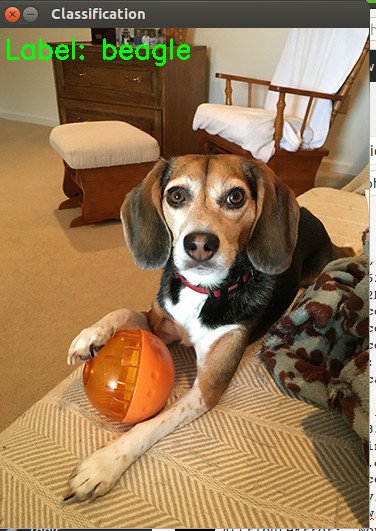 NOTE: The last error ‘NoneType’ not related with keras. TAKE CARE OF IT LATER (SOLUTION READ: http://www.pyimagesearch.com/2016/12/26/opencv-resolving-nonetype-errors/)
TRY ANOTHER EXAMPLE:
1(opencv_keras_tf) teddy@teddy-K43SJ:~/deep-learning-models$ python test_imagenet.py --image images/space_shuttle.png
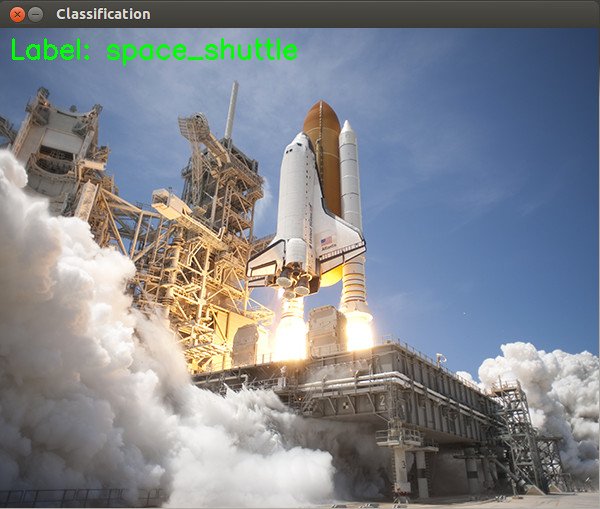 NOTE: The downloaded dataset would be stored in /.keras/models/ directory. the dataset filename is ‘vgg16_weights_tf_dim_ordering_tf_kernels.h5’ and the labeled index filename is ‘imagenet_class_index.json’.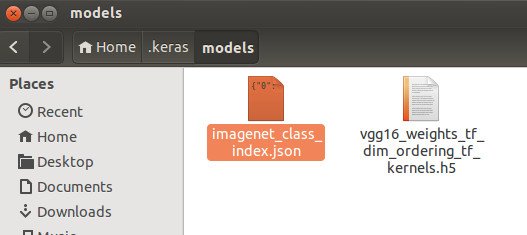
- MORE TEST
I have some test for recognizing fish on some pictures. I put three samples in ‘images’ directory (/deep-learning-models/images).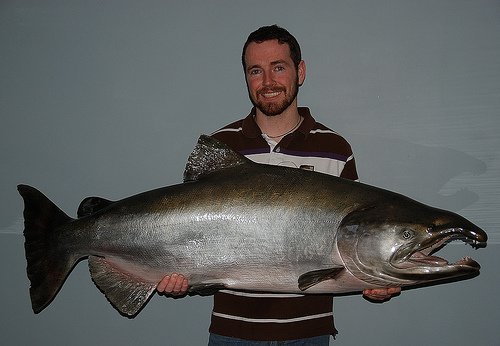

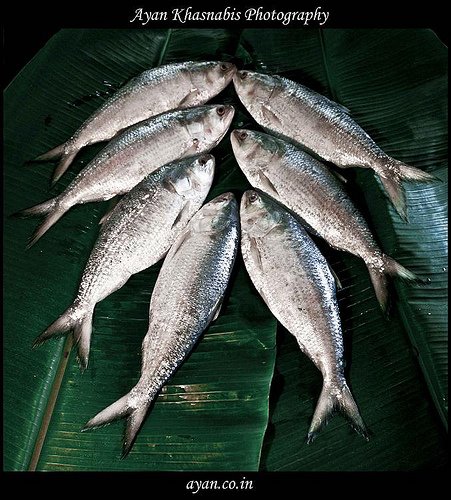 BUT NONE OF THEM SHOW THE CORRECT RESULT. HERE ARE THE RESULT
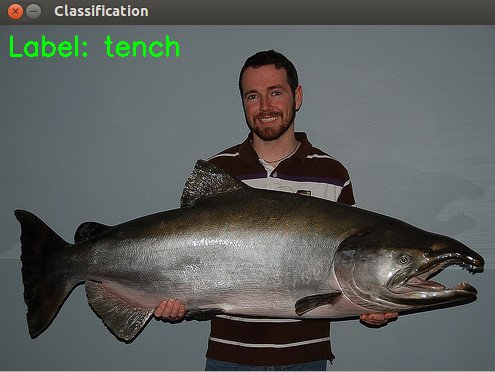 RECOGNIZED AS ‘tench’ ???
 RECOGNIZED AS ‘electric_ray’ ???
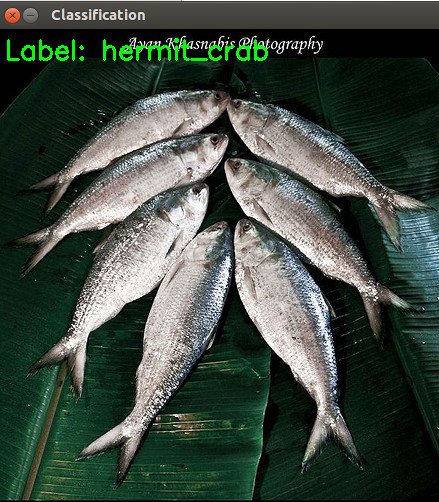 RECOGNIZED AS ‘hermit_crab’ ???
I THINK I NEED TO TRAIN THESE SAMPLES FIRST BEFORE IT READY TO BE RECOGNIZED