Here I ‘m going to extend my previous testapp. Also learn more about ruby on rails file structure. Ref: http://www.belajarrubyonrails.com/2012/12/membuat-aplikasi-rails-sederhana-say.html
Extend Controller.
Create a new controller ‘home_controller.rb’ in /app/controllers/ directory. Here is the content:
|
1 2 3 4 |
class HomeController < ApplicationController def index end end |
Extend View.
Create a new directory ‘home’ in /app/views/ directory. Then create a new file ‘index.html.erb’ in the new directory. Here is the content:
|
1 |
Hello Ruby on Rails!!! Here I am!!! |
Then remove ‘index.html’ file in /public/directory (I DONT FIND IT!!!)
Routes.
Modify ‘routes.rb’ file in /config/ directory. Set the default route to our testapp.
|
1 2 3 4 5 |
Rails.application.routes.draw do # For details on the DSL available within this file, see http://guides.rubyonrails.org/routing.html #Testapp::Application.routes.draw.do --> WHY NOT WORKING??? rails s SHOWED ERROR root :to => 'home#index' end |
Then start the rails server (rails s) and open it in http://localhost:3000/. It should show this text:
|
1 |
Hello Ruby on Rails!!! Here I am!!! |
I want to show Date and Time on my browser. Modify ‘home_controller.rb’ like this:
|
1 2 3 4 5 |
class HomeController < ApplicationController def index @time_now = Time.now end end |
Then modify ‘index.html.erb’ to show the date time:
|
1 2 3 |
<h1>Hello Ruby on Rails!!! Here I am!!!</h1> <p>Time now is <%= @time_now %></p> |
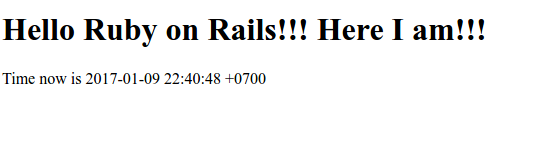
OK. Start the server and open it on the browser. It should be something like this: