- Download the latest version from https://download.moodle.org/
- Extract the zip file to your webroot directory
- Install via your browser http://localhost/works/moodle32/install.php
My setting:
123Web address: http://localhost/works/moodle32Moodle directory : /home/teddy/Documents/works/moodle32Data directory : /home/teddy/moodledata
Make sure the ‘Data directory’ can be written!
I created the dir ‘moodledata’ then set the permission to 777 - Select the database ‘Improved MySQL/mysqli)
My setting:
12Database name: moodle32Tables prefix: mdl_
But create the new database ‘moodle32’ via phpmyadmin first (collation: utf8-general-ci) - Install and enable some php extensions required. For example I need to install also two php extension xmlrpc and intl (dont forget to restart the apache server after the installation)
123teddy@teddy-K43SJ:~$ sudo apt-get install php5.6-xmlrpcteddy@teddy-K43SJ:~$ sudo apt-get install php5.6-intlteddy@teddy-K43SJ:~$ sudo service apache2 restart
Then refresh the page to see the changes - Create an username and password
12345username: adminpassword: Admin@123First Name: AdminSur Name: User
- Site setting
12Full site name (fullname) : Moodle 3.2.1 TestShort name for site (eg single word) (shortname) : moodle
- Done. Here is the screenshot
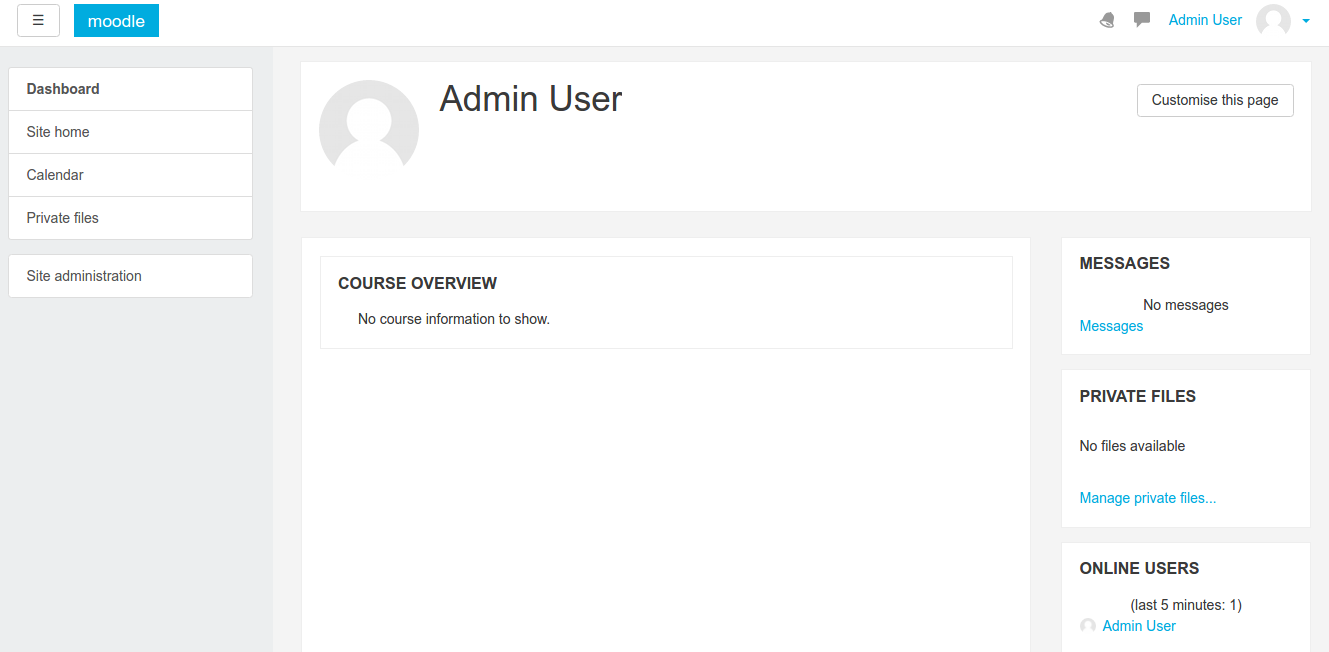
Admin dashboard (http://localhost/works/moodle32/my/)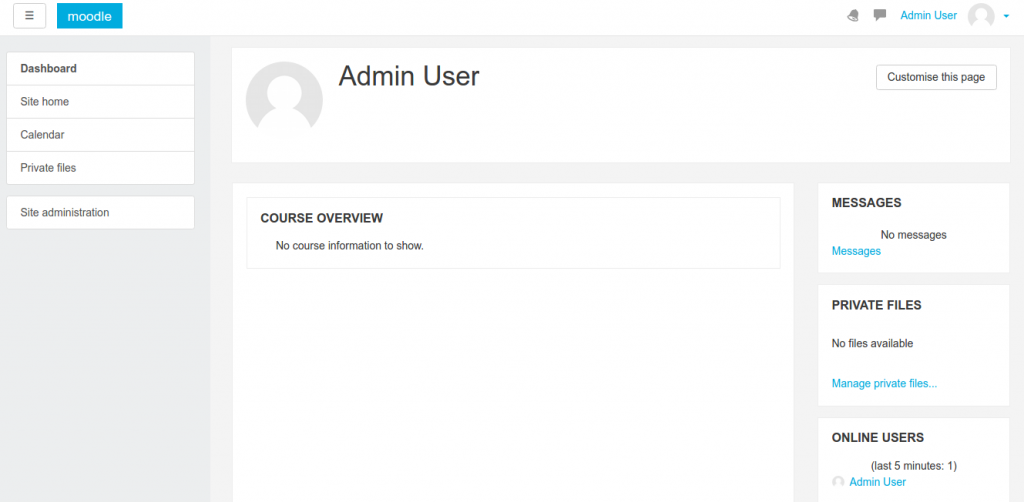 Site Home (http://localhost/works/moodle32/?redirect=0)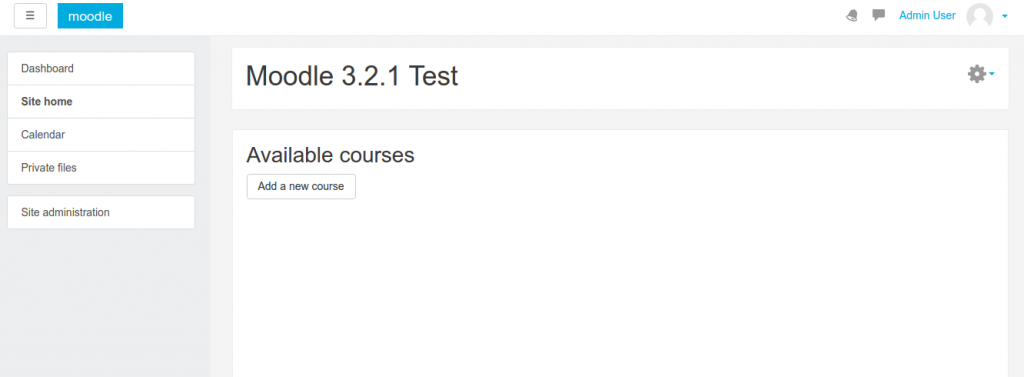
- Install and Change theme
Currently the default theme is ‘Boost’. If you want to change the theme, you can find them on the internet. The free themes can be found in https://moodle.org/plugins/browse.php?list=category&id=3. Please find the correct support version (here, it should support moodle version 3.2). I use ‘Campus’ theme as an example (https://moodle.org/plugins/theme_campus). The tutorial for the theme installation can be read in https://github.com/dasistwas/moodle-theme_campus/.
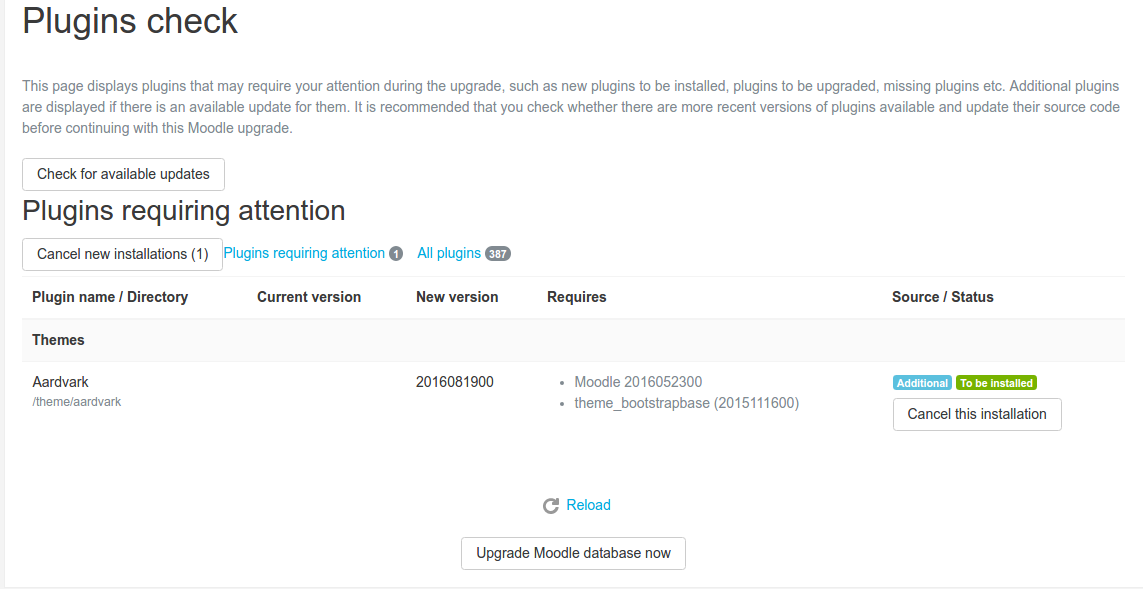
I downloaded the theme (https://moodle.org/plugins/download.php/13006/theme_campus_moodle32_2016121403.zip) then extract it in ‘/theme/’ directory of my moodle installation (/moodle32/theme/). Then Go to ‘Site Administration’ -> ‘Notification’ or http://localhost/works/moodle32/admin/index.php. It’d show this page (note: I use ‘Aadvark’ theme here but the step is relatively same)
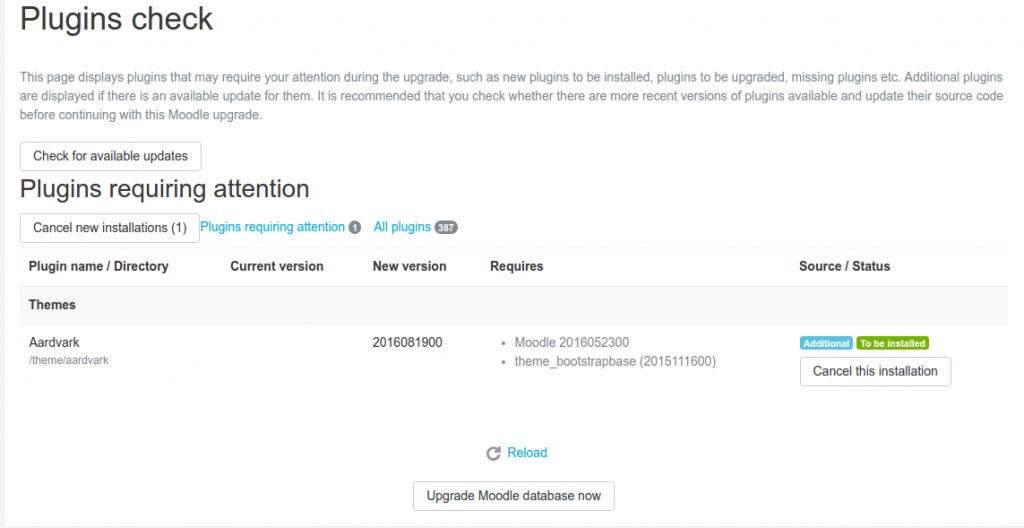 Then click ‘Upgrade Moodle database now’ button. ATTN: SOMETIMES THE PROCESS TO UPGRADE THE DB IS SLOW (FOR CAMPUS THEME)!
If success, click ‘Continue’ button!.
Then We’d face the page setting for the theme (http://localhost/works/moodle32/admin/upgradesettings.php?). Make any change if necessary then click ‘Save Changes’ button.
DONE - To use the theme, Pls go to ‘Site Administration’ -> ‘Appearance’ -> ‘Themes’ -> ‘Theme Selector’ or http://localhost/works/moodle32/theme/index.php. On ‘Default’, click ‘Change theme’
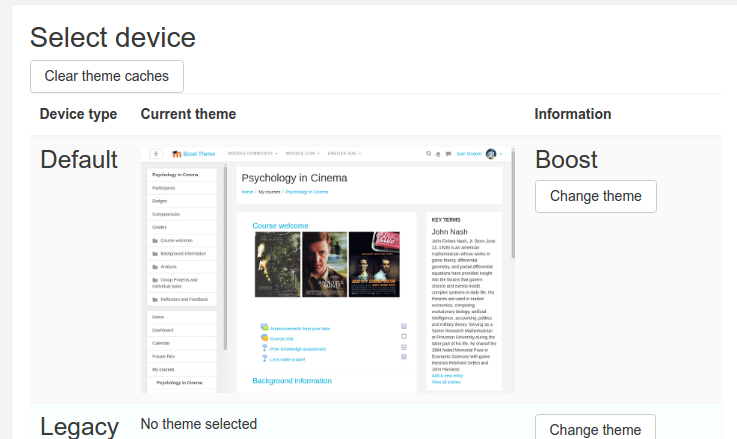 Then select ‘Campus’ theme. Click ‘Use theme’ button (http://localhost/works/moodle32/theme/index.php?confirmation=1&choose=campus).
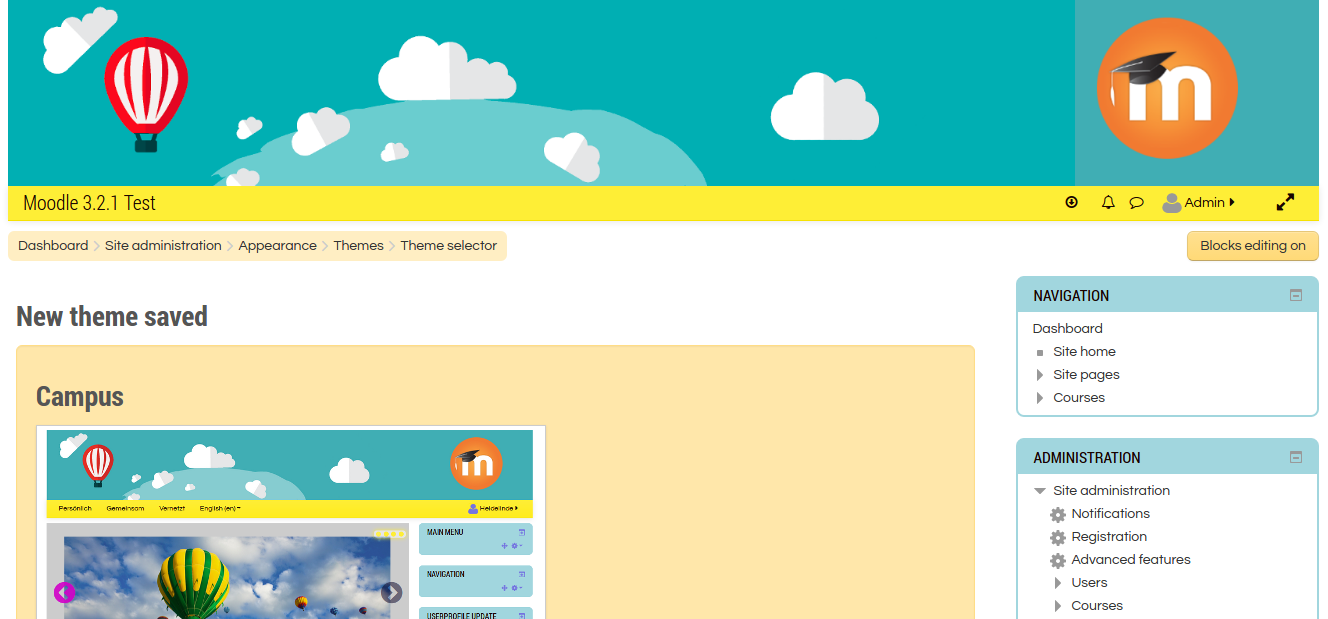
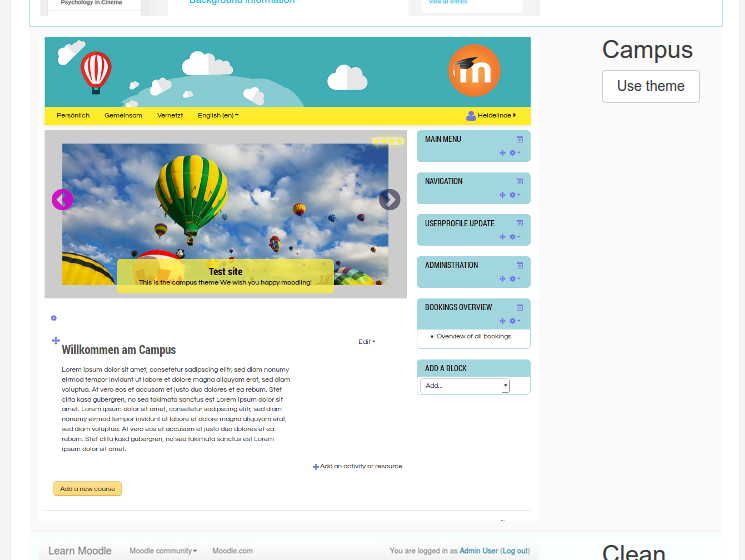 Here is the ‘Campus’ theme looks!
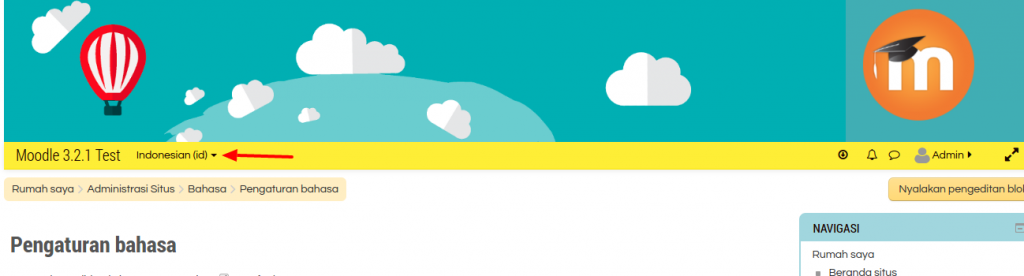
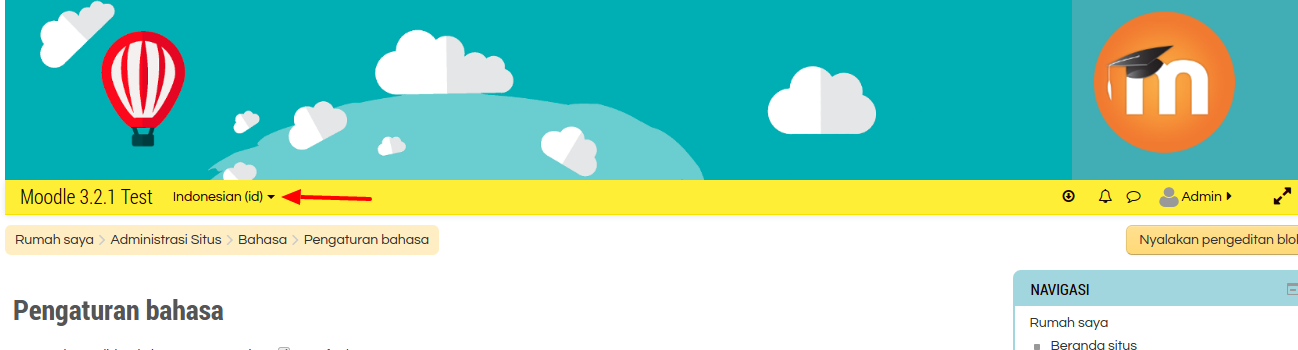
- I can do many things else like install and use your own language (Install new language: Site Administration -> Language -> Language Packs) then at ‘Language Settings’, change the default language. Then you can select and change the language from the frontend
- Create a new user
Pls go to Site administration -> Users -> Accounts -> Add a new user (http://localhost/works/moodle32/user/editadvanced.php?id=-1). Then fill the form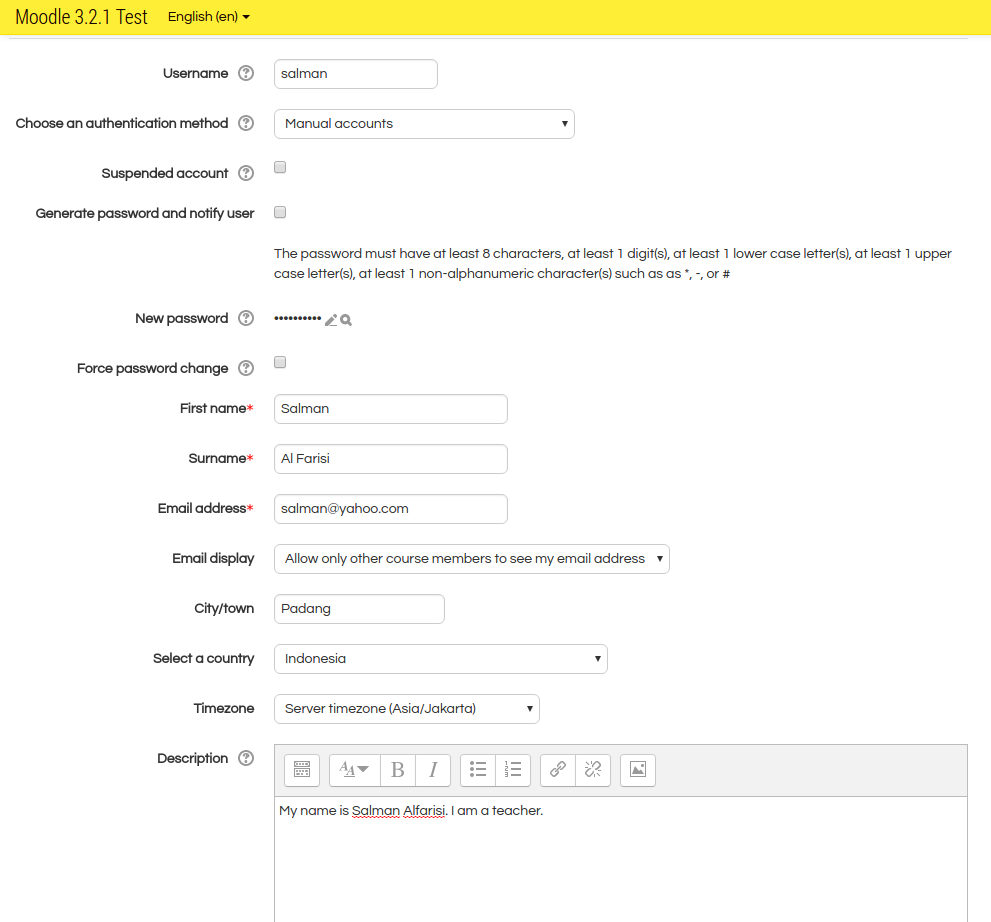 Then click ‘Create User’
 - Create the courses (and the course category)
Pls go to Site administration -> Courses -> Add a category (http://localhost/works/moodle32/course/editcategory.php?parent=0) then fill the form.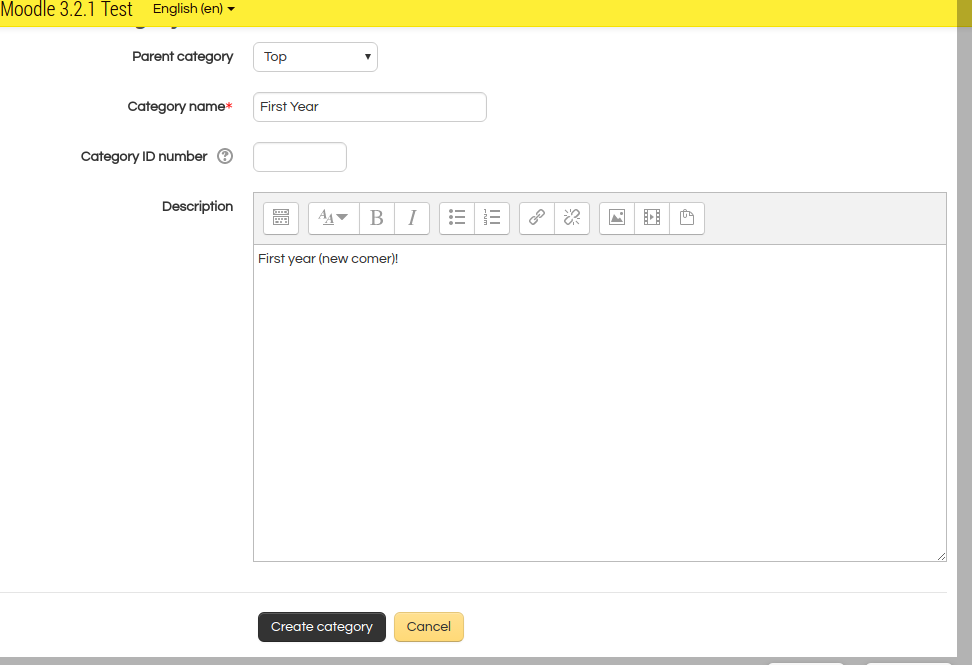 Then click ‘Create category’.
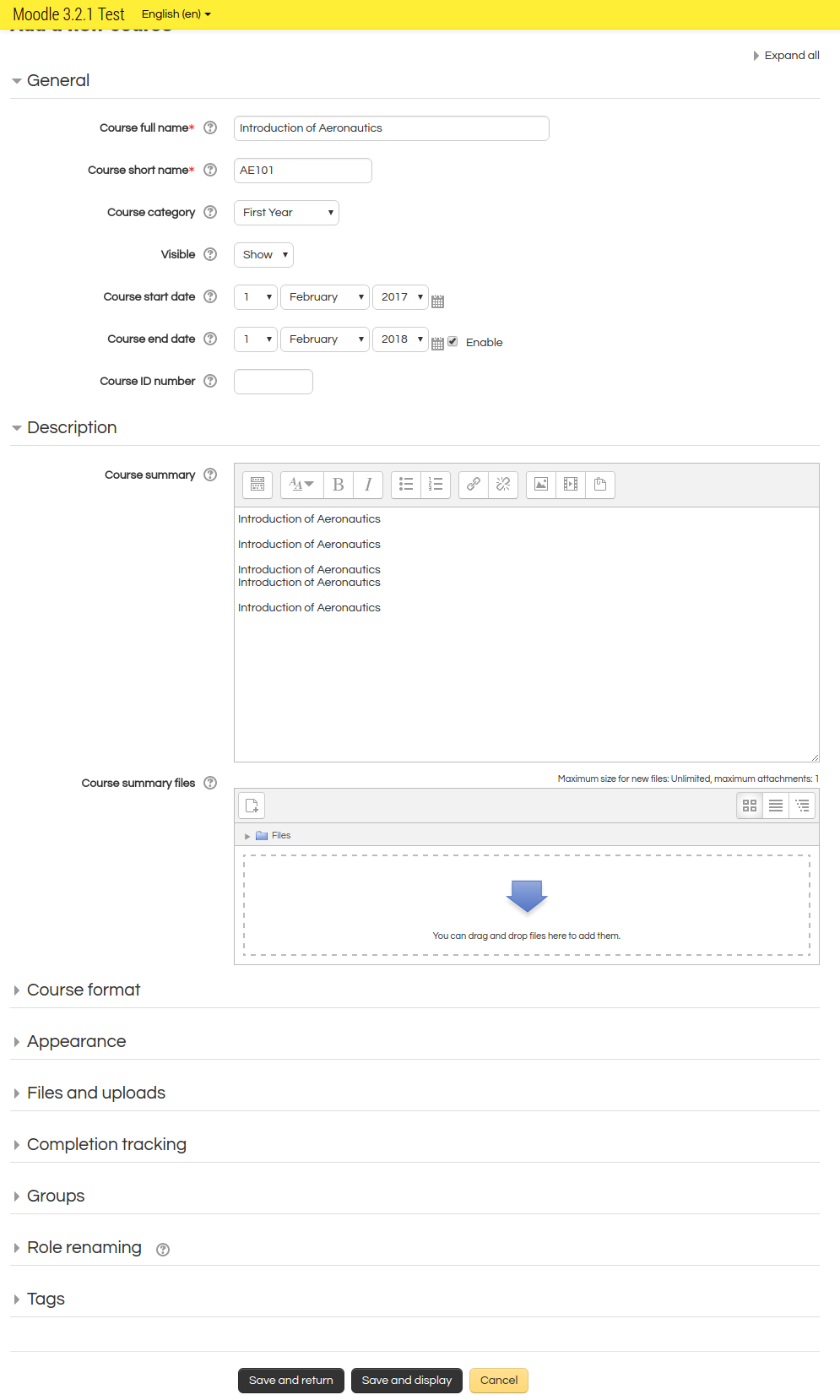
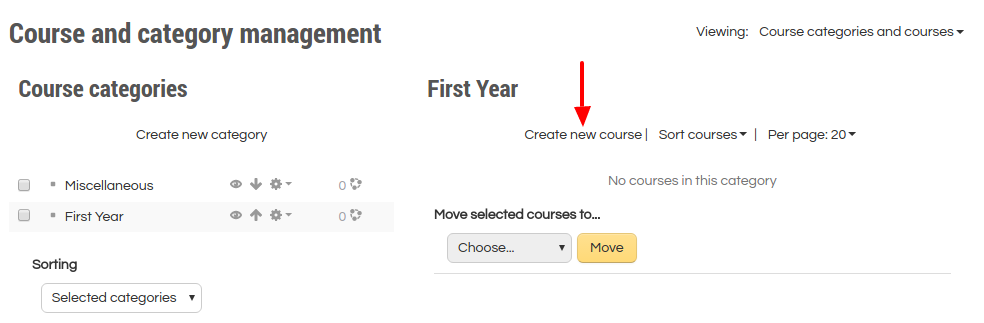 Then click ‘Create new course’. Then fill the form.
 Then click ‘Save and return’. You can add some more courses. So here is the looks.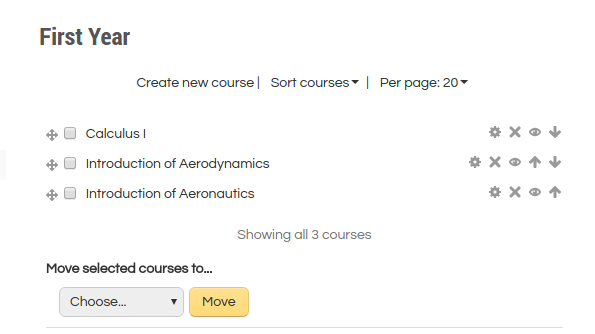
- Enroll (Add) users to the courses
For example for adding the new user ‘salman’ to the course ‘Calculus I’. First, click the course ‘Calculus I,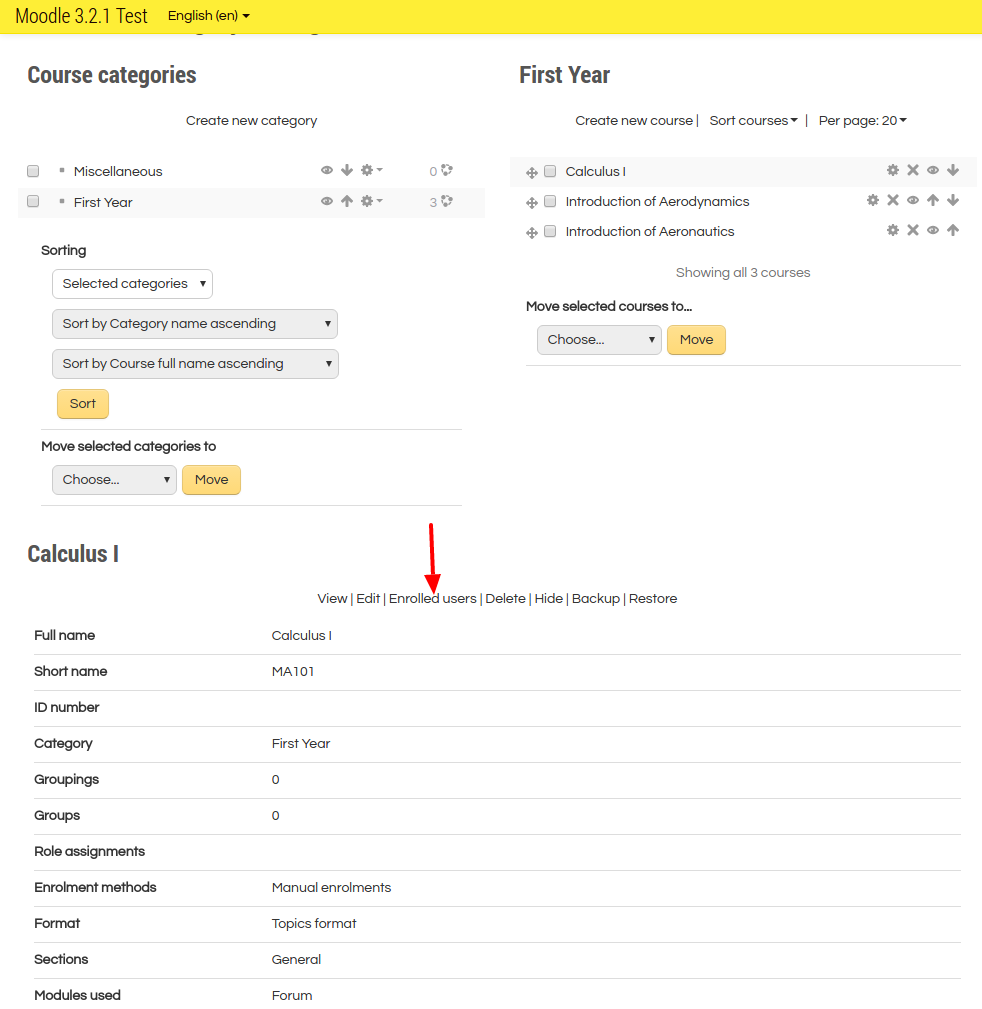 then click ‘Enrolled users’ link.
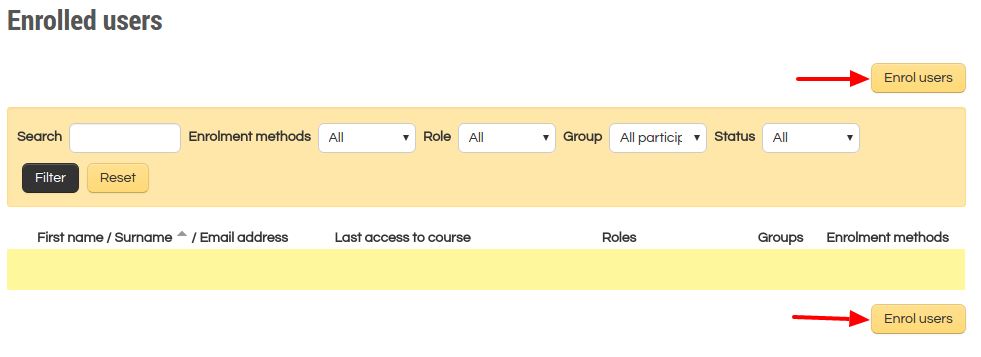 then click ‘Enroll user’ button.
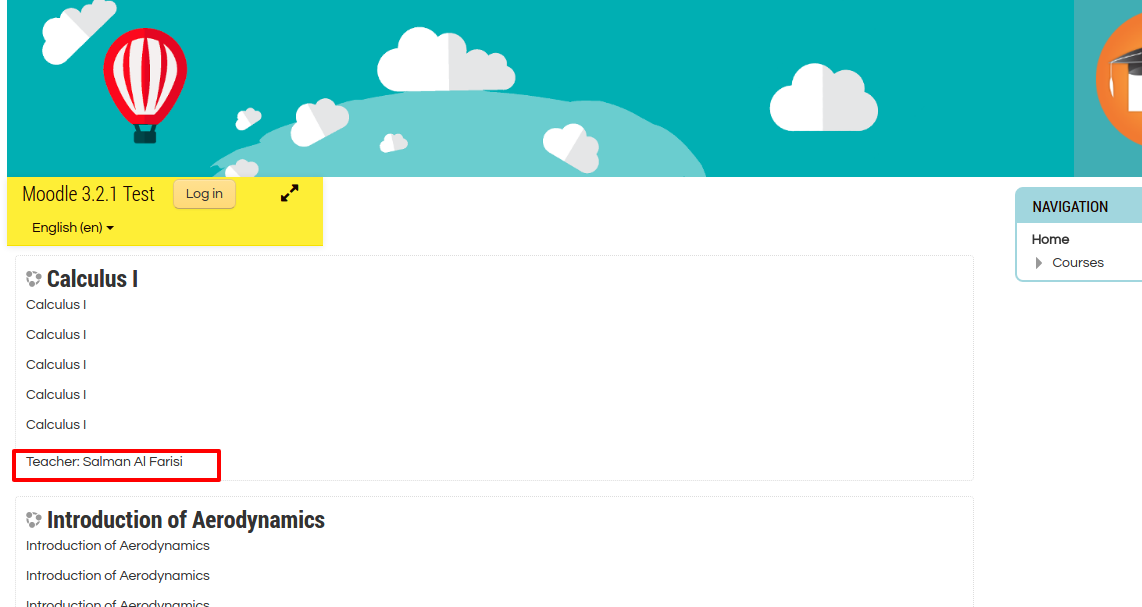
 then modify ‘Assign roles’ to ‘Teacher’ and click ‘Enrol’ for user ‘Salman’. At the end, click ‘Finish enrolling users’ button. Here is the result.
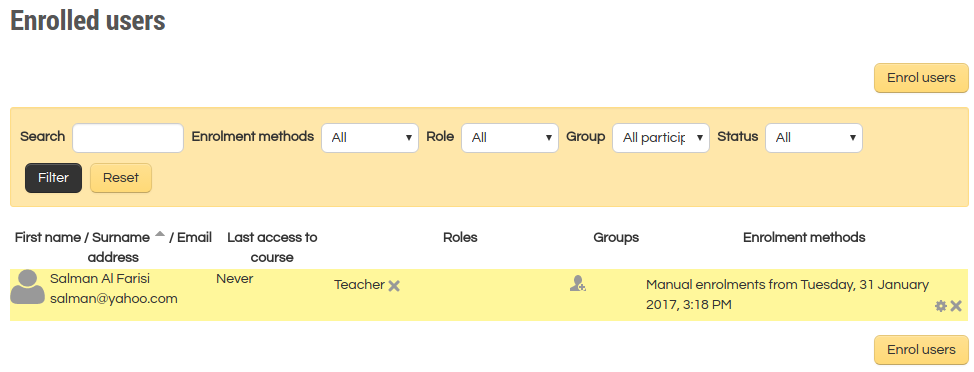 To add/enroll a new user as a student, please create the new user like #12 then enroll this user as a student like above!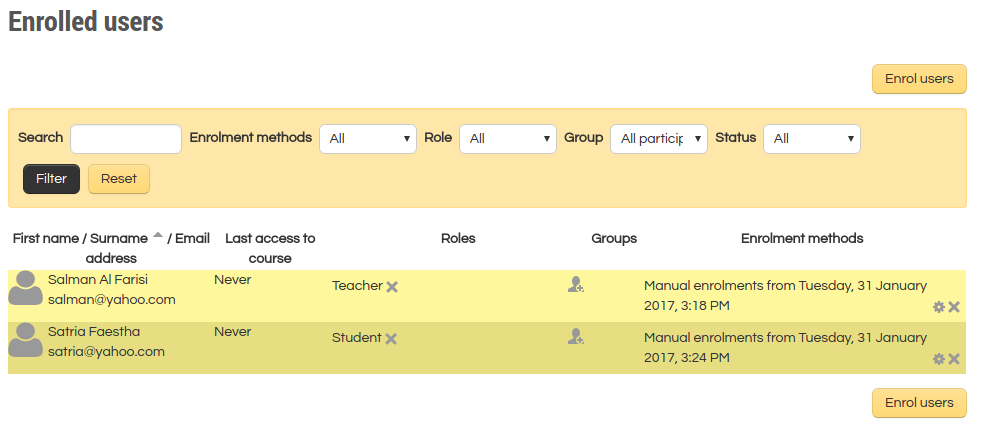
- ourses view as a teacher and a student.
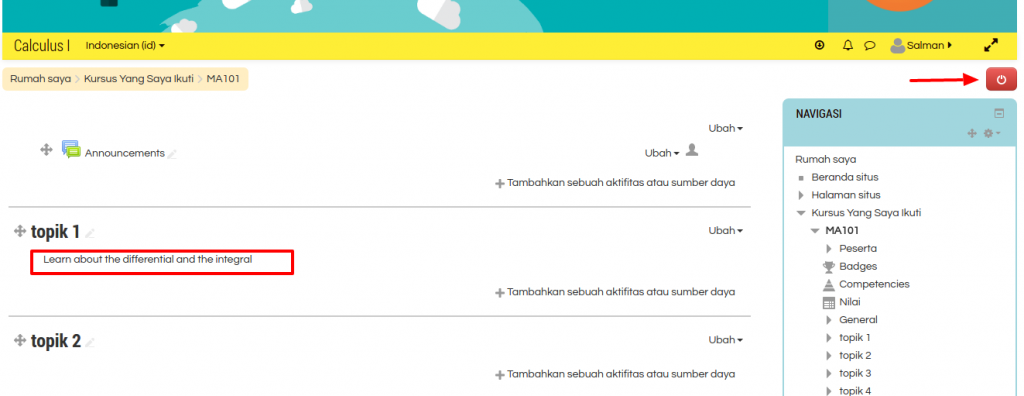
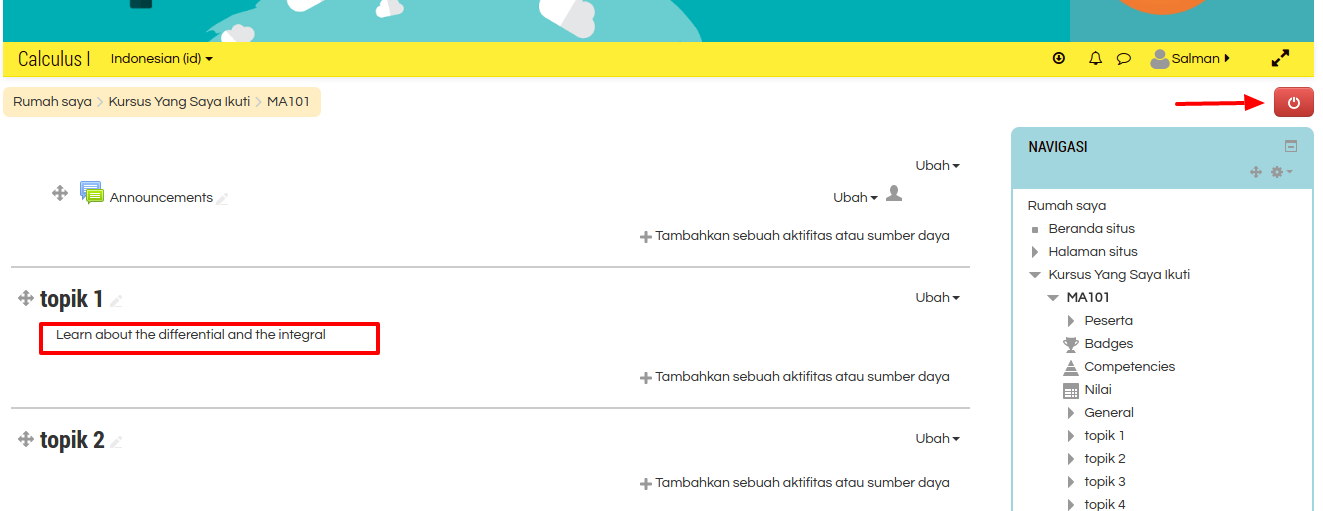
Logout from the admin account. Here is the frontpage (http://localhost/works/moodle32/) looks.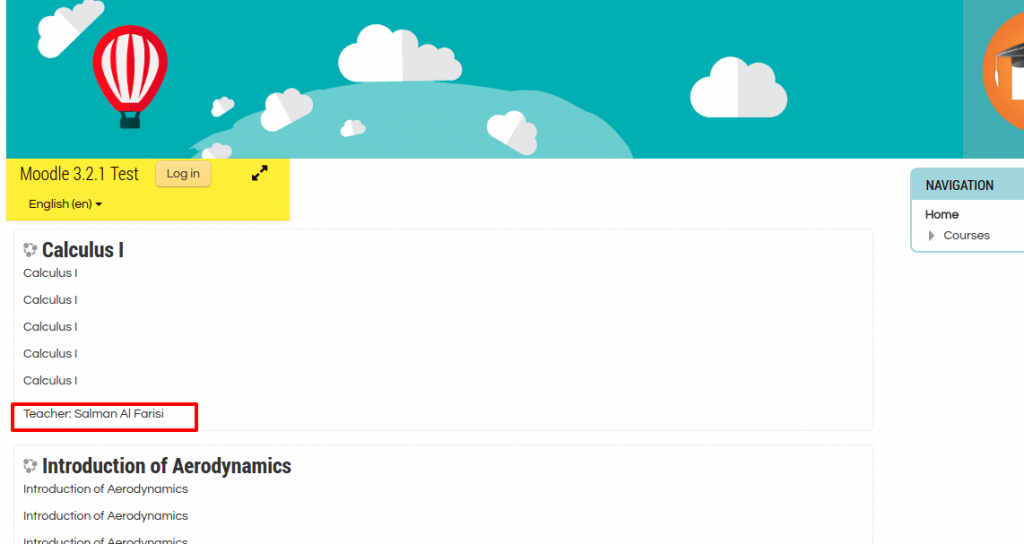 Then try to login as a teacher (user: salman, password: Salman@123). As a teacher, he/she can change/modify the course content (press the right button to on/off the edit mode) and give/add activity.
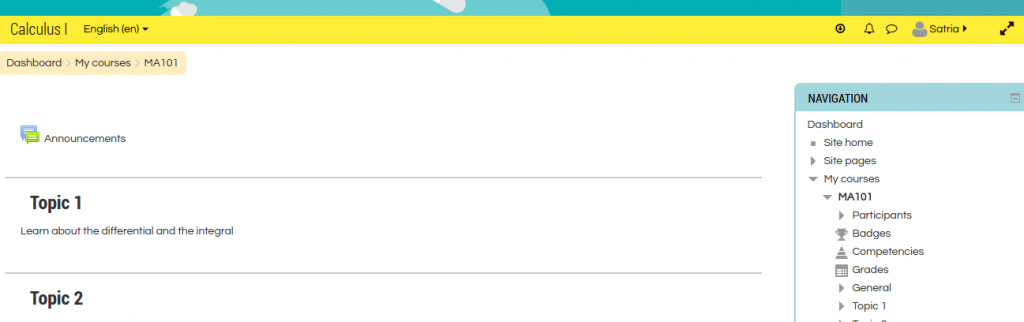
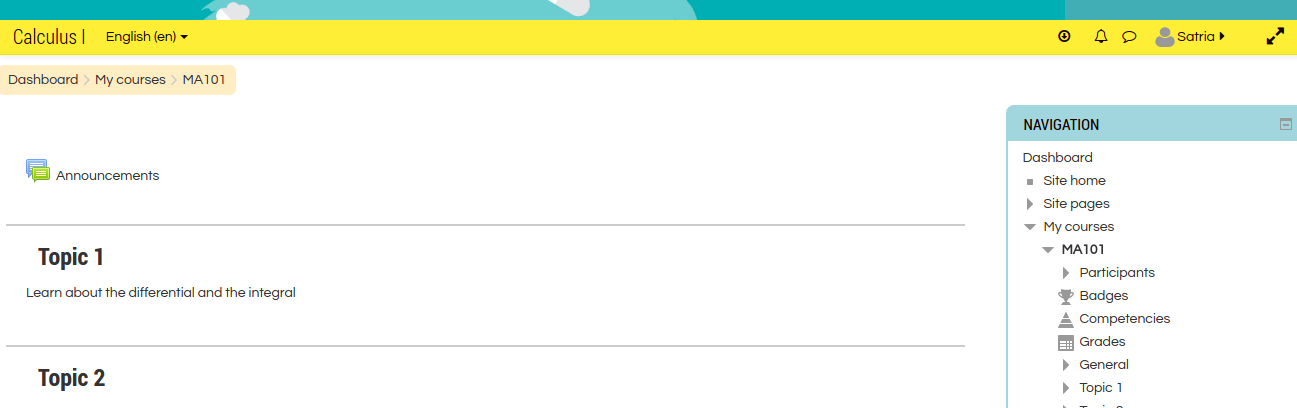
 Then try to login as a student (user: satria, password: Satria@123). As a student, he/she can only read/view the courses (cannot edit the course).
 Moodle 1.9.7
USE PHP 5.6 — NO NEED TO CHANGE PHP CLI
1teddy@teddy:~$ sudo ln -sfn /usr/bin/php5.6 /etc/alternatives/php
Setup with Nginx
1teddy@teddy:~$ sudo gedit /etc/nginx/sites-available/moodle_1917.test
Here is the content
1234567891011121314151617181920212223242526272829303132333435363738394041424344454647server {listen 80;listen [::]:80;root /home/teddy/Documents/works/moodle1917;index index.php index.html index.htm;server_name www.moodle_1917.test moodle_1917.test;error_log /home/teddy/Documents/works/moodle1917/var/log/moodle_errors.log;access_log /home/teddy/Documents/works/moodle1917/var/log/moodle_access.log;location / {try_files $uri $uri/ =404;}location /dataroot/ {internal;alias /home/teddy/Documents/works/moodle1917data/;}location ~ [^/]\.php(/|$) {include snippets/fastcgi-php.conf;fastcgi_pass unix:/run/php/php5.6-fpm.sock;fastcgi_param SCRIPT_FILENAME $document_root$fastcgi_script_name;include fastcgi_params;}gzip on;gzip_disable "msie6";gzip_comp_level 6;gzip_min_length 1100;gzip_buffers 16 8k;gzip_proxied any;gzip_typestext/plaintext/csstext/jstext/xmltext/javascriptapplication/javascriptapplication/x-javascriptapplication/jsonapplication/xmlapplication/xml+rssimage/svg+xml;gzip_vary on;}
NOTE: Pay attention on these lines
1234location /dataroot/ {internal;alias /home/teddy/Documents/works/moodledata/;}
I HAVE TO PUT THEM THERE. IF NOT, I’D GET SESSION PROBLEM AND THE STATIC FILES (JS AND CSS) PATH WOULD NOT BE RECOGNIZED
REF: https://www.sudutbaca.com/cara-install-moodle-di-debian-9-menggunakan-nginx-mariadb-php7-2-fpm/XXXdon’t forget to create the log file in var/log/system.log
Then
1teddy@teddy:~$ sudo ln -s /etc/nginx/sites-available/moodle_1917.test /etc/nginx/sites-enabled/moodle_1917.test
Then
1teddy@teddy:~$ sudo gedit /etc/hosts
Insert this line:
123...127.0.0.1 moodle_1917.test...
Then check the nginx config and restart nginx
12345teddy@teddy:~/Documents/works/moodle$ sudo nginx -tnginx: [warn] conflicting server name "" on 0.0.0.0:80, ignorednginx: the configuration file /etc/nginx/nginx.conf syntax is oknginx: configuration file /etc/nginx/nginx.conf test is successfulteddy@teddy:~/Documents/works/moodle$ sudo service nginx restart
Set the files owner
1teddy@teddy:~/Documents/works/moodle1917$ sudo chown www-data:www-data -R .
Open it on your browser http://moodle_1917.test. For the first time, it’ll install Moodle.
Month: January 2017

Salesforce REST API
Ref: Step One: Obtain a Salesforce Developer Edition Organization
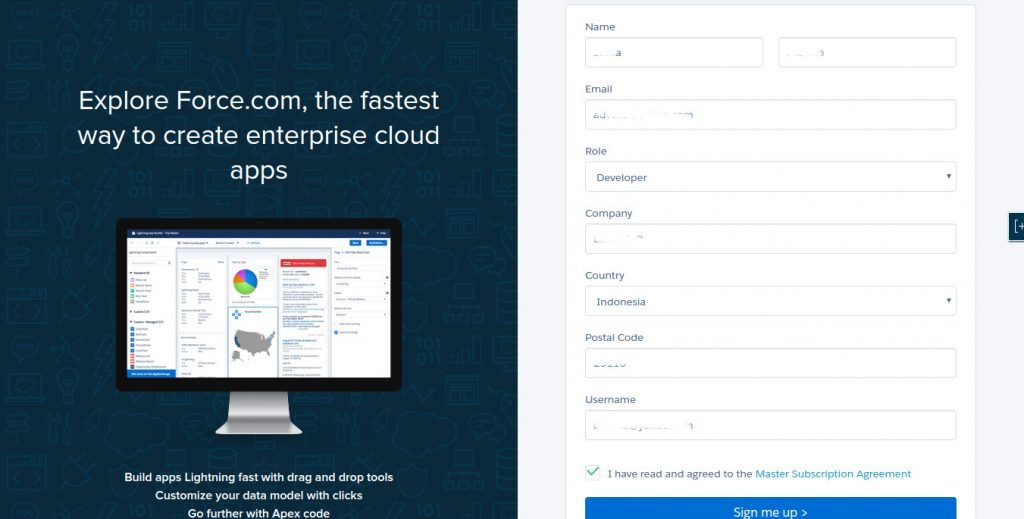
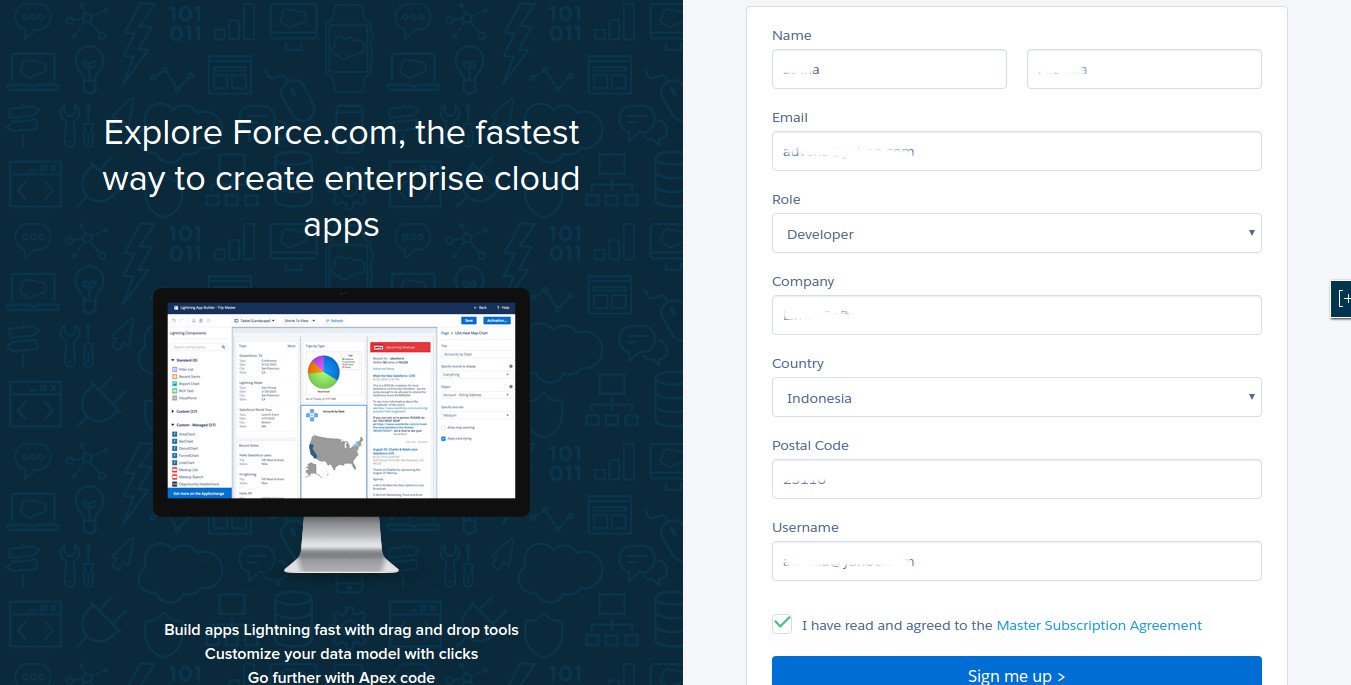
- Go to https://developer.salesforce.com/signup to register.
- Check your email if you got an email confirmation from salesforce has been arrived (‘Welcome to Force.com Developer Edition’). then click the link in the email to set/change your salesforce pasword
- Done! Click ‘Setup’ and find ‘Add App’ to create a salesforce App.
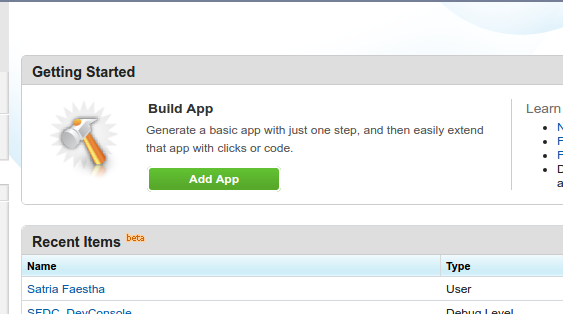 Click ‘Add App’
 - Fill the App entries
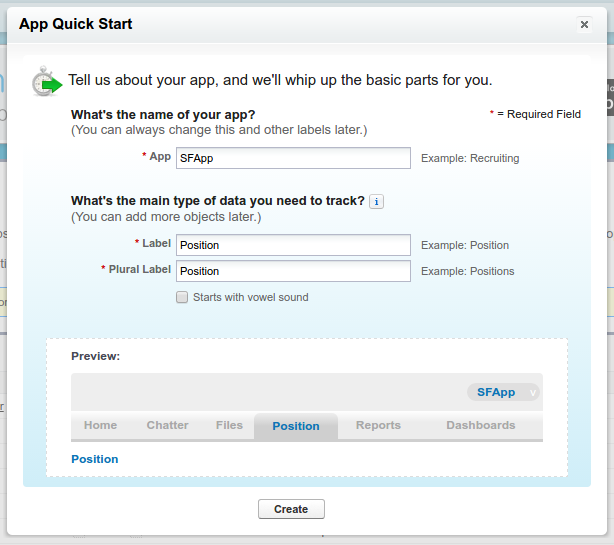 Then click ‘Create’
 - Here is my app (STILL DON’T HOW TO USE IT!!!!)
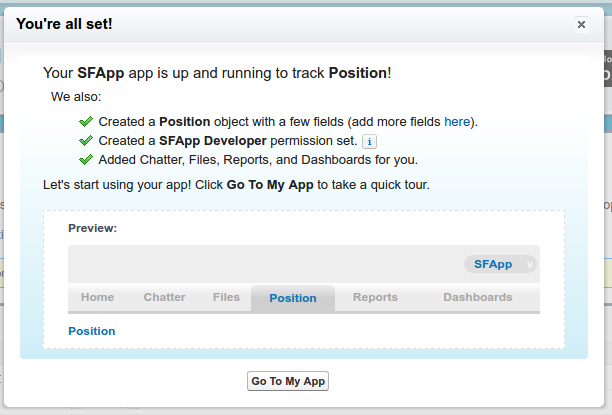 Click ‘Go To My App’
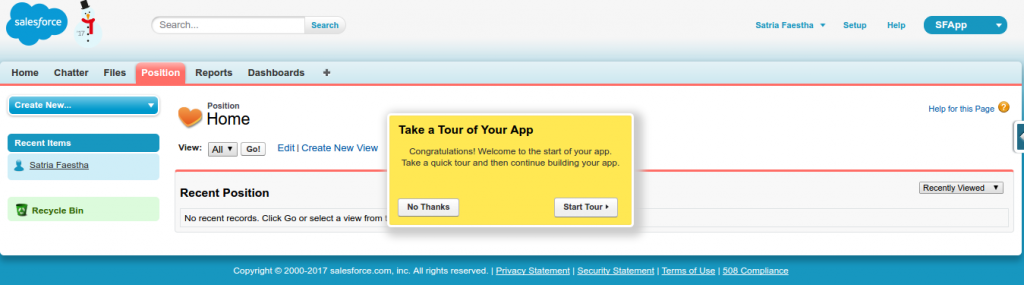
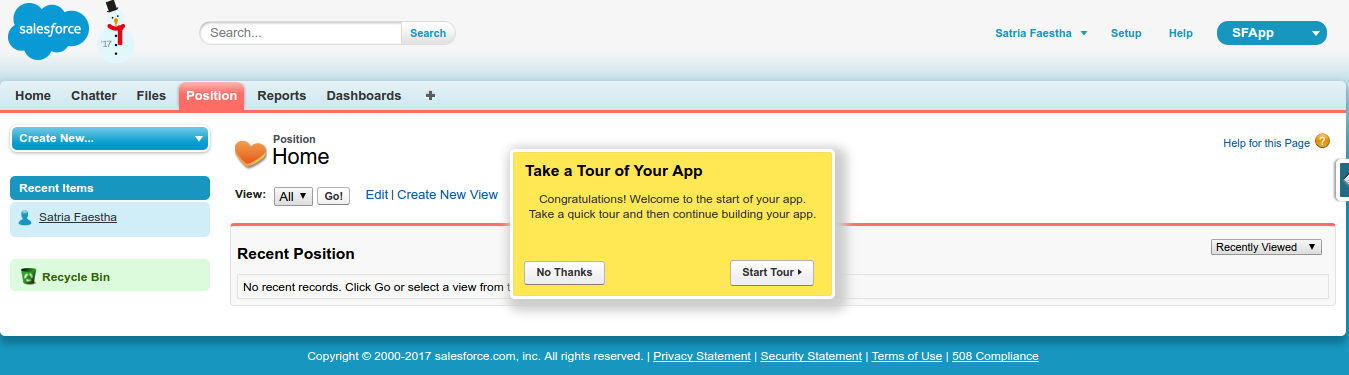
 - Here is the app looks
Url: https://ap4.salesforce.com/a00/o?tsid=02u6F000000v1oN
Laravel Tips & Tricks
View (Template)
- How to show the data in the blade template (like var_dump function)?
Solution:
123@foreach($booking as $item){{ dd($item->toArray()) }}@endfor
use ‘dd’ instead of var_dump. but var_dump also can be used to replace dd! - How to concatenate strings?
Solution: Use ‘.’ like in PHP
1$item->customer->first_name.' '.$item->customer->last_name - How to check if variable is empty (null)?
Solution: Use ‘is_null()’ like in PHP
1@if(is_null($item->customer)){{ $item->customer_id }}@else{{$item->customer->first_name.' '.$item->customer->last_name}}@endif
- How to find out the array key/index in foreach loop
Solution:
123@foreach($select_cities as $idx=>$item)<div class="chk_city">{!! Form::checkbox('city[]', $idx, null, ['class' => 'field']) !!} <span>{!! $item !!}</span></div>@endforeach
Use ‘key=>value’ pair in foreach loop - How to link to the css files in /public/css/ directory?
Solution: Use ‘URL:asset()’ like this
1<link href="{{ URL::asset('css/style.css') }}" rel="stylesheet">
Model
Controller
- How to use Eloquent Query (select, join, group by, etc)
Solution: Use ‘DB::table’
To use specific command like ‘GROUP_CONCAT’, use ‘DB::raw()’
Don’t put ‘get()’ at the end of the query if the blade template use ‘render’ but use ‘paginate()’ instead
12345678$cleaner = DB::table('cleaners')->join('cleaner_cities','cleaners.id','=','cleaner_cities.cleaner_id')->join('cities','cleaner_cities.city_id','=','cities.id')->select('cleaners.id','cleaners.first_name','cleaners.last_name','cleaners.quality_score',DB::raw('(GROUP_CONCAT(cities.city_name)) AS city'))->groupBy('cleaners.id','cleaners.first_name','cleaners.last_name','cleaners.quality_score')->paginate(25);return view('admin.cleaner.index', compact('cleaner'));
My Booking App
Source: (local) http://localhost/works/laravel/mybooking/public/
(from) https://github.com/prehire/php-23093023909ad09a09
TASK:
NOTE: I do this without using because it’s heavier for my laptop. I can use vagrant later but need to set some configuration. Please read Laravel Homestead VirtualBox Vagrant.
- Copy the available local ‘php-23093023909ad09a09’ directory then paste to be ‘mybooking’. If you dont have the source code of ‘php-23093023909ad09a09’, then clone from https://github.com/prehire/php-23093023909ad09a09 then rename it to ‘mybooking’
- Go to the directory ‘mybooking’ then use composer to install the dependency packages.
1teddy@teddy-K43SJ:~/Documents/works/laravel/mybooking$ composer install - Because I want to use SQLite, so modify .env to use SQLite
1DB_CONNECTION=sqlite
Also modify /config/database.php to make sure these settings:
12345678910'default' => 'sqlite',...'connections' => ['sqlite' => ['driver' => 'sqlite','database' => database_path('homework_database.sqlite'),'prefix' => '',],...
Also make sure the sqlite database ‘homework_database.sqlite’ is in /database/ directory! - Set the files permission for these directories:
123teddy@teddy-K43SJ:~/Documents/works/laravel/mybooking$ sudo chmod -R 777 database/teddy@teddy-K43SJ:~/Documents/works/laravel/mybooking$ sudo chmod -R 777 storage/teddy@teddy-K43SJ:~/Documents/works/laravel/mybooking$ sudo chmod -R 777 bootstrap/
- Test the app for the first time http://localhost/works/laravel/mybooking/public/. Here is how it looks
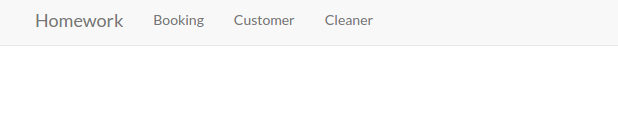 It only shows Homework (http://localhost/works/laravel/mybooking/public/), Booking (http://localhost/works/laravel/mybooking/public/booking), Customer (http://localhost/works/laravel/mybooking/public/customer) and Cleaner (http://localhost/works/laravel/mybooking/public/cleaner).
 - OK. It’s time for the task description!
Summary
We are a local home cleaning company called Homework. Today we are keeping track of all our bookings using a spreadsheet and we want to move it into a web application. Our main goal with this project is to make it possible for customers to schedule a booking online. I’ve already created the scaffolding of the app for you and now I need you to add some functionality to it. This should take you about 1-2 hours, but you have up to 4 hours to complete it.
Deliverables
1. All models and columns should have validation as described in the model spec below, plus any common-sense validation you’ll put on new models.
2. We need to split the site in to Admin-only and Customer-only. Right now all the admin functionality is exposed to the world.
3. Currently we operate in 10 cities, but plan to expand quickly. We need a way to admin the list of cities we operate in and the ability to add to the list. You should create a new table to do this.
4. On the admin cleaner form we need a way to select the cities a cleaner works in. This should be a checkbox list populated by the list of the cities we operate in. You may need to create a new table to store this data.
5. We need a way for customers to signup and schedule a booking all on one form. To accomplish this you will need to do the following:
– Make the site root a customer-facing form designed for customers to sign up and book a cleaner.
– On this form, capture all the data needed to create a customer in the database (first name, last name, phone number).
– If the customer already exists in the database (use phone number to determine this) use the existing record instead of creating a new one. You should probably add a validation to enforce this.
– Let the customer select what city they are in from the cities table created earlier.
– Let the customer specify a date and time when they would like their house cleaned.
– When the user submits the form, look for cleaners that work in the specified city that do not have any bookings that conflict with the time specified.
– If you can find an available cleaner, create the booking and display the name of the cleaner assigned to the booking.
– If you can’t find an available cleaner, tell the user that we could not fulfill their request.
6. Write tests for the parts of the application you feel need it the most.
7. When you are done, please zip up the entire root directory including your SQLite database and vendor files — do not cherry-pick folders.
Restrictions
1. Do NOT switch the database from SQLite to MySQL.
2. If you create a password-protected account, use credentials “admin@admin.com” and password “admin”.Existing Models
1. customer
– first_name (required)
– last_name (required)
– phone_number (optional)
2. booking
– customer (required, enforce referential integrity)
– cleaner (required, enforce referential integrity)
– date (required)
3. cleaner
– first_name (required)
– last_name (required)
– quality_score (required, must be a number between 0.0 and 5.0)
Setup
https://github.com/prehire/php-23093023909ad09a09Summary
The following deliverables are not required but are nice-to-haves. If you choose to implement them, it should take around 1 hour but you must complete this section within 3 hours. You can complete any number of the bonus deliverables: you don’t need to complete all of them.Bonus Deliverables
1. Use a free theme to make the application look a little better, especially the pages seen by our customers.
2. Add security to the admin pages on our site. Customers and cleaners do not need to be able to login at the moment.
3. The cleaner form should have one additional field: ’email’
o Email should be required
0 Check that it is a valid email address
4. When a new booking is created, email the cleaner with information on the booking and customer.
5. The Customer Show view should show all associated bookings below the form and link to them.
6. The Cleaner Show view should show all associated bookings below the form and link to them.
7. When you are done, please zip up the whole app directory with dependencies and upload it below. - Step by step the task completion!
“2. We need to split the site in to Admin-only and Customer-only. Right now all the admin functionality is exposed to the world.”. For the Admin-only page, It’d need a login. But it not needed for Customer-only page! So we’re going to show the homepage for customer and also the login link for the admin!
Use ‘Auth’ to create the login/register scaffolding
12teddy@teddy-K43SJ:~/Documents/works/laravel/mybooking$ php artisan make:authAuthentication scaffolding generated successfully.
NOTE: This will modify ‘app.blade.php’ in /resources/views/layouts/ directory and would mess the web looks. But no worry. We’d fix this later!
Then modify ‘web.php’ in /routes/ like this:
123456Route::get('/', function () {return redirect('/home');});Route::get('/home', 'Home\HomeController@index');Auth::routes();
Then create ‘HomeController’ in ‘Home’ directory:
12teddy@teddy-K43SJ:~/Documents/works/laravel/mybooking$ php artisan make:controller Home/HomeControllerController created successfully.
You’ll see ‘HomeController.php’ in /app/Http/Controllers/Home/ directory!
NOTE: You can remove ‘HomeController.php’ file in /app/Http/Controllers/ directory created by Auth scaffoldiing!
Then add a new function ‘index’ in the new controller. Here is the controller content look
123456789101112131415<?phpnamespace App\Http\Controllers\Home;use Illuminate\Http\Request;use App\Http\Requests;use App\Http\Controllers\Controller;class HomeController extends Controller{public function index(){return view('home.index');}}
Then create a new directory ‘home’ in /resources/views/ and a new blade template ‘index.blade.php’ in the new directory. Here is the temporary content of the file
1234567@extends('layouts.app')@section('content')<h1>Hello My Customer!</h1>@endsection
I also need to modify ‘app.blade.php’ in /layouts/ directory so we can fix the web layout and the login (and register) link can be showed up. We also need to add some bootstrap links for the CSS and Javascript/JQuery. Here is the modification in app.blade.php
123456789101112131415161718192021222324252627282930313233343536373839404142434445464748495051525354555657585960616263646566676869707172737475767778798081828384858687888990919293949596979899<!DOCTYPE html><html lang="en"><head><meta charset="utf-8"><meta http-equiv="X-UA-Compatible" content="IE=edge"><meta name="viewport" content="width=device-width, initial-scale=1"><title>Homework</title><!-- Fonts --><link rel="stylesheet" href="https://cdnjs.cloudflare.com/ajax/libs/font-awesome/4.5.0/css/font-awesome.min.css"integrity="sha384-XdYbMnZ/QjLh6iI4ogqCTaIjrFk87ip+ekIjefZch0Y+PvJ8CDYtEs1ipDmPorQ+" crossorigin="anonymous"><link rel="stylesheet" href="https://fonts.googleapis.com/css?family=Lato:100,300,400,700"><!-- Styles --><link rel="stylesheet" href="https://cdnjs.cloudflare.com/ajax/libs/twitter-bootstrap/3.3.6/css/bootstrap.min.css"integrity="sha384-1q8mTJOASx8j1Au+a5WDVnPi2lkFfwwEAa8hDDdjZlpLegxhjVME1fgjWPGmkzs7" crossorigin="anonymous">{{-- <link href="{{ elixir('css/app.css') }}" rel="stylesheet"> --}}<style>body {font-family: 'Lato';}.fa-btn {margin-right: 6px;}</style></head><body><div id="app"><nav class="navbar navbar-default navbar-static-top"><div class="container"><div class="navbar-header"><!-- Collapsed Hamburger --><button type="button" class="navbar-toggle collapsed" data-toggle="collapse" data-target="#app-navbar-collapse"><span class="sr-only">Toggle Navigation</span><span class="icon-bar"></span><span class="icon-bar"></span><span class="icon-bar"></span></button><!-- Branding Image --><a class="navbar-brand" href="{{ url('/') }}">Homework</a></div><div class="collapse navbar-collapse" id="app-navbar-collapse"><!-- Left Side Of Navbar --><ul class="nav navbar-nav"> </ul><!-- Right Side Of Navbar --><ul class="nav navbar-nav navbar-right"><!-- Authentication Links -->@if (Auth::guest())<li><a href="{{ url('/login') }}">Login</a></li><li><a href="{{ url('/register') }}">Register</a></li>@else<li class="dropdown"><a href="#" class="dropdown-toggle" data-toggle="dropdown" role="button" aria-expanded="false">{{ Auth::user()->name }} <span class="caret"></span></a><ul class="dropdown-menu" role="menu"><li><a href="{{ url('/logout') }}"onclick="event.preventDefault();document.getElementById('logout-form').submit();">Logout</a><form id="logout-form" action="{{ url('/logout') }}" method="POST" style="display: none;">{{ csrf_field() }}</form></li></ul></li>@endif</ul></div></div></nav>@yield('content')</div><!-- JavaScripts --><script src="https://cdnjs.cloudflare.com/ajax/libs/jquery/2.2.3/jquery.min.js"integrity="sha384-I6F5OKECLVtK/BL+8iSLDEHowSAfUo76ZL9+kGAgTRdiByINKJaqTPH/QVNS1VDb"crossorigin="anonymous"></script><script src="https://cdnjs.cloudflare.com/ajax/libs/twitter-bootstrap/3.3.6/js/bootstrap.min.js"integrity="sha384-0mSbJDEHialfmuBBQP6A4Qrprq5OVfW37PRR3j5ELqxss1yVqOtnepnHVP9aJ7xS"crossorigin="anonymous"></script>{{-- <script src="{{ elixir('js/app.js') }}"></script> --}}</body></html>
OK. Here is the homepage looks Then try to add a new user (customer) by clicking the register link (http://localhost/works/laravel/mybooking/public/register). Then add a new user with Name: ‘Admin’, email: ‘advcha@admin.com’ and password: ‘admin123’. This is a ‘fake admin’ user!. Not actual admin user. We’re going to add the real admin later. (NOTE: I think also I need to differentiate the login/register page for the customer and cleaner. May be add an option if the user want to be a customer or a cleaner!)
Now we can login with the name. But where is the links to Booking, Customer and Cleaner? Here is how to show them up. Modify ‘app.blade.php’ again, then put the links like this:
12345678910111213<div class="collapse navbar-collapse" id="app-navbar-collapse"><!-- Left Side Of Navbar -->@if (!Auth::guest())<ul class="nav navbar-nav"><li><a href="{{ url('/') }}">Booking</a></li><li><a href="{{ url('/') }}">Customer</a></li><li><a href="{{ url('/') }}">Cleaner</a></li></ul>@endif<!-- Right Side Of Navbar --><ul class="nav navbar-nav navbar-right">...
Here is the looks Okay. but the links still can be clicked properly. We need to add some routes in /routes/web.app like this:
12345...Route::resource('admin/customer', 'Admin\CustomerController');Route::resource('admin/booking', 'Admin\BookingController');Route::resource('admin/cleaner', 'Admin\CleanerController');...
So create a new directory ‘Admin’ in /app/Http/Controllers/ then move BookingController.php, CleanerController.php and CustomerController.php into the new directory.
Then (don’t forget) to modify the namespace in those three files to
1namespace App\Http\Controllers\Admin;
Now we can put the routes for the links in ‘app.blade.php’ like this:
1234567@if (!Auth::guest())<ul class="nav navbar-nav"><li><a href="{{ url('/admin/booking') }}">Booking</a></li><li><a href="{{ url('/admin/customer') }}">Customer</a></li><li><a href="{{ url('/admin/cleaner') }}">Cleaner</a></li></ul>@endif
Now we’ve completed the links! You can see the working urls like Booking (http://localhost/works/laravel/mybooking/public/admin/booking), Customer (http://localhost/works/laravel/mybooking/public/admin/customer) and Cleaner (http://localhost/works/laravel/mybooking/public/admin/cleaner). Here is the example for the admin booking page.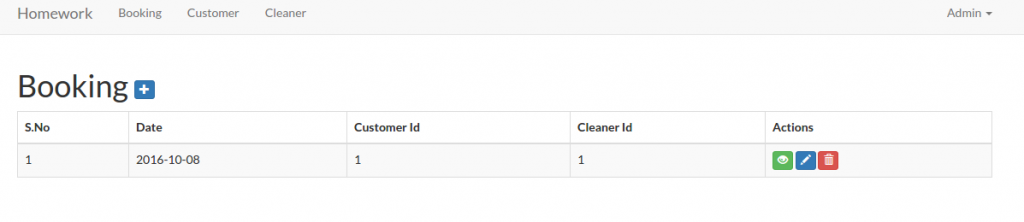 But there is another thing we need to pay attention for the above links. If we’re logged out, the above links and the urls should not be displayed and opened. Here we need to employ the middleware auth for each the controllers files (BookingController.php, CleanerController.php and CustomerController.php) in ‘__construct’ function like this:
1234public function __construct(){$this->middleware('auth');}
Now if we open the url (for example: http://localhost/works/laravel/mybooking/public/admin/customer) without login first, we’d be redirected to the login page!
<IF YOU HAVE MORE TIME, PLS DO THIS. BUT IT’D TAKE MANY WORKS AND TIME!!!>
To make the view structures tidier, we need to create a new directory ‘admin’ in /resources/views/ then move these directories ‘booking’, ‘customer’ and ‘cleaner’ into it. Then don’t forget to modify the ‘index’ function in our three controller files to refer to the new location:
1234567891011121314151617181920212223BookingController.php:public function index(){$booking = Booking::paginate(25);return view('admin.booking.index', compact('booking'));}CustomerController.php:public function index(){$customer = Customer::paginate(25);return view('admin.customer.index', compact('customer'));}CleanerController.php:public function index(){$cleaner = Cleaner::paginate(25);return view('admin.cleaner.index', compact('cleaner'));}
Also do the same thing for others functions like ‘create’, ‘edit’ and ‘show’. Dont forget to modify also almost all the blade template for them!!! for example: /admin/customer/index.blade.php, modify the urls like url(‘/customer/create’) to url(‘/admin/customer/create’) and the others same urls in the file!!!
</IF YOU HAVE MORE TIME, PLS DO THIS. BUT IT’D TAKE MANY WORKS AND TIME!!!>
CRUD
To make CRUD works for them, I need to modify also some functions in the controller files to redirect to the correct route. For example for CustomerController.php, modify the redirect to ‘admin/customer’ for ‘store’, ‘update’ and ‘destroy’ functions. Do the same thing for Booking and Cleaner controllers! Also modify the blade templates!
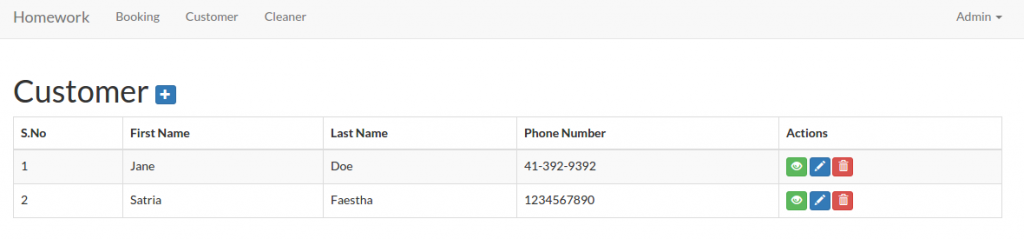
Here is the look for the admin customer (http://localhost/works/laravel/mybooking/public/admin/customer)
 I think I’ve completed the Admin page. NO!! WAIT!! How about the Admin page for Booking??? The Booking form need CustomerId, CleanerId and Date. On the create form, currently the Ids need to be typed manually, I want to change it to a select box to avoid any error like undefined Id. OK. First, modify ‘BookingController.php’ in /app/Http/Controllers/Admin/ to retrieve the customers and cleaners data
123456789101112131415161718192021222324252627282930313233343536373839404142...use App\Booking;use App\Customer;use App\Cleaner;....class BookingController extends Controller{static $select_customers;static $select_cleaners;public function __construct(){// get customers for drop-down menu$customers = Customer::all();self::$select_customers = [];foreach ($customers as $item) {self::$select_customers[$item->id] = $item->first_name . ' ' . $item->last_name;}// get cleaners for drop-down menu$cleaners = Cleaner::all();self::$select_cleaners = [];foreach ($cleaners as $item) {self::$select_cleaners[$item->id] = $item->first_name . ' ' . $item->last_name;}$this->middleware('auth');}...public function create(){return view('admin.booking.create', ['select_customers' => self::$select_customers,'select_cleaners' => self::$select_cleaners,]);}...}
Then modify ‘create.blade.php’ in /resources/views/admin/booking/ to display the selection of the customers and the cleaners
1234567891011121314<div class="form-group {{ $errors->has('customer_id') ? 'has-error' : ''}}">{!! Form::label('customer_id', 'Customer', ['class' => 'col-sm-3 control-label']) !!}<div class="col-sm-6">{!! Form::select('customer_id', $select_customers, null, ['class' => 'form-control']) !!}{!! $errors->first('customer_id', '<p class="help-block">:message</p>') !!}</div></div><div class="form-group {{ $errors->has('cleaner_id') ? 'has-error' : ''}}">{!! Form::label('cleaner_id', 'Cleaner', ['class' => 'col-sm-3 control-label']) !!}<div class="col-sm-6">{!! Form::select('cleaner_id', $select_cleaners, null, ['class' => 'form-control']) !!}{!! $errors->first('cleaner_id', '<p class="help-block">:message</p>') !!}</div></div>
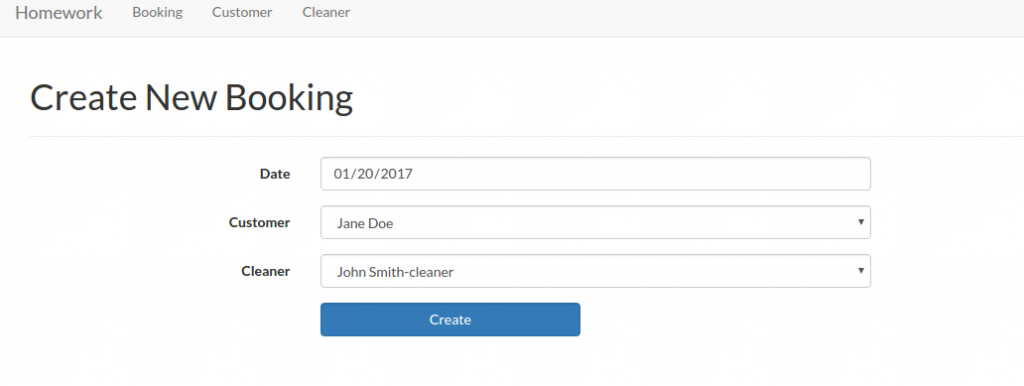 We need also change the booking table in /resources/views/admin/booking/index.blade.php to show the names instead of the ids. First, modify the model ‘Booking.php’ in /app/ directory to add relation with customer and cleaner models
123456789101112131415...class Booking extends Model{...public function customer(){return $this->belongsTo('App\Customer');}public function cleaner(){return $this->belongsTo('App\Cleaner');}}
Then modify ‘index’ function in /app/Http/Controllers/Admin/BookingController.php to retrieve also the customer and cleaner data
123456public function index(){$booking = Booking::with('customer', 'cleaner')->paginate(25);return view('admin.booking.index', compact('booking'));}
Now in /resources/views/admin/booking/index.blade.php, we can show the names instead of the ids
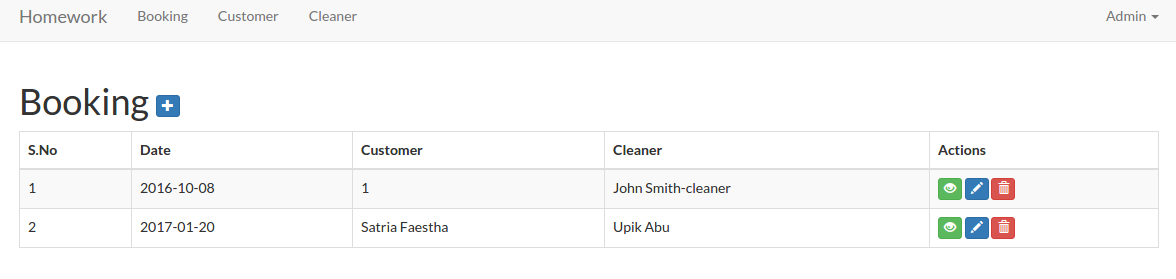
123456789101112131415161718...<thead><tr><th>S.No</th><th> Date </th><th> Customer </th><th> Cleaner </th><th>Actions</th></tr></thead><tbody>@foreach($booking as $item)<tr><td>{{ $loop->iteration }}</td><td>{{ $item->date }}</td><td>@if(is_null($item->customer)){{ $item->customer_id }}@else{{$item->customer->first_name.' '.$item->customer->last_name}}@endif</td><td>@if(is_null($item->cleaner)){{ $item->cleaner_id }}@else{{ $item->cleaner->first_name.' '.$item->cleaner->last_name}}@endif</td><td>...</td></tr>@endforeach</tbody>...
Here is the looks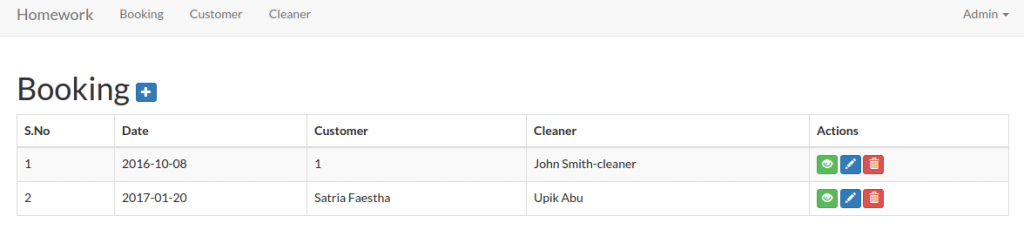 For the booking edit function, we only need to do a small changes. In /app/Http/Controllers/Admin/BookingController.php, modify ‘edit’ function to pass also the customer and the cleaner data
1234567891011public function edit($id){$booking = Booking::findOrFail($id);//return view('admin.booking.edit', compact('booking'));return view('admin.booking.edit', ['booking' => $booking,'select_customers' => self::$select_customers,'select_cleaners' => self::$select_cleaners,]);}
Then modify /resources/views/admin/booking/edit.blade.php to display the customer and the cleaner options
1234567891011121314<div class="form-group {{ $errors->has('customer_id') ? 'has-error' : ''}}">{!! Form::label('customer_id', 'Customer', ['class' => 'col-sm-3 control-label']) !!}<div class="col-sm-6">{!! Form::select('customer_id', $select_customers, null, ['class' => 'form-control']) !!}{!! $errors->first('customer_id', '<p class="help-block">:message</p>') !!}</div></div><div class="form-group {{ $errors->has('cleaner_id') ? 'has-error' : ''}}">{!! Form::label('cleaner_id', 'Cleaner', ['class' => 'col-sm-3 control-label']) !!}<div class="col-sm-6">{!! Form::select('cleaner_id', $select_cleaners, null, ['class' => 'form-control']) !!}{!! $errors->first('cleaner_id', '<p class="help-block">:message</p>') !!}</div></div>
NOTE: If any customer or the cleaner is not exists (may be because it’s already deleted) in the selection, the selection SHOWS THE FIRST OPTION NOT NULL. IT CAN BE MISLEADING AS IF THE FIRST OPTION IS SELECTED. HOW TO HANDLE THIS???
Now I’m going to work on the Customer page (homepage). The current homepage (http://localhost/works/laravel/mybooking/public/home) content still show the ugly text ‘Hello My Customer!’. Please modify the home template ‘app.blade.php’ in /resources/views/layouts/ to make it tidier. especially in the body tag, add class ‘container’ to wrap the content:
12345678910111213141516171819202122...<body id="app-layout"><!--div id="app"--><nav class="navbar navbar-default navbar-static-top">...</nav><div class="container">@if (Session::has('flash_message'))<div class="alert alert-success">{{ Session::get('flash_message') }}</div>@endif@yield('content')</div><!-- JavaScripts -->...</body>...
Then add a form and a few text input in /resources/views/home/index.blade.php. So it’ll be like this:
123456789101112131415161718192021222324252627282930313233343536373839404142434445464748@extends('layouts.app')@section('content')<h1>Welcome, Please fill this form to book a cleaner!</h1><hr/>{!! Form::open(['url' => '/home/book/', 'class' => 'form-horizontal', 'files' => true]) !!}<div class="form-group {{ $errors->has('first_name') ? 'has-error' : ''}}">{!! Form::label('first_name', 'First Name', ['class' => 'col-sm-3 control-label']) !!}<div class="col-sm-6">{!! Form::text('first_name', null, ['class' => 'form-control']) !!}{!! $errors->first('first_name', '<p class="help-block">:message</p>') !!}</div></div><div class="form-group {{ $errors->has('last_name') ? 'has-error' : ''}}">{!! Form::label('last_name', 'Last Name', ['class' => 'col-sm-3 control-label']) !!}<div class="col-sm-6">{!! Form::text('last_name', null, ['class' => 'form-control']) !!}{!! $errors->first('last_name', '<p class="help-block">:message</p>') !!}</div></div><div class="form-group {{ $errors->has('phone_number') ? 'has-error' : ''}}">{!! Form::label('phone_number', 'Phone Number', ['class' => 'col-sm-3 control-label']) !!}<div class="col-sm-6">{!! Form::text('phone_number', null, ['class' => 'form-control']) !!}{!! $errors->first('phone_number', '<p class="help-block">:message</p>') !!}</div></div><div class="form-group"><div class="col-sm-offset-3 col-sm-3">{!! Form::submit('Create', ['class' => 'btn btn-primary form-control']) !!}</div></div>{!! Form::close() !!}@if ($errors->any())<ul class="alert alert-danger">@foreach ($errors->all() as $error)<li>{{ $error }}</li>@endforeach</ul>@endif@endsection
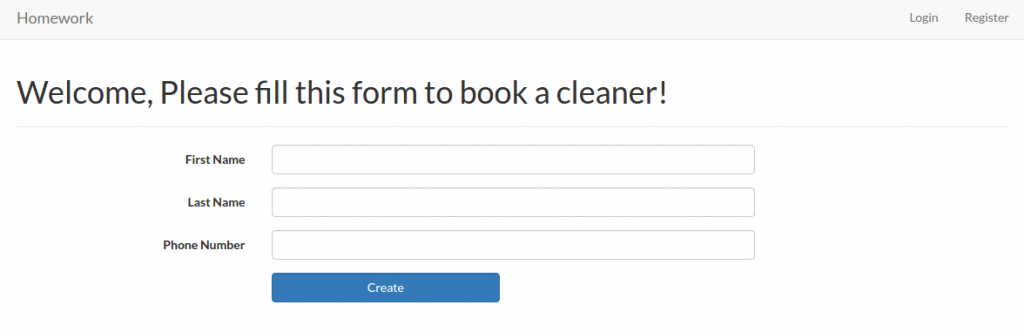 The layout looks same with the customer form for adding a new one. But this moment leave it as is. We’re going to change it later with some new features. For the front end booking, it’ll go to ‘/home/book/’ url to save the inputs. We need to add this to our route in /routes/web.php
123...Route::post('/home/book', 'Home\HomeController@book');...
Then modify /app/Http/Controllers/Home/HomeController.php to add a new function ‘book’ to store the data into the customer table.
1234567891011121314151617181920<?php...use App\Customer;use Session;class HomeController extends Controller{...public function book(Request $request){$requestData = $request->all();Customer::create($requestData);Session::flash('flash_message', 'Customer added!');return view('home');}}
The ‘book’ function is pretty same with ‘store’ function in CustomerController.php file.
OK. The Next task: “3. Currently we operate in 10 cities, but plan to expand quickly. We need a way to admin the list of cities we operate in and the ability to add to the list. You should create a new table to do this.”
First we need to create a new model ‘City’. Use artisan to do this job
12teddy@teddy-K43SJ:~/Documents/works/laravel/mybooking$ php artisan make:model CityModel created successfully.
A new file ‘City.php’ would be in /app/ directory. Here is the content
12345678910<?phpnamespace App;use Illuminate\Database\Eloquent\Model;class City extends Model{//}
I’m going to add some variables into the file to represent the table name, the primary key and so on. So it’d be like this:
1234567891011121314151617181920212223242526272829<?phpnamespace App;use Illuminate\Database\Eloquent\Model;class City extends Model{/*** The database table used by the model.** @var string*/protected $table = 'cities';/*** The database primary key value.** @var string*/protected $primaryKey = 'id';/*** Attributes that should be mass-assignable.** @var array*/protected $fillable = ['city_name'];}
Then we need to create a new table ‘cities’ via ‘migration’ command
12teddy@teddy-K43SJ:~/Documents/works/laravel/mybooking$ php artisan make:migration create_cities_table --create=citiesCreated Migration: 2017_01_14_044005_create_cities_table
NOTE: If you get an error like this
12PHP Fatal error: Uncaught UnexpectedValueException: The stream or file "/home/teddy/Documents/works/laravel/mybooking/storage/logs/laravel.log" could not be opened: failed to open stream: Permission denied in /home/teddy/Documents/works/laravel/mybooking/vendor/monolog/monolog/src/Monolog/Handler/StreamHandler.php:107Stack trace: ...
it means you need to set the file permission of ‘storage’ directory to 777 in order to let the migration command to create a new file
1teddy@teddy-K43SJ:~/Documents/works/laravel/mybooking$ sudo chmod -R 777 storage/
Here is the migration file created (2017_01_14_044005_create_cities_table.php in /database/migrations/)
12345678910111213141516171819202122232425262728293031<?phpuse Illuminate\Support\Facades\Schema;use Illuminate\Database\Schema\Blueprint;use Illuminate\Database\Migrations\Migration;class CreateCitiesTable extends Migration{/*** Run the migrations.** @return void*/public function up(){Schema::create('cities', function (Blueprint $table) {$table->increments('id');$table->timestamps();});}/*** Reverse the migrations.** @return void*/public function down(){Schema::dropIfExists('cities');}}
In ‘up’ function, I need to add a new field ‘city_name’ with ‘string’ type. So it’d be like this
12345678public function up(){Schema::create('cities', function (Blueprint $table) {$table->increments('id');$table->string('city_name');$table->timestamps();});}
Then do create the new table ‘cities’ via ‘migrate’ command
12teddy@teddy-K43SJ:~/Documents/works/laravel/mybooking$ php5.6 artisan migrate --database=sqliteMigrated: 2017_01_14_044005_create_cities_table
NOTE: I got a confusing error the first time when tried to execute ‘migrate’ command. Here is the error
1234teddy@teddy-K43SJ:~/Documents/works/laravel/mybooking$ php artisan migrate --database=sqlite[PDOException]could not find driver
I JUST DIDN’T REALIZE MY PHP VERSION VIA TERMINAL IS VERSION 7.0! SO I USE ‘php5.6’ INSTEAD AN IT’S WORKS! IT SEEMS I HAVEN’T CONFIGURED THE PDO FOR SQLITE ON PHP 7.0.
NOTE: ‘migration’ command ONLY RUN ON THE NEW FILE. IT’D NOT RUN THE FILES ALREADY MIGRATED!
Now create a new controller ‘CityController’ in ‘Admin’ directory
12teddy@teddy-K43SJ:~/Documents/works/laravel/mybooking$ php artisan make:controller Admin/CityControllerController created successfully.
The new file ‘CityController.php’ would be in /app/Http/Controllers/Admin/ directory!. Here is the content
12345678910111213<?phpnamespace App\Http\Controllers\Admin;use Illuminate\Http\Request;use App\Http\Requests;use App\Http\Controllers\Controller;class CityController extends Controller{//}
Here we want some functions/methods for CRUD the city data. The function much similar within the others controllers like Cleaner. Here it is
123456789101112131415161718192021222324252627282930313233343536373839404142434445464748495051525354555657585960616263646566676869707172737475767778798081828384858687888990919293949596979899100101102103104105106107108109110111112113114115116117118119120121122123124<?phpnamespace App\Http\Controllers\Admin;use Illuminate\Http\Request;use App\Http\Requests;use App\Http\Controllers\Controller;use App\City;use Session;class CityController extends Controller{/*** Display a listing of the resource.** @return \Illuminate\View\View*/public function __construct(){$this->middleware('auth');}public function index(){$city = City::paginate(25);return view('admin.city.index', compact('city'));}/*** Show the form for creating a new resource.** @return \Illuminate\View\View*/public function create(){return view('admin.city.create');}/*** Store a newly created resource in storage.** @param \Illuminate\Http\Request $request** @return \Illuminate\Http\RedirectResponse|\Illuminate\Routing\Redirector*/public function store(Request $request){$requestData = $request->all();City::create($requestData);Session::flash('flash_message', 'City added!');return redirect('admin/city');}/*** Display the specified resource.** @param int $id** @return \Illuminate\View\View*/public function show($id){$city = City::findOrFail($id);return view('admin.city.show', compact('city'));}/*** Show the form for editing the specified resource.** @param int $id** @return \Illuminate\View\View*/public function edit($id){$city = City::findOrFail($id);return view('admin.city.edit', compact('city'));}/*** Update the specified resource in storage.** @param int $id* @param \Illuminate\Http\Request $request** @return \Illuminate\Http\RedirectResponse|\Illuminate\Routing\Redirector*/public function update($id, Request $request){$requestData = $request->all();$city = City::findOrFail($id);$city->update($requestData);Session::flash('flash_message', 'City updated!');return redirect('admin/city');}/*** Remove the specified resource from storage.** @param int $id** @return \Illuminate\Http\RedirectResponse|\Illuminate\Routing\Redirector*/public function destroy($id){City::destroy($id);Session::flash('flash_message', 'City deleted!');return redirect('admin/city');}}
Then modify our routes in /routes/web.php for this ‘city’
123...Route::resource('admin/city', 'Admin\CityController');...
The last step is to create the blades templates for this ‘city’. Create a new directory ‘city’ in /resources/views/admin/. Then create some files ‘index.blade.php’, ‘create.blade.php’, ‘edit.blade.php’ and ‘show.blade.php’. The content of the files are pretty similar with Cleaner! Just modify some details like change ‘cleaner’ to ‘city’ and the others things. Also don’t forget to add ‘City’ menu in /resources/views/layouts/app.blade.php
12345678@if (!Auth::guest())<ul class="nav navbar-nav"><li><a href="{{ url('/admin/booking') }}">Booking</a></li><li><a href="{{ url('/admin/customer') }}">Customer</a></li><li><a href="{{ url('/admin/cleaner') }}">Cleaner</a></li><li><a href="{{ url('/admin/city') }}">City</a></li></ul>@endif
http://localhost/works/laravel/mybooking/public/admin/city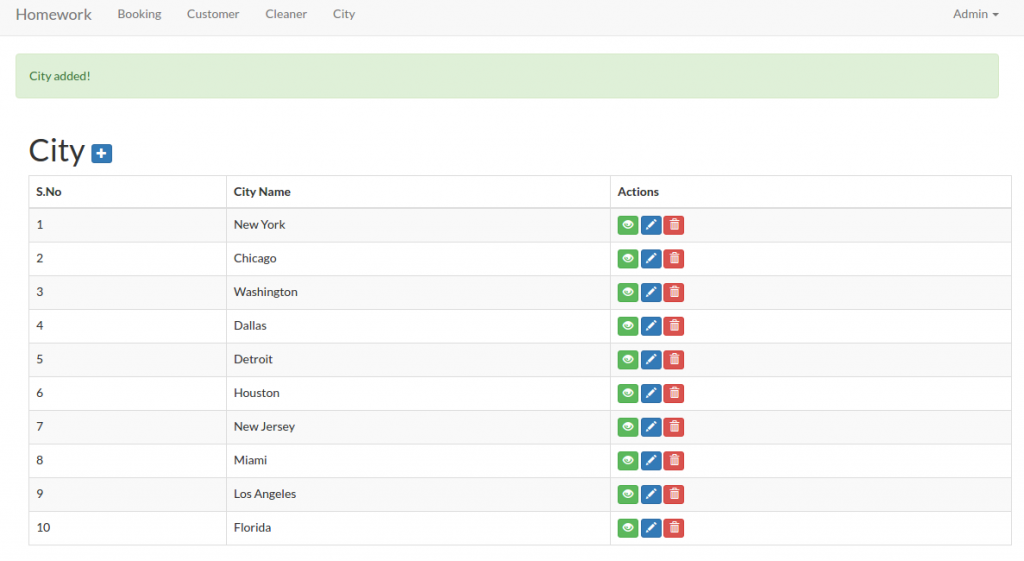 The next task: “4. On the admin cleaner form we need a way to select the cities a cleaner works in. This should be a checkbox list populated by the list of the cities we operate in. You may need to create a new table to store this data.”.
Here I need to create a new table ‘cleaner_cities’. This new table would store the cleaner id and the city id values. Then I also need to modify the form input of the cleaner to include the cities they can work in (they can select more than one city). Then store the selection in the new table ‘cleaner_cities’. Same solution with the above, we need to create a new model ‘CleanerCity’. Use artisan to do this job
12teddy@teddy-K43SJ:~/Documents/works/laravel/mybooking$ php artisan make:model CleanerCityModel created successfully.
Then modify /app/CleanerCity.php file to add a few variables like cleaner_id and city_id. So it’d be like this:
1234567891011121314151617181920212223242526272829<?phpnamespace App;use Illuminate\Database\Eloquent\Model;class CleanerCity extends Model{/*** The database table used by the model.** @var string*/protected $table = 'cleaner_cities';/*** The database primary key value.** @var string*/protected $primaryKey = 'id';/*** Attributes that should be mass-assignable.** @var array*/protected $fillable = ['cleaner_id','city_id'];}
Then we need to create a new table ‘cleaner_cities’ via ‘migration’ command
12teddy@teddy-K43SJ:~/Documents/works/laravel/mybooking$ php artisan make:migration create_cleaner_cities_table --create=cleaner_citiesCreated Migration: 2017_01_14_070618_create_cleaner_cities_table
Then modify ‘up’ function in the migration file created (2017_01_14_070618_create_cleaner_cities_table.php in /database/migrations/)
123456789public function up(){Schema::create('cleaner_cities', function (Blueprint $table) {$table->increments('id');$table->integer('cleaner_id');$table->integer('city_id');$table->timestamps();});}
Use ‘migrate’ command to create the new table
12teddy@teddy-K43SJ:~/Documents/works/laravel/mybooking$ php5.6 artisan migrate --database=sqliteMigrated: 2017_01_14_070618_create_cleaner_cities_table
Then modify the model ‘Cleaner.php’ to add ‘City’ and ‘CleanerCity’ model
1234567891011...public function city(){return $this->belongsTo('App\City');}public function cleanercity(){return $this->belongsTo('App\CleanerCity');}...
Then modify ‘CleanerController.php’ in /app/Https/Controllers/Admin/ directory. For example at ‘create’ function, we need to show up the cities checkboxes. So pass the ‘city’ data in the function
1234567891011121314151617181920212223242526272829...use App\City;use App\CleanerCity;...class CleanerController extends Controller{static $select_cities;...public function __construct(){// get cities for checkbox menu$cities = City::all();self::$select_cities = [];foreach ($cities as $item) {self::$select_cities[$item->id] = $item->city_name;}$this->middleware('auth');}...public function create(){return view('admin.cleaner.create',['select_cities' => self::$select_cities]);}...}
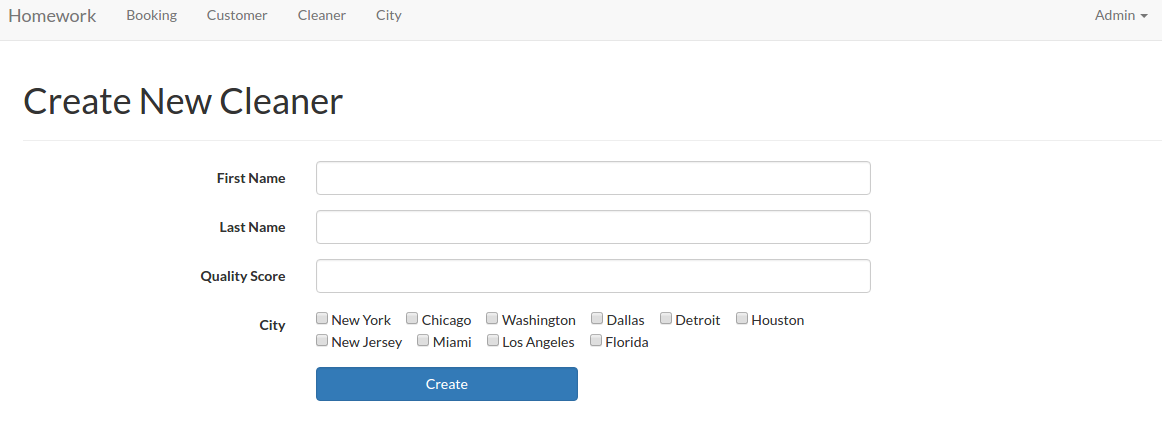
Then modify ‘create.blade.php’ in /resources/views/admin/cleaner/ directory to display the checboxes
12345678<div class="form-group">{!! Form::label('city', 'City', ['class' => 'col-sm-3 control-label']) !!}<div class="col-sm-6">@foreach($select_cities as $idx=>$item)<div class="chk_city">{!! Form::checkbox('city[]', $idx, null, ['class' => 'field']) !!} <span>{!! $item !!}</span></div>@endforeach</div></div>
Here I need to add a class ‘chk_city’ to manage the checkboxes display (side by side). I need to create a new css file ‘style.css’ in /public/css/ directory. Here is the css content
1234.chk_city{padding-right: 15px;float:left;}
Also I need to add the css link in /resources/views/layouts/app.blade.php file
123...<link href="{{ URL::asset('css/style.css') }}" rel="stylesheet">...
OK. Here is the looks (http://localhost/works/laravel/mybooking/public/admin/cleaner/create)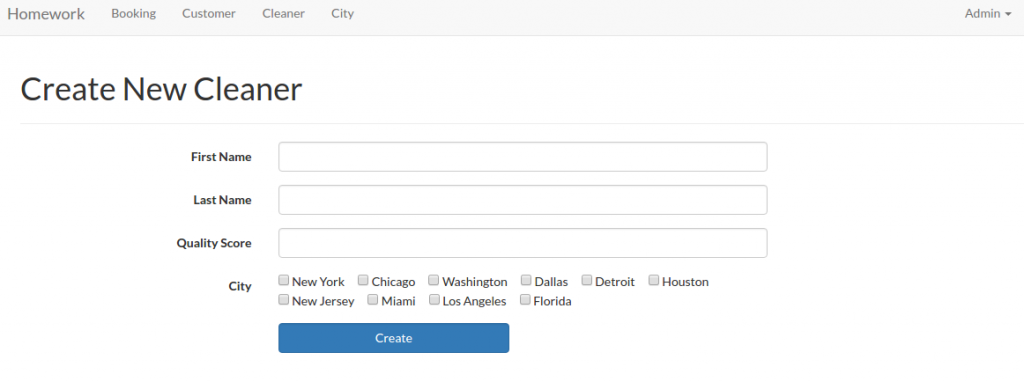 OK. To make sure the create cleaner function work properly, modify ‘store’ function in /app/Http/Controllers/Admin/CleanerController.php like this:
1234567891011121314151617181920212223242526272829303132333435363738394041424344454647public function store(Request $request){$requestData = $request->all();//search if this cleaner is already exist in the cleaner table$cleaner = Cleaner::where(['first_name' => $requestData['first_name'],'last_name'=> $requestData['last_name'],])->take(1)->get();if (count($cleaner) == 0) {Cleaner::create(['first_name' => $requestData['first_name'],'last_name' => $requestData['last_name'],'quality_score' => $requestData['quality_score'],]);if(isset($requestData['city'])){$new_cleaner = Cleaner::where([['first_name', '=', $requestData['first_name']],['last_name', '=', $requestData['last_name']],])->take(1)->get();$new_cleaner_id=0;foreach ($new_cleaner as $item) {$new_cleaner_id = $item->id;};if($new_cleaner_id){foreach($requestData['city'] as $city_id){CleanerCity::create(['cleaner_id' => $new_cleaner_id,'city_id' => $city_id,]);}}}Session::flash('flash_message', 'Cleaner added!');}else{Session::flash('flash_warning', 'Sorry, Your data is already exist!');}return redirect('admin/cleaner');}
So this function also check the input if already exist or not then also insert the cleaner_id and city_id into ‘cleaner_cities’ table!
We can do the same thing for ‘edit’ and ‘update’ function. Modify ‘edit’ and ‘update’ function in /app/Http/Controllers/Admin/CleanerController.php like this
1234567891011121314151617181920212223242526272829303132333435363738394041424344454647484950515253545556575859public function edit($id){$cleaner = Cleaner::findOrFail($id);$cities = self::$select_cities;$cleaner_cities = CleanerCity::where('cleaner_id',$id)->select('id','city_id')->get()->toArray();return view('admin.cleaner.edit', compact('cleaner','cities','cleaner_cities'));}public function update($id, Request $request){$requestData = $request->all();$cleaner = Cleaner::findOrFail($id);$cleaner->update($requestData);$cleaner_city = CleanerCity::where('cleaner_id',$id)->get();if (count($cleaner_city) == 0) {if($requestData['city']){foreach($requestData['city'] as $city_id){CleanerCity::create(['cleaner_id' => $id,'city_id' => $city_id,]);}}}else{if(isset($requestData['city'])){$new_city=$requestData['city'];foreach($cleaner_city as $cc){if(in_array($cc['city_id'], $requestData['city'])){$new_city=array_diff($new_city, array($cc['city_id']));continue;}else{CleanerCity::destroy($cc['id']);}}if($new_city){foreach($new_city as $city){CleanerCity::create(['cleaner_id' => $id,'city_id' => $city,]);}}}else{foreach($cleaner_city as $cc){CleanerCity::destroy($cc['id']);}}}Session::flash('flash_message', 'Cleaner updated!');return redirect('admin/cleaner');}
The ‘update’ function is more complicated. If there is no city selected, remove all the cities if exist in the cleaner_cities related to the cleaner_id. If some cities selected and same within the table, just leave it. But if different cities are selected, add the new cities and remove the unselected ones.
Then modify also /resources/views/admin/cleaner/edit.blade.php to show the selected/unselected cities
12345678910111213141516...<div class="form-group">{!! Form::label('city', 'City', ['class' => 'col-sm-3 control-label']) !!}<div class="col-sm-6">@foreach($cities as $idx=>$item)<?php $checked=null; ?>@foreach($cleaner_cities as $city)@if($idx == $city['city_id'])<?php $checked=true; ?>@endif@endforeach<div class="chk_city">{!! Form::checkbox('city[]', $idx, $checked, ['class' => 'field']) !!} <span>{!! $item !!}</span></div>@endforeach</div></div>...
Now, we want to display the cities also on the cleaner table. So modify ‘index’ function in /app/Http/Controllers/Admin/CleanerController.php like this:
123456789101112public function index(){//$cleaner = Cleaner::paginate(25);$cleaner = DB::table('cleaners')->join('cleaner_cities','cleaners.id','=','cleaner_cities.cleaner_id')->join('cities','cleaner_cities.city_id','=','cities.id')->select('cleaners.id','cleaners.first_name','cleaners.last_name','cleaners.quality_score',DB::raw('(GROUP_CONCAT(cities.city_name)) AS city'))->groupBy('cleaners.id','cleaners.first_name','cleaners.last_name','cleaners.quality_score')->paginate(25);return view('admin.cleaner.index', compact('cleaner'));}
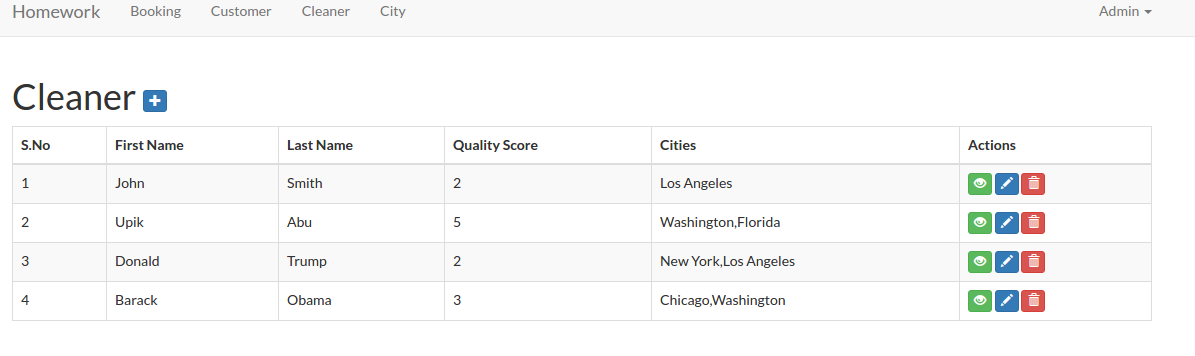
Then modify /resources/views/admin/cleaner/index.blade.php to display the cities
12345678910111213141516171819<table class="table table-bordered table-striped table-hover"><thead><tr><th>S.No</th><th> First Name </th><th> Last Name </th><th> Quality Score </th><th> Cities </th><th>Actions</th></tr></thead><tbody>@foreach($cleaner as $item)<tr><td>{{ $loop->iteration }}</td><td>{{ $item->first_name }}</td><td>{{ $item->last_name }}</td><td>{{ $item->quality_score }}</td><td>{{ $item->city }}</td><td>...</td></tr>@endforeach</tbody></table>
Here is the looks: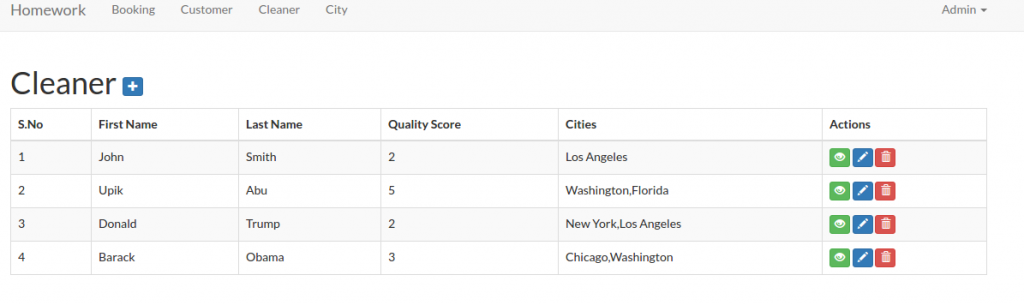 The last thing for the ‘show’ function. Modify the function to get the cities then pass it to the view
123456789101112public function show($id){$cleaner = Cleaner::findOrFail($id);$cleaner_cities = DB::table('cleaner_cities')->join('cities','cleaner_cities.city_id','=','cities.id')->select(DB::raw('(GROUP_CONCAT(cities.city_name)) AS city_name'))->where('cleaner_cities.cleaner_id',$id)->groupBy('cities.city_name')->get();return view('admin.cleaner.show', compact('cleaner','cleaner_cities'));}
Then modify /resources/views/admin/cleaner/show.blade.php, to display the cities
123456789101112131415161718192021<div class="table-responsive"><table class="table table-bordered table-striped table-hover"><tbody><tr><th>ID</th><td>{{ $cleaner->id }}</td></tr><tr><th> First Name </th><td> {{ $cleaner->first_name }} </td></tr><tr><th> Last Name </th><td> {{ $cleaner->last_name }} </td></tr><tr><th> Quality Score </th><td> {{ $cleaner->quality_score }} </td></tr><tr><th> City </th><td> {{ $cleaner_cities->implode('city_name', ', ') }} </td></tr></tbody></table></div>
COMPLETED!
The next task: “5. We need a way for customers to signup and schedule a booking all on one form. To accomplish this you will need to do the following:
– Make the site root a customer-facing form designed for customers to sign up and book a cleaner.
– On this form, capture all the data needed to create a customer in the database (first name, last name, phone number).”
We already have it. Please look http://localhost/works/laravel/mybooking/public/home. Also look the two routes for this in /routes/web.php
12Route::get('/home', 'Home\HomeController@index');Route::post('/home/book', 'Home\HomeController@book');
Look the function ‘index’ and ‘book’ (We’ll get it done at the next task) in /app/Http/Controllers/Home/HomeController.php.
“- If the customer already exists in the database (use phone number to determine this) use the existing record instead of creating a new one. You should probably add a validation to enforce this.”
Modify /app/Http/Controllers/Home/HomeController.php at ‘book’ function like this:
12345678910111213141516171819202122public function book(Request $request){$requestData = $request->all();$customer = Customer::where('phone_number',$requestData['phone_number'])->take(1)->get();if (count($customer) == 0) {//create/register a new customerCustomer::create(['first_name' => $requestData['first_name'],'last_name' => $requestData['last_name'],'phone_number' => $requestData['phone_number'],]);Session::flash('flash_message', 'Customer added!');}else{Session::flash('flash_warning', 'Sorry, A customer with phone number "'.$requestData['phone_number'].'" is already exist!');}return view('home.index');}
Here we add a check and validation if a phone number entered is already exist in the customer table. If so, please give a message about it. Here is the look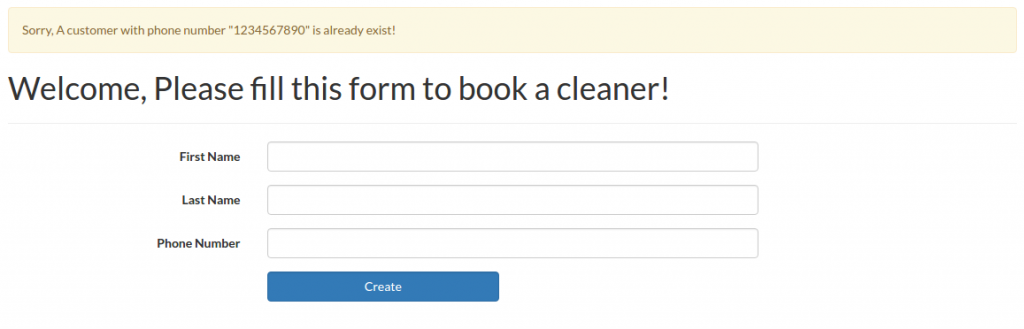
“- Let the customer select what city they are in from the cities table created earlier.”
Modify /app/Http/Controllers/Home/HomeController.php to add the city data and pass it to the view
123456789101112131415161718192021222324252627...use App\City;...class HomeController extends Controller{static $select_cities;public function __construct(){// get cities$cities = City::all();self::$select_cities = [];foreach ($cities as $item) {self::$select_cities[$item->id] = $item->city_name;}}public function index(){return view('home.index',['select_cities' => self::$select_cities]);}...}
Then show the city selection in /resources/views/home/index.blade.php file
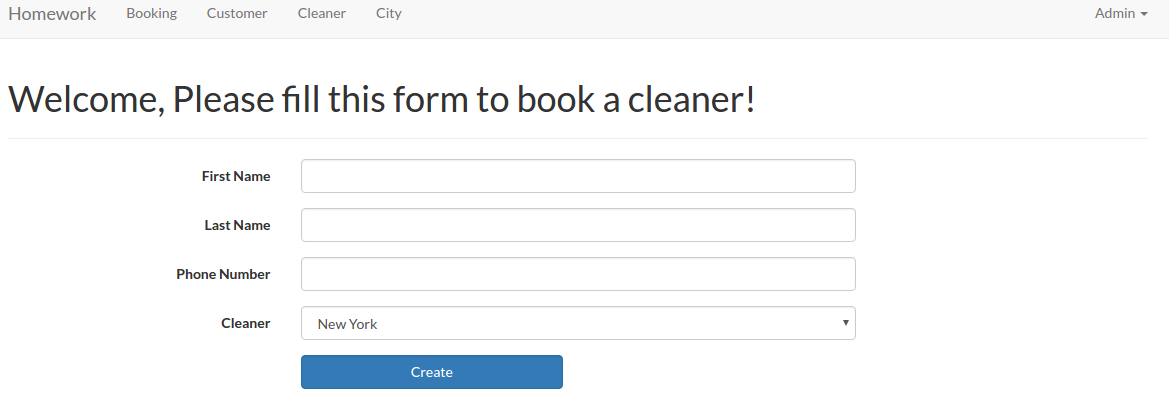
123456789...<div class="form-group">{!! Form::label('city_id', 'Cleaner', ['class' => 'col-sm-3 control-label']) !!}<div class="col-sm-6">{!! Form::select('city_id', $select_cities, null, ['class' => 'form-control']) !!}{!! $errors->first('city_id', '<p class="help-block">:message</p>') !!}</div></div>...
Here is the new looks: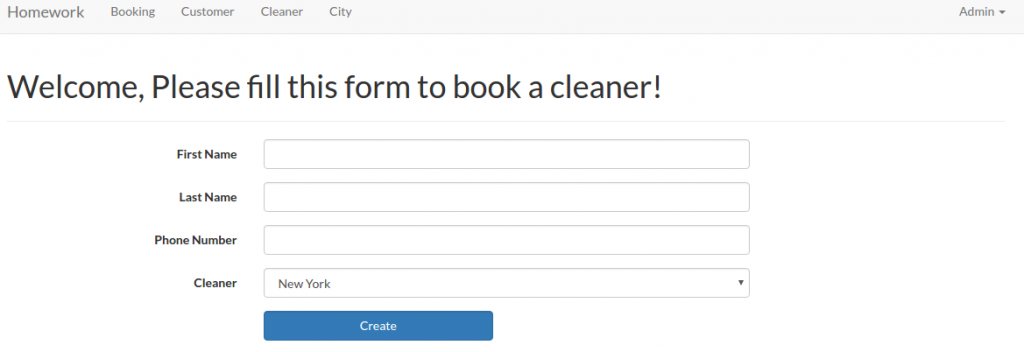 We’ll do the rest after working on the below task!
“- Let the customer specify a date and time when they would like their house cleaned.”
Put like this to show the datetime inputs in /resources/views/home/index.blade.php file
1234567891011121314151617181920212223242526...<div class="form-group {{ $errors->has('date') ? 'has-error' : ''}}">{!! Form::label('cleaning_time_from', 'Cleaning Time (From)', ['class' => 'col-sm-3 control-label']) !!}<div class="col-sm-6"><div class='input-group date' id='dtp_cleaning_form'><input type='text' class="form-control" name="cleaning_time_from" /><span class="input-group-addon"><span class="glyphicon glyphicon-calendar"></span></span></div>{!! $errors->first('cleaning_time_from', '<p class="help-block">:message</p>') !!}</div></div><div class="form-group {{ $errors->has('date') ? 'has-error' : ''}}">{!! Form::label('cleaning_time_to', 'Cleaning Time (To)', ['class' => 'col-sm-3 control-label']) !!}<div class="col-sm-6"><div class='input-group date' id='dtp_cleaning_to'><input type='text' class="form-control" name="cleaning_time_to" /><span class="input-group-addon"><span class="glyphicon glyphicon-calendar"></span></span></div>{!! $errors->first('cleaning_time_to', '<p class="help-block">:message</p>') !!}</div></div>...
I added two datetime input here: Cleaning Time (From) and Cleaning Time (To). I can’t use ‘Form::date’ here because I need ‘Datetime’ not just ‘Date’. I have to use datetimepicker from bootstrap. To make sure the dropdown of the datetime work properly, I have to add/import ‘bootstrap-datetimepicker’ libraries in /resources/views/layouts/app.blade.php file
123456789101112131415...<!-- Styles -->...<link rel="stylesheet" href="https://cdnjs.cloudflare.com/ajax/libs/bootstrap-datetimepicker/4.17.37/css/bootstrap-datetimepicker.min.css" crossorigin="anonymous" />...<!-- JavaScripts -->...<script src="https://cdnjs.cloudflare.com/ajax/libs/bootstrap-datetimepicker/4.17.37/js/bootstrap-datetimepicker.min.js" crossorigin="anonymous"></script><script type="text/javascript">$(function () {$('#dtp_cleaning_form').datetimepicker();$('#dtp_cleaning_to').datetimepicker();});</script>...
Here is the looks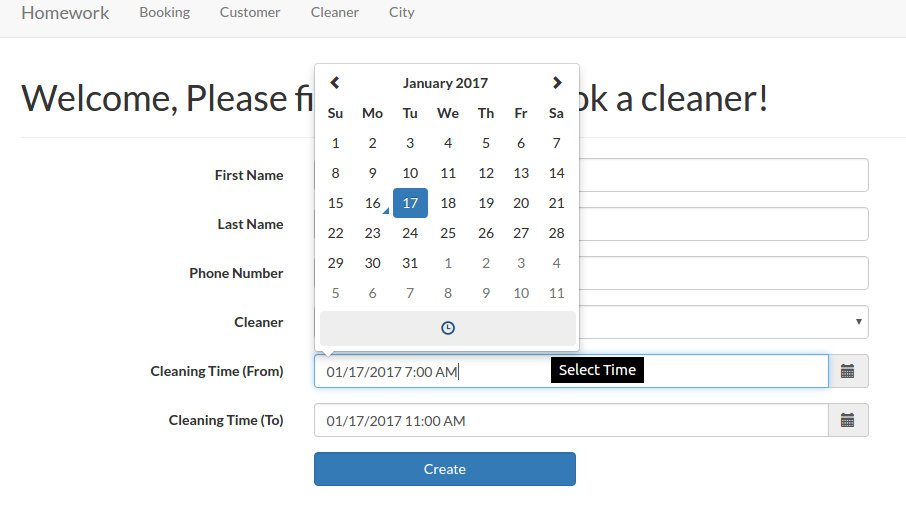 Then I need to create a new model ‘CityCleaningTime’ to store the city id and the cleanings time.
1teddy@teddy-K43SJ:~/Documents/works/laravel/mybooking$ php artisan make:model CityCleaningTime
Then modify ‘CityCleaningTime.php’ file
1234567891011121314151617181920212223242526272829<?phpnamespace App;use Illuminate\Database\Eloquent\Model;class CityCleaningTime extends Model{/*** The database table used by the model.** @var string*/protected $table = 'citycleaningtimes';/*** The database primary key value.** @var string*/protected $primaryKey = 'id';/*** Attributes that should be mass-assignable.** @var array*/protected $fillable = ['customer_id', 'city_id', 'cleaning_time_from', 'cleaning_time_to'];}
Then do migration to create the migration file
1teddy@teddy-K43SJ:~/Documents/works/laravel/mybooking$ php artisan make:migration create_citycleaningtimes_table --create=citycleaningtimes
Then do migrate to create the new table ‘citycleaningtimes’.
1teddy@teddy-K43SJ:~/Documents/works/laravel/mybooking$ php5.6 artisan migrate --database=sqlite
NOTE: I did some mistakes about the migration file and the migrate. First I forgot to put ‘customer_id’ in the migration file. I realized it after I created the new table. I updated the migration file and did the migrate but I got a message ‘Nothing to migrate.’ Because I was in a hurry, I deleted the migration file so I thought I can create a new one. But when I wanted to create the new migration file, I got this error:
1234[ErrorException]include(/home/teddy/Documents/works/laravel/mybooking/vendor/composer/../../database/migrations/2017_01_16_141740_create_citycleaningtimes_table.php):failed to open stream: No such file or directory
To solve this problem, I have to type this ‘composer dump-autoload’:
1teddy@teddy-K43SJ:~/Documents/works/laravel/mybooking$ composer dump-autoload
Then did the migration again. After fixing the file, I wanted to create the table again. But, of course, the same table is already exists!
12[PDOException]SQLSTATE[HY000]: General error: 1 table "citycleaningtimes" already exists
I tried to fix this mistake by doing the ‘migrate:rollback’
1teddy@teddy-K43SJ:~/Documents/works/laravel/mybooking$ php5.6 artisan migrate:rollback
But I got another error
12[ErrorException]Undefined index: 2017_01_16_141740_create_citycleaningtimes_table
Then I created again (manually) the old migration file (copy and paste the new migration file then rename it!). I did the rollback again. but here is another error:
12teddy@teddy-K43SJ:~/Documents/works/laravel/mybooking$ php5.6 artisan migrate:rollbackPHP Fatal error: Cannot redeclare class CreateCitycleaningtimesTable in /home/teddy/Documents/works/laravel/mybooking/database/migrations/2017_01_16_151401_create_citycleaningtimes_table.php on line 35
After some thought, I have to remove (or move it to another directory) the new migration file and let the old one (the above name!). Then did the rollback again. SUCCESS! Fixed the old migration file by adding ‘customer_id’ then did the migrate again. SUCCESS!
OK. HERE IS THE IMPORTANT LESSON, IF I FOUND AN ERROR/NOT COMPLETED IN MY LAST MIGRATE/MIGRATION FILE, DO THE ROLLBACK IF THE TABLE IS ALREADY CREATED! DONT REMOVE THE MIGRATION FILE!.
“- When the user submits the form, look for cleaners that work in the specified city that do not have any bookings that conflict with the time specified.
– If you can find an available cleaner, create the booking and display the name of the cleaner assigned to the booking.
– If you can’t find an available cleaner, tell the user that we could not fulfill their request.” - First, add a free theme like bootstrap or materialize css.


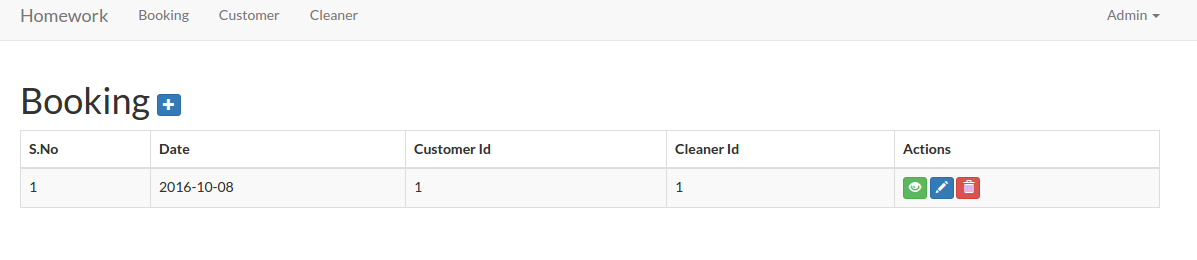
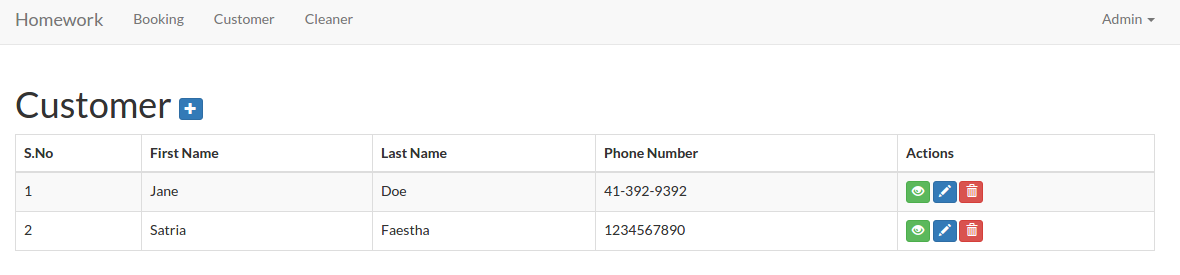
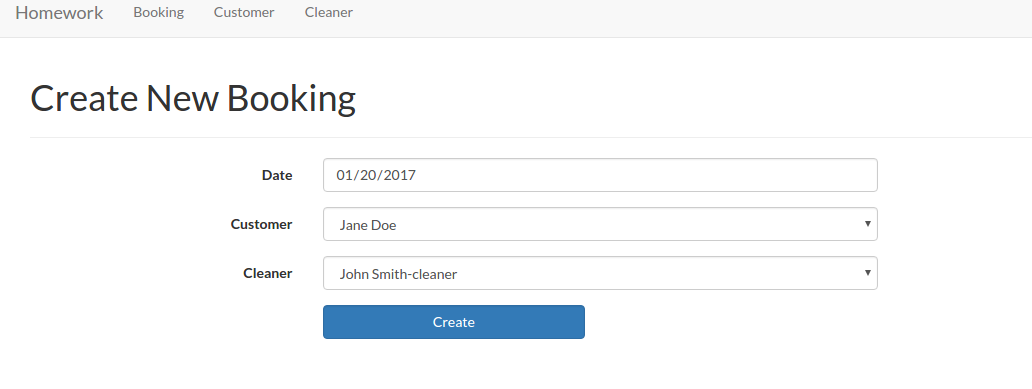



Cleaner Booking
Source: https://github.com/ricardoandrietta/cleaner_booking
and https://github.com/MasterHans/HomeWork (better!)
Installation:
- Clone the app
1234567teddy@teddy-K43SJ:~/Documents/works/laravel$ git clone https://github.com/ricardoandrietta/cleaner_booking.gitCloning into 'cleaner_booking'...remote: Counting objects: 221, done.remote: Total 221 (delta 0), reused 0 (delta 0), pack-reused 221Receiving objects: 100% (221/221), 243.69 KiB | 150.00 KiB/s, done.Resolving deltas: 100% (72/72), done.Checking connectivity... done.
- Go to the new directory ‘cleaner_booking’ then use composer to install the dependencies
12345teddy@teddy-K43SJ:~/Documents/works/laravel$ cd cleaner_booking/teddy@teddy-K43SJ:~/Documents/works/laravel/cleaner_booking$ composer install...Generating optimized class loaderThe compiled class file has been removed.
- Here i use sqlite (pls see /config/database.php file) as a default database
1'default' => 'sqlite',
and here is the configuration in the same file.
12345678'connections' => ['sqlite' => ['driver' => 'sqlite','database' => database_path('homework_database.sqlite'),'prefix' => '',],...
The database ‘homework_database.sqlite’ in /database/ directory!
NOTE: To open .sqlite file manually, I need to install ‘sqlitebrowser’ (ref:http://askubuntu.com/questions/805219/how-to-properly-view-a-sqlite-file-using-sqlite)
1teddy@teddy-K43SJ:~/Documents/works/laravel/cleaner_booking$ sudo apt-get install sqlitebrowser
The application menu in Programming -> SQLite database browser - Modify the files permission in /storage/ and /bootstrap/ AND ALSO /database (because it need to update the sqlite database!) directories
123teddy@teddy-K43SJ:~/Documents/works/laravel/cleaner_booking$ sudo chmod -R 777 storage/teddy@teddy-K43SJ:~/Documents/works/laravel/cleaner_booking$ sudo chmod -R 777 bootstrap/teddy@teddy-K43SJ:~/Documents/works/laravel/HomeWork$ sudo chmod -R 777 database/
OR I CAN MODIFY /config/database.php on the ‘connection’ like this:
12345'sqlite' => ['driver' => 'sqlite','database' => storage_path('homework_database.sqlite'),'prefix' => '',],
Change ‘database_path’ to ‘storage_path’ (ref: http://stackoverflow.com/questions/30382554/sqlite-unable-to-open-database-file-laravel-windows) - Test the app (refer to the below errors if exist!) http://localhost/works/laravel/cleaner_booking/public/
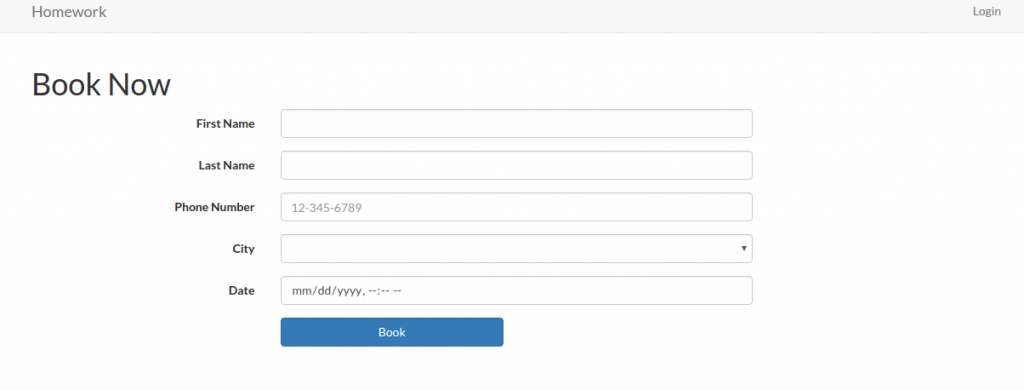 and http://localhost/works/laravel/HomeWork/public/home
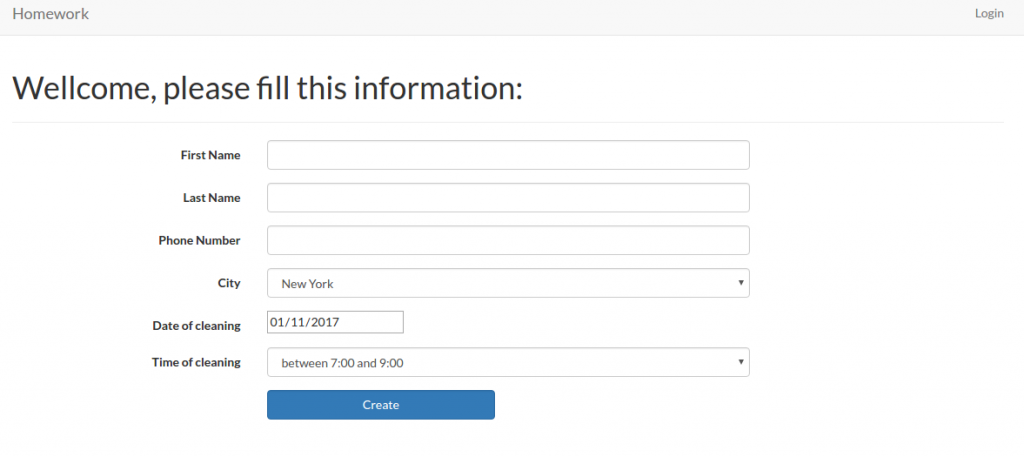 For registering an user: http://localhost/works/laravel/cleaner_booking/public/register. use user: ‘Admin’, email: ‘advcha@yahoo.com’ and password: ‘admin123’
Admin Customer: http://localhost/works/laravel/HomeWork/public/admin/customer
Admin Cleaner: http://localhost/works/laravel/HomeWork/public/admin/cleaner
Admin Booking: http://localhost/works/laravel/HomeWork/public/admin/booking
Admin City: http://localhost/works/laravel/HomeWork/public/admin/city
Admin Time selection: http://localhost/works/laravel/HomeWork/public/admin/time-gaps - Errors:
12PDOException in Connector.php line 119:could not find driver
Solution:
I’ve tried many suggestion from here: https://www.digitalocean.com/community/questions/how-to-enable-extension-pdo-in-ubuntu-14-04. I checked if php5-mysql package is installed or not
12teddy@teddy-K43SJ:~/Documents/works/laravel/cleaner_booking$ dpkg-query --status php5-mysql | grep StatusStatus: install ok installed
It’s installed. From this link https://www.drupal.org/docs/7/system-requirements/what-is-pdo, I modified my php.ini (sudo gedit /etc/php/5.6/apache2/php.ini), I added these two lines
12extension=pdo.soextension=pdo_mysql.so
Then I checked my php info in http://localhost/info.php. The PDO MySQL is exist! But The above error still persist!.
This link http://stackoverflow.com/questions/2852748/pdoexception-could-not-find-driver?rq=1 finally make it works. I need to install sqlite and php5-sqlite (for php 5.6) or php-sqlite3 (for php7)
12345For PHP 7teddy@teddy-K43SJ:~/Documents/works/laravel/cleaner_booking$ sudo apt-get install sqlite php-sqlite3For PHP 5.6teddy@teddy-K43SJ:~/Documents/works/laravel/cleaner_booking$ sudo apt-get install php5-sqlite
Check phpinfo, PDO SQLITE (pdo_sqlite) should be existed!
Restart Apache server!Another error when trying to register: http://localhost/works/laravel/HomeWork/public/register
12SQLSTATE[HY000]: General error: 8 attempt to write a readonly databaseSQLSTATE[HY000]: General error: 8 attempt to write a readonly database (SQL: insert into "users" ("name", "email", "password", "updated_at", "created_at") values (Admin, advcha@yahoo.com, $2y$10$uzxAC6sJTEmX8310QBrwW.ONGrjiht/3aP2CWepsR0kjpdayse1iC, 2017-01-11 14:48:25, 2017-01-11 14:48:25))Solution:
1teddy@teddy-K43SJ:~/Documents/works/laravel/HomeWork$ sudo chmod -R 777 database/homework_database.sqliteBUT GOT ANOTHER ERROR:
1SQLSTATE[HY000]: General error: 14 unable to open database file (SQL: insert into "users" ("name", "email", "password", "role", "updated_at", "created_at") values (Admin, advcha@yahoo.com, $2y$10$TuL4RS2rB5tUsd.wDhcK9eONLt/pKsh8miQbWVJijojMihA9egC1S, 2, 2017-01-11 14:47:38, 2017-01-11 14:47:38))Solution: see #4 –> modify /database/ permission or modify /config/database.php
Also modify .env file and remove ‘DB_…’ related setting but change1DB_CONNECTION=sqlite - TASK SUMMARY!
For https://github.com/MasterHans/HomeWork
Summary
We are a local home cleaning company called Homework. Today we are keeping track of all our bookings using a spreadsheet and we want to move it into a web application. Our main goal with this project is to make it possible for customers to schedule a booking online. I’ve already created the scaffolding of the app for you and now I need you to add some functionality to it. This should take you about 1-2 hours, but you have up to 4 hours to complete it.
Deliverables
1. All models and columns should have validation as described in the model spec below, plus any common-sense validation you’ll put on new models.
2. We need to split the site in to Admin-only and Customer-only. Right now all the admin functionality is exposed to the world.
3. Currently we operate in 10 cities, but plan to expand quickly. We need a way to admin the list of cities we operate in and the ability to add to the list. You should create a new table to do this.
4. On the admin cleaner form we need a way to select the cities a cleaner works in. This should be a checkbox list populated by the list of the cities we operate in. You may need to create a new table to store this data.
5. We need a way for customers to signup and schedule a booking all on one form. To accomplish this you will need to do the following:
– Make the site root a customer-facing form designed for customers to sign up and book a cleaner.
– On this form, capture all the data needed to create a customer in the database (first name, last name, phone number).
– If the customer already exists in the database (use phone number to determine this) use the existing record instead of creating a new one. You should probably add a validation to enforce this.
– Let the customer select what city they are in from the cities table created earlier.
– Let the customer specify a date and time when they would like their house cleaned.
– When the user submits the form, look for cleaners that work in the specified city that do not have any bookings that conflict with the time specified.
– If you can find an available cleaner, create the booking and display the name of the cleaner assigned to the booking.
– If you can’t find an available cleaner, tell the user that we could not fulfill their request.
6. Write tests for the parts of the application you feel need it the most.
7. When you are done, please zip up the entire root directory including your SQLite database and vendor files — do not cherry-pick folders.
Restrictions
1. Do NOT switch the database from SQLite to MySQL.
2. If you create a password-protected account, use credentials “admin@admin.com” and password “admin”.Existing Models
1. customer
– first_name (required)
– last_name (required)
– phone_number (optional)
2. booking
– customer (required, enforce referential integrity)
– cleaner (required, enforce referential integrity)
– date (required)
3. cleaner
– first_name (required)
– last_name (required)
– quality_score (required, must be a number between 0.0 and 5.0)Setup
https://github.com/prehire/php-23093023909ad09a09
For https://github.com/ricardoandrietta/cleaner_booking.
Summary
The following deliverables are not required but are nice-to-haves. If you choose to implement them, it should take around 1 hour but you must complete this section within 3 hours. You can complete any number of the bonus deliverables: you don’t need to complete all of them.Bonus Deliverables
1. Use a free theme to make the application look a little better, especially the pages seen by our customers.
2. Add security to the admin pages on our site. Customers and cleaners do not need to be able to login at the moment.
3. The cleaner form should have one additional field: ’email’
o Email should be required
0 Check that it is a valid email address
4. When a new booking is created, email the cleaner with information on the booking and customer.
5. The Customer Show view should show all associated bookings below the form and link to them.
6. The Cleaner Show view should show all associated bookings below the form and link to them.
7. When you are done, please zip up the whole app directory with dependencies and upload it below.
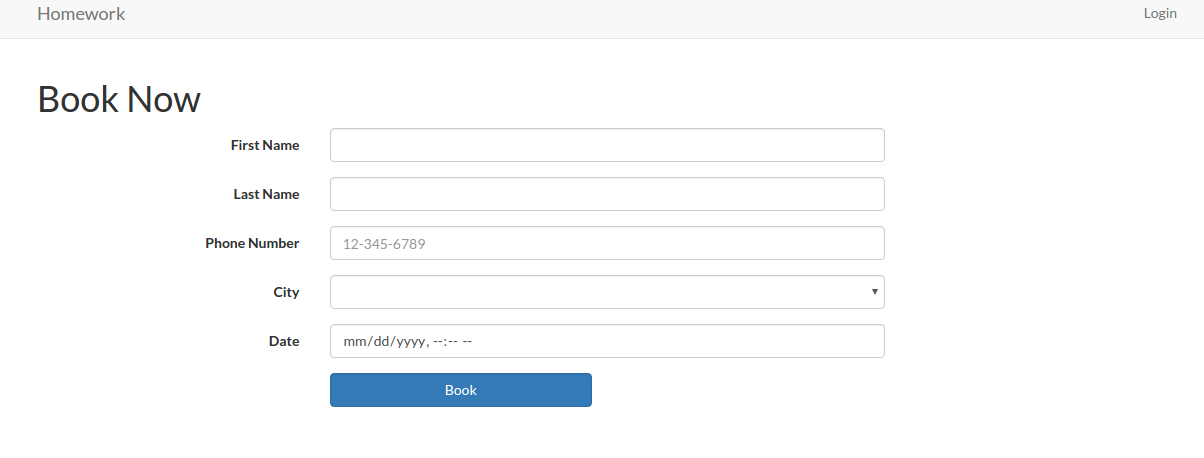
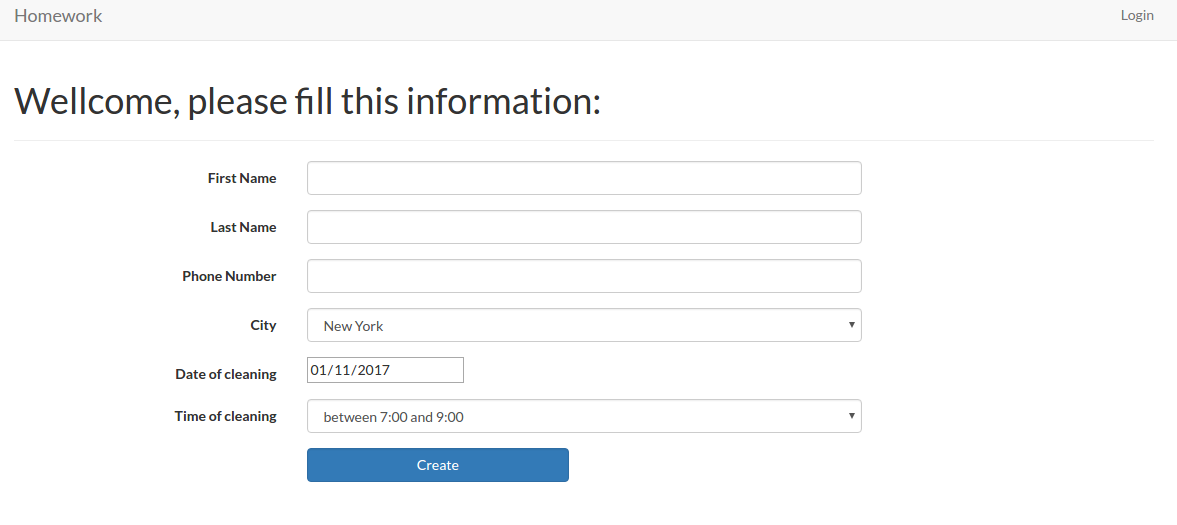
Booking application developed on Laravel platform
Source: https://github.com/juanmvega/my-booking
Tutorial: Laravel Tutorial
- Clone the app
1234567teddy@teddy-K43SJ:~/Documents/works/laravel$ git clone https://github.com/juanmvega/my-booking.gitCloning into 'my-booking'...remote: Counting objects: 6233, done.remote: Total 6233 (delta 0), reused 0 (delta 0), pack-reused 6233Receiving objects: 100% (6233/6233), 6.70 MiB | 1.28 MiB/s, done.Resolving deltas: 100% (1576/1576), done.Checking connectivity... done.
Check the files in /laravel/my-booking/ directory! - Go to the the directory and use composer to install the dependencies
12345678910teddy@teddy-K43SJ:~/Documents/works/laravel$ cd my-booking/teddy@teddy-K43SJ:~/Documents/works/laravel/my-booking$ composer installYou are running composer with xdebug enabled. This has a major impact on runtime performance. See https://getcomposer.org/xdebugLoading composer repositories with package informationInstalling dependencies (including require-dev) from lock fileNothing to install or updateGenerating autoload files> Illuminate\Foundation\ComposerScripts::postInstall> php artisan optimizeGenerating optimized class loader
‘Vendor’ directory is already exist! so the dependencies are already downloaded! - Create a new database ‘demo_data’ via phpmyadmin
- Create a new table ‘demo_data’
123456789101112CREATE TABLE IF NOT EXISTS `demo_data` (`roomid` int(10) unsigned NOT NULL AUTO_INCREMENT,`name` varchar(50) NOT NULL,`roomname` varchar(50) NOT NULL,`features` tinytext NOT NULL,`baseprice` float NOT NULL,`occupancy` tinyint(4) NOT NULL,`deleted_at` datetime NOT NULL,`created_at` datetime NOT NULL,`updated_at` datetime NOT NULL,PRIMARY KEY (`roomid`)) ENGINE=InnoDB DEFAULT CHARSET=utf8 AUTO_INCREMENT=1 ; - Edit .env file to add the database setting
- Modify the files permission in /storage/ and /bootstrap/ directories
12teddy@teddy-K43SJ:~/Documents/works/laravel/my-booking$ sudo chmod -R 777 storage/teddy@teddy-K43SJ:~/Documents/works/laravel/my-booking$ sudo chmod -R 777 bootstrap/ - Test the app in http://localhost/works/laravel/my-booking/public/rooms
WORKS!!!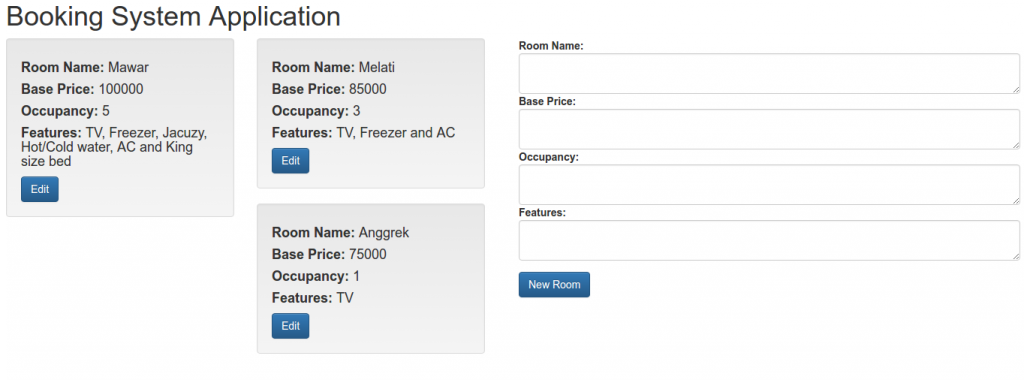
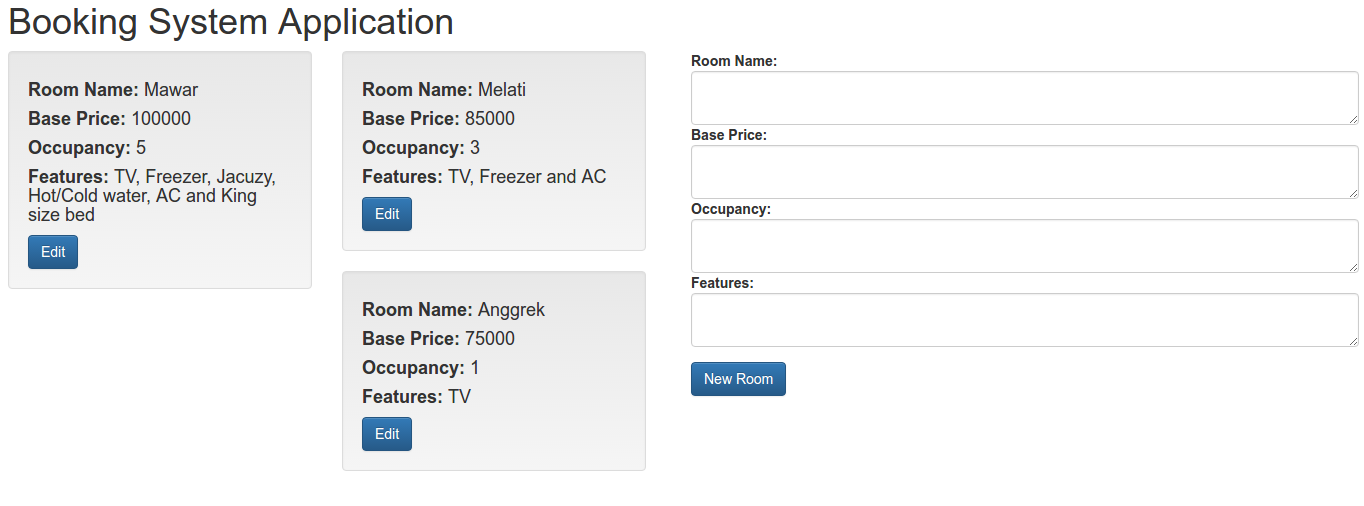
- Something still not correct. in /resources/views/layout/layout.blade.php, I still have to add jQuery library because bootstrap need jQuery!
1234...<script src="https://code.jquery.com/jquery-1.12.0.min.js"></script><script src="https://maxcdn.bootstrapcdn.com/bootstrap/3.3.6/js/bootstrap.min.js" integrity="sha384-0mSbJDEHialfmuBBQP6A4Qrprq5OVfW37PRR3j5ELqxss1yVqOtnepnHVP9aJ7xS" crossorigin="anonymous"></script><html>
Also I have to change many links on many blade files (index.blade.php, create.blade.php, show.blade.php, edit.blade.php) that those not correct. Change from ‘/laravel/’ to ‘/works/laravel/my-booking/’. Also change from ‘http://tutorials.juanmvega.com/laravel/’ to ‘/works/laravel/my-booking/’.
CSS Tips & Tricks
- How to disable text selection on a page website?
SOLUTION: Ref: How to disable text selection highlighting using CSS?
Use user-select.
123456789101112131415.noselect {-webkit-touch-callout: none; /* iOS Safari */-webkit-user-select: none; /* Chrome/Safari/Opera */-khtml-user-select: none; /* Konqueror */-moz-user-select: none; /* Firefox */-ms-user-select: none; /* Internet Explorer/Edge */user-select: none; /* Non-prefixed version, currentlynot supported by any browser */}<p>Selectable text.</p><p class="noselect">Unselectable text.</p>
Or in body selector (css):
123456body{-moz-user-select: none;-khtml-user-select: none;user-select: none;}
Then also put onselectstart=”return false” in body tag (html):
123<body onselectstart="return false" style="margin-top: 0px;" bgcolor="#DDDDDD">...</body>
Local file: /media/data/MASTER/oDesk/test_answer/php-694.html
/media/data/MASTER/oDesk/test_answer/php-694_files/phpkb.css
Ruby On Rails: Introduction
Here I ‘m going to extend my previous testapp. Also learn more about ruby on rails file structure. Ref: http://www.belajarrubyonrails.com/2012/12/membuat-aplikasi-rails-sederhana-say.html
Extend Controller.
Create a new controller ‘home_controller.rb’ in /app/controllers/ directory. Here is the content:
|
1 2 3 4 |
class HomeController < ApplicationController def index end end |
Extend View.
Create a new directory ‘home’ in /app/views/ directory. Then create a new file ‘index.html.erb’ in the new directory. Here is the content:
|
1 |
Hello Ruby on Rails!!! Here I am!!! |
Then remove ‘index.html’ file in /public/directory (I DONT FIND IT!!!)
Routes.
Modify ‘routes.rb’ file in /config/ directory. Set the default route to our testapp.
|
1 2 3 4 5 |
Rails.application.routes.draw do # For details on the DSL available within this file, see http://guides.rubyonrails.org/routing.html #Testapp::Application.routes.draw.do --> WHY NOT WORKING??? rails s SHOWED ERROR root :to => 'home#index' end |
Then start the rails server (rails s) and open it in http://localhost:3000/. It should show this text:
|
1 |
Hello Ruby on Rails!!! Here I am!!! |
I want to show Date and Time on my browser. Modify ‘home_controller.rb’ like this:
|
1 2 3 4 5 |
class HomeController < ApplicationController def index @time_now = Time.now end end |
Then modify ‘index.html.erb’ to show the date time:
|
1 2 3 |
<h1>Hello Ruby on Rails!!! Here I am!!!</h1> <p>Time now is <%= @time_now %></p> |
OK. Start the server and open it on the browser. It should be something like this: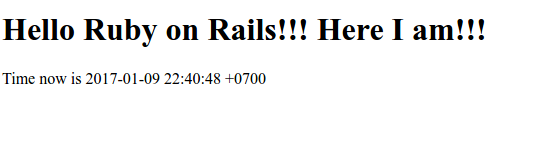
Ruby On Rails Installation on Ubuntu 14.04
Source: Installing Ruby on Rails on Ubuntu 14.04 – 15.10 and Install Ruby on Rails · Ubuntu Linux.
Installation:
- Install Ruby Version Manager (RVM). I already had ‘curl’, so import the rvm.io public key in the server system.
12teddy@teddy-K43SJ:~$ curl -#LO https://rvm.io/mpapis.asc######################################################################## 100,0%
1234teddy@teddy-K43SJ:~$ gpg --import mpapis.ascgpg: key D39DC0E3: public key "Michal Papis (RVM signing) <mpapis@gmail.com>" importedgpg: Total number processed: 1gpg: imported: 1 (RSA: 1)
- Then download the RVM installer with curl and execute it (by piping the curl output to bash):
12345678910111213141516171819202122232425262728teddy@teddy-K43SJ:~$ curl -sSL https://get.rvm.io | bash -s stableDownloading https://github.com/rvm/rvm/archive/1.28.0.tar.gzDownloading https://github.com/rvm/rvm/releases/download/1.28.0/1.28.0.tar.gz.ascgpg: Signature made Sel 20 Des 2016 01:50:13 WIB using RSA key ID BF04FF17gpg: Good signature from "Michal Papis (RVM signing) <mpapis@gmail.com>"gpg: Note: This key has expired!Primary key fingerprint: 409B 6B17 96C2 7546 2A17 0311 3804 BB82 D39D C0E3Subkey fingerprint: 62C9 E5F4 DA30 0D94 AC36 166B E206 C29F BF04 FF17GPG verified '/home/teddy/.rvm/archives/rvm-1.28.0.tgz'Installing RVM to /home/teddy/.rvm/stat: cannot stat ‘/<gconf>/ a<entry name='login_shell' mtime='1483934280' type='bool' value='true'/>’: No such file or directorystat: cannot stat ‘/<gconf>/ a<entry name='login_shell' mtime='1483934280' type='bool' value='true'/>’: No such file or directoryAdding rvm PATH line to /home/teddy/.profile /home/teddy/.mkshrc /home/teddy/.bashrc /home/teddy/.zshrc.Adding rvm loading line to /home/teddy/.profile /home/teddy/.bash_profile /home/teddy/.zlogin.Installation of RVM in /home/teddy/.rvm/ is almost complete:* To start using RVM you need to run `source /home/teddy/.rvm/scripts/rvm`in all your open shell windows, in rare cases you need to reopen all shell windows.# advcha,## Thank you for using RVM!# We sincerely hope that RVM helps to make your life easier and more enjoyable!!!## ~Wayne, Michal & team.In case of problems: https://rvm.io/help and https://twitter.com/rvm_io
KEEP IN MIND THIS LINE
1To start using RVM you need to run `source /home/teddy/.rvm/scripts/rvm
I need to execute ‘source /home/teddy/.rvm/scripts/rvm’ to build the RVM environment and to save the settings of this environment into current shell.
1teddy@teddy-K43SJ:~$ source /home/teddy/.rvm/scripts/rvm
NOT (ref: Error message: -bash: /etc/profile.d/rvm.sh: No such file or directory)
12teddy@teddy-K43SJ:~$ source /etc/profile.d/rvm.shbash: /etc/profile.d/rvm.sh: No such file or directory
- Install the Ruby dependencies with the RVM command below:
1teddy@teddy-K43SJ:~$ rvm requirements
For the first time, I got some errors like this:
123456789101112131415161718192021222324teddy@teddy-K43SJ:~$ rvm requirementsChecking requirements for ubuntu.Installing requirements for ubuntu.Updating systemteddy password required for 'apt-get --quiet --yes update':teddy password required for 'apt-get --quiet --yes update':..................................Error running 'requirements_debian_update_system ',showing last 15 lines of /home/teddy/.rvm/log/1483934510/update_system.log+ case "${TERM:-dumb}" in+ case "$1" in+ [[ -t 2 ]]+ return 1+ printf %b 'There has been error while updating '\''apt-get'\'', please give it some time and try again later.404 errors should be fixed for rvm to proceed. Check your sources configured in:/etc/apt/sources.list/etc/apt/sources.list.d/*.list\n'There has been error while updating 'apt-get', please give it some time and try again later.404 errors should be fixed for rvm to proceed. Check your sources configured in:/etc/apt/sources.list/etc/apt/sources.list.d/*.list+ return 100Requirements installation failed with status: 100.
SOLUTION: ref: Error installing Ruby on Ubuntu 14.04
I have to fix/remove some failed ubuntu repository. From ‘sudo apt-get update’, I got these repositories error:
12345678W: GPG error: https://apt.dockerproject.org ubuntu-trusty InRelease: The following signatures couldn't be verified because the public key is not available: NO_PUBKEY F76221572C52609DW: GPG error: http://download.opensuse.org Release: The following signatures were invalid: KEYEXPIRED 1460070962W: GPG error: http://ppa.launchpad.net trusty Release: The following signatures were invalid: BADSIG A9E15C2F2B944FEE Launchpad PPA for Alex MurrayW: Failed to fetch http://ppa.launchpad.net/ondrej/php5-5.6/ubuntu/dists/trusty/main/binary-amd64/Packages 404 Not FoundW: Failed to fetch http://ppa.launchpad.net/ondrej/php5-5.6/ubuntu/dists/trusty/main/binary-i386/Packages 404 Not FoundE: Some index files failed to download. They have been ignored, or old ones used instead.
After fixing them (see the above link), it’s working fine
123456teddy@teddy-K43SJ:~$ rvm requirementsChecking requirements for ubuntu.Installing requirements for ubuntu.Updating system...........................Installing required packages: gawk, libreadline6-dev, libyaml-dev, sqlite3, libgmp-dev, libgdbm-dev, libncurses5-dev, bison............Requirements installation successful.
- Check for available Ruby versions
The following command lists the available ruby versions:
123456789101112131415161718192021222324252627282930313233343536373839404142434445464748495051525354555657585960teddy@teddy-K43SJ:~$ rvm list known# MRI Rubies[ruby-]1.8.6[-p420][ruby-]1.8.7[-head] # security released on head[ruby-]1.9.1[-p431][ruby-]1.9.2[-p330][ruby-]1.9.3[-p551][ruby-]2.0.0[-p648][ruby-]2.1[.10][ruby-]2.2[.6][ruby-]2.3[.3][ruby-]2.4[.0-rc1]ruby-head# for forks use: rvm install ruby-head-<name> --url https://github.com/github/ruby.git --branch 2.2# JRubyjruby-1.6[.8]jruby-1.7[.26]jruby[-9.1.6.0]jruby-head# Rubiniusrbx-1[.4.3]rbx-2.3[.0]rbx-2.4[.1]rbx-2[.5.8]rbx[-3.69]rbx-head# Opalopal# Minimalistic ruby implementation - ISO 30170:2012mruby-1.0.0mruby-1.1.0mruby-1[.2.0]mruby[-head]# Ruby Enterprise Editionree-1.8.6ree[-1.8.7][-2012.02]# Topaztopaz# MagLevmaglev[-head]maglev-1.0.0# Mac OS X Snow Leopard Or Newermacruby-0.10macruby-0.11macruby[-0.12]macruby-nightlymacruby-head# IronRubyironruby[-1.1.3]ironruby-head
I’m going to install the latest stable ruby version 2.3.3 because ruby 2.4.0-rc1 still in release candidate. - Install Ruby Version
Using RVM makes the independent management of ruby versions an easy process. The command listed below installs the Ruby version 2.3.3.
12345678910111213141516171819202122teddy@teddy-K43SJ:~$ rvm install 2.3.3Searching for binary rubies, this might take some time.Found remote file https://rubies.travis-ci.org/ubuntu/14.04/x86_64/ruby-2.3.3.tar.bz2Checking requirements for ubuntu.Requirements installation successful.ruby-2.3.3 - #configureruby-2.3.3 - #download% Total % Received % Xferd Average Speed Time Time Time CurrentDload Upload Total Spent Left Speed0 0 0 0 0 0 0 0 --:--:-- 0:00:01 --:--:-- 0100 25.1M 100 25.1M 0 0 927k 0 0:00:27 0:00:27 --:--:-- 1196kNo checksum for downloaded archive, recording checksum in user configuration.ruby-2.3.3 - #validate archiveruby-2.3.3 - #extractruby-2.3.3 - #validate binaryruby-2.3.3 - #setupruby-2.3.3 - #gemset created /home/teddy/.rvm/gems/ruby-2.3.3@globalruby-2.3.3 - #importing gemset /home/teddy/.rvm/gemsets/global.gems...................................ruby-2.3.3 - #generating global wrappers........ruby-2.3.3 - #gemset created /home/teddy/.rvm/gems/ruby-2.3.3ruby-2.3.3 - #importing gemsetfile /home/teddy/.rvm/gemsets/default.gems evaluated to empty gem listruby-2.3.3 - #generating default wrappers........
- Default Ruby Version must be Set up
In order for the applications to use Ruby, the default ruby version needs to be set. The following command sets Ruby 2.3.3 as default version.
12teddy@teddy-K43SJ:~$ rvm use 2.3.3 --defaultUsing /home/teddy/.rvm/gems/ruby-2.3.3 - Confirm ruby version installed
12teddy@teddy-K43SJ:~$ ruby -vruby 2.3.3p222 (2016-11-21 revision 56859) [x86_64-linux]
We’ve just finished installing ‘Ruby’. Now we’re going to install ‘Rails’ - Installing Rails
Rails can be easily installed with the Ruby gem installer.
123456789101112131415161718192021222324252627282930313233343536373839404142434445464748495051525354555657585960616263646566676869707172737475767778798081828384858687888990919293949596979899100101102103104105106107108109110111112113114115116117118119120121122123124125126127128129130131132133134135136137138139140141142143144145146147148149150teddy@teddy-K43SJ:~$ gem install railsFetching: i18n-0.7.0.gem (100%)Successfully installed i18n-0.7.0Fetching: thread_safe-0.3.5.gem (100%)Successfully installed thread_safe-0.3.5Fetching: tzinfo-1.2.2.gem (100%)Successfully installed tzinfo-1.2.2Fetching: concurrent-ruby-1.0.4.gem (100%)Successfully installed concurrent-ruby-1.0.4Fetching: activesupport-5.0.1.gem (100%)Successfully installed activesupport-5.0.1Fetching: rack-2.0.1.gem (100%)Successfully installed rack-2.0.1Fetching: rack-test-0.6.3.gem (100%)Successfully installed rack-test-0.6.3Fetching: mini_portile2-2.1.0.gem (100%)Successfully installed mini_portile2-2.1.0Fetching: nokogiri-1.7.0.1.gem (100%)Building native extensions. This could take a while...Successfully installed nokogiri-1.7.0.1Fetching: loofah-2.0.3.gem (100%)Successfully installed loofah-2.0.3Fetching: rails-html-sanitizer-1.0.3.gem (100%)Successfully installed rails-html-sanitizer-1.0.3Fetching: rails-dom-testing-2.0.2.gem (100%)Successfully installed rails-dom-testing-2.0.2Fetching: builder-3.2.2.gem (100%)Successfully installed builder-3.2.2Fetching: erubis-2.7.0.gem (100%)Successfully installed erubis-2.7.0Fetching: actionview-5.0.1.gem (100%)Successfully installed actionview-5.0.1Fetching: actionpack-5.0.1.gem (100%)Successfully installed actionpack-5.0.1Fetching: activemodel-5.0.1.gem (100%)Successfully installed activemodel-5.0.1Fetching: arel-7.1.4.gem (100%)Successfully installed arel-7.1.4Fetching: activerecord-5.0.1.gem (100%)Successfully installed activerecord-5.0.1Fetching: globalid-0.3.7.gem (100%)Successfully installed globalid-0.3.7Fetching: activejob-5.0.1.gem (100%)Successfully installed activejob-5.0.1Fetching: mime-types-data-3.2016.0521.gem (100%)Successfully installed mime-types-data-3.2016.0521Fetching: mime-types-3.1.gem (100%)Successfully installed mime-types-3.1Fetching: mail-2.6.4.gem (100%)Successfully installed mail-2.6.4Fetching: actionmailer-5.0.1.gem (100%)Successfully installed actionmailer-5.0.1Fetching: nio4r-1.2.1.gem (100%)Building native extensions. This could take a while...Successfully installed nio4r-1.2.1Fetching: websocket-extensions-0.1.2.gem (100%)Successfully installed websocket-extensions-0.1.2Fetching: websocket-driver-0.6.4.gem (100%)Building native extensions. This could take a while...Successfully installed websocket-driver-0.6.4Fetching: actioncable-5.0.1.gem (100%)Successfully installed actioncable-5.0.1Fetching: thor-0.19.4.gem (100%)Successfully installed thor-0.19.4Fetching: method_source-0.8.2.gem (100%)Successfully installed method_source-0.8.2Fetching: railties-5.0.1.gem (100%)Successfully installed railties-5.0.1Fetching: bundler-1.13.7.gem (100%)Successfully installed bundler-1.13.7Fetching: sprockets-3.7.1.gem (100%)Successfully installed sprockets-3.7.1Fetching: sprockets-rails-3.2.0.gem (100%)Successfully installed sprockets-rails-3.2.0Fetching: rails-5.0.1.gem (100%)Successfully installed rails-5.0.1Parsing documentation for i18n-0.7.0Installing ri documentation for i18n-0.7.0Parsing documentation for thread_safe-0.3.5Installing ri documentation for thread_safe-0.3.5Parsing documentation for tzinfo-1.2.2Installing ri documentation for tzinfo-1.2.2Parsing documentation for concurrent-ruby-1.0.4Installing ri documentation for concurrent-ruby-1.0.4Parsing documentation for activesupport-5.0.1Installing ri documentation for activesupport-5.0.1Parsing documentation for rack-2.0.1Installing ri documentation for rack-2.0.1Parsing documentation for rack-test-0.6.3Installing ri documentation for rack-test-0.6.3Parsing documentation for mini_portile2-2.1.0Installing ri documentation for mini_portile2-2.1.0Parsing documentation for nokogiri-1.7.0.1Installing ri documentation for nokogiri-1.7.0.1Parsing documentation for loofah-2.0.3Installing ri documentation for loofah-2.0.3Parsing documentation for rails-html-sanitizer-1.0.3Installing ri documentation for rails-html-sanitizer-1.0.3Parsing documentation for rails-dom-testing-2.0.2Installing ri documentation for rails-dom-testing-2.0.2Parsing documentation for builder-3.2.2Installing ri documentation for builder-3.2.2Parsing documentation for erubis-2.7.0Installing ri documentation for erubis-2.7.0Parsing documentation for actionview-5.0.1Installing ri documentation for actionview-5.0.1Parsing documentation for actionpack-5.0.1Installing ri documentation for actionpack-5.0.1Parsing documentation for activemodel-5.0.1Installing ri documentation for activemodel-5.0.1Parsing documentation for arel-7.1.4Installing ri documentation for arel-7.1.4Parsing documentation for activerecord-5.0.1Installing ri documentation for activerecord-5.0.1Parsing documentation for globalid-0.3.7Installing ri documentation for globalid-0.3.7Parsing documentation for activejob-5.0.1Installing ri documentation for activejob-5.0.1Parsing documentation for mime-types-data-3.2016.0521Installing ri documentation for mime-types-data-3.2016.0521Parsing documentation for mime-types-3.1Installing ri documentation for mime-types-3.1Parsing documentation for mail-2.6.4Installing ri documentation for mail-2.6.4Parsing documentation for actionmailer-5.0.1Installing ri documentation for actionmailer-5.0.1Parsing documentation for nio4r-1.2.1Installing ri documentation for nio4r-1.2.1Parsing documentation for websocket-extensions-0.1.2Installing ri documentation for websocket-extensions-0.1.2Parsing documentation for websocket-driver-0.6.4Installing ri documentation for websocket-driver-0.6.4Parsing documentation for actioncable-5.0.1Installing ri documentation for actioncable-5.0.1Parsing documentation for thor-0.19.4Installing ri documentation for thor-0.19.4Parsing documentation for method_source-0.8.2Installing ri documentation for method_source-0.8.2Parsing documentation for railties-5.0.1Installing ri documentation for railties-5.0.1Parsing documentation for bundler-1.13.7Installing ri documentation for bundler-1.13.7Parsing documentation for sprockets-3.7.1Installing ri documentation for sprockets-3.7.1Parsing documentation for sprockets-rails-3.2.0Installing ri documentation for sprockets-rails-3.2.0Parsing documentation for rails-5.0.1Installing ri documentation for rails-5.0.1Done installing documentation for i18n, thread_safe, tzinfo, concurrent-ruby, activesupport, rack, rack-test, mini_portile2, nokogiri, loofah, rails-html-sanitizer, rails-dom-testing, builder, erubis, actionview, actionpack, activemodel, arel, activerecord, globalid, activejob, mime-types-data, mime-types, mail, actionmailer, nio4r, websocket-extensions, websocket-driver, actioncable, thor, method_source, railties, bundler, sprockets, sprockets-rails, rails after 107 seconds36 gems installed - Check the rails version
Execute the following command to check the rails version and to see if rails has been installed successfully.
12teddy@teddy-K43SJ:~$ rails -vRails 5.0.1
I just installed the latest rails (version 5.0.1). To install certain version (like version 4.2.5), install rails like this:
1gem install rails --version=4.2.5
- Create a test app ‘testapp’ in Document/rubyonrails/ directory
1teddy@teddy-K43SJ:~$ cd Documents/rubyonrails/
123456789101112131415161718192021222324252627282930313233343536373839404142434445464748495051525354555657585960616263646566676869707172737475767778798081828384858687888990919293949596979899100101102103104105106107108109110111112113114115116117118119120121122123124125126127128129130131132133134135136137138139140141142143144145146147148149150151152153154155156157158159160161162163164165166167168169170171172173174teddy@teddy-K43SJ:~/Documents/rubyonrails$ rails new testappcreatecreate README.mdcreate Rakefilecreate config.rucreate .gitignorecreate Gemfilecreate appcreate app/assets/config/manifest.jscreate app/assets/javascripts/application.jscreate app/assets/javascripts/cable.jscreate app/assets/stylesheets/application.csscreate app/channels/application_cable/channel.rbcreate app/channels/application_cable/connection.rbcreate app/controllers/application_controller.rbcreate app/helpers/application_helper.rbcreate app/jobs/application_job.rbcreate app/mailers/application_mailer.rbcreate app/models/application_record.rbcreate app/views/layouts/application.html.erbcreate app/views/layouts/mailer.html.erbcreate app/views/layouts/mailer.text.erbcreate app/assets/images/.keepcreate app/assets/javascripts/channelscreate app/assets/javascripts/channels/.keepcreate app/controllers/concerns/.keepcreate app/models/concerns/.keepcreate bincreate bin/bundlecreate bin/railscreate bin/rakecreate bin/setupcreate bin/updatecreate configcreate config/routes.rbcreate config/application.rbcreate config/environment.rbcreate config/secrets.ymlcreate config/cable.ymlcreate config/puma.rbcreate config/spring.rbcreate config/environmentscreate config/environments/development.rbcreate config/environments/production.rbcreate config/environments/test.rbcreate config/initializerscreate config/initializers/application_controller_renderer.rbcreate config/initializers/assets.rbcreate config/initializers/backtrace_silencers.rbcreate config/initializers/cookies_serializer.rbcreate config/initializers/cors.rbcreate config/initializers/filter_parameter_logging.rbcreate config/initializers/inflections.rbcreate config/initializers/mime_types.rbcreate config/initializers/new_framework_defaults.rbcreate config/initializers/session_store.rbcreate config/initializers/wrap_parameters.rbcreate config/localescreate config/locales/en.ymlcreate config/boot.rbcreate config/database.ymlcreate dbcreate db/seeds.rbcreate libcreate lib/taskscreate lib/tasks/.keepcreate lib/assetscreate lib/assets/.keepcreate logcreate log/.keepcreate publiccreate public/404.htmlcreate public/422.htmlcreate public/500.htmlcreate public/apple-touch-icon-precomposed.pngcreate public/apple-touch-icon.pngcreate public/favicon.icocreate public/robots.txtcreate test/fixturescreate test/fixtures/.keepcreate test/fixtures/filescreate test/fixtures/files/.keepcreate test/controllerscreate test/controllers/.keepcreate test/mailerscreate test/mailers/.keepcreate test/modelscreate test/models/.keepcreate test/helperscreate test/helpers/.keepcreate test/integrationcreate test/integration/.keepcreate test/test_helper.rbcreate tmpcreate tmp/.keepcreate tmp/cachecreate tmp/cache/assetscreate vendor/assets/javascriptscreate vendor/assets/javascripts/.keepcreate vendor/assets/stylesheetscreate vendor/assets/stylesheets/.keepremove config/initializers/cors.rbrun bundle installFetching gem metadata from https://rubygems.org/..........Fetching version metadata from https://rubygems.org/..Fetching dependency metadata from https://rubygems.org/.Resolving dependencies...Installing rake 12.0.0Using concurrent-ruby 1.0.4Using i18n 0.7.0Installing minitest 5.10.1Using thread_safe 0.3.5Using builder 3.2.2Using erubis 2.7.0Using mini_portile2 2.1.0Using rack 2.0.1Using nio4r 1.2.1Using websocket-extensions 0.1.2Using mime-types-data 3.2016.0521Using arel 7.1.4Using bundler 1.13.7Installing byebug 9.0.6 with native extensionsInstalling coffee-script-source 1.12.2Installing execjs 2.7.0Using method_source 0.8.2Using thor 0.19.4Installing debug_inspector 0.0.2 with native extensionsInstalling ffi 1.9.14 with native extensionsInstalling multi_json 1.12.1Installing rb-fsevent 0.9.8Installing puma 3.6.2 with native extensionsInstalling sass 3.4.23Installing tilt 2.0.5Installing sqlite3 1.3.13 with native extensionsInstalling turbolinks-source 5.0.0Using tzinfo 1.2.2Using nokogiri 1.7.0.1Using rack-test 0.6.3Using sprockets 3.7.1Using websocket-driver 0.6.4Using mime-types 3.1Installing coffee-script 2.4.1Installing uglifier 3.0.4Installing rb-inotify 0.9.7Installing turbolinks 5.0.1Using activesupport 5.0.1Using loofah 2.0.3Using mail 2.6.4Installing listen 3.0.8Using rails-dom-testing 2.0.2Using globalid 0.3.7Using activemodel 5.0.1Installing jbuilder 2.6.1Installing spring 2.0.0Using rails-html-sanitizer 1.0.3Using activejob 5.0.1Using activerecord 5.0.1Installing spring-watcher-listen 2.0.1Using actionview 5.0.1Using actionpack 5.0.1Using actioncable 5.0.1Using actionmailer 5.0.1Using railties 5.0.1Using sprockets-rails 3.2.0Installing coffee-rails 4.2.1Installing jquery-rails 4.2.2Installing web-console 3.4.0Using rails 5.0.1Installing sass-rails 5.0.6Bundle complete! 15 Gemfile dependencies, 62 gems now installed.Use `bundle show [gemname]` to see where a bundled gem is installed.run bundle exec spring binstub --all* bin/rake: spring inserted* bin/rails: spring inserted
- Go into the ‘testapp’ then start the rails server
1234567891011teddy@teddy-K43SJ:~/Documents/rubyonrails$ cd testapp/teddy@teddy-K43SJ:~/Documents/rubyonrails/testapp$ rails s=> Booting Puma=> Rails 5.0.1 application starting in development on http://localhost:3000=> Run `rails server -h` for more startup optionsPuma starting in single mode...* Version 3.6.2 (ruby 2.3.3-p222), codename: Sleepy Sunday Serenity* Min threads: 5, max threads: 5* Environment: development* Listening on tcp://localhost:3000Use Ctrl-C to stop
- Open it on your browser http://localhost:3000/. If nothing wrong, here is the looks