source: https://github.com/sms516/quiz
online: http://dojang.nz/
Installation:
- Create a new laravel project:
1composer create-project --prefer-dist laravel/laravel quiz
- Download the app from https://github.com/sms516/quiz. It’s better to donwload in zip file then extract the content in /works/laravel/quiz/ directory. Overwrite the existing files and directories.
- Install the laravel component required:
1composer install
- Import the database file (DB_SETUP.sql) along with the github.
NOTE: ‘quiz_details’ table can’t be created because the field type ‘datetime CURRENT_TIMESTAMP ON UPDATE CURRENT_TIMESTAMP’ for ‘updated_at’ can’t be used. So replace ‘datetime’ with ‘timestamp’ - Set the file/folder permission for ‘storage’
1teddy@teddy-K43SJ:~/Documents/works/laravel/quiz$ sudo chmod -R 777 storage/ - Test it live (http://localhost:8000/admin)
1teddy@teddy-K43SJ:~/Documents/works/laravel/quiz$ php5.6 artisan serve
WORKING!!! CAN’T SHOW http://localhost:8000/admin BUT CAN SHOW http://localhost:8000/admin/quiz/questions
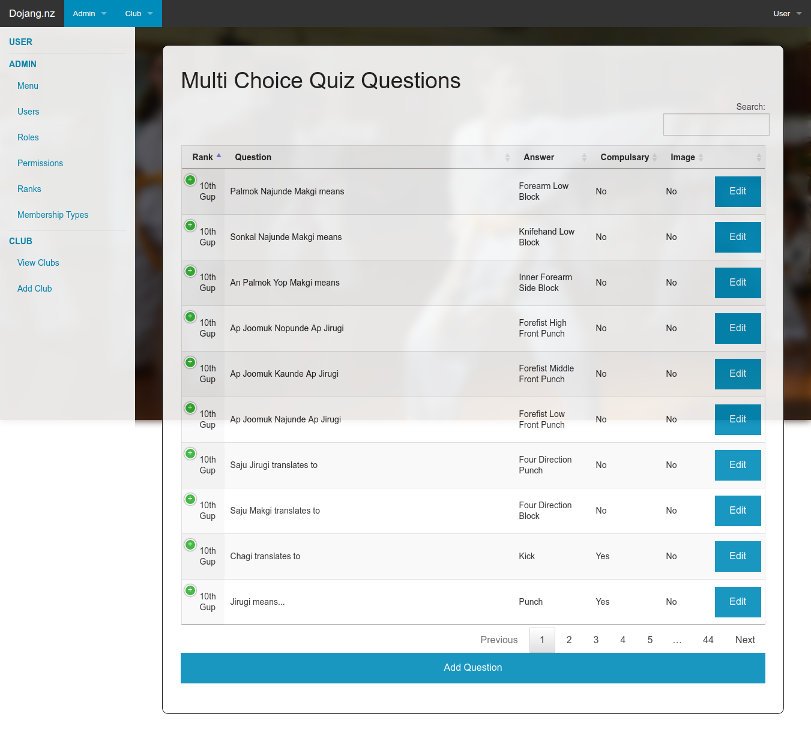 NOTE: Check the routes in /app/Http/routes.php. The routes are very limited! NO ROUTE FOR ADMIN???
 - I found gulpfile.js in the root of the website, so I think I need to use npm and gulp to compile the saas:
Use ‘npm install’ to install required modules
123456789101112131415161718192021222324252627282930313233343536373839404142434445464748495051525354555657585960616263646566676869707172737475767778teddy@teddy-K43SJ:~/Documents/works/laravel/quiz$ npm installnpm WARN deprecated gulp-minify-css@0.3.13: Please use gulp-clean-cssnpm WARN deprecated minimatch@2.0.10: Please update to minimatch 3.0.2 or higher to avoid a RegExp DoS issuenpm WARN deprecated minimatch@0.2.14: Please update to minimatch 3.0.2 or higher to avoid a RegExp DoS issuenpm WARN deprecated lodash@1.0.2: lodash@<2.0.0 is no longer maintained. Upgrade to lodash@^3.0.0npm WARN deprecated graceful-fs@1.2.3: graceful-fs v3.0.0 and before will fail on node releases >= v7.0. Please update to graceful-fs@^4.0.0 as soon as possible. Use 'npm ls graceful-fs' to find it in the tree.npm WARN deprecated win-spawn@2.0.0: use [cross-spawn](https://github.com/IndigoUnited/node-cross-spawn) or [cross-spawn-async](https://github.com/IndigoUnited/node-cross-spawn-async) instead.npm WARN deprecated minimatch@1.0.0: Please update to minimatch 3.0.2 or higher to avoid a RegExp DoS issuenpm WARN deprecated minimatch@0.3.0: Please update to minimatch 3.0.2 or higher to avoid a RegExp DoS issuenpm WARN optional dep failed, continuing fsevents@1.0.15-> node-sass@3.13.1 install /home/teddy/Documents/works/laravel/quiz/node_modules/laravel-elixir/node_modules/gulp-sass/node_modules/node-sass> node scripts/install.jsDownloading binary from https://github.com/sass/node-sass/releases/download/v3.13.1/linux-x64-46_binding.nodeDownload completeBinary saved to /home/teddy/Documents/works/laravel/quiz/node_modules/laravel-elixir/node_modules/gulp-sass/node_modules/node-sass/vendor/linux-x64-46/binding.nodeCaching binary to /home/teddy/.npm/node-sass/3.13.1/linux-x64-46_binding.node> node-sass@3.13.1 postinstall /home/teddy/Documents/works/laravel/quiz/node_modules/laravel-elixir/node_modules/gulp-sass/node_modules/node-sass> node scripts/build.jsBinary found at /home/teddy/Documents/works/laravel/quiz/node_modules/laravel-elixir/node_modules/gulp-sass/node_modules/node-sass/vendor/linux-x64-46/binding.nodeTesting binaryBinary is finebootstrap-sass@3.3.7 node_modules/bootstrap-sassgulp@3.9.1 node_modules/gulp├── interpret@1.0.1├── pretty-hrtime@1.0.3├── deprecated@0.0.1├── archy@1.0.0├── minimist@1.2.0├── v8flags@2.0.11 (user-home@1.1.1)├── semver@4.3.6├── tildify@1.2.0 (os-homedir@1.0.2)├── chalk@1.1.3 (supports-color@2.0.0, escape-string-regexp@1.0.5, ansi-styles@2.2.1, has-ansi@2.0.0, strip-ansi@3.0.1)├── orchestrator@0.3.8 (stream-consume@0.1.0, sequencify@0.0.7, end-of-stream@0.1.5)├── gulp-util@3.0.8 (array-differ@1.0.0, lodash._reinterpolate@3.0.0, lodash._reescape@3.0.0, lodash._reevaluate@3.0.0, object-assign@3.0.0, array-uniq@1.0.3, beeper@1.1.1, dateformat@2.0.0, replace-ext@0.0.1, has-gulplog@0.1.0, fancy-log@1.3.0, vinyl@0.5.3, gulplog@1.0.0, lodash.template@3.6.2, through2@2.0.3, multipipe@0.1.2)├── vinyl-fs@0.3.14 (strip-bom@1.0.0, vinyl@0.4.6, defaults@1.0.3, graceful-fs@3.0.11, mkdirp@0.5.1, through2@0.6.5, glob-stream@3.1.18, glob-watcher@0.0.6)└── liftoff@2.3.0 (lodash.isstring@4.0.1, lodash.isplainobject@4.0.6, lodash.mapvalues@4.6.0, rechoir@0.6.2, extend@3.0.0, flagged-respawn@0.3.2, resolve@1.2.0, fined@1.0.2, findup-sync@0.4.3)laravel-elixir@2.3.13 node_modules/laravel-elixir├── gulp-rename@1.2.2├── underscore@1.8.3├── install@0.1.8├── require-dir@0.1.0├── partialify@3.1.6 (string-to-js@0.0.1, through@2.3.8)├── run-sequence@1.2.2 (chalk@1.1.3)├── merge-stream@0.1.8 (through2@0.6.5)├── gulp-rev@2.0.1 (object-assign@1.0.0, through2@0.6.5)├── vinyl-paths@1.0.0 (through2@0.6.5)├── vinyl-source-stream@1.1.0 (vinyl@0.4.6, through2@0.6.5)├── gulp-filter@1.0.2 (through2@0.6.5, multimatch@0.3.0)├── gulp-shell@0.2.11 (async@0.9.2, lodash@2.4.2, through2@0.6.5)├── vinyl-buffer@1.0.0 (through2@0.6.5, bl@0.9.5)├── parse-filepath@0.5.0 (path-ends-with@0.2.3)├── gulp-concat@2.6.1 (concat-with-sourcemaps@1.0.4, vinyl@2.0.1, through2@2.0.3)├── gulp-coffee@2.3.3 (merge@1.2.0, coffee-script@1.12.2, vinyl-sourcemaps-apply@0.2.1, through2@2.0.3)├── gulp-util@3.0.8 (array-differ@1.0.0, lodash._reevaluate@3.0.0, lodash._reescape@3.0.0, lodash._reinterpolate@3.0.0, array-uniq@1.0.3, object-assign@3.0.0, beeper@1.1.1, dateformat@2.0.0, replace-ext@0.0.1, has-gulplog@0.1.0, fancy-log@1.3.0, minimist@1.2.0, vinyl@0.5.3, lodash.template@3.6.2, gulplog@1.0.0, chalk@1.1.3, through2@2.0.3, multipipe@0.1.2)├── del@0.1.3 (is-path-cwd@1.0.0, each-async@1.1.1, is-path-in-cwd@1.0.0, globby@0.1.1, rimraf@2.5.4)├── gulp-load-plugins@0.7.1 (multimatch@1.0.0, findup-sync@0.1.3)├── gulp-if@1.2.5 (through2@0.6.5, gulp-match@0.2.1, ternary-stream@1.2.3)├── gulp-sourcemaps@1.9.1 (detect-newline@2.1.0, graceful-fs@4.1.11, convert-source-map@1.3.0, strip-bom@2.0.0, source-map@0.5.6, vinyl@1.2.0, acorn@4.0.4, through2@2.0.3, debug-fabulous@0.0.4, css@2.2.1)├── gulp-minify-css@0.3.13 (memory-cache@0.0.5, through2@0.6.5, bufferstreams@0.0.2, vinyl-sourcemaps-apply@0.1.4, clean-css@3.0.10)├── gulp-ruby-sass@1.4.0 (slash@1.0.0, path-exists@1.0.0, object-assign@2.1.1, dargs@2.1.0, os-tmpdir@1.0.2, win-spawn@2.0.0, convert-source-map@1.3.0, each-async@1.1.1, md5-hex@1.3.0, mkdirp@0.5.1, glob@5.0.15, rimraf@2.5.4, vinyl-fs@1.0.0)├── gulp-uglify@1.5.4 (uglify-save-license@0.4.1, deap@1.0.0, isobject@2.1.0, vinyl-sourcemaps-apply@0.2.1, fancy-log@1.3.0, through2@2.0.3, uglify-js@2.6.4)├── gulp-phpunit@0.6.3 (map-stream@0.0.6, gulp-util@2.2.20)├── gulp-phpspec@0.4.2 (map-stream@0.0.4, chalk@1.1.3, chai@2.3.0, gulp-todo@2.6.2, gulp-logger@0.0.2, gulp-util@2.2.20, expect@1.20.2)├── gulp-notify@1.8.0 (node.extend@1.1.6, lodash.template@2.4.1, through2@1.1.1, gulp-util@2.2.20, node-notifier@3.4.1)├── browserify@9.0.8 (string_decoder@0.10.31, inherits@2.0.3, isarray@0.0.1, https-browserify@0.0.1, path-browserify@0.0.0, tty-browserify@0.0.0, constants-browserify@0.0.1, builtins@0.0.7, process@0.10.1, defined@0.0.0, os-browserify@0.1.2, commondir@0.0.1, punycode@1.2.4, stream-browserify@1.0.0, duplexer2@0.0.2, xtend@3.0.0, deep-equal@1.0.1, assert@1.3.0, shell-quote@0.0.1, domain-browser@1.1.7, shallow-copy@0.0.1, querystring-es3@0.2.1, through2@1.1.1, concat-stream@1.4.10, events@1.0.2, has@1.0.1, parents@1.0.1, console-browserify@1.1.0, vm-browserify@0.0.4, readable-stream@1.1.14, timers-browserify@1.4.2, util@0.10.3, read-only-stream@1.1.1, subarg@1.0.0, url@0.10.3, http-browserify@1.7.0, glob@4.5.3, shasum@1.0.2, buffer@3.6.0, resolve@1.2.0, JSONStream@0.10.0, labeled-stream-splicer@1.0.2, browserify-zlib@0.1.4, syntax-error@1.1.6, browser-resolve@1.11.2, deps-sort@1.3.9, browser-pack@4.0.4, crypto-browserify@3.11.0, insert-module-globals@6.6.3, module-deps@3.9.1)├── watchify@3.8.0 (defined@1.0.0, xtend@4.0.1, through2@2.0.3, outpipe@1.1.1, anymatch@1.3.0, chokidar@1.6.1, browserify@13.1.1)├── gulp-autoprefixer@1.0.1 (object-assign@1.0.0, through2@0.6.5, vinyl-sourcemaps-apply@0.1.4, autoprefixer-core@3.1.2)├── gulp-less@3.3.0 (object-assign@4.1.0, vinyl-sourcemaps-apply@0.2.1, through2@2.0.3, accord@0.26.4, less@2.7.1)├── babelify@6.4.0 (object-assign@4.1.0, babel-core@5.8.38)├── gulp-babel@5.3.0 (object-assign@4.1.0, replace-ext@0.0.1, vinyl-sourcemaps-apply@0.2.1, through2@2.0.3, babel-core@5.8.38)├── npm@2.15.11└── gulp-sass@2.3.2 (lodash.clonedeep@4.5.0, vinyl-sourcemaps-apply@0.2.1, through2@2.0.3, node-sass@3.13.1)
Use ‘gulp’ to compile saas
12345678teddy@teddy-K43SJ:~/Documents/works/laravel/quiz$ gulp[16:36:24] Using gulpfile ~/Documents/works/laravel/quiz/gulpfile.js[16:36:24] Starting 'default'...[16:36:24] Starting 'sass'...[16:36:24] Running Sass: resources/assets/sass/app.scss[16:36:25] Finished 'default' after 555 ms[16:36:26] gulp-notify: [Laravel Elixir] Sass Compiled![16:36:26] Finished 'sass' after 2 s
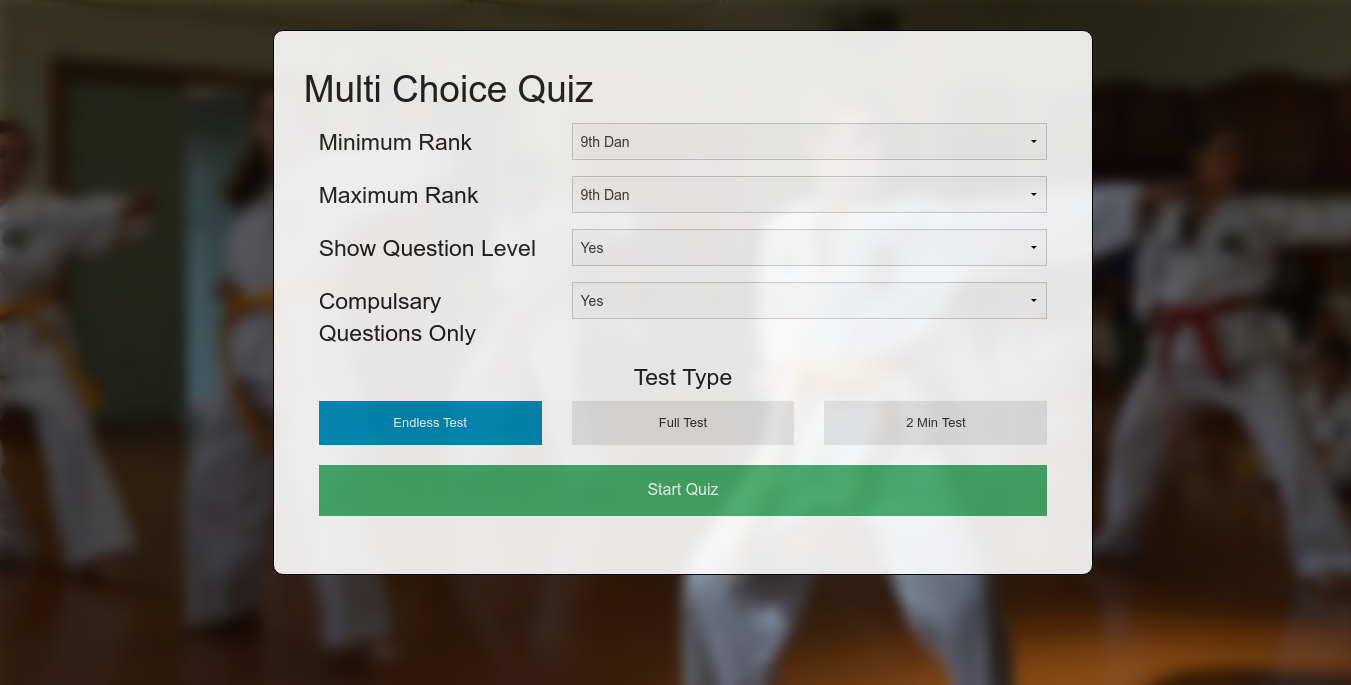
I DONT KNOW HOW TO DO NEXT OR HOW THE NPM AND GULP AFFECT THE WEBSITE! NEED TO LEARN ABOUT THESE!!! - On the homepage ‘http://localhost:8000’, I clicked ‘Start Quiz’ button but I got NOT FOUND error (ajax error) at the chrome console. I found it is triggered by ‘onclick=”startQuiz()”‘ in /resources/views/quiz/view.blade.php and the javascript command in /public/js/functions.js. I NEED TO MODIFY A FEW SETTING IN functions.js file! First replace the ‘base_dir’ variable like below:
12//var base_dir='http://localhost/quiz/public/ajax/';var base_dir='http://localhost/works/laravel/quiz/public/ajax/';
FROM NOW ON, I HAVE TO USE ‘http://localhost/works/laravel/quiz/public/’ INSTEAD OF ‘http://localhost:8000’! FOR HOMEPAGE AND ‘http://localhost/works/laravel/quiz/public/admin/quiz/questions’ FOR ADMIN PAGE!
NOW THE AJAX IS WORKING!! ‘Start Quiz’ button IS WORKING!
Another errors detected:
123localhost/:19 GET http://localhost/works/laravel/quiz/public/foundation-5.5.2/js/vendor/modernizr.jslocalhost/:22 GET http://localhost/works/laravel/quiz/public/foundation-5.5.2/js/vendor/fastclick.jslocalhost/:22 GET http://localhost/works/laravel/quiz/public/foundation-5.5.2/js/vendor/fastclick.js 404 (Not Found)
Sometimes I got unknow error when trying to edit the question (http://localhost/works/laravel/quiz/public/admin/quiz/question/376).
Solution: I need to put ‘ini_set(‘display_errors’,1);’ in /app/Http/routes.php to enable to debug the errors. It seems the ‘storage’ directory HAS NOT BEEN SET THE PERMISSION. So make sure the step #5 is executed first! - Improvements:
Many links in the admin page can’t be opened or don’t have the correct routes. Here I want to fix or develop the links.
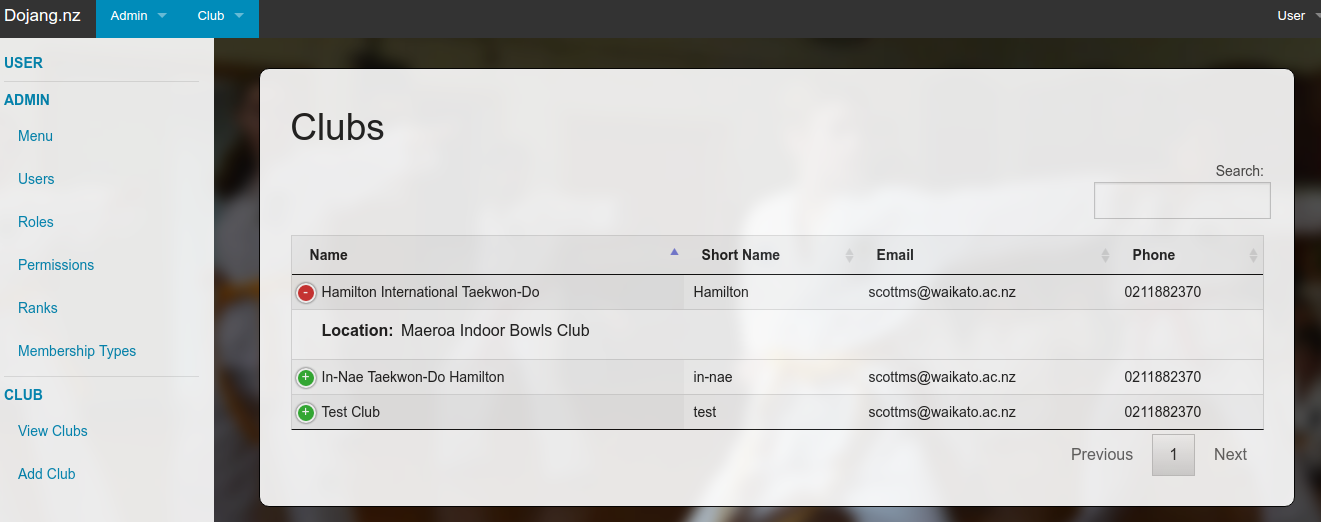
Club Admin (http://localhost/works/laravel/quiz/public/admin/club)
Add a new route in /app/Http/routes.php
1Route::get('admin/club', 'ClubController@viewClubs');
Create a new controller ‘ClubController.php’ in /app/Http/Controllers/
12345678910111213141516namespace App\Http\Controllers;use Illuminate\Http\Request;use App\models\Club;class ClubController extends Controller{public function viewClubs(Request $request){$data=array();$data['title']='Clubs';$data['clubs']=Club::get();return view('club.view',$data);}}
The ‘Club’ model is already exist in /app/models/ directory! Here we want to show all the club in our database!
The data would be showed up by /resources/views/club/view.blade.php like this: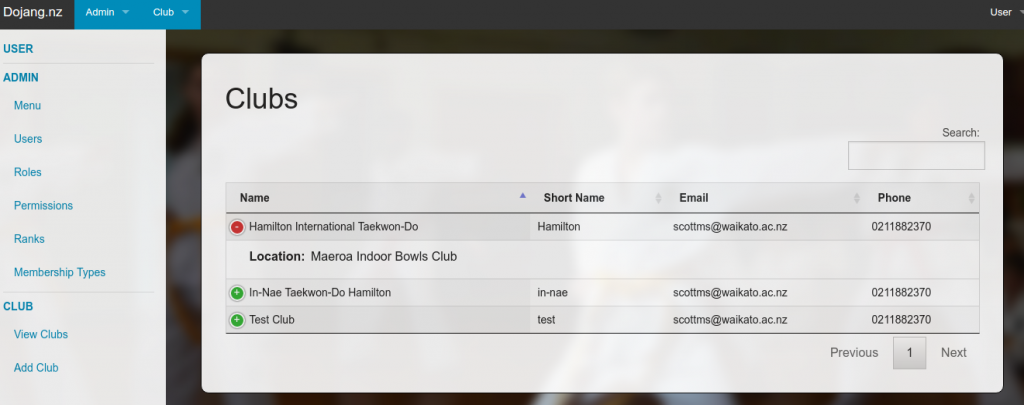 Add/Save New Club (http://localhost/works/laravel/quiz/public/admin/club/add)
Add two new routes in /app/Http/routes.php
12Route::get('admin/club/add', 'ClubController@addClub');Route::post('admin/club/add', 'ClubController@saveAddClub');
Modify a controller ‘ClubController.php’ in /app/Http/Controllers/
1234567891011121314151617181920212223242526272829303132333435363738...use App\models\Club;use App\models\MartialArt;use Validator;class ClubController extends Controller{public function viewClubs(Request $request){...}public function addClub(){$data=array();$data['title']='Add Club';$data['martial_art']=MartialArt::get();return view('club.add',$data);}public function saveAddClub(Request $request){$request->flash();$validator = Validator::make($request->all(), ['club_name' => 'required','club_short_name' => 'required','club_email' => 'required','martial_art_id' => 'required']);if ($validator->fails()) {return redirect('admin/club/add')->withErrors($validator);}else{$club=new Club($request->all());$club->write();return redirect('admin/club')->with('status', 'Club successfully added');}}}
Add/modify a model ‘Club.php’ in /app/models/ directory:
12345678910111213141516171819202122232425262728293031<?phpnamespace App\models;use Illuminate\Database\Eloquent\Model;use Illuminate\Database\Eloquent\SoftDeletes;use App\models\ClubMeta;class Club extends Model{use SoftDeletes;protected $table = 'club';protected $primaryKey ='club_id';/*** The attributes that are mass assignable.** @var array*/protected $fillable = ['club_name','club_short_name','club_email','club_phone','club_location','club_map_url','martial_art_id'];/*** The attributes excluded from the model's JSON form.** @var array*/protected $dates= ['deleted_at'];public function write(){$this->save();}}
Add new model ‘MartialArt.php’ in /app/models/ directory:
12345678910111213141516171819202122232425262728293031<?phpnamespace App\models;use Illuminate\Database\Eloquent\Model;use Illuminate\Database\Eloquent\SoftDeletes;class MartialArt extends Model{use SoftDeletes;protected $table = 'martial_art';protected $primaryKey ='martial_art_id';/*** The attributes that are mass assignable.** @var array*/protected $fillable = ['martial_art_name'];/*** The attributes excluded from the model's JSON form.** @var array*/protected $dates= ['deleted_at'];public function write(){$this->save();}}
Add a new blade template ‘add.blade.php’ in /resources/views/club/ directory
123456789101112131415161718192021222324252627282930313233343536373839404142434445464748495051525354555657585960616263646566676869707172737475767778@extends('layouts.master')@section('title')@endsection@section('content')<div class="row"><div class="large-8 large-offset-2 columns"><div class="add-panel panel panel-default"><div class="panel-heading"><h3 class="panel-title">{{$title}}</h3></div><br />@if (count($errors) > 0)<div class="alert alert-danger"><ul>@foreach ($errors->all() as $error)<li>{{ $error }}</li>@endforeach</ul></div>@endif<form class="form-horizontal" role="form" method="POST" enctype="multipart/form-data" data-abide><input type="hidden" name="_token" value="{{ csrf_token() }}"><div class="name-field"><label>Club Name <small>required</small><input type="text" class="form-control" name="club_name" value="{{ old('club_name') }}" required></label><small class="error">Club Name is required.</small></div><div class="name-field"><label>Club Short Name <small>required</small><input type="text" class="form-control" name="club_short_name" value="{{ old('club_short_name') }}" required></label><small class="error">Club Short Name is required.</small></div><div class="name-field"><label>Club Email <small>required</small><input type="email" class="form-control" name="club_email" value="{{ old('club_email') }}" required pattern="email"></label><small class="error">Valid Email address is required.</small></div><div class="name-field"><label>Club Phone<input type="text" class="form-control" name="club_phone" value="{{ old('club_phone') }}"></label><small class="error"></small></div><div class="name-field"><label>Club Location<input type="text" class="form-control" name="club_location" value="{{ old('club_location') }}"></label><small class="error"></small></div><div class="name-field"><label>Club Map Url<input type="text" class="form-control" name="club_map_url" value="{{ old('club_map_url') }}"></label><small class="error"></small></div><div class="name-field"><label>Martial Art <small>required</small><select class="form-control" name="martial_art_id" required><option value="">Select Martial Art</option>@foreach($martial_art as $m)<option value="{{$m->martial_art_id}}" {{old('martial_art_id')==$m->martial_art_id?'selected="selected"':''}}>{{$m->martial_art_name}}</option>@endforeach</select></label><small class="error">Martial Art is required.</small></div><button type="submit">Add Club</button></form></div></div></div>@endsection
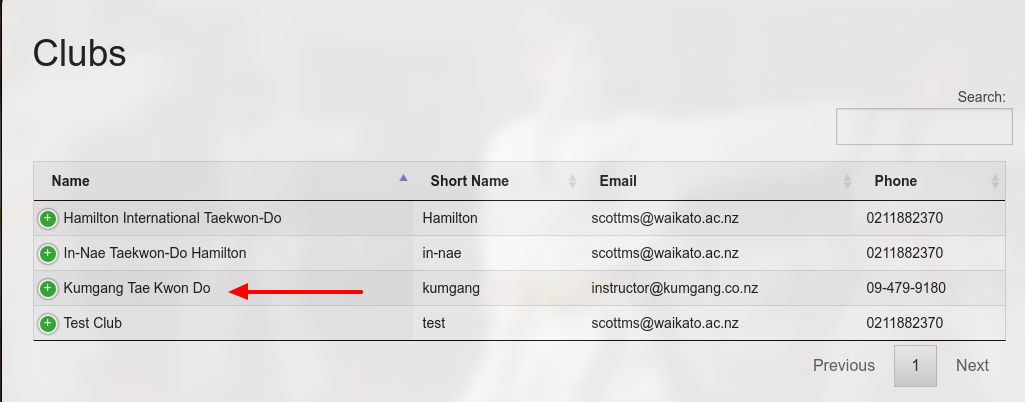
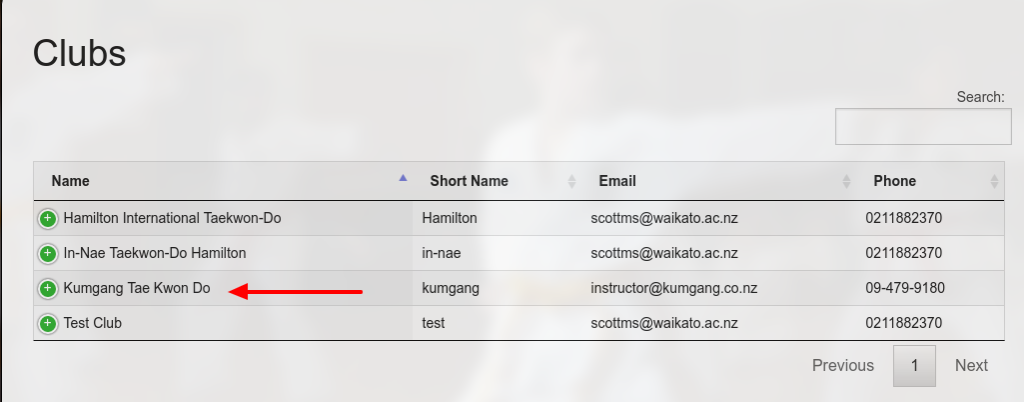
OK. then make a test at http://localhost/works/laravel/quiz/public/admin/club/add.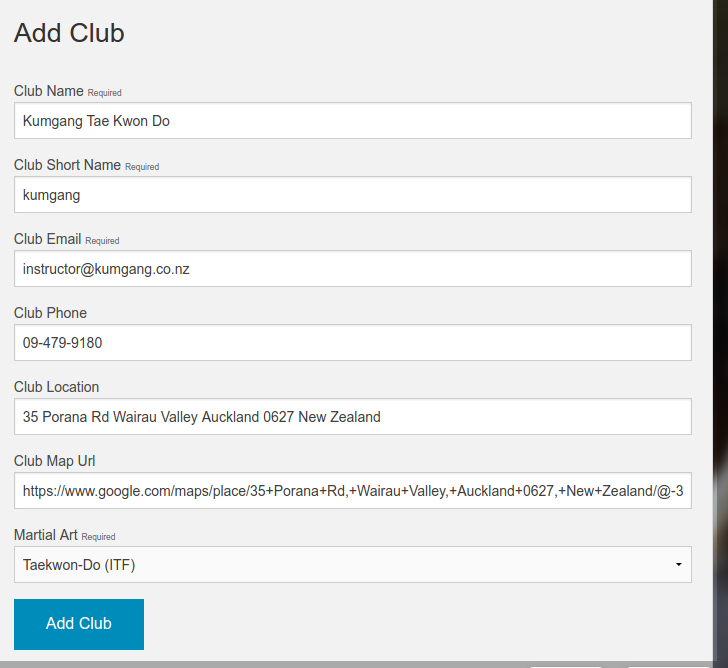 I got this club sample from Kumgang Tae Kwon Do website. Then save the data by clicking ‘Add Club’. Here is the working result:
 Edit/Save Club (http://localhost/works/laravel/quiz/public/admin/club/edit/4)
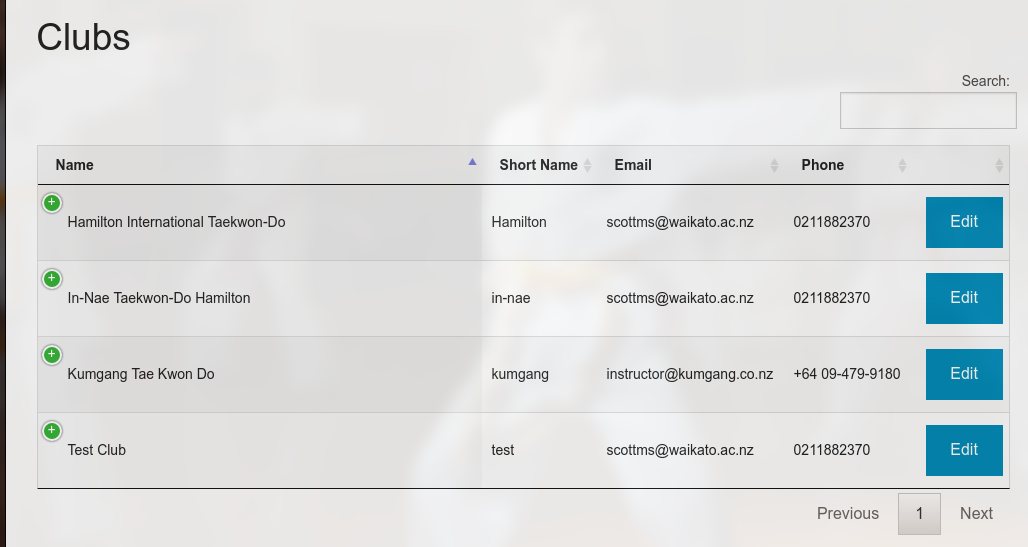
First I need to put ‘Edit’ link on the club admin page (http://localhost/works/laravel/quiz/public/admin/club). Modify ‘view.blade.php’ in /resources/views/club/ directory. Modify the header table to show/hide the needed field (add class ‘all’ to show and ‘none’ to hide)
12345678910111213...<table id="clubTable" class="display responsive nowrap" cellspacing="0" width="100%"><thead><tr><th class="all">Name</th><th class="all">Short Name</th><th class="all">Email</th><th class="all">Phone</th><th class="none">Location</th><th class="all"></th></tr></thead>...
Then arrange the field width by defining the columns (‘columnDefs’) like this:
123456789101112$(document).ready(function() {$('#clubTable').dataTable({responsive: true,"dom": 'f<t>p',"columnDefs": [{ "width": "10%", "targets": 1 },{ "width": "10%", "targets": 2 },{ "width": "10%", "targets": 3 },{ "width": "10%", "targets": 5 }]});});
So here is the new looks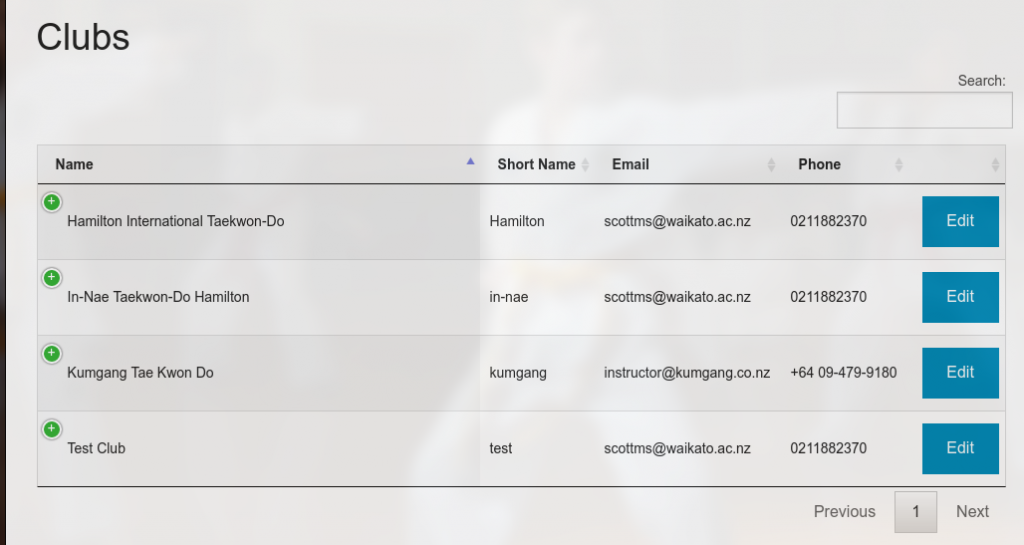 To make the ‘Edit’ links work, add two new routes in /app/Http/routes.php
12Route::get('admin/club/edit/{club_id}', 'ClubController@editClub');Route::post('admin/club/edit/{club_id}', 'ClubController@saveEditClub');
Then Modify ‘ClubController.php’ in /app/Http/Controllers/ dir:
12345678910111213141516171819202122232425262728293031323334353637383940414243444546474849505152<?php...class ClubController extends Controller{public function viewClubs(Request $request){...}public function addClub(){...}public function saveAddClub(Request $request){...}public function editClub(Request $request){$data=array();$data['title']='Edit Club';$data['martial_art']=MartialArt::get();$data['club']=Club::find($request->club_id);return view('club.edit',$data);}public function saveEditClub(Request $request){$request->flash();$validator = Validator::make($request->all(), ['club_name' => 'required','club_short_name' => 'required','club_email' => 'required','martial_art_id' => 'required']);if ($validator->fails()) {return redirect('admin/club/edit/'.$request->club_id)->withErrors($validator);}else{$club=Club::find($request->club_id);$club->club_name=$request->club_name;$club->club_short_name=$request->club_short_name;$club->club_email=$request->club_email;$club->club_phone=$request->club_phone;$club->club_location=$request->club_location;$club->club_map_url=$request->club_map_url;$club->martial_art_id=$request->martial_art_id;$club->write();return redirect('admin/club')->with('status', 'Club successfully updated');}}}
Add/Modify ‘edit.blade.php’ in /resources/views/club/ directory:
12345678910111213141516171819202122232425262728293031323334353637383940414243444546474849505152535455565758596061626364656667686970717273747576777879@extends('layouts.master')@section('title')@endsection@section('content')<div class="row"><div class="large-8 large-offset-2 columns"><div class="add-panel panel panel-default"><div class="panel-heading"><h3 class="panel-title">{{$title}}</h3></div><br />@if (count($errors) > 0)<div class="alert alert-danger"><ul>@foreach ($errors->all() as $error)<li>{{ $error }}</li>@endforeach</ul></div>@endif<form class="form-horizontal" role="form" method="POST" enctype="multipart/form-data" data-abide><input type="hidden" name="_token" value="{{ csrf_token() }}"><input type="hidden" name="club_id" value="{{ $club->club_id }}"><div class="name-field"><label>Club Name <small>required</small><input type="text" class="form-control" name="club_name" value="{{ $club->club_name }}" required></label><small class="error">Club Name is required.</small></div><div class="name-field"><label>Club Short Name <small>required</small><input type="text" class="form-control" name="club_short_name" value="{{ $club->club_short_name }}" required></label><small class="error">Club Short Name is required.</small></div><div class="name-field"><label>Club Email <small>required</small><input type="email" class="form-control" name="club_email" value="{{ $club->club_email }}" required pattern="email"></label><small class="error">Valid Email address is required.</small></div><div class="name-field"><label>Club Phone<input type="text" class="form-control" name="club_phone" value="{{ $club->club_phone }}"></label><small class="error"></small></div><div class="name-field"><label>Club Location<input type="text" class="form-control" name="club_location" value="{{ $club->club_location }}"></label><small class="error"></small></div><div class="name-field"><label>Club Map Url<input type="text" class="form-control" name="club_map_url" value="{{ $club->club_map_url }}"></label><small class="error"></small></div><div class="name-field"><label>Martial Art <small>required</small><select class="form-control" name="martial_art_id" required><option value="">Select Martial Art</option>@foreach($martial_art as $m)<option value="{{$m->martial_art_id}}" {{$club->martial_art_id==$m->martial_art_id?'selected="selected"':''}}>{{$m->martial_art_name}}</option>@endforeach</select></label><small class="error">Martial Art is required.</small></div><button type="submit">Update Club</button></form></div></div></div>@endsection
OK. Now the Club admin can be used properly.
NOTES: When I save the new club or the edited club, I don’t find the flash status to show the data is saved/updated successfully!
HOW TO DELETE CLUB???