Ref: APIS, WORDPRESS TIPS AND TRICKS, USING OAUTH IN WORDPRESS PLUGINS, PART 1: THE BASICS
How to write a WordPress plugin
- Make sure you already registered on Upwork (https://upwork.com) and have any Upwork key. If not go to https://developers.upwork.com and get the keys (API Key, API secret, redirect URL, etc). Apply for the API on https://www.upwork.com/services/api/apply
- Go into the plugin directory (/wp-content/plugins/) then create a new directory ‘upwork’. then in the new directory, create a new file ‘upwork.php’
- Here is our first content in upwork.php file
1234567891011121314151617181920212223<?php/** Plugin Name: WP Upwork* Version: 1* Plugin URI: http://advchaweb.com/* Description: A plugin to connect to upwork API* Author: Satria Faestha* Author URI: http://advchaweb.com/** This program is free software: you can redistribute it and/or modify* it under the terms of the GNU General Public License as published by* the Free Software Foundation, either version 3 of the License, or* (at your option) any later version.** This program is distributed in the hope that it will be useful,* but WITHOUT ANY WARRANTY; without even the implied warranty of* MERCHANTABILITY or FITNESS FOR A PARTICULAR PURPOSE. See the* GNU General Public License for more details.** You should have received a copy of the GNU General Public License* along with this program. If not, see <http://www.gnu.org/licenses/>.**/
From here, we can see the plugin ‘Upwork’ in the wordpress admin -> plugin Then please ‘Activate’ it.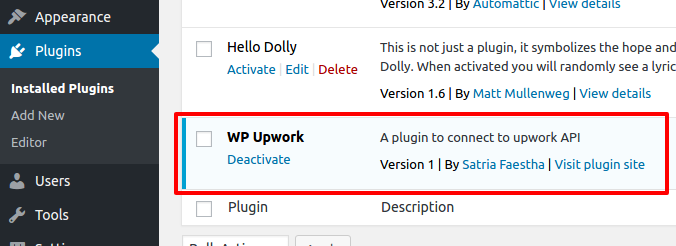
- Create a class ‘WP_Upwork’ and instantiate it in upwork.php file
12345678910111213141516171819202122232425262728293031323334353637383940if ( ! defined( 'ABSPATH' ) ) exit;if(!class_exists('WP_Upwork')){class WP_Upwork{/*** Construct the plugin object*/public function __construct(){// register actions} // END public function __construct/*** Activate the plugin*/public static function activate(){// Do nothing} // END public static function activate/*** Deactivate the plugin*/public static function deactivate(){// Do nothing} // END public static function deactivate} // END class WP_Upwork} // END if(!class_exists('WP_Upwork'))//Instantiate WP_Upwork classif(class_exists('WP_Upwork')){// Installation and uninstallation hooksregister_activation_hook(__FILE__, array('WP_Upwork', 'activate'));register_deactivation_hook(__FILE__, array('WP_Upwork', 'deactivate'));// instantiate the plugin class$wp_upwork = new WP_Upwork();} - Add the setting page
To add the setting page, we need to add actions and callback in constructor of WP_Upwork class.
123456789101112131415161718if(!class_exists('WP_Upwork')){class WP_Upwork{/*** Construct the plugin object*/public function __construct(){// register actions// Register plugin settingsadd_action('admin_init', array(&$this, 'admin_init'));// Add settings page to menuadd_action('admin_menu', array(&$this, 'add_menu'));} // END public function __construct...} // END class WP_Upwork} // END if(!class_exists('WP_Upwork'))
First we set and register the Upwork setting (API Key and Secret) in WP_Upwork class:
12345678910111213141516171819202122232425262728293031323334353637383940414243444546474849505152535455/*** hook into WP's admin_init action hook*/public function admin_init(){// register your plugin's settingsregister_setting( 'wp_upwork-group', 'wp_upwork_api_key' );register_setting( 'wp_upwork-group', 'wp_upwork_api_secret' );// add your settings sectionadd_settings_section('wp_upwork-section','Upwork API Settings',array( &$this, 'settings_section_wp_upwork'),'wp_upwork_settings');// add your setting's fieldsadd_settings_field('wp_upwork-api_key','API Key',array(&$this, 'settings_field_input_text'),'wp_upwork_settings','wp_upwork-section',array('field' => 'wp_upwork_api_key'));// add your setting's fieldsadd_settings_field('wp_upwork-wp_upwork_api_secret','API Secret',array(&$this, 'settings_field_input_text'),'wp_upwork_settings','wp_upwork-section',array('field' => 'wp_upwork_api_secret'));}public function settings_section_wp_upwork(){// Think of this as help text for the section.echo 'Upwork API Setting:';}/*** This function provides text inputs for settings fields*/public function settings_field_input_text($args){// Get the field name from the $args array$field = esc_attr($args['field']);// Get the value of this setting$value = get_option($field);// echo a proper input type="text"echo sprintf('<input type="text" name="%s" id="%s" value="%s" />', $field, $field, $value);} // END public function settings_field_input_text($args)
Then we add the menu ‘WP Upwork Setting’ in the Settings menu. Let’s add some code in WP_Upwork class:
123456789101112131415161718192021222324252627282930313233343536373839/*** add a menu*/public function add_menu(){// Add a page to manage this plugin's settingsadd_options_page('WP Upwork Settings','WP Upwork Settings','manage_options','wp_upwork',array(&$this, 'plugin_settings_page'));} // END public function add_menu()/*** Menu Callback*/public function plugin_settings_page(){if(!current_user_can('manage_options')){wp_die(__('You do not have sufficient permissions to access this page.'));}// Render the settings template//include(sprintf("%s/templates/settings.php", dirname(__FILE__)));?><div class="wrap"><h2>Upwork API Settings</h2><p>You'll need to go to the <a href="https://developers.upwork.com">Upwork Developer Page</a> to setup your project and setup the values below.</p><form action="options.php" method="POST"><?php settings_fields( 'wp_upwork-group' ); ?><?php do_settings_sections( 'wp_upwork_settings' ); ?><?php submit_button(); ?></form></div><?php} // END public function plugin_settings_page()
Okay. Here is the menu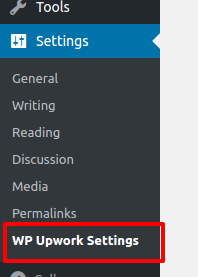 And here is the ‘Upwork API Settings’ page (http://localhost/works/wordpress_local/wp-admin/options-general.php?page=wp_upwork)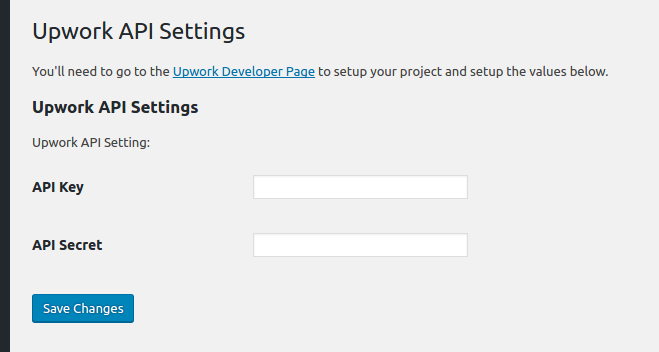
- Save the settings
Fill the API Key and API Secret data above given by upwork then click ‘Save Changes’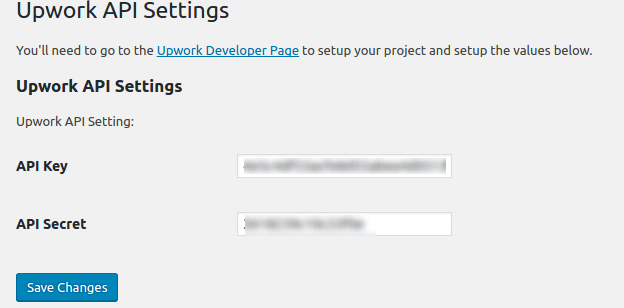 The above values would be saved in the database at ‘wp_options’ table. You can see them in the table like this:
 Here is my Upwork API Settings:
 - Add Setting link next to activate/deactivate link in the plugin management list.
In the WP_Upwork class constructor, add filter ‘plugin_action_links’ like this line:
123456public function __construct(){...// Add settings link to plugins pageadd_filter( 'plugin_action_links_' . plugin_basename(__FILE__) , array( &$this , 'add_settings_link' ) );} // END public function __construct
Then define the function ‘add_settings_link’ in the WP_Upwork class:
1234567// Add the settings link to the plugins pagefunction add_settings_link($links){$settings_link = '<a href="options-general.php?page=wp_upwork">Settings</a>';array_unshift($links, $settings_link);return $links;}
Here is the result looks like: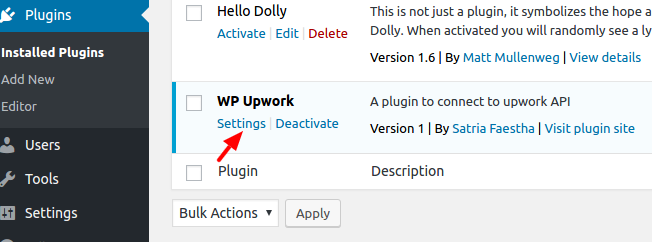
- Refactor our plugin structure a bit. Create a new directory ‘includes’ and add a new file in it ‘settings.php’. I want to move the settings in to the file to make the plugin structure better (Please learn WordPress plugin boilerplate and read How to Build a WordPress Plugin (part 1)).
Here is the content of /includes/settings.php:
123456789101112131415161718192021222324252627282930313233343536373839404142434445464748495051525354555657585960616263646566676869707172737475767778798081828384858687888990919293949596979899100101102103104105106107108109110111112113114115116<?phpif ( ! defined( 'ABSPATH' ) ) exit;if(!class_exists('WP_Upwork_Settings')){class WP_Upwork_Settings{/*** Construct the plugin object*/public function __construct(){// register actions// Register plugin settingsadd_action('admin_init', array(&$this, 'admin_init'));// Add settings page to menuadd_action('admin_menu', array(&$this, 'add_menu'));} // END public function __construct/*** hook into WP's admin_init action hook*/public function admin_init(){// register your plugin's settingsregister_setting( 'wp_upwork-group', 'wp_upwork_api_key' );register_setting( 'wp_upwork-group', 'wp_upwork_api_secret' );// add your settings sectionadd_settings_section('wp_upwork-section',__('Upwork API Settings'),array( &$this, 'settings_section_wp_upwork'),'wp_upwork_settings');// add your setting's fieldsadd_settings_field('wp_upwork-api_key',__('API Key'),array(&$this, 'settings_field_input_text'),'wp_upwork_settings','wp_upwork-section',array('field' => 'wp_upwork_api_key'));// add your setting's fieldsadd_settings_field('wp_upwork-wp_upwork_api_secret',__('API Secret'),array(&$this, 'settings_field_input_text'),'wp_upwork_settings','wp_upwork-section',array('field' => 'wp_upwork_api_secret'));}public function settings_section_wp_upwork(){// Think of this as help text for the section.//echo 'Upwork API Setting:';_e('Upwork API Setting:','wp_upwork');}/*** This function provides text inputs for settings fields*/public function settings_field_input_text($args){// Get the field name from the $args array$field = esc_attr($args['field']);// Get the value of this setting$value = get_option($field);// echo a proper input type="text"echo sprintf('<input type="text" name="%s" id="%s" value="%s" />', $field, $field, $value);} // END public function settings_field_input_text($args)/*** add a menu*/public function add_menu(){// Add a page to manage this plugin's settingsadd_options_page(__('WP Upwork Settings'),__('WP Upwork Settings'),'manage_options','wp_upwork',array(&$this, 'plugin_settings_page'));} // END public function add_menu()/*** Menu Callback*/public function plugin_settings_page(){if(!current_user_can('manage_options')){wp_die(__('You do not have sufficient permissions to access this page.'));}// Render the settings template//include(sprintf("%s/templates/settings.php", dirname(__FILE__)));?><div class="wrap"><h2><?php _e('Upwork API Settings','wp_upwork'); ?></h2><p><?php _e('You\'ll need to go to the <a href="https://developers.upwork.com">Upwork Developer Page</a> to setup your project and setup the values below.'); ?></p><form action="options.php" method="POST"><?php settings_fields( 'wp_upwork-group' ); ?><?php do_settings_sections( 'wp_upwork_settings' ); ?><?php submit_button(); ?></form></div><?php} // END public function plugin_settings_page()} // END class WP_Upwork_Settings} // END if(!class_exists('WP_Upwork_Settings'))
And here is our main plugin file ‘upwork.php’ content:
12345678910111213141516171819202122232425262728293031323334353637383940414243444546474849505152535455if ( ! defined( 'ABSPATH' ) ) exit;if( ! defined('WP_UPWORK_PLUGIN_DIR' ) ) {define('WP_UPWORK_PLUGIN_DIR', dirname(__FILE__));}if(!class_exists('WP_Upwork')){class WP_Upwork{/*** Construct the plugin object*/public function __construct(){//Initialize settingsrequire_once(WP_UPWORK_PLUGIN_DIR . '/includes/settings.php');$WP_Upwork_Settings=new WP_Upwork_Settings();// Add settings link to plugins pageadd_filter( 'plugin_action_links_' . plugin_basename(__FILE__) , array( &$this , 'add_settings_link' ) );}/*** Activate the plugin*/public static function activate(){// Do nothing} // END public static function activate/*** Deactivate the plugin*/public static function deactivate(){// Do nothing} // END public static function deactivate// Add the settings link to the plugins pagefunction add_settings_link($links){$settings_link = '<a href="options-general.php?page=wp_upwork">Settings</a>';array_unshift($links, $settings_link);return $links;}} // END class WP_Upwork} // END if(!class_exists('WP_Upwork'))//Instantiate WP_Upwork classif(class_exists('WP_Upwork')){// Installation and uninstallation hooksregister_activation_hook(__FILE__, array('WP_Upwork', 'activate'));register_deactivation_hook(__FILE__, array('WP_Upwork', 'deactivate'));// instantiate the plugin class$wp_upwork = new WP_Upwork();}
Somehow I can’t put the filter ‘plugin_action_links_’ . plugin_basename(__FILE__)’ in ‘WP_Upwork_Settings’ class! The setting link can’t be displayed in the plugin main list! - Now I want to connect to Upwork API with My API key and API Secret provided by Upwork. When the connection is success, I would get the access token! I need to store the token to get more access from Upwork like searching the jobs and many more.
NOTE: I MADE A WRONG THING HERE! WHAT I THOUGHT AS ACCESS TOKEN ACTUALLY IS A REQUEST TOKEN! AND FINALLY IT’S NOT WORKING FROM HERE #9 UNTIL #13
Modify /includes/settings.php to show the token below the API Key and Secret (The token must be from Upwork so I dont have to type it manually). The screnario is every ‘Save’ button is pressed, beside the keys, the token would be updated as well. So in ‘WP_Upwork_Settings’ class constructor, add this:
12345678910111213class WP_Upwork_Settings{/*** Construct the plugin object*/protected $action = 'wp_upwork';protected $option_name = 'wp_upwork';public function __construct(){...// Get access token after saving dataadd_action('init', array(&$this, 'get_access_token'));} // END public function __construct
Then show the label for the access token in ‘admin_init’ and ‘settings_field_label’ function:
123456789101112131415161718192021222324252627282930public function admin_init(){// register your plugin's settings...register_setting( 'wp_upwork-group', 'wp_upwork_access_token' );...// add your setting's fieldsadd_settings_field('wp_upwork-wp_upwork_access_token',__('Access Token'),array(&$this, 'settings_field_label'),'wp_upwork_settings','wp_upwork-section',array('field' => 'wp_upwork_access_token'));}.../*** This function provides label for settings fields*/public function settings_field_label($args){// Get the field name from the $args array$field = esc_attr($args['field']);// Get the value of this setting$value = get_option($field);// echo a proper input type="text"echo sprintf('<label name="%s" id="%s">%s</label>', $field, $field, $value);} // END public function settings_field_input_text($args)
Modify ‘plugin_settings_page’ function to add a new hidden value ‘wp_nonce_field’ and change the button title to ‘Save and Get Access Token’.
12345678910111213141516public function plugin_settings_page(){...?><div class="wrap"><h2><?php _e('Upwork API Settings','wp_upwork'); ?></h2><p><?php _e('You\'ll need to go to the <a href="https://developers.upwork.com">Upwork Developer Page</a> to setup your project and setup the values below.'); ?></p><form action="options-general.php?page=wp_upwork" method="POST"><?php settings_fields( 'wp_upwork-group' ); ?><?php wp_nonce_field( $this->action, $this->option_name . '_nonce', FALSE ); ?><?php do_settings_sections( 'wp_upwork_settings' ); ?><?php submit_button(__('Save and Get Access Token')); ?></form></div><?php} // END public function plugin_settings_page()
The hidden value would be submitted and be caught to inspect the keys and get the access token in ‘get_access_token’ function.
12345678910111213141516171819202122232425262728293031323334/*** Get access token after saving data*/public function get_access_token(){if(isset($_POST[ $this->option_name . '_nonce' ])){if ( wp_verify_nonce( $_POST[ $this->option_name . '_nonce' ], $this->action ) ){if ( isset ( $_POST[ 'wp_upwork_api_key' ] ) && isset ( $_POST[ 'wp_upwork_api_secret' ] )){/*require_once(WP_UPWORK_PLUGIN_DIR . '/src/Upwork/API/Config.php');NO MORE INCLUDE.USE AUTOLOAD INSTEAD*/$api_key=$_POST[ 'wp_upwork_api_key' ];$api_secret=$_POST[ 'wp_upwork_api_secret' ];$my_config=array('consumerKey' => $api_key,'consumerSecret' => $api_secret,'accessToken' => NULL, // got access token'accessSecret' => NULL, // got access secret'requestToken' => NULL, // got request token'requestSecret' => NULL, // got request secret'verifySsl' => false,'mode' => 'web','authType' => 'OAuthPHPLib','debug' => false);$config=new \Upwork\API\Config($my_config);//echo $config::get('consumerKey');$client=new \Upwork\API\Client($config);//$requestTokenInfo = $client->getRequestToken();var_dump($client->getRequestToken());}exit;}}} // END public function admin_post()
There is an important setting to pass the configuration beside ‘consumer key’ and ‘consumer secret’, it’s ‘authType’. I tried ‘OAuth1’ but it didn’t work. the work is ‘OAuthPHPLib’. - Use composer to download the Upwork API for PHP (https://github.com/upwork/php-upwork). Create a new composer.json file in our main plugin directory. Here is the content:
123456{"name": "advcha/upwork","require": {"upwork/php-upwork": "dev-master"}}
Now use terminal and download the API PHP library
12345678910teddy@teddy-K43SJ:~$ cd Documents/works/wordpress_local/wp-content/plugins/upwork/teddy@teddy-K43SJ:~/Documents/works/wordpress_local/wp-content/plugins/upwork$ composer updateLoading composer repositories with package informationUpdating dependencies (including require-dev)- Installing upwork/php-upwork (dev-master b48b104)Downloading: 100%upwork/php-upwork suggests installing ext-oauth (This extension from PECL provides OAuth consumer and provider bindings. See more under http://www.php.net/oauth)Writing lock fileGenerating autoload files
This would create a new directory ‘vendor’ in the main our plugin directory. The API would be there!
Read how to use autoload and composer for developing wordpress plugin: Improving WordPress Development Workflow with Composer, Managing Your WordPress Site with Git and Composer Part 2 – Using Composer to Manage Themes and Plugins and How To Use Autoloading And A Plugin Container In WordPress Plugins. - We need to add the autoload in upwork.php file so we can use the API library:
1require __DIR__ . '/vendor/autoload.php';
With this only single line, we dont need to include/require the API library manually like this (/includes/settings.php at ‘admin_post’ function):
123456/*require_once(WP_UPWORK_PLUGIN_DIR . '/src/Upwork/API/Config.php');require_once(WP_UPWORK_PLUGIN_DIR . '/src/Upwork/API/Client.php');require_once(WP_UPWORK_PLUGIN_DIR . '/src/Upwork/API/Debug.php');require_once(WP_UPWORK_PLUGIN_DIR . '/src/Upwork/API/Interfaces/Client.php');require_once(WP_UPWORK_PLUGIN_DIR . '/src/Upwork/API/AuthTypes/AbstractOAuth.php');require_once(WP_UPWORK_PLUGIN_DIR . '/src/Upwork/API/AuthTypes/OAuth1.php');*/ - Here is how it looks
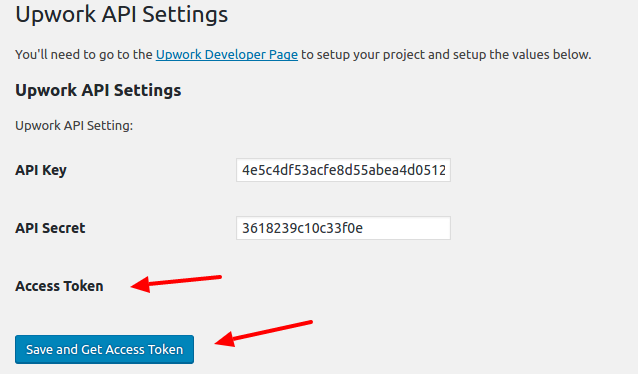 When the button is pressed, if nothing wrong the access token and the access token secret would be revealed like this:
 - Now I want to store the tokens values in database so later we can get the values and use its for Upwork API functions.
Modify ‘get_access_token’ function in /includes/settings.php file to get the tokens and save its. I use ‘update_option’ function to do its (https://codex.wordpress.org/Function_Reference/update_option)
12345678910111213141516171819202122public function get_access_token(){if(isset($_POST[ $this->option_name . '_nonce' ])){if ( wp_verify_nonce( $_POST[ $this->option_name . '_nonce' ], $this->action ) ){if ( isset ( $_POST[ 'wp_upwork_api_key' ] ) && isset ( $_POST[ 'wp_upwork_api_secret' ] )){...$client=new \Upwork\API\Client($config);$requestTokenInfo = $client->getRequestToken();if(isset($requestTokenInfo['oauth_token']) && isset($requestTokenInfo['oauth_token_secret'])){//save/update the tokens in databaseupdate_option('wp_upwork_access_token', $requestTokenInfo['oauth_token']);update_option('wp_upwork_access_token_secret', $requestTokenInfo['oauth_token_secret']);}else{var_dump($client->getRequestToken());exit;}}//exit;}}} // END public function get_access_token()
If everything right, here is how it would looks like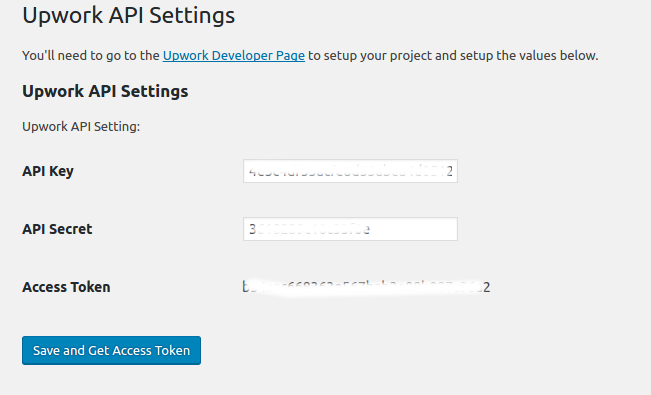 <OLD>
<OLD>
You can also check the tokens values. Not only the value for access token (‘wp_upwork_access_token’) but also for access token secret’s value (‘wp_upwork_access_token_secret’). No reason to display the secret’s value here.
</OLD>
<NEW>
Actually I GOT THE REQUEST TOKEN ABOVE NOT THE ACCESS TOKEN!! SO UPWORK GAVE REQUEST TOKEN FIRST THEN GIVE BACK THE ACCESS TOKEN IF SUCCESS!
READ THIS FOR THE WORKFLOW: https://developers.upwork.com/?lang=php#authentication_oauth-10
</NEW> - I tried to get the access token (actually I just realized I got the request token not the access token)
I MODIFY ‘get_access_token’ function
12345678910111213141516171819202122232425262728293031323334353637383940414243444546474849505152535455565758596061626364656667686970717273747576777879808182838485/*** Get access token after saving data*/public function get_access_token(){if( !session_id() )session_start();if(isset($_POST[ $this->option_name . '_nonce' ]) || (isset($_SESSION['oauth_token']) && isset($_SESSION['oauth_token_secret'])) || (isset($_GET['oauth_token']) && isset($_SESSION['oauth_verifier']))){//first$api_key=get_option('wp_upwork_api_key');$api_secret=get_option('wp_upwork_api_secret');/*if ( isset ( $_POST[ 'wp_upwork_api_key' ] ) && isset ( $_POST[ 'wp_upwork_api_secret' ] )){$api_key=$_POST[ 'wp_upwork_api_key' ];$api_secret=$_POST[ 'wp_upwork_api_secret' ];}*/$request_token=$_SESSION['oauth_token'];$request_token_secret=$_SESSION['oauth_token_secret'];$verifier=$_GET['oauth_verifier'];$access_token=$_SESSION['access_token'];$access_secret=$_SESSION['access_secret'];$my_config=array('consumerKey' => $api_key,'consumerSecret' => $api_secret,'accessToken' => $access_token, // got access token'accessSecret' => $access_secret, // got access secret'requestToken' => $request_token, // got request token'requestSecret' => $request_token_secret, // got request secret'verifier' => $verifier,'verifySsl' => false,'mode' => 'web','authType' => 'OAuthPHPLib','debug' => false);$config=new \Upwork\API\Config($my_config);$client=new \Upwork\API\Client($config);if ( wp_verify_nonce( $_POST[ $this->option_name . '_nonce' ], $this->action ) && (empty($_SESSION['oauth_token']) && empty($_SESSION['access_token'])) ){if ( isset ( $_POST[ 'wp_upwork_api_key' ] ) && isset ( $_POST[ 'wp_upwork_api_secret' ] )){$requestTokenInfo = $client->getRequestToken();if(isset($requestTokenInfo['oauth_token']) && isset($requestTokenInfo['oauth_token_secret'])){$_SESSION['oauth_token']=$requestTokenInfo['oauth_token'];$_SESSION['oauth_token_secret']=$requestTokenInfo['oauth_token_secret'];// request authorization$client->auth();//var_dump($accessTokenInfo);//exit;}else{var_dump($client->getRequestToken());exit;}}//exit;}elseif(empty($_SESSION['access_token'])){//get authorization$accessTokenInfo = $client->auth();var_dump($accessTokenInfo);if($accessTokenInfo){$_SESSION['access_token'] = $accessTokenInfo['access_token'];$_SESSION['access_secret'] = $accessTokenInfo['access_secret'];//save/update the tokens in databaseupdate_option('wp_upwork_access_token',$accessTokenInfo['access_token']);update_option('wp_upwork_access_token_secret',$accessTokenInfo['access_secret']);}//exit;}if ($_SESSION['access_token']) {// clean up session dataunset($_SESSION['request_token']);unset($_SESSION['request_secret']);// gets info of the authenticated user$auth = new \Upwork\API\Routers\Auth($client);$info = $auth->getUserInfo();print_r($info);}}} // END public function get_access_token()
LIKE I SAID ABOVE, IT DIDN’T WORK
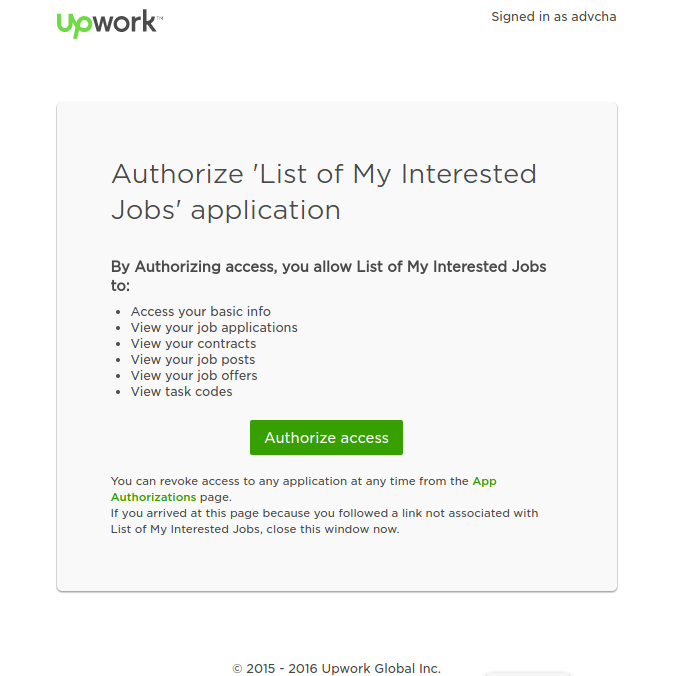
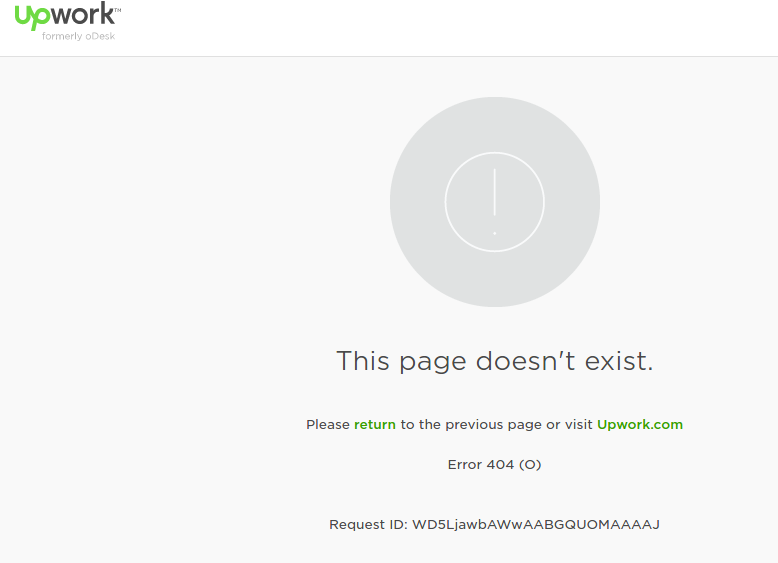 https://www.upwork.com/services/api/www.advchaweb.com/upwork?oauth_token=708638d60eee72f4c7c133a2617b15ef&oauth_verifier=b57428447a10ef831db125a1c9f6e648
IT SHOULD BE LIKE:
http://localhost/works/wordpress_local/wp-admin/options-general.php?page=wp_upwork&oauth_token=63c1ab57d81ef2a120dc122255f252fd&oauth_verifier=4601823dab3c049d2d71be0f76a48a7cUNTIL HERE, IT’S NOT WORKING AS EXPECTED. I NEED TO TRY THIS SAMPLE https://github.com/upwork/php-upwork/blob/master/example/web.php
I MAKE THE SAMPLE LOCALLY: http://localhost/works/upwork_api/ AND IT’S WORKING FOR THE FIRST TIME (NOT WORKING AFTER THAT. MEANS NO DATA CAN I GET FROM UPWORK!!!)
After a few hours I tried again to call the Upwork API via http://localhost/works/upwork_api AND it’s working again. Actually to get the access token and call a function (like User), it takes four web call.
- Because I failed to get the access token from ‘get_access_token’ function, I tried to use Custom Page Template (Please read Add Page Templates to WordPress with a Plugin) like I used to use it for Elance API. But it different here. I dont have to inject the php file in the active theme. I can use it from my plugin!
Okay. I need to clean my code and remove the previous changes above (from #9 and #14) about the tokens field and the ‘get_access_token’ function.
SO I BACK TO THE PREVIOUS CODE WHERE THE WP_Upwork plugin in the admin page only to store API Key and API Secret!
Back to our custom page template, create a new file ‘template.php’ in /includes/ directory. this file would consist of a class ‘WP_Upwork_Template’. This class would get the template file, show it on the page/post page dropdown template and render/view it.
123456789101112131415161718192021222324252627282930313233343536373839404142434445464748495051525354555657585960616263646566676869707172737475767778798081828384858687888990919293949596979899100101102103104105106107108109110111112113114115116117118119120121122123124<?phpif ( ! defined( 'ABSPATH' ) ) exit;if(!class_exists('WP_Upwork_Template')){class WP_Upwork_Template{/*** A reference to an instance of this class.*/private static $instance;/*** The array of templates that this plugin tracks.*/protected $templates;/*** Returns an instance of this class.*/public static function get_instance() {if ( null == self::$instance ) {self::$instance = new WP_Upwork_Template();}return self::$instance;}/*** Construct the plugin object*/public function __construct(){$this->templates = array();// Add a filter to the attributes metabox to inject template into the cache.if ( version_compare( floatval( get_bloginfo( 'version' ) ), '4.7', '<' ) ) { // 4.6 and olderadd_filter('page_attributes_dropdown_pages_args',array( &$this, 'register_upwork_templates' ));} else { // Add a filter to the wp 4.7 version attributes metaboxadd_filter('theme_page_templates', array( &$this, 'add_upwork_template' ));}// Add a filter to the save post to inject out template into the page cacheadd_filter('wp_insert_post_data',array( &$this, 'register_upwork_templates' ));// Add a filter to the template include to determine if the page has our// template assigned and return it's pathadd_filter('template_include',array( &$this, 'view_upwork_template'));// Add your templates to this array.$this->templates = array('upwork-template.php' => 'Upwork Template',);} // END public function __construct/*** Adds our template to the page dropdown for v4.7+**/public function add_upwork_template( $posts_templates ) {$posts_templates = array_merge( $posts_templates, $this->templates );return $posts_templates;}/*** Adds our template to the pages cache in order to trick WordPress* into thinking the template file exists where it doens't really exist.**/public function register_upwork_templates( $atts ) {// Create the key used for the themes cache$cache_key = 'page_templates-' . md5( get_theme_root() . '/' . get_stylesheet() );// Retrieve the cache list.// If it doesn't exist, or it's empty prepare an array$templates = wp_get_theme()->get_page_templates();if ( empty( $templates ) ) {$templates = array();}// New cache, therefore remove the old onewp_cache_delete( $cache_key , 'themes');// Now add our template to the list of templates by merging our templates// with the existing templates array from the cache.$templates = array_merge( $templates, $this->templates );// Add the modified cache to allow WordPress to pick it up for listing// available templateswp_cache_add( $cache_key, $templates, 'themes', 1800 );return $atts;}/*** Checks if the template is assigned to the page*/public function view_upwork_template( $template ) {// Get global postglobal $post;// Return template if post is emptyif ( ! $post ) {return $template;}// Return default template if we don't have a custom one definedif ( !isset( $this->templates[get_post_meta($post->ID, '_wp_page_template', true)] ) ) {return $template;}$file = plugin_dir_path(__FILE__). get_post_meta($post->ID, '_wp_page_template', true);// Just to be safe, we check if the file exist firstif ( file_exists( $file ) ) {echo "File exist:";return $file;} else {echo "File NOT exist:".$file;}// Return templatereturn $template;}} // END class WP_Upwork_Template} // END if(!class_exists('WP_Upwork_Template'))
The template name is in a file ‘upwork-template.php’ in the same directory (/includes/). this file is the main page to connect to Upwork API (authenticate, authorize/get access token and call the Upwork API functions). This content looks like same with https://github.com/upwork/php-upwork/blob/master/example/web.php. Only API key and API secret I got from database. For a test only and to prove it can work as expected, here is the file content:
123456789101112131415161718192021222324252627282930313233343536373839404142434445464748495051525354555657<?php/** Template Name: Upwork Template* Description: A Page Template for displaying Upwork API capability.*/session_start();require WP_UPWORK_PLUGIN_DIR . '/vendor/autoload.php';$config = new \Upwork\API\Config(array('consumerKey' => get_option('wp_upwork_api_key'), // SETUP YOUR CONSUMER KEY'consumerSecret' => get_option('wp_upwork_api_secret'), // SETUP YOUR KEY SECRET'accessToken' => $_SESSION['access_token'], // got access token'accessSecret' => $_SESSION['access_secret'], // got access secret'requestToken' => $_SESSION['request_token'], // got request token'requestSecret' => $_SESSION['request_secret'], // got request secret'verifier' => $_GET['oauth_verifier'], // got oauth verifier after authorization'mode' => 'web', // can be 'nonweb' for console apps (default),// and 'web' for web-based apps'debug' => true, // enables debug mode. Note that enabling debug in web-based applications can block redirects'authType' => 'OAuthPHPLib' // your own authentication type, see AuthTypes directory));$client = new \Upwork\API\Client($config);//var_dump($_SESSION);exit;if (empty($_SESSION['request_token']) && empty($_SESSION['access_token'])) {// we need to get and save the request token. It will be used again// after the redirect from the Upwork site$requestTokenInfo = $client->getRequestToken();$_SESSION['request_token'] = $requestTokenInfo['oauth_token'];$_SESSION['request_secret'] = $requestTokenInfo['oauth_token_secret'];// request authorization$client->auth();} elseif (empty($_SESSION['access_token'])) {// the callback request should be pointed to this script as well as// the request access token after the callback$accessTokenInfo = $client->auth();$_SESSION['access_token'] = $accessTokenInfo['access_token'];$_SESSION['access_secret'] = $accessTokenInfo['access_secret'];}// $accessTokenInfo has the following structure// array('access_token' => ..., 'access_secret' => ...);// keeps the access token in a secure place// if authenticatedif ($_SESSION['access_token']) {//var_dump($_SESSION);// clean up session dataunset($_SESSION['request_token']);unset($_SESSION['request_secret']);// gets info of the authenticated user$auth = new \Upwork\API\Routers\Auth($client);$info = $auth->getUserInfo();//$roles = new \Upwork\API\Routers\Hr\Roles($client);//$info = $roles->getAll();echo "<BR/>PROFILE:<BR/>".print_r($info);}
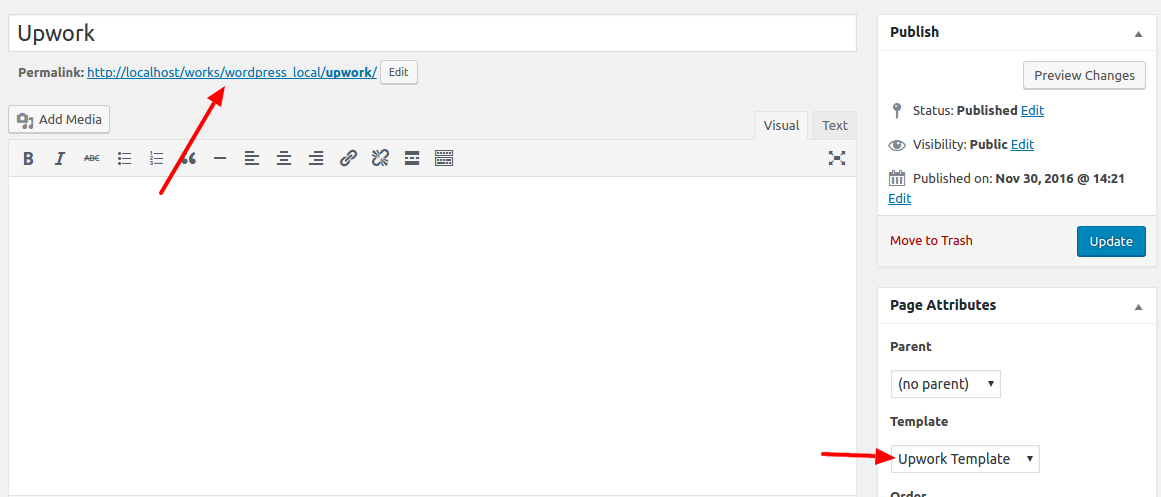
The template name is ‘Upwork Template’ - Then create a new page ‘Upwork’ and select the template ‘Upwork Template’
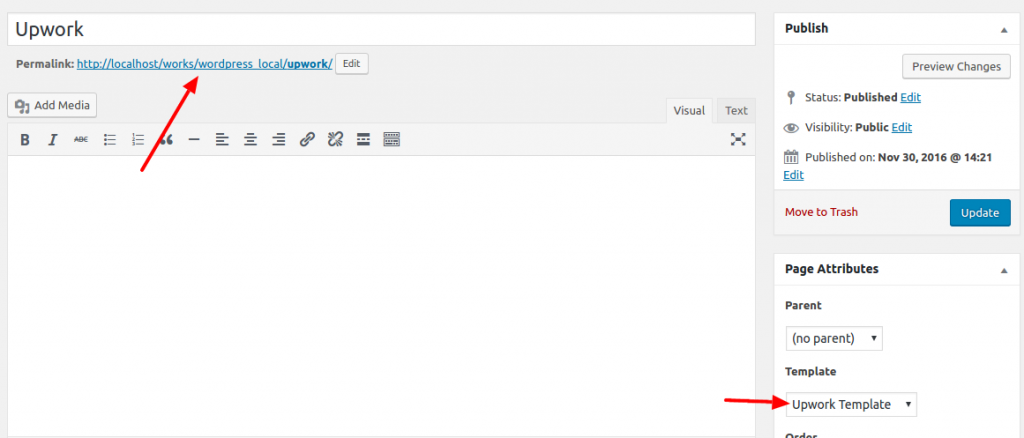 Okay. One more thing. It’s better to change the permalink of our page url to http://localhost/works/wordpress_local/upwork/ instead of http://localhost/works/wordpress_local/?p=123. To do this, please go to Settings -> Permalinks -> Select ‘Post name’ Then Click ‘Save Changes’. It’d change the page url like above. BUT if you open the link and show 404 error, it means something wrong on your .htaccess or the permission or the apache2 setting. I tried many thing from
12teddy@teddy-K43SJ:~/Documents/works/wordpress_local$ sudo chmod 777 .htaccessteddy@teddy-K43SJ:~/Documents/works/wordpress_local$ sudo service apache2 restart
or
12teddy@teddy-K43SJ:~/Documents/works/wordpress_local$ sudo a2enmod rewriteModule rewrite already enabled
BUT NOTHING IS WORKING. IT’S FINALLY WORKING IS FROM http://askubuntu.com/questions/48362/how-to-enable-mod-rewrite-in-apache. I need to put ‘AllowOverride All’ in the default apache2 configuration file:
1teddy@teddy-K43SJ:~/Documents/works/wordpress_local$ sudo gedit /etc/apache2/sites-available/000-default.conf
Then add these lines:
12345678910<VirtualHost *:80>...DocumentRoot /var/www/html<Directory "/var/www/html">AllowOverride All</Directory>...</VirtualHost>
Then restart apache2 server.
Okay. It’s working now. It can open http://localhost/works/wordpress_local/upwork correctly. ALSO DON’T FORGET TO CHANGE AND SAVE Callback URL IN UPWORK API PAGE (https://www.upwork.com/services/api/keys).
- Modify ‘upwork-template.php’ so we can save the access token and no need to get new token each API call. I tried like this:
12345678910111213141516171819202122232425262728293031323334353637383940414243444546474849505152535455565758596061626364656667686970717273747576777879<?php/** Template Name: Upwork Template* Description: A Page Template for displaying Upwork API capability.*/session_start();require WP_UPWORK_PLUGIN_DIR . '/vendor/autoload.php';$access_token=get_option('wp_upwork_access_token');$access_token_secret=get_option('wp_upwork_access_token_secret');if($access_token && $access_token_secret){$config = new \Upwork\API\Config(array('consumerKey' => get_option('wp_upwork_api_key'), // SETUP YOUR CONSUMER KEY'consumerSecret' => get_option('wp_upwork_api_secret'), // SETUP YOUR KEY SECRET'accessToken' => $access_token, // got access token'accessSecret' => $access_token_secret, // got access secret'mode' => 'web', // can be 'nonweb' for console apps (default),// and 'web' for web-based apps'debug' => true, // enables debug mode. Note that enabling debug in web-based applications can block redirects'authType' => 'OAuthPHPLib' // your own authentication type, see AuthTypes directory));$client = new \Upwork\API\Client($config);}else{$config = new \Upwork\API\Config(array('consumerKey' => get_option('wp_upwork_api_key'), // SETUP YOUR CONSUMER KEY'consumerSecret' => get_option('wp_upwork_api_secret'), // SETUP YOUR KEY SECRET'accessToken' => $_SESSION['access_token'], // got access token'accessSecret' => $_SESSION['access_secret'], // got access secret'requestToken' => $_SESSION['request_token'], // got request token'requestSecret' => $_SESSION['request_secret'], // got request secret'verifier' => $_GET['oauth_verifier'], // got oauth verifier after authorization'mode' => 'web', // can be 'nonweb' for console apps (default),// and 'web' for web-based apps'debug' => true, // enables debug mode. Note that enabling debug in web-based applications can block redirects'authType' => 'OAuthPHPLib' // your own authentication type, see AuthTypes directory));$client = new \Upwork\API\Client($config);if (empty($_SESSION['request_token']) && empty($_SESSION['access_token'])) {// we need to get and save the request token. It will be used again// after the redirect from the Upwork site$requestTokenInfo = $client->getRequestToken();$_SESSION['request_token'] = $requestTokenInfo['oauth_token'];$_SESSION['request_secret'] = $requestTokenInfo['oauth_token_secret'];// request authorization$client->auth();} elseif (empty($_SESSION['access_token'])) {// the callback request should be pointed to this script as well as// the request access token after the callback$accessTokenInfo = $client->auth();$_SESSION['access_token'] = $accessTokenInfo['access_token'];$_SESSION['access_secret'] = $accessTokenInfo['access_secret'];update_option('wp_upwork_access_token',$accessTokenInfo['access_token']);update_option('wp_upwork_access_token_secret',$accessTokenInfo['access_secret']);}}// $accessTokenInfo has the following structure// array('access_token' => ..., 'access_secret' => ...);// keeps the access token in a secure place// if authenticatedif ($access_token) {//if ($_SESSION['access_token']) {//var_dump($_SESSION);// clean up session dataunset($_SESSION['request_token']);unset($_SESSION['request_secret']);// gets info of the authenticated user$auth = new \Upwork\API\Routers\Auth($client);$info = $auth->getUserInfo();//$roles = new \Upwork\API\Routers\Hr\Roles($client);//$info = $roles->getAll();echo "<BR/>PROFILE:<BR/>".print_r($info);}
THE RESULT CAN’T BE EXPECTED BECAUSE UPWORK SERVER IS NOT RELIABLE ENOUGH!!!!. THIS SUPPOSED TO WORK BUT I GOT THIS ERROR
123456789101112131415161718192021222324252627File exist:<br /><b>Notice</b>: Undefined index: access_token in <b>/home/teddy/Documents/works/wordpress_local/wp-content/plugins/upwork/includes/upwork-template.php</b> on line <b>30</b><br /><br /><b>Notice</b>: Undefined index: access_secret in <b>/home/teddy/Documents/works/wordpress_local/wp-content/plugins/upwork/includes/upwork-template.php</b> on line <b>31</b><br /><br /><b>Notice</b>: Undefined index: request_token in <b>/home/teddy/Documents/works/wordpress_local/wp-content/plugins/upwork/includes/upwork-template.php</b> on line <b>32</b><br /><br /><b>Notice</b>: Undefined index: request_secret in <b>/home/teddy/Documents/works/wordpress_local/wp-content/plugins/upwork/includes/upwork-template.php</b> on line <b>33</b><br /><br /><b>Notice</b>: Undefined index: oauth_verifier in <b>/home/teddy/Documents/works/wordpress_local/wp-content/plugins/upwork/includes/upwork-template.php</b> on line <b>34</b><br />> preparing Client.> starting Upwork\API\AuthTypes\AbstractOAuth authentication.> getRequestToken.> query request token from server.> get OAuth instance.> create full url, based on global constant.> url, dump: 'https://www.upwork.com/api/auth/v1/oauth/token/request'.> create full url, based on global constant.> url, dump: 'https://www.upwork.com/api/auth/v1/oauth/token/access'.<br /><b>Fatal error</b>: Uncaught exception 'OAuthException2' with message 'Unexpected result from the server "https://www.upwork.com/api/auth/v1/oauth/token/request" (503) while requesting a request token' in /home/teddy/Documents/works/wordpress_local/wp-content/plugins/upwork/vendor/upwork/php-upwork/vendor-src/oauth-php/library/OAuthRequester.php:169Stack trace:#0 /home/teddy/Documents/works/wordpress_local/wp-content/plugins/upwork/vendor/upwork/php-upwork/src/Upwork/API/AuthTypes/OAuthPHPLib.php(84): OAuthRequester::requestRequestToken('4e5c4df53acfe8d...', 0, Array, 'POST', Array, Array)#1 /home/teddy/Documents/works/wordpress_local/wp-content/plugins/upwork/vendor/upwork/php-upwork/src/Upwork/API/Client.php(82): Upwork\API\AuthTypes\OAuthPHPLib->setupRequestToken()#2 /home/teddy/Documents/works/wordpress_local/wp-content/plugins/upwork/includes/upwork-template.php(45): Upwork\API\Client->getRequestToken()#3 /home/teddy/Documents/works/wordpress_local/wp-includes/template-loader.php(75): include('/home/teddy/Doc...')#4 / in <b>/home/teddy/Documents/works/wordpress_local/wp-content/plugins/upwork/vendor/upwork/php-upwork/vendor-src/oauth-php/library/OAuthRequester.php</b> on line <b>169</b><br />
IT’S REALLY EMBARRASSING. I NEED TO WAIT A FEW HOURS TO TRY IT AGAIN!
OKAY. IT’S WORKING NOW. I MODIFIED ‘upwork-template.php’ file like this:
123456789101112131415161718192021222324252627282930313233343536373839404142434445464748495051525354555657585960616263646566676869707172737475767778798081828384858687888990919293949596979899100101102103104105106107108109110111112113114115116117118119120121122123<?php/** Template Name: Upwork Template* Description: A Page Template for displaying Upwork API capability.*/session_start();//SOMETIMES I HAVE TO DO THIS (CLEAR THE SESSION) IF THERE IS SOMETHING WRONG ON THE AUTHENTICATION/AUTHORIZATION PROCESS!! THEN COMMENT ITS AGAIN!/*unset($_SESSION['callback_url']);unset($_SESSION['access_token']);unset($_SESSION['access_secret']);unset($_SESSION['request_token']);unset($_SESSION['request_secret']);exit;*/require WP_UPWORK_PLUGIN_DIR . '/vendor/autoload.php';$access_token=get_option('wp_upwork_access_token');$access_token_secret=get_option('wp_upwork_access_token_secret');if($access_token && $access_token_secret){$config = new \Upwork\API\Config(array('consumerKey' => get_option('wp_upwork_api_key'), // SETUP YOUR CONSUMER KEY'consumerSecret' => get_option('wp_upwork_api_secret'), // SETUP YOUR KEY SECRET'accessToken' => $access_token, // got access token'accessSecret' => $access_token_secret, // got access secret'mode' => 'web', // can be 'nonweb' for console apps (default),// and 'web' for web-based apps'debug' => false, // enables debug mode. Note that enabling debug in web-based applications can block redirects'authType' => 'OAuthPHPLib' // your own authentication type, see AuthTypes directory));$client = new \Upwork\API\Client($config);}else{if(empty($_SESSION['callback_url']))$_SESSION['callback_url']='http' . (isset($_SERVER['HTTPS']) ? 's' : '') . '://' . "{$_SERVER['HTTP_HOST']}{$_SERVER['REQUEST_URI']}";$config = new \Upwork\API\Config(array('consumerKey' => get_option('wp_upwork_api_key'), // SETUP YOUR CONSUMER KEY'consumerSecret' => get_option('wp_upwork_api_secret'), // SETUP YOUR KEY SECRET'accessToken' => $_SESSION['access_token'], // got access token'accessSecret' => $_SESSION['access_secret'], // got access secret'requestToken' => $_SESSION['request_token'], // got request token'requestSecret' => $_SESSION['request_secret'], // got request secret'verifier' => $_GET['oauth_verifier'], // got oauth verifier after authorization'mode' => 'web', // can be 'nonweb' for console apps (default),// and 'web' for web-based apps'debug' => true, // enables debug mode. Note that enabling debug in web-based applications can block redirects'authType' => 'OAuthPHPLib' // your own authentication type, see AuthTypes directory));$client = new \Upwork\API\Client($config);if (empty($_SESSION['request_token']) && empty($_SESSION['access_token'])) {// we need to get and save the request token. It will be used again// after the redirect from the Upwork site$requestTokenInfo = $client->getRequestToken();$_SESSION['request_token'] = $requestTokenInfo['oauth_token'];$_SESSION['request_secret'] = $requestTokenInfo['oauth_token_secret'];// request authorization$client->auth();} elseif (empty($_SESSION['access_token'])) {// the callback request should be pointed to this script as well as// the request access token after the callback$accessTokenInfo = $client->auth();$_SESSION['access_token'] = $accessTokenInfo['access_token'];$_SESSION['access_secret'] = $accessTokenInfo['access_secret'];update_option('wp_upwork_access_token',$accessTokenInfo['access_token']);update_option('wp_upwork_access_token_secret',$accessTokenInfo['access_secret']);//$redirect_url="http://localhost/works/wordpress_local/upwork/";header("Location:".$_SESSION['callback_url']);}}// $accessTokenInfo has the following structure// array('access_token' => ..., 'access_secret' => ...);// keeps the access token in a secure place// if authenticatedif ($access_token) {//if ($_SESSION['access_token']) {//var_dump($_SESSION);// clean up session dataunset($_SESSION['callback_url']);unset($_SESSION['access_token']);unset($_SESSION['access_secret']);unset($_SESSION['request_token']);unset($_SESSION['request_secret']);// gets info of the authenticated user//$auth = new \Upwork\API\Routers\Auth($client);//$info = $auth->getUserInfo();//$roles = new \Upwork\API\Routers\Hr\Roles($client);//$info = $roles->getAll();//echo "<BR/>PROFILE:<BR/>".print_r($info);$jobs = new \Upwork\API\Routers\Jobs\Search($client);$params=array("q"=>"laravel","page"=>"0;5" //page param is not working anyway!!!);$result = $jobs->find($params);get_header(); ?><div id="job_result" class="job_result" style="margin-top: -50px;"><?php$i=1;foreach($result->jobs as $j){echo $i.". ".$j->title."<br/>";$i++;}?></div><!-- #primary --><?php get_sidebar(); ?><?php get_footer(); ?><?php}
With this changes, I can store the access token in database when it haven’t it yet and use the tokens from repeat Upwork API call without having to get the new token. From https://developers.upwork.com/?lang=php#authentication_get-access-token, IT SAID “Once created, the Access token never expires.”.
NOTE: the ‘config’ parameters is different when we already have the tokens. it no need the ‘request token’ anymore (see above code at if($access_token && $access_token_secret){) .
NOTE: I also need to clear the sessions if there is any error related with the Upwork API occured. I think it’d be better to put a new button ‘Reset Access Token’ on the WP Upwork admin settings. The button would empty the tokens values in the database. This would give a chance to get the new token and fix the errors. The button would also be responsible to clear the sessions!
This is a screenshots of the Upwork API to display job listing by some criteria.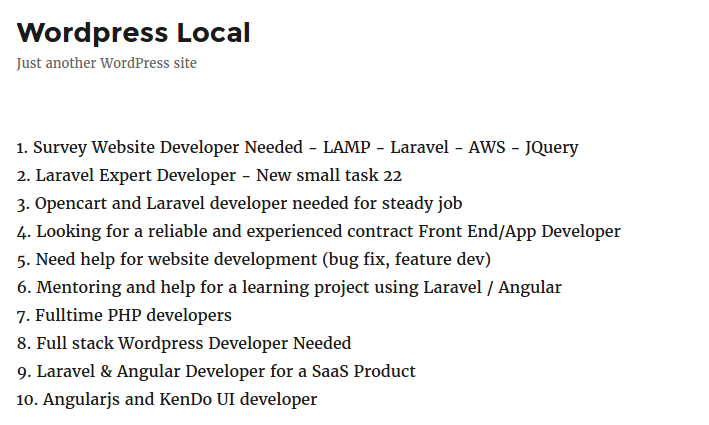 NOTE: SOMEHOW I CAN’T MANAGE HOW TO GET THE RESULT MORE THAN 10 DATA
NEXT: HOW TO CATCH ANY ERROR FROM THE UPWORK API???
CREATE a new button ‘Reset Access Token’ on the WP Upwork admin settings. - SOME ERROR HAS HAPPENED. HERE THEY ARE AND THE SOLUTIONS:
1234567<br /><b>Fatal error</b>: Uncaught exception 'OAuthException2' with message 'Request failed with code 400: {"server_time":1480603525,"error":{"status":400,"code":400,"message":"Your request has a missing obligatory OAuth parameter [oauth_token]."}}' in /home/teddy/Documents/works/wordpress_local/wp-content/plugins/upwork/vendor/upwork/php-upwork/vendor-src/oauth-php/library/OAuthRequester.php:117Stack trace:#0 /home/teddy/Documents/works/wordpress_local/wp-content/plugins/upwork/vendor/upwork/php-upwork/src/Upwork/API/AuthTypes/OAuthPHPLib.php(59): OAuthRequester->doRequest(0, Array)#1 /home/teddy/Documents/works/wordpress_local/wp-content/plugins/upwork/vendor/upwork/php-upwork/src/Upwork/API/Client.php(150): Upwork\API\AuthTypes\OAuthPHPLib->request('GET', '/profiles/v2/se...', Array)#2 /home/teddy/Documents/works/wordpress_local/wp-content/plugins/upwork/vendor/upwork/php-upwork/src/Upwork/API/Client.php(166): Upwork\API\Client->_request('GET', '/profiles/v2/se...', Array)#3 /home/teddy/Documents/works/wordpress_local/wp-conte in <b>/home/teddy/Documents/works/wordpress_local/wp-content/plugins/upwork/vendor/upwork/php-upwork/vendor-src/oauth-php/library/OAuthRequester.php</b> on line <b>117</b><br />
SOLUTIONS: Clear the sessions and empty the tokens values in the database then refresh the page again! - Now, I already put the source code in my github repository: https://github.com/advcha/upwork.