Prerequisite: Ubuntu 14.04, Apache Webserver 2.4 and php 5.6
Install PostgreSQL. Read How To Install and Use PostgreSQL on Ubuntu 14.04:
- Update system
1sudo apt-get update - Install Postgres package and a “contrib” package that adds some additional utilities and functionality
1sudo apt-get install postgresql postgresql-contrib - PostgreSQL Roles and Databases
created a user account called ‘postgres’
1teddy@teddy-K43SJ:~$ sudo -i -u postgres
get a Postgres prompt immediately by typing
12345postgres@teddy-K43SJ:~$ psqlpsql (9.3.14)Type "help" for help.postgres=# \q
Type ‘\q’ to quit! I can see my postgresql version is 9.3.14. Watch the above carefully! MY USER ALSO BE CHANGED FROM ‘teddy@teddy-K43SJ’ to ‘postgres@teddy-K43SJ’! To quit completely, type ‘exit’
123postgres@teddy-K43SJ:~$ exitlogoutteddy@teddy-K43SJ:~$
HERE WE DON’T THE PASSWORD FOR ‘postgres’ ROLE, SO ALTER IT (Read ‘How connect Postgres to localhost server using pgAdmin on Ubuntu?‘)
1234567teddy@teddy-K43SJ:~$ sudo -u postgres psql postgrespsql (9.3.14)Type "help" for help.postgres=# alter user postgres with password 'postgres';ALTER ROLEpostgres=# \q
SO (without quote) user = ‘postgres’ and password = ‘postgres’Install pgadmin 3
1teddy@teddy-K43SJ:~$ sudo apt-get install pgadmin3To open it, you can type : pgadmin3 or (better) go to Applications-> Programming->pgAdmin III
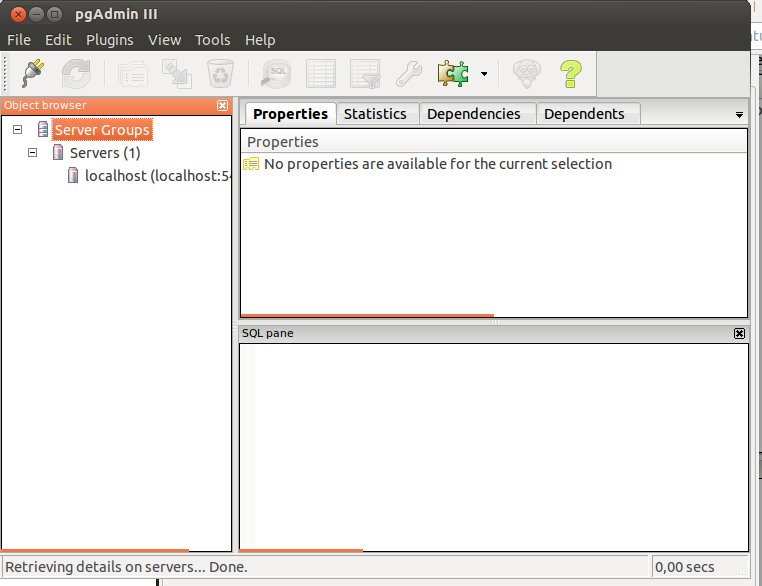
Create local connection with pgadmin:
1. Click ‘Add a connection to a server’ or File->Add Server. Then fill it Click ‘OK’ and if everything right, here is the result
 Create a new database. Select ‘Databases’->right click and click ‘New Database…’-> On ‘Name’ fill (for example) ‘testdb’
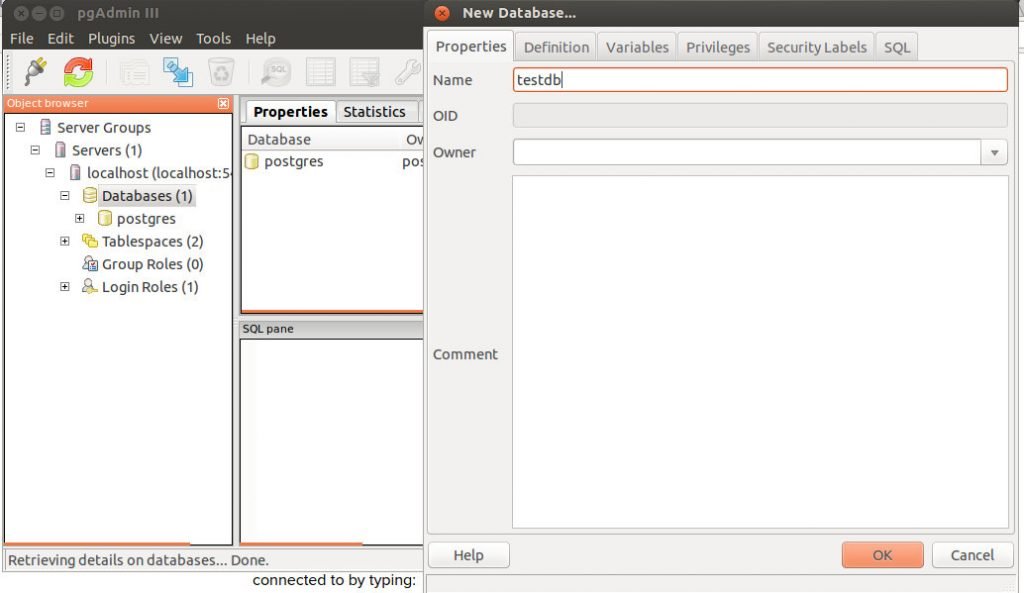 Then OK. There would be a ‘red cross’ on the database name. It’s fine. Just click it. Here is the structure
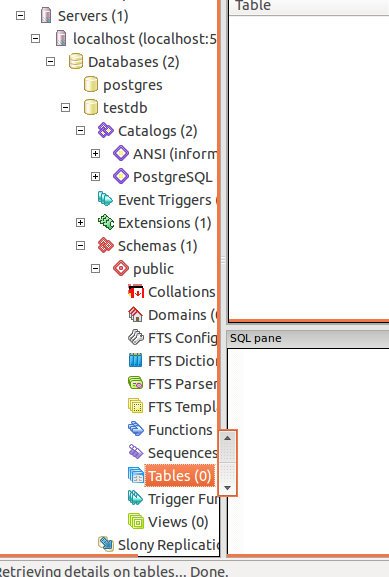 Create a new table. We can do it from the structure above: Select ‘Tables’ -> right click and click ‘New Table…’ OR (better) from SQL Query
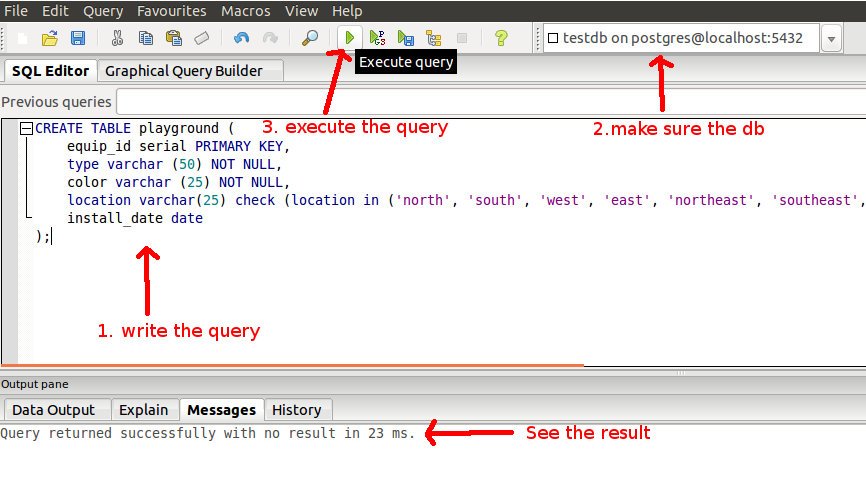 Here is the result of the new tabel ‘playground’ (DONT FORGET TO REFRESH FIRST)
 For more command and samples, read How To Install and Use PostgreSQL on Ubuntu 14.04 or watch this video

Install MapServer
- Update your ubuntu system
1sudo apt-get update - Install the MapServer packages and the companions
1sudo apt-get install cgi-mapserver mapserver-bin mapserver-doc php5-mapscript python-mapscript
But I got this error:
123456789Some packages could not be installed. This may mean that you haverequested an impossible situation or if you are using the unstabledistribution that some required packages have not yet been createdor been moved out of Incoming.The following information may help to resolve the situation:The following packages have unmet dependencies:php5-mapscript : Depends: phpapi-20121212E: Unable to correct problems, you have held broken packages.
Why??? I check my php version. its 5.6.23-1 version
123456teddy@teddy-K43SJ:~$ php -vPHP 5.6.23-1+deprecated+dontuse+deb.sury.org~trusty+1 (cli)Copyright (c) 1997-2016 The PHP GroupZend Engine v2.6.0, Copyright (c) 1998-2016 Zend Technologieswith Zend OPcache v7.0.6-dev, Copyright (c) 1999-2016, by Zend Technologieswith Xdebug v2.3.3, Copyright (c) 2002-2015, by Derick Rethans
Here is my apache2 version.
123teddy@teddy-K43SJ:~$ apache2 -vServer version: Apache/2.4.20 (Ubuntu)Server built: 2016-04-20T00:00:00
My ubuntu still use a deprecated ppa for php 5.6. From this link https://launchpad.net/~ondrej/+archive/ubuntu/php5-5.6, its suggest me to change my ppa to the stable one. Read the explanation PPA migration to ppa:ondrej php and from askubuntu. Read here to find out the steps to change the ppa, the problem and the solution.
Okay. I tried to rety the installation
1teddy@teddy-K43SJ:~$ sudo apt-get install cgi-mapserver mapserver-bin mapserver-doc php5-mapscript python-mapscript
The mapserver can be installed successfully BUT I got an error for php5-mapscript (I can’t install php-mapscript because the package is not available).
12345678910111213...Setting up mapserver-bin (6.4.1-2) ...Setting up mapserver-doc (6.4.1-2) ...Setting up php5-mapscript (6.4.1-2) .../var/lib/dpkg/info/php5-mapscript.postinst: 11: /var/lib/dpkg/info/php5-mapscript.postinst: php5enmod: not founddpkg: error processing package php5-mapscript (--configure):subprocess installed post-installation script returned error exit status 127Setting up python-mapscript (6.4.1-2) ...Setting up proj-bin (4.8.0-2ubuntu2) ...Processing triggers for libc-bin (2.19-0ubuntu6.9) ...Errors were encountered while processing:php5-mapscriptE: Sub-process /usr/bin/dpkg returned an error code (1)
It also caused my system broken.
 It seems php5-mapscript can’t be installed on my php 5.6. This article PHP mapscript fails to build with PHP 5.6 dont help either. Right now I haven’t found any solution yet. I just don’t have time. Next time I’ll try to find the solution or install the different php version like php 5.5 or even php 7.0 to make mapscript work. I heard mapscript on the way to support php 7.0. Please read Support for PHP 7.
UPDATE! I try to use php 5.5 but DIDN’T WORK EITHER FOR MAPSCRIPT!! MAY BE I NEED TO USE PHP5 FROM DEPRECATED PPA???I still tried to force the mapscript installation. I found something interesting about mapscript in my system.
12345teddy@teddy-K43SJ:~$ locate mapscript/etc/php5/mods-available/mapscript.ini.../usr/lib/php5/20121212/php_mapscript.so...
I found ‘mapscript.ini’ file and ‘php_mapscript.so’ file but it reside on different directory that php5.6 should be stored. the ‘.ini’ file supposed to be in /etc/php/5.6/mods-available/ and the extension/library ‘.so’ file supposed to be in /usr/lib/php/20131226 (found in phpinfo in ‘extension_dir’). I tried to copy them to the proper directory
12sudo cp /etc/php5/mods-available/mapscript.ini /etc/php/5.6/mods-available/sudo cp /usr/lib/php5/20121212/php_mapscript.so /usr/lib/php/20131226/
then enable the module
1sudo phpenmod mapscript
also add it in ‘/etc/php/5.6/apache2/php.ini’
1teddy@teddy-K43SJ:~$ sudo gedit /etc/php/5.6/apache2/php.ini
12[mapscript]extension=php_mapscript.so
Restart apache
I found no error on phpinfo but found a warning on terminal
23456PHP Warning: PHP Startup: MapScript: Unable to initialize moduleModule compiled with module API=20121212PHP compiled with module API=20131226These options need to matchin Unknown on line 0
Solution for this is to remove the mapscript in php.ini and also remove mapscript.ini
1teddy@teddy-K43SJ:~$ sudo rm /etc/php/5.6/mods-available/mapscript.ini
then restart apache. Now there is no mapscript error on the terminal
12345teddy@teddy-K43SJ:~$ php -vPHP 5.6.26-1+deb.sury.org~trusty+1 (cli)Copyright (c) 1997-2016 The PHP GroupZend Engine v2.6.0, Copyright (c) 1998-2016 Zend Technologieswith Zend OPcache v7.0.6-dev, Copyright (c) 1999-2016, by Zend Technologies
UPDATE 2017-02-14:
Trying to install again. There is no package with named ‘php5.6-mapscript’
123456teddy@teddy-K43SJ:~$ sudo apt-get install php5.6-mapscriptReading package lists... DoneBuilding dependency treeReading state information... DoneE: Unable to locate package php5.6-mapscriptE: Couldn't find any package by regex 'php5.6-mapscript'
Trying with ‘php5-mapscript’
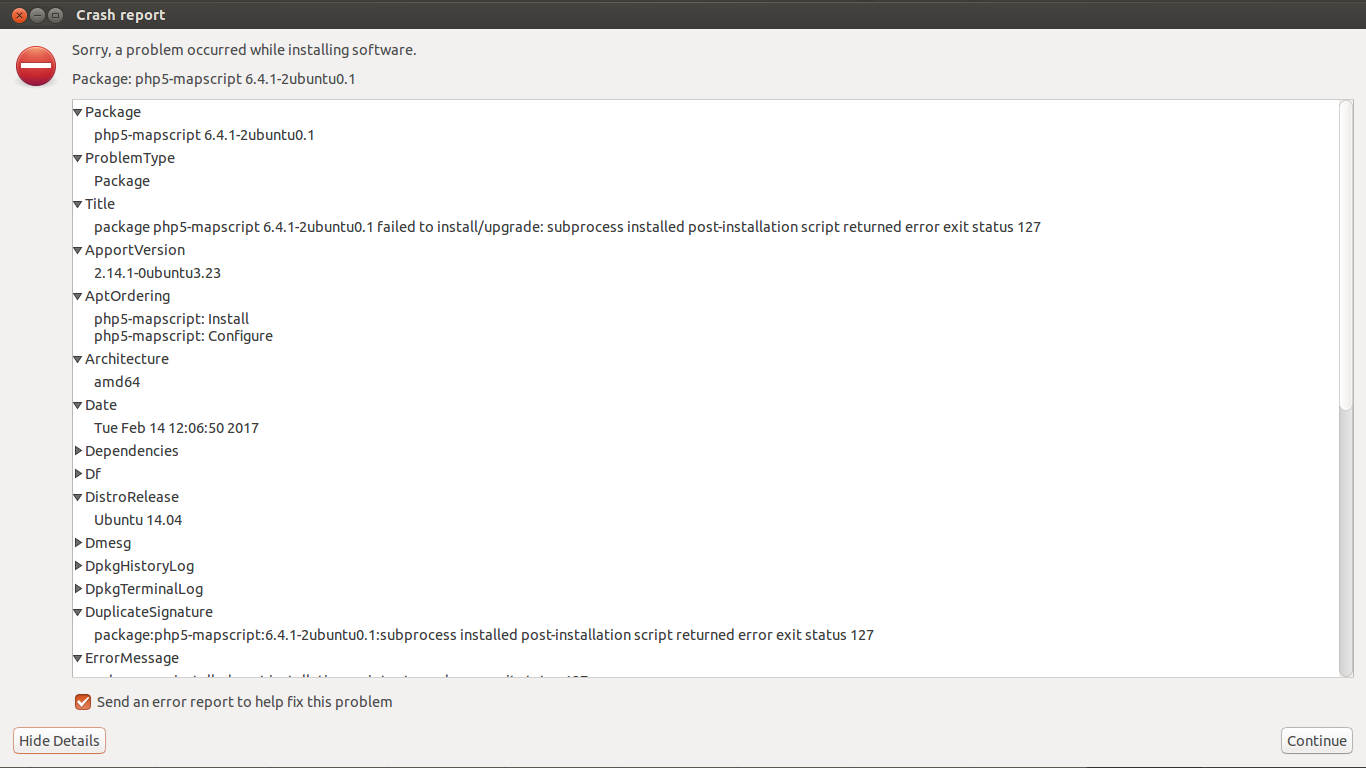
1234567891011121314151617181920212223242526teddy@teddy-K43SJ:~$ sudo apt-get install php5-mapscriptReading package lists... DoneBuilding dependency treeReading state information... DoneThe following packages were automatically installed and are no longer required:espeak linux-headers-3.13.0-76 linux-headers-3.19.0-25linux-headers-4.4.0-34 python3-imaging-sane python3-pil python3-saneUse 'apt-get autoremove' to remove them.The following NEW packages will be installed:php5-mapscript0 upgraded, 1 newly installed, 0 to remove and 8 not upgraded.Need to get 96,6 kB of archives.After this operation, 563 kB of additional disk space will be used.Get:1 http://kambing.ui.ac.id/ubuntu/ trusty-updates/universe php5-mapscript amd64 6.4.1-2ubuntu0.1 [96,6 kB]Fetched 96,6 kB in 0s (354 kB/s)Selecting previously unselected package php5-mapscript.(Reading database ... 1123978 files and directories currently installed.)Preparing to unpack .../php5-mapscript_6.4.1-2ubuntu0.1_amd64.deb ...Unpacking php5-mapscript (6.4.1-2ubuntu0.1) ...Setting up php5-mapscript (6.4.1-2ubuntu0.1) .../var/lib/dpkg/info/php5-mapscript.postinst: 11: /var/lib/dpkg/info/php5-mapscript.postinst: php5enmod: not founddpkg: error processing package php5-mapscript (--configure):subprocess installed post-installation script returned error exit status 127Errors were encountered while processing:php5-mapscriptE: Sub-process /usr/bin/dpkg returned an error code (1)
Also there is an error in my system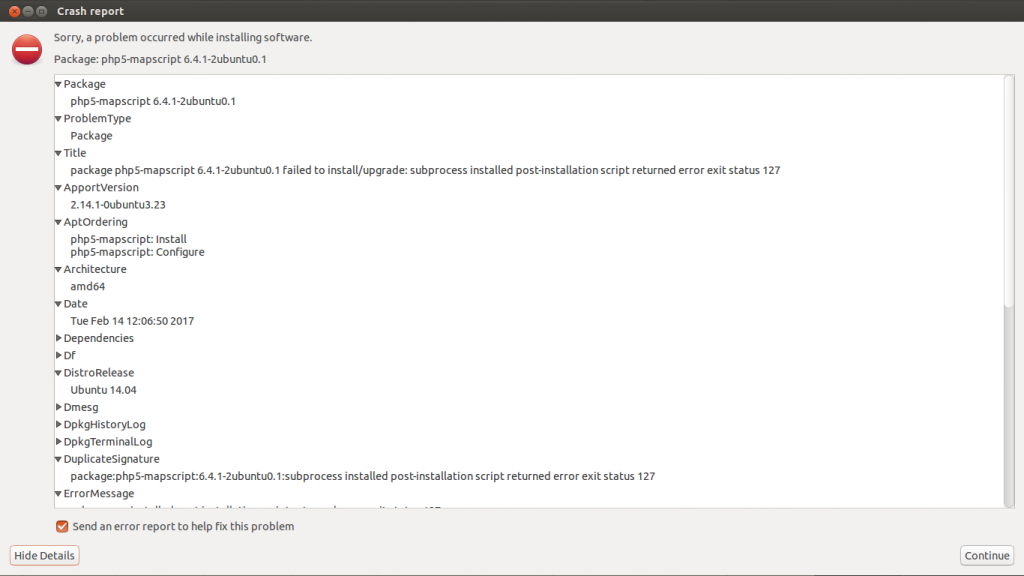 May be I need to compile it from the source like I did here: https://github.com/oerdnj/deb.sury.org/issues/461.
 - References
Reference: https://www.youtube.com/watch?v=wabttt1tZhw and https://www.youtube.com/watch?v=9MGbM2zMA_Y