Ref: https://blog.hauri.me/magento-2-with-varnish-and-nginx-as-ssl-termination.html
https://www.absolute-design.co.uk/services/magento-ecommerce/using-nginx-for-ssl-termination-with-varnish-and-magento-2/
https://linuxize.com/post/configure-magento-2-to-use-varnish-on-centos-7/
https://www.digitalocean.com/community/tutorials/how-to-configure-nginx-with-ssl-as-a-reverse-proxy-for-jenkins
On a few last articles, I wrote about the Varnish and Nginx configuration also Self-signed certificate. Now I want to combine them all on my local magento 2 website https://fontaineind.test/. When I run the site, the varnish is not working. I need to configure it (and Nginx) to make it working again.
From many articles I found Varnish can’t work with SSL. Varnish does not support SSL, so we need to use another service as an SSL Termination Proxy, in our case that will be Nginx.
When a visitor opens your website over HTTPS on port 443 the request will be handled by Nginx which works as a proxy and passes the request to Varnish (on port 6081). Varnish checks if the request is cached or not. If it is cached, Varnish will return the cached data to Nginx without a request to the Magento application. If the request is not cached Varnish will pass the request to Nginx on port 8080 which will pull data from Magento and Varnish will cache the response.
If a visitor opens your website without SSL on port 80 then he will be redirected to the HTTPS on port 443 URL by Varnish. So here is the topology
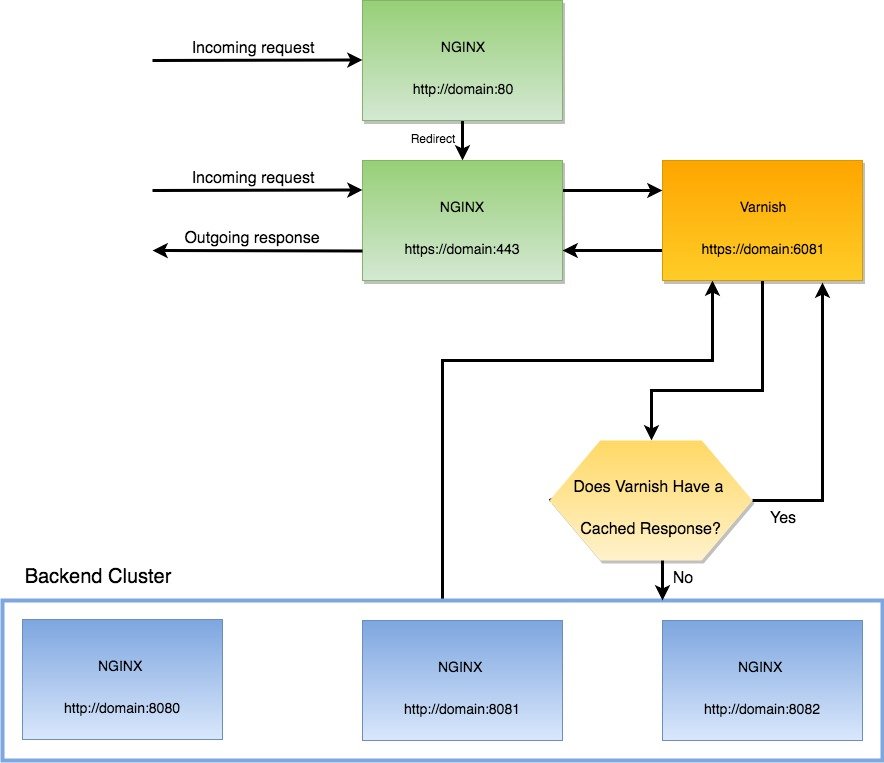 I need to change the Varnish port back to 6081 because I need to redirect HTTP port 80 to HTTPS port 443. (This article said I can still use port 80 for varnish: https://medium.com/magebit/magento-2-full-ssl-with-varnish-d2cfed3d7df also https://www.getpagespeed.com/web-apps/magento/magento-2-nginx-config-ssl-termination-varnish) But I keep the nginx port to 8080. So modify /etc/default/varnish file like this:
|
1 2 3 4 5 6 7 8 9 10 11 |
... # Should we start varnishd at boot? Set to "no" to disable. #START=yes START=no ... DAEMON_OPTS="-a :6081 \ -T localhost:6082 \ -f /etc/varnish/default.vcl \ -S /etc/varnish/secret \ -s malloc,256m" ... |
Then also modify /etc/systemd/system/varnish.service file to change the varnish port back to 6081
|
1 |
ExecStart=/usr/sbin/varnishd -j unix,user=vcache -F -a :6081 -T localhost:6082 -f /etc/varnish/default.vcl -S /etc/varnish/secret -s malloc,256m |
Then modify /etc/varnish/default.vcl
|
1 2 3 4 5 6 |
... backend default { .host = "fontaineind.test"; .port = "8080"; } ... |
I use host “fontaineind.test” here because I have many local websites. Usually it’s enough to use “localhost”. Port 8080 is the nginx port as the backend server. After saving the changes, I need to restart varnish server:
|
1 |
sudo service varnish restart |
Don’t forget to verify the varnish port is 6081 now. Just see it by typing
|
1 |
sudo service varnish status |
|
1 2 3 4 5 6 7 8 9 10 11 12 13 14 15 16 17 18 |
teddy@teddy:~/Documents/works/fontaineind$ sudo service varnish status ● varnish.service - Varnish HTTP accelerator Loaded: loaded (/etc/systemd/system/varnish.service; enabled; vendor preset: Active: active (running) since Sen 2019-02-11 16:53:14 WIB; 13min ago Docs: https://www.varnish-cache.org/docs/4.1/ man:varnishd Main PID: 2379 (varnishd) CGroup: /system.slice/varnish.service ├─2379 /usr/sbin/varnishd -j unix,user=vcache -F -a :6081 -T localhos └─2389 /usr/sbin/varnishd -j unix,user=vcache -F -a :6081 -T localhos Peb 11 16:53:14 teddy systemd[1]: Started Varnish HTTP accelerator. Peb 11 16:53:14 teddy varnishd[2379]: Debug: Platform: Linux,4.15.0-38-generic,x Peb 11 16:53:14 teddy varnishd[2379]: Platform: Linux,4.15.0-38-generic,x86_64,- Peb 11 16:53:14 teddy varnishd[2379]: Debug: Child (2389) Started Peb 11 16:53:14 teddy varnishd[2379]: Child (2389) Started Peb 11 16:53:14 teddy varnishd[2379]: Info: Child (2389) said Child starts Peb 11 16:53:14 teddy varnishd[2379]: Child (2389) said Child starts |
Then I need to modify also the nginx setting for fontaineind.test.
|
1 |
teddy@teddy:~$ sudo gedit /etc/nginx/sites-available/fontaineind.test |
Modify it like this:
|
1 2 3 4 5 6 7 8 9 10 11 12 13 14 15 16 17 18 19 20 21 22 23 24 25 26 27 28 29 30 31 32 33 34 35 36 37 38 39 40 41 42 43 44 45 46 47 48 49 50 51 52 53 54 55 56 57 58 59 60 61 62 63 64 65 66 67 68 69 70 71 72 73 74 75 76 77 78 79 80 81 82 83 84 85 86 87 88 89 90 91 92 93 94 95 96 97 98 99 100 101 102 103 104 105 106 107 108 109 110 111 112 113 114 115 116 117 118 119 120 121 122 123 124 125 126 127 128 129 130 131 132 133 134 135 136 137 138 139 140 141 142 143 144 145 146 147 148 149 150 151 152 153 154 155 156 157 158 159 160 161 162 163 164 165 166 167 168 169 170 171 172 173 174 175 176 177 178 179 180 181 182 183 184 185 186 187 188 189 190 191 192 193 194 195 196 197 198 199 200 201 202 203 204 205 206 207 208 209 210 211 212 213 214 215 216 217 218 219 220 221 222 223 224 225 226 227 228 229 230 231 232 233 234 235 236 237 238 239 240 241 242 243 244 245 246 247 248 249 250 251 |
# nginx = 443 # varnish = 6081 # nginx -> php-fpm = 8080 server { listen 443 ssl http2; server_name fontaineind.test; location / { # Pass the request on to Varnish. proxy_pass http://127.0.0.1:6081; # Pass a bunch of headers to the downstream server, so they'll know what's going on. proxy_set_header Host $host; proxy_set_header X-Real-IP $remote_addr; proxy_set_header X-Forwarded-For $proxy_add_x_forwarded_for; # Most web apps can be configured to read this header and understand that the current session is actually HTTPS. proxy_set_header X-Forwarded-Port 443; proxy_set_header X-Forwarded-Proto https; # We expect the downsteam servers to redirect to the right hostname, so don't do any rewrites here. #proxy_redirect off; } ssl_certificate /etc/ssl/certs/fontaineind.test.crt; ssl_certificate_key /etc/ssl/private/fontaineind.test.key; ssl_protocols TLSv1.2 TLSv1.1 TLSv1; } server { listen fontaineind.test:8080; #listen [::]:8080; #server_name fontaineind.test; set $MAGE_ROOT /home/teddy/Documents/works/fontaineind; root $MAGE_ROOT; index index.php; autoindex off; charset UTF-8; error_page 404 403 = /errors/404.php; #add_header "X-UA-Compatible" "IE=Edge"; client_max_body_size 100M; # PHP entry point for setup application location ~* ^/setup($|/) { root $MAGE_ROOT; location ~ ^/setup/index.php { fastcgi_split_path_info ^(.+?\.php)(/.*)$; fastcgi_buffers 1024 4k; fastcgi_read_timeout 600s; fastcgi_connect_timeout 600s; fastcgi_pass unix:/run/php/php7.0-fpm.sock; #FOR AWS SERVER #fastcgi_pass 127.0.0.1:9000; #fastcgi_index index.php; fastcgi_param SCRIPT_FILENAME $document_root$fastcgi_script_name; include fastcgi_params; } location ~ ^/setup/(?!pub/). { deny all; } location ~ ^/setup/pub/ { add_header X-Frame-Options "SAMEORIGIN"; } } # PHP entry point for update application location ~* ^/update($|/) { root $MAGE_ROOT; location ~ ^/update/index.php { fastcgi_split_path_info ^(/update/index.php)(/.+)$; fastcgi_pass unix:/run/php/php7.0-fpm.sock; #FOR AWS SERVER #fastcgi_pass 127.0.0.1:9000; fastcgi_index index.php; fastcgi_param SCRIPT_FILENAME $document_root$fastcgi_script_name; fastcgi_param PATH_INFO $fastcgi_path_info; include fastcgi_params; } # Deny everything but index.php location ~ ^/update/(?!pub/). { deny all; } location ~ ^/update/pub/ { add_header X-Frame-Options "SAMEORIGIN"; } } location / { try_files $uri $uri/ /index.php?$args; } location /pub/ { location ~ ^/pub/media/(downloadable|customer|import|theme_customization/.*\.xml) { deny all; } alias $MAGE_ROOT/pub/; add_header X-Frame-Options "SAMEORIGIN"; } location ~ ^/pub/static/version { rewrite ^/pub/static/(version\d*/)?(.*)$ /pub/static/$2 last; } location /static/ { # Uncomment the following line in production mode # expires max; # Remove signature of the static files that is used to overcome the browser cache location ~ ^/static/version { rewrite ^/static/(version\d*/)?(.*)$ /static/$2 last; } location ~* \.(ico|jpg|jpeg|png|gif|svg|js|css|swf|eot|ttf|otf|woff|woff2)$ { add_header Cache-Control "public"; add_header X-Frame-Options "SAMEORIGIN"; expires +1y; if (!-f $request_filename) { rewrite ^/static/(version\d*/)?(.*)$ /static.php?resource=$2 last; } } location ~* \.(zip|gz|gzip|bz2|csv|xml)$ { add_header Cache-Control "no-store"; add_header X-Frame-Options "SAMEORIGIN"; expires off; if (!-f $request_filename) { rewrite ^/static/(version\d*/)?(.*)$ /static.php?resource=$2 last; } } if (!-f $request_filename) { rewrite ^/static/(version\d*/)?(.*)$ /static.php?resource=$2 last; } add_header X-Frame-Options "SAMEORIGIN"; } location /media/ { try_files $uri $uri/ /get.php?$args; location ~ ^/media/theme_customization/.*\.xml { deny all; } location ~* \.(ico|jpg|jpeg|png|gif|svg|js|css|swf|eot|ttf|otf|woff|woff2)$ { add_header Cache-Control "public"; add_header X-Frame-Options "SAMEORIGIN"; expires +1y; try_files $uri $uri/ /get.php?$args; } location ~* \.(zip|gz|gzip|bz2|csv|xml)$ { add_header Cache-Control "no-store"; add_header X-Frame-Options "SAMEORIGIN"; expires off; try_files $uri $uri/ /get.php?$args; } add_header X-Frame-Options "SAMEORIGIN"; } location /media/customer/ { deny all; } location /media/downloadable/ { deny all; } location /media/import/ { deny all; } # PHP entry point for main application location ~ (index|get|static|report|404|503)\.php$ { try_files $uri =404; fastcgi_pass unix:/run/php/php7.0-fpm.sock; #FOR AWS SERVER #fastcgi_pass 127.0.0.1:9000; fastcgi_buffers 1024 4k; fastcgi_read_timeout 600s; fastcgi_connect_timeout 600s; # to configure profiler in Magento 2 #fastcgi_param MAGE_PROFILER html; fastcgi_index index.php; fastcgi_param SCRIPT_FILENAME $document_root$fastcgi_script_name; #include fastcgi_params; #FOR DEVELOPMENT MODE ONLY - BEGIN fastcgi_param MAGE_IS_DEVELOPER_MODE true; fastcgi_param PHP_VALUE display_startup_errors=on; fastcgi_param PHP_VALUE display_errors=on; fastcgi_param PHP_VALUE html_errors=on; fastcgi_param PHP_VALUE log_errors=on; fastcgi_param PHP_VALUE error_log=/home/teddy/Documents/works/fontaineind/var/log/system.log; #FOR DEVELOPMENT MODE ONLY - END include fastcgi_params; #FOR DEBUGGING WITH XDEBUG - BEGIN #fastcgi_read_timeout 600; #FOR DEBUGGING WITH XDEBUG - END } #gzip on; #gzip_disable "msie6"; #gzip_comp_level 6; #gzip_min_length 1100; #gzip_buffers 16 8k; #gzip_proxied any; #gzip_types #text/plain #text/css #text/js #text/xml #text/javascript #application/javascript #application/x-javascript #application/json #application/xml #application/xml+rss #image/svg+xml; #gzip_vary on; # Banned locations (only reached if the earlier PHP entry point regexes don't match) location ~* (\.php$|\.htaccess$|\.git) { deny all; } } server { listen 80; server_name fontaineind.test www.fontaineind.test; #location ^~ /.well-known/acme-challenge { # root /var/www; #} location / { return 301 https://$server_name$request_uri; } } |
So if the user use non-https (port 80) url like http://fontaineind.test/, It’d be redirected permanently (301) to https url like https://fontaineind.test/. Please see
|
1 2 3 4 5 6 7 8 9 |
... server { listen 80; server_name fontaineind.test www.fontaineind.test; ... location / { return 301 https://$server_name$request_uri; } } |
Then if the user entering the https site (port 443), it’d use varnish proxy (port 6081)
|
1 2 3 4 5 6 7 8 9 10 11 12 13 14 15 16 17 18 19 20 21 22 23 24 25 26 27 |
... server { listen 443 ssl http2; server_name fontaineind.test; location / { # Pass the request on to Varnish. proxy_pass http://127.0.0.1:6081; # Pass a bunch of headers to the downstream server, so they'll know what's going on. proxy_set_header Host $host; proxy_set_header X-Real-IP $remote_addr; proxy_set_header X-Forwarded-For $proxy_add_x_forwarded_for; # Most web apps can be configured to read this header and understand that the current session is actually HTTPS. proxy_set_header X-Forwarded-Port 443; proxy_set_header X-Forwarded-Proto https; # We expect the downsteam servers to redirect to the right hostname, so don't do any rewrites here. #proxy_redirect off; } ssl_certificate /etc/ssl/certs/fontaineind.test.crt; ssl_certificate_key /etc/ssl/private/fontaineind.test.key; ssl_protocols TLSv1.2 TLSv1.1 TLSv1; } ... |
If the page request is already exist in the varnish cache, it’d be returned immediately. But if not, it’d look it in the backend server (nginx port 8080).
|
1 2 3 4 5 6 |
... server { listen fontaineind.test:8080; ... } ... |
This is very tricky. Because I use many local website, I have to use ‘listen fontaineind.test:8080;’ instead of just ‘listen 8080;’. It must same with the backend host in /etc/varnish/default.vcl.
NOTE: Somehow the other local websites would be redirected to fontaineind.test. So if I open for example phpmyadmin.test:8080. It’d be redirected to fontaineind.test. This is not expected. So If I want to open phpmyadmin, I need to stop varnish then change ‘listen fontaineind.test:8080;’ to ‘listen 8080;’. I still dont know how to solve this problem.
Don’t forget to modify env.php file in magento root (app/etc/env.php) like this:
|
1 2 3 4 5 6 7 8 9 10 |
... 'http_cache_hosts' => array ( 0 => array ( 'host' => 'localhost', 'port' => '6081', ), ), ... |
So now varnish is working with SSL. Here is the response header on https://fontaineind.test/ (after first refresh)
|
1 2 3 4 5 6 7 8 9 10 11 12 13 14 15 16 |
accept-ranges: bytes age: 100 cache-control: no-store, no-cache, must-revalidate, max-age=0 content-encoding: gzip content-length: 118047 content-type: text/html; charset=UTF-8 date: Mon, 11 Feb 2019 10:12:09 GMT expires: -1 pragma: no-cache server: nginx/1.10.3 (Ubuntu) status: 200 vary: Accept-Encoding x-content-type-options: nosniff x-frame-options: SAMEORIGIN x-varnish: 131226 3 x-xss-protection: 1; mode=block |
You can see ‘Age’ and ‘x-varnish’ values.