Reference: https://docs.phalconphp.com/en/latest/reference/linuxtools.html
Developer Tools
These tools are a collection of useful scripts to generate skeleton code. Core components of your application can be generated with a simple command, allowing you to easily develop applications using Phalcon.
Make sure the phalcon module already installed.
Installation of Phalcon Developer Tools for Linux:
- Clone the tools
12345678teddy@teddy-K43SJ:~/Documents/works/phalcon$ git clone git://github.com/phalcon/phalcon-devtools.gitCloning into 'phalcon-devtools'...remote: Counting objects: 18743, done.remote: Compressing objects: 100% (19/19), done.remote: Total 18743 (delta 6), reused 0 (delta 0), pack-reused 18721Receiving objects: 100% (18743/18743), 6.66 MiB | 1.21 MiB/s, done.Resolving deltas: 100% (9959/9959), done.Checking connectivity... done. - Go into the directory then execute ”. ./phalcon.sh”, (don’t forget the dot at beginning of the command):
1234567891011121314151617181920teddy@teddy-K43SJ:~/Documents/works/phalcon$ cd phalcon-devtools/teddy@teddy-K43SJ:~/Documents/works/phalcon/phalcon-devtools$ . ./phalcon.shPhalcon Developer Tools InstallerMake sure phalcon.sh is in the same dir as phalcon.phpand that you are running this with sudo or as root.Installing Devtools...Working dir is: /home/teddy/Documents/works/phalcon/phalcon-devtoolsGenerating symlink...Done. Phalcon Developer Tools installed!Thank you for using Phalcon Developer Tools!We hope that Phalcon Developer Tools helps to make your life easier.In case of problems: https://github.com/phalcon/phalcon-devtools/issuesand: https://forum.phalconphp.comERROR: Phalcon extension isn't installed, follow these instructions to install it: https://docs.phalconphp.com/en/latest/reference/install.html
At the end I got an error “ERROR: Phalcon extension isn’t installed…”. This is may be because my php cli version (php version 7) is different with my default php (php version 5.6). From the previous article, I only install phalcon for php 5.6. So change the php version for cli (read again http://myprojects.advchaweb.com/index.php/2016/09/16/update-ppa-for-php/) like this:
12345678teddy@teddy-K43SJ:~/Documents/works/phalcon/phalcon-devtools$ sudo ln -sfn /usr/bin/php5.6 /etc/alternatives/php[sudo] password for teddy:teddy@teddy-K43SJ:~/Documents/works/phalcon/phalcon-devtools$ php -vPHP 5.6.30-1+deb.sury.org~trusty+1 (cli)Copyright (c) 1997-2016 The PHP GroupZend Engine v2.6.0, Copyright (c) 1998-2016 Zend Technologieswith Zend OPcache v7.0.6-dev, Copyright (c) 1999-2016, by Zend Technologieswith Xdebug v2.5.0, Copyright (c) 2002-2016, by Derick Rethans
When I did the last error command, it’s working now
123456789101112131415teddy@teddy-K43SJ:~/Documents/works/phalcon/phalcon-devtools$ . ./phalcon.shPhalcon DevTools (3.0.4)Available commands:info (alias of: i)commands (alias of: list, enumerate)controller (alias of: create-controller)module (alias of: create-module)model (alias of: create-model)all-models (alias of: create-all-models)project (alias of: create-project)scaffold (alias of: create-scaffold)migration (alias of: create-migration)webtools (alias of: create-webtools)
- Create a symbolink link to the phalcon.php script:
1teddy@teddy-K43SJ:~/Documents/works/phalcon/phalcon-devtools$ sudo ln -s ~/phalcon-devtools/phalcon.php /usr/bin/phalcon
I think ‘phalcon’ can be used from everywhere now. even I don’t need to execute this command anymore
12teddy@teddy-K43SJ:~/Documents/works/phalcon/phalcon-devtools$ sudo chmod ugo+x /usr/bin/phalconchmod: cannot operate on dangling symlink ‘/usr/bin/phalcon’
Here is the ‘phalcon’ command running at home directory:
123456789101112131415teddy@teddy-K43SJ:~$ phalconPhalcon DevTools (3.0.4)Available commands:info (alias of: i)commands (alias of: list, enumerate)controller (alias of: create-controller)module (alias of: create-module)model (alias of: create-model)all-models (alias of: create-all-models)project (alias of: create-project)scaffold (alias of: create-scaffold)migration (alias of: create-migration)webtools (alias of: create-webtools)
Use Phalcon Developer Tools for Projects (ref: https://docs.phalconphp.com/en/latest/reference/tools.html):
- Create a project
Note: To enable the web tools (for web GUI) , add the ‘–enable-webtools’ after the project name
12345678910teddy@teddy-K43SJ:~/Documents/works/phalcon$ phalcon create-project store --enable-webtoolsPhalcon DevTools (3.0.4)Success: Controller "index" was successfully created./home/teddy/Documents/works/phalcon/store/app/controllers/IndexController.phpSuccess: Project "store" was successfully created.
SO it just not ‘phalcon create-project store’ - Open it on your browser (http://localhost/works/phalcon/store/). But I got this error:
12345678Volt directory can't be written#0 [internal function]: Phalcon\Mvc\View\Engine\Volt\Compiler->compileFile('/home/teddy/Doc...', '/home/teddy/Doc...', false)#1 [internal function]: Phalcon\Mvc\View\Engine\Volt\Compiler->compile('/home/teddy/Doc...')#2 [internal function]: Phalcon\Mvc\View\Engine\Volt->render('/home/teddy/Doc...', Array, true)#3 [internal function]: Phalcon\Mvc\View->_engineRender(Array, 'index/index', true, true, NULL)#4 [internal function]: Phalcon\Mvc\View->render('index', 'index', Array)#5 /home/teddy/Documents/works/phalcon/store/public/index.php(37): Phalcon\Mvc\Application->handle()#6 {main}
From this forum: https://forum.phalconphp.com/discussion/15389/volt-directory-cant-be-written, I tried to modify the files permission to ‘664’
1teddy@teddy-K43SJ:~/Documents/works/phalcon$ sudo chmod -R 664 store/
Then refresh, got another error:
1234ForbiddenYou don't have permission to access /works/phalcon/store/ on this server.Server unable to read htaccess file, denying access to be safe
Now try to modify to ‘777’.
1teddy@teddy-K43SJ:~/Documents/works/phalcon$ sudo chmod -R 777 store/
Then refresh again AND IT’S WORKING NOW (http://localhost/works/phalcon/store/)
1234Congratulations!You're now flying with Phalcon. Great things are about to happen!This page is located at views/index/index.volt
The web tools (make sure you create your project with the webtools enabled)
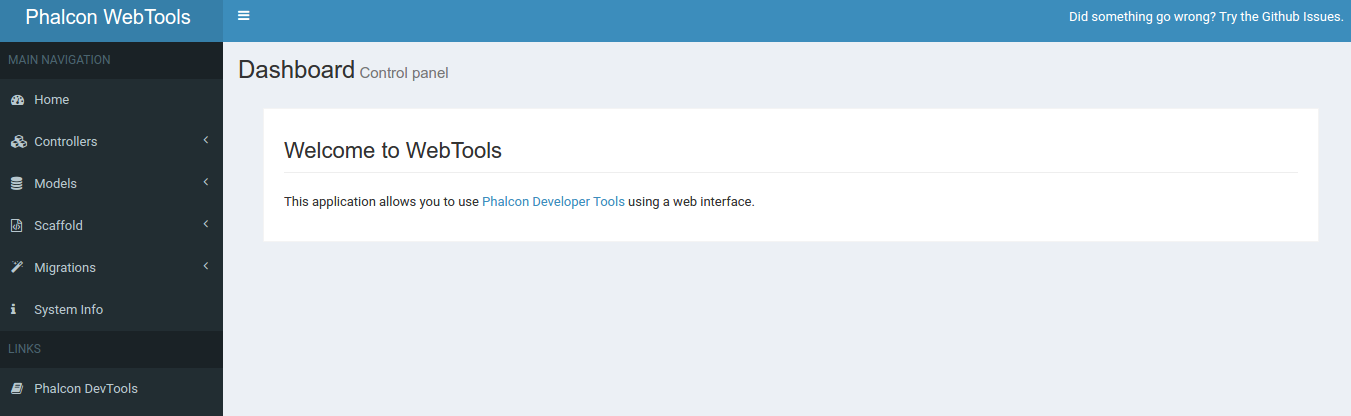
Open it on your browser http://localhost/works/phalcon/store/public/webtools.php. If you get the display like this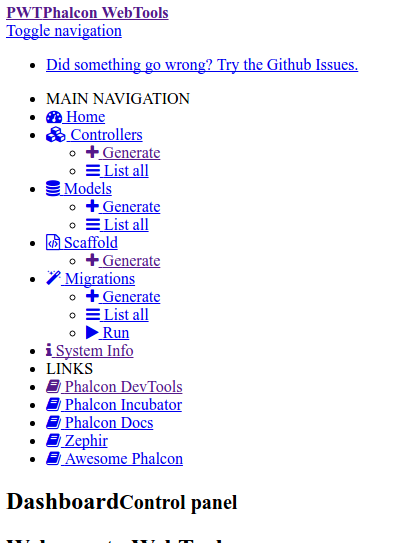 It means the css and js file can’t be loaded properly. From this link: https://forum.phalconphp.com/discussion/15111/webtools-can-not-load-css-if-using-different-baseuri, I need to modify /app/config/config.php and add ‘staticUri’ like this:
123456789...return new \Phalcon\Config([...'application' => [....'baseUri' => preg_replace('/public([\/\\\\])index.php$/', '', $_SERVER["PHP_SELF"]),'staticUri' => '/works/phalcon/store/',]]);
Then refresh again your browser (http://localhost/works/phalcon/store/public/webtools.php), Here is the display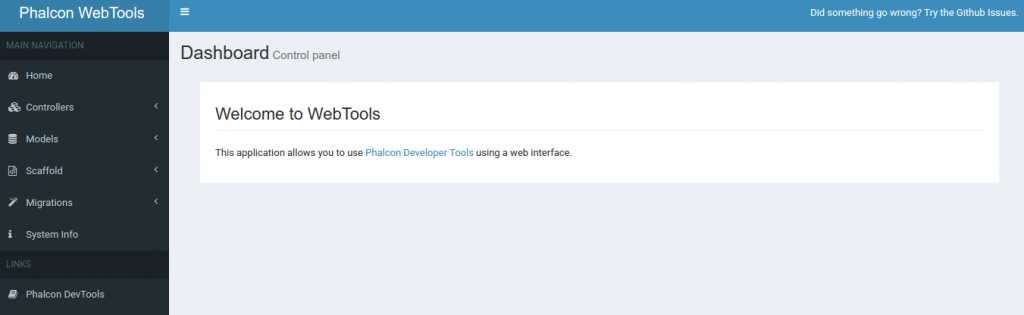 NOTE: I FOUND ONLY ‘controller’ COMMAND IS WORKING, BUT ‘model’ and ‘scaffold’ COMMANDS IS NOT WORKING! I ALSO TRIED THE COMMAND LIKE ‘phalcon model products’ AND IT DON’T WORK. I THINK THE PROBLEM IN THE DEV TOOLS! I put this issue in phalcon github (https://github.com/phalcon/phalcon-devtools/issues/976): Cannot create model via devtools but can create controller
“I can create controller via the devtools (and webtools) but I can’t create model. Here is the command:$ phalcon model products
The result:
Phalcon DevTools (3.0.4)
Error: Table “products” does not exist.I also can’t do it via webtools. I fill the form like the table name and click ‘Generate’. The weird thing happened. it said ‘Models were created successfully’ but I see nothing.
I also found the url for the webtools is a bit weird (it’s working though). when I opened it the first time, the url is like this: http://localhost/works/phalcon/store/public/webtools.php
but after i clicked the others links (do some stuff on controllers, models, system info, etc), the ‘/webtools.php/’ keep added and make the url longer, so it’d be like this: http://localhost/works/phalcon/store/public/webtools.php/webtools.php/webtools.php/webtools.php/webtools.php?_url=/controllers/list.Info:
Phalcon DevTools Version: 3.0.4
Phalcon Version: 3.0.3
AdminLTE Version: 2.3.6
OS: Linux teddy-K43SJ 4.4.0-62-generic #83 14.04.1-Ubuntu SMP Wed Jan 18 18:10:30 UTC 2017 x86_64
PHP Version: 5.6.30-1+deb.sury.org~trusty+1
PHP SAPI: apache2handler”
I’M WAITING THE ANSWER!!!Test Phalcon (https://docs.phalconphp.com/en/latest/reference/tools.html)
Generating Controllers
The command “create-controller” generates controller skeleton structures. It’s important to invoke this command inside a directory that already has a Phalcon project.12345678teddy@teddy-K43SJ:~/Documents/works/phalcon/store$ phalcon create-controller --name testPhalcon DevTools (3.0.4)Success: Controller "test" was successfully created./home/teddy/Documents/works/phalcon/store/app/controllers/TestController.phpThis is the content of /store/app/controllers/TestController.php
123456789<?phpclass TestController extends \Phalcon\Mvc\Controller{public function indexAction(){}}Modify the above controller like this:
123456...public function indexAction(){echo "<h1>Test Test Test</h1>";}...Then open it on your browser: http://localhost/works/phalcon/store/test
Result of the test controller:
Create a new database ‘phalcon_store’ (via phpmyadmin)
Preparing Database Settings
When a project is generated using developer tools. A configuration file can be found in app/config/config.php (NOT config.ini file).1234567891011121314151617181920212223242526...return new \Phalcon\Config(['database' => ['adapter' => 'Mysql','host' => 'localhost','username' => 'root','password' => 'teddy','dbname' => 'phalcon_store','charset' => 'utf8',],'application' => ['appDir' => APP_PATH . '/','controllersDir' => APP_PATH . '/controllers/','modelsDir' => APP_PATH . '/models/','migrationsDir' => APP_PATH . '/migrations/','viewsDir' => APP_PATH . '/views/','pluginsDir' => APP_PATH . '/plugins/','libraryDir' => APP_PATH . '/library/','cacheDir' => BASE_PATH . '/cache/',// This allows the baseUri to be understand project paths that are not in the root directory// of the webpspace. This will break if the public/index.php entry point is moved or// possibly if the web server rewrite rules are changed. This can also be set to a static path.'baseUri' => preg_replace('/public([\/\\\\])index.php$/', '', $_SERVER["PHP_SELF"]),]]);To generate models or scaffold, you will need to change the settings used to connect to your database. I CAN’T USE DEVTOOL FOR CREATING MODEL LIKE I SAID ABOVE, SO I’LL DO IT MANUALLY! SO create a new file ‘Products.php’ in /app/models/ directory. I also added setter/getter methods
123456789101112131415161718192021222324252627282930313233343536373839404142434445464748495051525354555657585960616263646566676869<?phpuse Phalcon\Mvc\Model;class Products extends Model{/*** @var integer*/protected $id;/*** @var integer*/protected $typesId;/*** @var string*/protected $name;/*** @var string*/protected $price;/*** @var integer*/protected $quantity;/*** @var string*/protected $status;/*** Method to set the value of field id** @param integer $id*/public function setId($id){$this->id = $id;}/*** Method to set the value of field typesId** @param integer $typesId*/public function setTypesId($typesId){$this->typesId = $typesId;}// .../*** Returns the value of field status** @return string*/public function getStatus(){return $this->status;}}SCAFFOLD ALSO SEEMS DONT WORK VIA DEVTOOLS!
123456teddy@teddy-K43SJ:~/Documents/works/phalcon/store$ phalcon scaffold --table-name productsPhalcon DevTools (3.0.4)Error: Table 'products' doesn't exist in database when dumping meta-data for ProductsSO FOR SAVING TIME, I DOWNLOAD THE WORKING CODE FROM https://github.com/gsokolowski/ph-store. –> THE LOOKS STILL SAME WITH MINE. NO DIFFERENT. ONLY SHOW ‘Congratulation.
HERE IS LOCAL PHALCON PROJECT WORKING: http://localhost/works/phalcon/invo. –>LEARN THIS!NOTES:
I found when the first time the page is loaded (index.php in /public/ dir), it’d be referred to /app/views/index.volt. then content “{{ content }}” would be picked up from /app/views/index/index.volt. We can modify this file to change the frontend content1234567891011121314151617181920212223{{ content() }}<div class="jumbotron"><h1>Welcome to INVO</h1><p>INVO is a revolutionary application to create invoices online for free.Receive online payments from your clients and improve your cash flow</p><p>{{ link_to('register', 'Try it for Free »', 'class': 'btn btn-primary btn-large btn-success') }}</p></div><div class="row"><div class="col-md-4"><h2>Manage Invoices Online</h2><p>Create, track and export your invoices online. Automate recurring invoices and design your own invoice using our invoice template and brand it with your business logo. </p></div><div class="col-md-4"><h2>Dashboards And Reports</h2><p>Gain critical insights into how your business is doing. See what sells most, who are your top paying customers and the average time your customers take to pay.</p></div><div class="col-md-4"><h2>Invite, Share And Collaborate</h2><p>Invite users and share your workload as invoice supports multiple users with different permissions. It helps your business to be more productive and efficient. </p></div></div>Here is the looks (http://localhost/works/phalcon/store/)