Source: https://github.com/laravel/socialite
I want to practice ‘socialite’ app given by Laravel 5.3 documentation. Installation:
- Open hosts file and Add a new domain ‘socialite.app’ at the file
1teddy@teddy-K43SJ:~/Homestead$ sudo gedit /etc/hosts
Add this line in the file:
1192.168.10.10 socialite.app - Edit ‘Homestead.yaml’ file in ~/.homestead/ to add the new domain ‘socialite.app’ and set the mapping
123456...sites:...- map: socialite.appto: /home/vagrant/Code/socialite/public... - Start vagrant with ‘vagrant up’ or if it already started up, refresh it with ‘vagrant provision’ then go into the ssh with ‘vagrant ssh’
- Go into ‘Code’ directory then create a new laravel project ‘socialite’
12345678vagrant@homestead:~$ cd Code/vagrant@homestead:~/Code$ composer create-project --prefer-dist laravel/laravel socialiteInstalling laravel/laravel (v5.3.16)- Installing laravel/laravel (v5.3.16)Loading from cache...> php artisan key:generateApplication key [base64:KYHaOwFIHGLog5xgPO5v1qjP/MDMKO9OL6ajTQGdQ4Q=] set successfully. - Test it at our browser with http://socialite.app/. If the laravel screen is showed up, we are on the right path.
- Go into the new project ‘socialite’ root directory then add a dependency ‘laravel/socialite’
123456789101112131415161718192021222324252627282930vagrant@homestead:~/Code$ cd socialite/vagrant@homestead:~/Code/socialite$ composer require laravel/socialiteUsing version ^2.0 for laravel/socialite./composer.json has been updatedLoading composer repositories with package informationUpdating dependencies (including require-dev)- Installing guzzlehttp/promises (1.3.0)Loading from cache- Installing psr/http-message (1.0.1)Loading from cache- Installing guzzlehttp/psr7 (1.3.1)Loading from cache- Installing guzzlehttp/guzzle (6.2.2)Loading from cache- Installing league/oauth1-client (1.7.0)Downloading: 100%- Installing laravel/socialite (v2.0.20)Downloading: 100%Writing lock fileGenerating autoload files> Illuminate\Foundation\ComposerScripts::postUpdate> php artisan optimizeGenerating optimized class loaderThe compiled class file has been removed.
- Configuration
After installing the Socialite library, register the Laravel\Socialite\SocialiteServiceProvider in your config/app.php configuration file:
12345678...'providers' => [...Laravel\Socialite\SocialiteServiceProvider::class,],...
Also, add the Socialite facade to the aliases array in your app configuration file:
12345678...'aliases' => [...'Socialite' => Laravel\Socialite\Facades\Socialite::class,],...
- You will also need to add credentials for the OAuth services your application utilizes. These credentials should be placed in your config/services.php configuration file, and should use the key facebook, twitter, linkedin, google, github or bitbucket, depending on the providers your application requires. For example for facebook credentials:
12345678910111213<?phpreturn [...'facebook' => ['client_id' => env('FB_APP_ID'),'client_secret' => env('FB_APP_SECRET'),'redirect' => env('FB_REDIRECT'),],];
we will use env file (.env) to store facebook credentials.
123FB_APP_ID=xxxxxxxFB_APP_SECRET=xxxxxxFB_REDIRECT=http://socialite.app/auth/facebook/callback
REMEMBER ‘http://socialite.app/auth/facebook/callback’ IS CALLBACK URL (AFTER THE SUCCESSFUL LOGIN ON FACEBOOK). ALSO IT MUST MATCH WITH ROUTE ‘auth/facebook/callback’ IN /routes/web.php LATER! - Basic Usage
Next, you are ready to authenticate users! You will need two routes: one for redirecting the user to the OAuth provider, and another for receiving the callback from the provider after authentication. We will access Socialite using the Socialite facade. Please create a new controller file ‘AuthController.php’ in /app/Http/Controllers/Auth/ to work with facebook login:
1234567891011121314151617181920212223242526272829303132333435363738<?phpnamespace App\Http\Controllers\Auth;use App\Http\Controllers\Controller;use Socialite;class AuthController extends Controller{/*** Redirect the user to the GitHub authentication page.** @return Response*/public function redirectToProvider(){return Socialite::driver('facebook')->redirect();}/*** Obtain the user information from GitHub.** @return Response*/public function handleProviderCallback(){$user = Socialite::driver('facebook')->user();//var_dump($user);// $user->token;$data=array('name'=>$user->name,'login_via'=>'Facebook');return view('home')->with('data',$data);//return redirect()->to('/')->with('data',$data);}}
NOTE: DONT FORGET TO ADD ‘use App\Http\Controllers\Controller;’ BEFORE ‘use Socialite;’ BECAUSE I GOT AN ERROR ABOUT IT! - Creating Views. Create two new blade files. They are /resources/views/home.blade.php and /resources/views/master.blade.php:
master.blade.php:
123456789101112131415161718192021<!doctype html><html lang="en"><head><meta charset="UTF-8"><meta name="_token" content="{{ csrf_token() }}"/><title>Social Login</title><link href="https://maxcdn.bootstrapcdn.com/bootstrap/3.3.5/css/bootstrap.min.css" rel="stylesheet"><style>body {padding-top : 70px;}</style></head><body><div class="container">@yield('content')</div><script src="http://code.jquery.com/jquery-2.1.4.min.js"></script></body></html>
home.blade.php:
1234567891011121314@extends('master')@section('content')@if(!empty($data))<h1>Hello {{$data['name']}}, You logged in via {{ $data['login_via'] }}</h1>@else<div class="row"><div class="col-md-6 col-md-offset-3"><h2>Login Using Social Sites</h2><a class="btn btn-primary" href="{{ url('/auth/facebook') }}">Facebook</a></div></div>@endif@stop
url(‘/auth/facebook’) would redirect the page to facebookpage! - Set the routes. Edit /routes/web.php like this:
1234567Route::get('/', function () {//return view('welcome');return view('home');});Route::get('auth/facebook', 'Auth\AuthController@redirectToProvider');Route::get('auth/facebook/callback', 'Auth\AuthController@handleProviderCallback');
We set the root (‘/’) url would open the home page (home.blade.php) - Test it! http://socialite.app/
Here is the screen If we click ‘Facebook’ link, it would redirect us to facebook page. The url would be like this: https://www.facebook.com/v2.8/dialog/oauth?client_id=166568033366882&redirect_uri=http%3A%2F%2Fsocialite.app&scope=email&response_type=code&state=es6ub834Woh7xDxTvdqru84U7kwiRJkftD83HFz7
If I get this page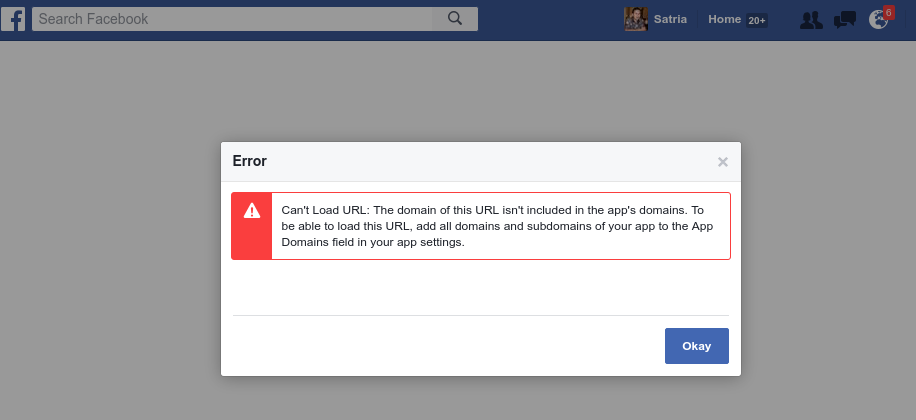 Then I need to modify my facebook app to add this domain (http://socialite.app/) at ‘Site URL’ box. To do it, Open your app from https://developers.facebook.com/apps, then Click your app. Then at Settings->Basic->at Site Url fill with this domain name: http://socialite.app/. Then Save and fix any error.
Here is the oauth2 output from facebook for successful login:
Here is the callback result the successful facebook login
- How to add the others social links (twitter, github, google plus and linkedin)?
Please read Complete Laravel 5 Socialite tutorial to find out how to do it.
You need to setup your apps for the above social app to get the credentials like Client ID and Client Secret and the redirect URL.
To setup Google+ app, please read Google APIs
To setup twitter app, please read Twitter Socialite App
To setup github app, please read Github App
To setup linkedin app, please read Linkedin Oauth2 App
Then modify .env file to include above credentials:
- Here I want to make the redirect URL to be uniform like this:
12345678910111213141516171819FB_APP_ID=XXXFB_APP_SECRET=XXXFB_REDIRECT=http://socialite.app/social/login/facebookGOOGLE_APP_ID=XXXGOOGLE_APP_SECRET=XXXGOOGLE_REDIRECT=http://socialite.app/social/login/googleTWITTER_APP_ID=XXXTWITTER_APP_SECRET=XXXTWITTER_REDIRECT=http://socialite.app/social/login/twitterGITHUB_APP_ID=XXXGITHUB_APP_SECRET=XXXGITHUB_REDIRECT=http://socialite.app/social/login/githubLINKEDIN_APP_ID=XXXLINKEDIN_APP_SECRET=XXXLINKEDIN_REDIRECT=http://socialite.app/social/login/linkedin
So modify our social routes in /routes/web.app like this:
12Route::get('social/login/redirect/{provider}', ['uses' => 'Auth\AuthController@redirectToProvider', 'as' => 'social.login']);Route::get('social/login/{provider}', 'Auth\AuthController@handleProviderCallback');
- Modify /config/services.php to get all the credentials from .env file
12345678910111213141516171819202122232425262728293031323334353637<?phpreturn [...'facebook' => ['client_id' => env('FB_APP_ID'),'client_secret' => env('FB_APP_SECRET'),'redirect' => env('FB_REDIRECT'),],'twitter' => ['client_id' => env('TWITTER_APP_ID'),'client_secret' => env('TWITTER_APP_SECRET'),'redirect' => env('TWITTER_REDIRECT'),],'google' => ['client_id' => env('GOOGLE_APP_ID'),'client_secret' => env('GOOGLE_APP_SECRET'),'redirect' => env('GOOGLE_REDIRECT'),],'github' => ['client_id' => env('GITHUB_APP_ID'),'client_secret' => env('GITHUB_APP_SECRET'),'redirect' => env('GITHUB_REDIRECT'),],'linkedin' => ['client_id' => env('LINKEDIN_APP_ID'),'client_secret' => env('LINKEDIN_APP_SECRET'),'redirect' => env('LINKEDIN_REDIRECT'),],];
- Modify /resources/views/home.blade.php to include all the social app
123456789101112131415161718@extends('master')@section('content')@if(!empty($data))<h1>Hello {{$data['name']}}, You logged in via {{ $data['login_via'] }}</h1>@else<div class="row"><div class="col-md-6 col-md-offset-3"><h2>Login Using Social Sites</h2><a class="btn btn-primary" href="{{ route('social.login','facebook') }}">Facebook</a><a class="btn btn-primary" href="{{ route('social.login','twitter') }}">Twitter</a><a class="btn btn-primary" href="{{ route('social.login','google') }}">Google+</a><a class="btn btn-primary" href="{{ route('social.login','github') }}">Github</a><a class="btn btn-primary" href="{{ route('social.login','linkedin') }}">Linkedin</a></div></div>@endif@stop - Modify /app/Http/Controllers/Auth/AuthController.php to add a parameter $provider
1234567891011121314151617181920...class AuthController extends Controller{public function redirectToProvider($provider){return Socialite::driver($provider)->redirect();}public function handleProviderCallback($provider){$user = Socialite::driver($provider)->user();$data=array('name'=>$user->name,'login_via'=>$provider);return view('home')->with('data',$data);}} - Run on your browser
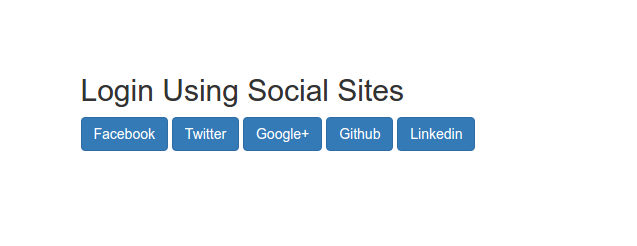 Login via Facebook RUN WELL LIKE BEFORE!
Login via Twitter, For the first time we are needed to authorize the application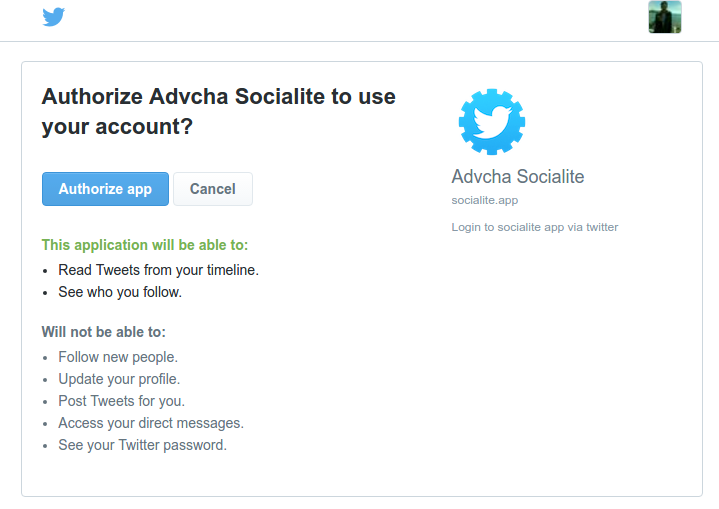 Click ‘Authorize app’. If nothing wrong, here is the callback result
Login via Google, For the first time we are needed to authorize the application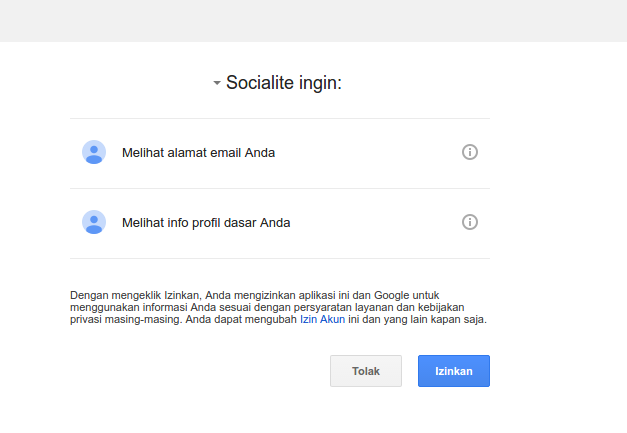 Click ‘Izinkan’. If nothing wrong, here is the callback result
Login via Github, For the first time we are needed to authorize the application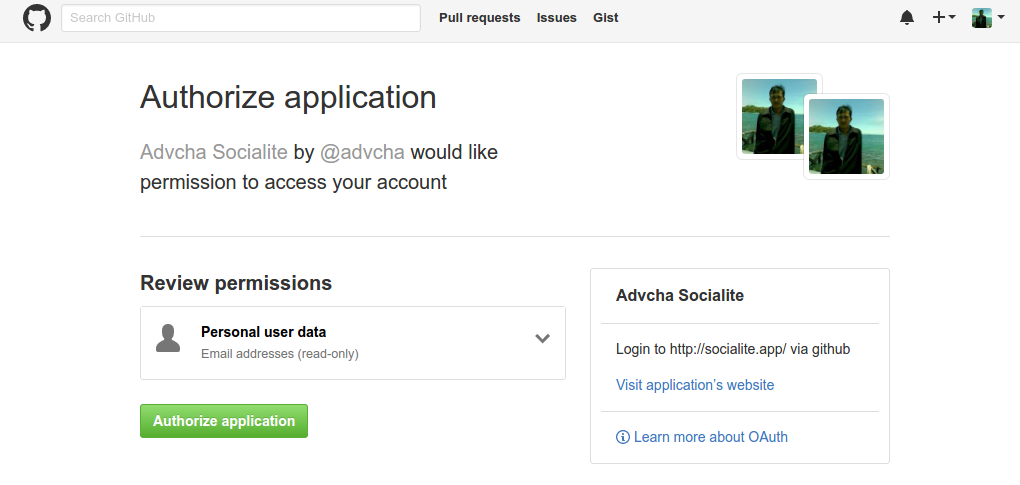 Click ‘Authorize application’. If nothing wrong, here is the callback result
Login via Linkedin, For the first time we are needed to authorize the application Click ‘Allow’. If nothing wrong, here is the callback result
- OKAY! EVERYTHING RUN WELL. THE NEXT STEP IS TO USE DATABASE/SESSION TO SAVE THE LOGIN INFORMATION!
For this, please read : Laravel 5.2 Socialite Facebook Login and Using Github authentication for login with Laravel Socialite.