Url: https://laravel.com/docs/5.3/homestead
Quick Tip: Get a Homestead Vagrant VM Up and Running
Getting Started with Laravel Homestead
Introduction
Laravel strives to make the entire PHP development experience delightful, including your local development environment. Vagrant provides a simple, elegant way to manage and provision Virtual Machines.
Laravel Homestead is an official, pre-packaged Vagrant box that provides you a wonderful development environment without requiring you to install PHP, a web server, and any other server software on your local machine. No more worrying about messing up your operating system! Vagrant boxes are completely disposable. If something goes wrong, you can destroy and re-create the box in minutes!
Homestead runs on any Windows, Mac, or Linux system, and includes the Nginx web server, PHP 7.0, MySQL, Postgres, Redis, Memcached, Node, and all of the other goodies you need to develop amazing Laravel applications.
Installation:
- Install VirtualBox (https://www.virtualbox.org/wiki/Linux_Downloads)
- Install Vagrant (https://www.vagrantup.com/downloads.html)
- Installing The Homestead Vagrant Box
1234567891011121314teddy@teddy-K43SJ:~$ vagrant box add laravel/homestead==> box: Loading metadata for box 'laravel/homestead'box: URL: https://atlas.hashicorp.com/laravel/homesteadThis box can work with multiple providers! The providers that itcan work with are listed below. Please review the list and choosethe provider you will be working with.1) virtualbox2) vmware_desktopEnter your choice: 1==> box: Adding box 'laravel/homestead' (v0.6.0) for provider: virtualboxbox: Downloading: https://atlas.hashicorp.com/laravel/boxes/homestead/versions/0.6.0/providers/virtualbox.box==> box: Successfully added box 'laravel/homestead' (v0.6.0) for 'virtualbox'!
- Installing Homestead
12345678teddy@teddy-K43SJ:~$ cd ~teddy@teddy-K43SJ:~$ git clone https://github.com/laravel/homestead.git HomesteadCloning into 'Homestead'...remote: Counting objects: 1675, done.remote: Total 1675 (delta 0), reused 0 (delta 0), pack-reused 1675Receiving objects: 100% (1675/1675), 261.38 KiB | 152.00 KiB/s, done.Resolving deltas: 100% (989/989), done.Checking connectivity... done.
Please check ‘Homestead’ directory at Home (/home/teddy) - Once you have cloned the Homestead repository, run the bash init.sh command from the Homestead directory to create the Homestead.yaml configuration file. The Homestead.yaml file will be placed in the ~/.homestead hidden directory:
123teddy@teddy-K43SJ:~$ cd Homestead/teddy@teddy-K43SJ:~/Homestead$ bash init.shHomestead initialized!
123teddy@teddy-K43SJ:~/Homestead$ cd ~/.homestead/teddy@teddy-K43SJ:~/.homestead$ lsafter.sh aliases Homestead.yaml
- Configuring Homestead. Setting Your Provider
The provider key in your ~/.homestead/Homestead.yaml file indicates which Vagrant provider should be used: virtualbox, vmware_fusion, or vmware_workstation. You may set this to the provider you prefer:
1teddy@teddy-K43SJ:~/.homestead$ gedit Homestead.yaml
Here is the file content looks like:
12345678910111213141516171819202122232425262728293031323334---ip: "192.168.10.10"memory: 2048cpus: 1provider: virtualboxauthorize: ~/.ssh/id_rsa.pubkeys:- ~/.ssh/id_rsafolders:- map: ~/Codeto: /home/vagrant/Codesites:- map: homestead.appto: /home/vagrant/Code/Laravel/publicdatabases:- homestead# blackfire:# - id: foo# token: bar# client-id: foo# client-token: bar# ports:# - send: 50000# to: 5000# - send: 7777# to: 777# protocol: udp
- Configuring Shared Folders
I prefer to let it as is (please see ‘folders’ in ~.homestead/Homestead.yaml file above)–> DON’T DO THIS, IF ‘map’ VALUE STILL ‘~/Code’, PLEASE MODIFY IT (CHECK YOUR WEB DIRECTORY IS BETTER) BECAUSE I GOT THIS ERROR:
1234567teddy@teddy-K43SJ:~/Homestead$ vagrant upBringing machine 'homestead-7' up with 'virtualbox' provider...There are errors in the configuration of this machine. Please fixthe following errors and try again:vm:* The host path of the shared folder is missing: ~/Code
MODIFY IT TO ‘~/Documents/works/laravel’ LIKE THIS:
12345...folders:- map: ~/Documents/works/laravelto: /home/vagrant/Code... - Configuring Nginx Sites
I prefer to let it as is (please see ‘sites’ in ~.homestead/Homestead.yaml file above)
If you change the sites property after provisioning the Homestead box, you should re-run vagrant reload –provision to update the Nginx configuration on the virtual machine. - Configure SSH Key (IF NOT EXIST IN /home/teddy/.ssh/)
1teddy@teddy-K43SJ:~/Homestead$ ssh-keygen -t rsa -C "advcha@yahoo.com" - The Hosts File
You must add the “domains” for your Nginx sites to the hosts file on your machine. The hosts file will redirect requests for your Homestead sites into your Homestead machine. On Mac and Linux, this file is located at /etc/hosts.
1teddy@teddy-K43SJ:~/.homestead$ sudo gedit /etc/hosts
Add this line in the file:
1192.168.10.10 homestead.app
Make sure the IP address listed is the one set in your ~/.homestead/Homestead.yaml file. Once you have added the domain to your hosts file and launched the Vagrant box you will be able to access the site via your web browser: - Launching The Vagrant Box
Once you have edited the Homestead.yaml to your liking, run the vagrant up command from your Homestead directory. Vagrant will boot the virtual machine and automatically configure your shared folders and Nginx sites.
123teddy@teddy-K43SJ:~/.homestead$ cd ~teddy@teddy-K43SJ:~$ cd Homestead/teddy@teddy-K43SJ:~/Homestead$ vagrant up
BUT I GOT THIS ERROR:
123456789101112131415161718192021222324252627/home/teddy/Homestead/scripts/homestead.rb:109:in `read': No such file or directory @ rb_sysopen - /home/teddy/.ssh/id_rsa (Errno::ENOENT)from /home/teddy/Homestead/scripts/homestead.rb:109:in `block (2 levels) in configure'from /opt/vagrant/embedded/gems/gems/vagrant-1.8.7/plugins/kernel_v2/config/vm_provisioner.rb:72:in `call'from /opt/vagrant/embedded/gems/gems/vagrant-1.8.7/plugins/kernel_v2/config/vm_provisioner.rb:72:in `add_config'from /opt/vagrant/embedded/gems/gems/vagrant-1.8.7/plugins/kernel_v2/config/vm.rb:324:in `provision'from /home/teddy/Homestead/scripts/homestead.rb:106:in `block in configure'from /home/teddy/Homestead/scripts/homestead.rb:105:in `each'from /home/teddy/Homestead/scripts/homestead.rb:105:in `configure'from /home/teddy/Homestead/Vagrantfile:30:in `block in <top (required)>'from /opt/vagrant/embedded/gems/gems/vagrant-1.8.7/lib/vagrant/config/v2/loader.rb:37:in `call'from /opt/vagrant/embedded/gems/gems/vagrant-1.8.7/lib/vagrant/config/v2/loader.rb:37:in `load'from /opt/vagrant/embedded/gems/gems/vagrant-1.8.7/lib/vagrant/config/loader.rb:113:in `block (2 levels) in load'from /opt/vagrant/embedded/gems/gems/vagrant-1.8.7/lib/vagrant/config/loader.rb:107:in `each'from /opt/vagrant/embedded/gems/gems/vagrant-1.8.7/lib/vagrant/config/loader.rb:107:in `block in load'from /opt/vagrant/embedded/gems/gems/vagrant-1.8.7/lib/vagrant/config/loader.rb:104:in `each'from /opt/vagrant/embedded/gems/gems/vagrant-1.8.7/lib/vagrant/config/loader.rb:104:in `load'from /opt/vagrant/embedded/gems/gems/vagrant-1.8.7/lib/vagrant/vagrantfile.rb:28:in `initialize'from /opt/vagrant/embedded/gems/gems/vagrant-1.8.7/lib/vagrant/environment.rb:746:in `new'from /opt/vagrant/embedded/gems/gems/vagrant-1.8.7/lib/vagrant/environment.rb:746:in `vagrantfile'from /opt/vagrant/embedded/gems/gems/vagrant-1.8.7/lib/vagrant/environment.rb:492:in `host'from /opt/vagrant/embedded/gems/gems/vagrant-1.8.7/lib/vagrant/environment.rb:214:in `block in action_runner'from /opt/vagrant/embedded/gems/gems/vagrant-1.8.7/lib/vagrant/action/runner.rb:33:in `call'from /opt/vagrant/embedded/gems/gems/vagrant-1.8.7/lib/vagrant/action/runner.rb:33:in `run'from /opt/vagrant/embedded/gems/gems/vagrant-1.8.7/lib/vagrant/environment.rb:479:in `hook'from /opt/vagrant/embedded/gems/gems/vagrant-1.8.7/lib/vagrant/environment.rb:728:in `unload'from /opt/vagrant/embedded/gems/gems/vagrant-1.8.7/bin/vagrant:192:in `ensure in <main>'from /opt/vagrant/embedded/gems/gems/vagrant-1.8.7/bin/vagrant:192:in `<main>'
SOLUTION: (ref: Problem launching vagrant on Homestead)
From this error
1No such file or directory @ rb_sysopen - /home/teddy/.ssh/id_rsa (Errno::ENOENT)
I didn’t find ‘id_rsa’ file in /home/teddy/.ssh/ directory. I need to configure my SSH location like this:
123456789101112131415161718192021teddy@teddy-K43SJ:~/Homestead$ ssh-keygen -t rsa -C "advcha@yahoo.com"Generating public/private rsa key pair.Enter file in which to save the key (/home/teddy/.ssh/id_rsa):Enter passphrase (empty for no passphrase):Enter same passphrase again:Your identification has been saved in /home/teddy/.ssh/id_rsa.Your public key has been saved in /home/teddy/.ssh/id_rsa.pub.The key fingerprint is:b6:7b:c7:0c:c9:d1:3d:a7:8b:8f:56:25:52:2b:6a:48 advcha@yahoo.comThe key's randomart image is:+--[ RSA 2048]----+| || . || . o . || E . + = o|| .So + o * || ...* o || .. + o . || .. *.. || .. o... |+-----------------+
SEE MY MODIFICATION AT #9.
Then I run ‘vagrant up’ again. BUT GOT ANOTHER ERROR:
1234567teddy@teddy-K43SJ:~/Homestead$ vagrant upBringing machine 'homestead-7' up with 'virtualbox' provider...There are errors in the configuration of this machine. Please fixthe following errors and try again:vm:* The host path of the shared folder is missing: ~/Code
SOLUTION: (ref: Vagrant: The host path of the shared folder is missing)
SEE MY MODIFICATION AT #7 ABOVE!
RUN ‘vagrant up’ again! SUCCESS:
123456789101112131415161718192021222324252627282930313233343536373839404142434445464748495051525354555657585960teddy@teddy-K43SJ:~/Homestead$ vagrant upBringing machine 'homestead-7' up with 'virtualbox' provider...==> homestead-7: Importing base box 'laravel/homestead'...==> homestead-7: Matching MAC address for NAT networking...==> homestead-7: Checking if box 'laravel/homestead' is up to date...==> homestead-7: Setting the name of the VM: homestead-7==> homestead-7: Clearing any previously set network interfaces...==> homestead-7: Preparing network interfaces based on configuration...homestead-7: Adapter 1: nathomestead-7: Adapter 2: hostonly==> homestead-7: Forwarding ports...homestead-7: 80 (guest) => 8000 (host) (adapter 1)homestead-7: 443 (guest) => 44300 (host) (adapter 1)homestead-7: 3306 (guest) => 33060 (host) (adapter 1)homestead-7: 5432 (guest) => 54320 (host) (adapter 1)homestead-7: 22 (guest) => 2222 (host) (adapter 1)==> homestead-7: Running 'pre-boot' VM customizations...==> homestead-7: Booting VM...==> homestead-7: Waiting for machine to boot. This may take a few minutes...homestead-7: SSH address: 127.0.0.1:2222homestead-7: SSH username: vagranthomestead-7: SSH auth method: private keyhomestead-7:homestead-7: Vagrant insecure key detected. Vagrant will automatically replacehomestead-7: this with a newly generated keypair for better security.homestead-7:homestead-7: Inserting generated public key within guest...homestead-7: Removing insecure key from the guest if it's present...homestead-7: Key inserted! Disconnecting and reconnecting using new SSH key...==> homestead-7: Machine booted and ready!==> homestead-7: Checking for guest additions in VM...==> homestead-7: Setting hostname...==> homestead-7: Configuring and enabling network interfaces...==> homestead-7: Mounting shared folders...homestead-7: /vagrant => /home/teddy/Homesteadhomestead-7: /home/vagrant/Code => /home/teddy/Documents/works/laravel==> homestead-7: Running provisioner: file...==> homestead-7: Running provisioner: shell...homestead-7: Running: inline script==> homestead-7:==> homestead-7: ssh-rsa AAAAB3NzaC1yc2EAAAADAQABAAABAQDFs0+Hb8l+48Eq9Ac6kXclhIuecnLDF6W5jocqSQBcLjdixzCnwnvciW26PvUp2HEjzkzAX8s56Zx4v4cBJUoRRx7yxU60y3HeFDOFzrZEicnI/10iwnmedFcm6SdvhhQvenVev8neZjI4SCnjAKvoTgu/RKkHiU9wBVXhb7gHl0qkvo5333I9l8bMqjWQqdD7GDTjfdrbddQD0QrxR+aU+Hbpo6E1w7htbQ0iic/Nif4oXjRQrQpgwHKA591oGyfAlqDNrQ361SZehIO0ZIBv/3+am5696AluSTkm5DZW1TdidMChFKVIah9VcSZ3K+yRvtpavpCsJwfrnFLsjq+9 advcha@yahoo.com==> homestead-7: Running provisioner: shell...homestead-7: Running: inline script==> homestead-7: Running provisioner: shell...homestead-7: Running: /tmp/vagrant-shell20161122-2322-u1zhuj.sh==> homestead-7: Running provisioner: shell...homestead-7: Running: script: Creating Site: homestead.app==> homestead-7: Running provisioner: shell...homestead-7: Running: script: Restarting Nginx==> homestead-7: Running provisioner: shell...homestead-7: Running: script: Creating MySQL Database==> homestead-7: Running provisioner: shell...homestead-7: Running: script: Creating Postgres Database==> homestead-7: Running provisioner: shell...homestead-7: Running: script: Clear Variables==> homestead-7: Running provisioner: shell...homestead-7: Running: script: Update Composer==> homestead-7: You are already using composer version 1.2.2 (stable channel).==> homestead-7: Running provisioner: shell...homestead-7: Running: /tmp/vagrant-shell20161122-2322-tjn045.sh
WE CAN SEE VAGRANT INSTALLED ALSO PHP, NGINX, MYSQL, POSTGRESQL,ETC.
Or you can see it from VirtualBox (Open Applications -> System Tools -> Oracle VM VirtualBox) THIS GUI MORE CONVENIENT. I CAN ‘START’, ‘PAUSE’ OR ‘CLOSE->POWER OFF’ THE VIRTUAL MACHINE!
NOTE: START MUST BE FROM TERMINAL BY TYPING ‘vagrant up’. I CAN USE GUI TO START IT UP BECAUSE IT’S ALWAYS ASK FOR LOGIN AND PASSWORD THAT I DONT KNOW!
USE ‘vagrant provision’ TO RELOAD/REFRESH VM!
TO SHUTDOWN THE VM (NO! USE SUSPEND INSTEAD. SEE BELOW), PLEASE TYPE ‘vagrant destroy –force’
READ (https://www.vagrantup.com/docs/cli/destroy.html): “The destroy command does not remove a box that may have been installed on your computer during vagrant up. Thus, even if you run vagrant destroy, the box installed in the system will still be present on the hard drive. To return your computer to the state as it was before vagrant up command, you need to use vagrant box remove.”
USE SUSPEND INSTEAD OF SHUTDOWN (ref:https://scotch.io/tutorials/getting-started-with-laravel-homestead)
12teddy@teddy-K43SJ:~/Homestead$ vagrant suspend==> homestead-7: Saving VM state and suspending execution...
SOMETIMES I FORGOT TO SUSPEND THE VM BEFORE HIBERNATING MY LAPTOP. IT’D MAKE MY LAPTOP VERY SLOW. THE TERMINAL WOULD NOT RESPOND ANYMORE FOR ANYKEY BUT I CAN OPEN THE NEW ONE OR NEW TAB. USUALLY THE VM STATUS IS PAUSED.
1234567891011teddy@teddy-K43SJ:~/Homestead$ vagrant statusCurrent machine states:homestead-7 paused (virtualbox)The VM is paused. This VM may have been paused via the VirtualBoxGUI or the VBoxManage command line interface. To unpause, pleaseuse the VirtualBox GUI and/or VBoxManage command line interface sothat vagrant would be able to control the VM again.teddy@teddy-K43SJ:~/Homestead$ vagrant provision==> homestead-7: VM is not currently running. Please, first bring it up with `vagrant up` then run this command.
I HAVE TO OPEN THE VirtualBox GUI AND DO Close -> Save State MANUALLY TO STOP THE CURRENT PROCESS!
123456teddy@teddy-K43SJ:~/Homestead$ vagrant statusCurrent machine states:homestead-7 saved (virtualbox)To resume this VM, simply run `vagrant up`.
- Use SSH to get into the VM (ref: https://www.sitepoint.com/quick-tip-get-homestead-vagrant-vm-running/)
123456789101112teddy@teddy-K43SJ:~/Homestead$ vagrant sshWelcome to Ubuntu 16.04.1 LTS (GNU/Linux 4.4.0-38-generic x86_64)* Documentation: https://help.ubuntu.com* Management: https://landscape.canonical.com* Support: https://ubuntu.com/advantage4 packages can be updated.0 updates are security updates.vagrant@homestead:~$
It seems vagrant INSTALLED ubuntu 16.04 AS VM!
I can check the PHP version like this:
123456vagrant@homestead:~$ php -vPHP 7.0.13-1+deb.sury.org~xenial+1 (cli) ( NTS )Copyright (c) 1997-2016 The PHP GroupZend Engine v3.0.0, Copyright (c) 1998-2016 Zend Technologieswith Zend OPcache v7.0.13-1+deb.sury.org~xenial+1, Copyright (c) 1999-2016, by Zend Technologieswith blackfire v1.14.1~linux-x64-non_zts70, https://blackfire.io, by Blackfireio Inc.
I can browse the files and directories in it:
123456vagrant@homestead:~$ lsCodevagrant@homestead:~$ cd Code/vagrant@homestead:~/Code$ lsblog composer.lock latihan-crudcomposer.json crud-materialize mylaravelproject - Run http://homestead.app
But before we do this, WE NEED TO ADD A FEW DIRECTORIES AND FILE. BECAUSE WE KNOW THE WEB ROOT FOR OUR VM IS ‘/home/vagrant/Code’ IS MAPPED TO ‘~/Documents/works/laravel’ (SEE ~/.homestead/Homestead.yaml). FOR ‘homestead.app’ (IS MAPPED TO ‘/home/vagrant/Code/Laravel/public’), ADD A NEW DIRECTORY ‘Laravel’ in /Documents/works/laravel/, THEN ADD ‘public’ DIRECTORY IN IT. THEN ADD A NEW FILE ‘index.php’ IN IT. SO THE FULL PATH IS ‘/Documents/works/laravel/Laravel/public/index.php’. In the PHP file, just add a line of code:
123<?phpphpinfo();?>
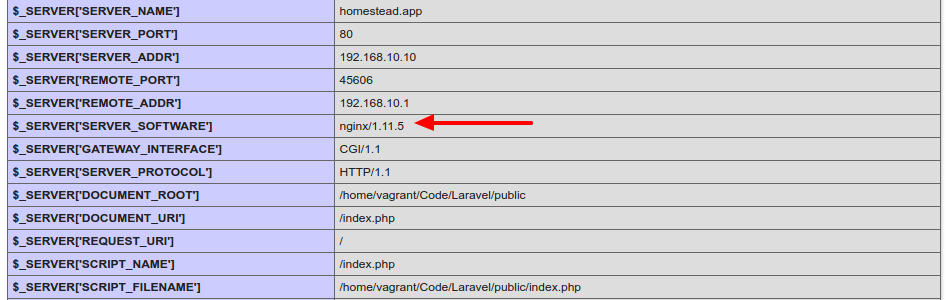
THEN RUN http://homestead.app/ IN OUR BROWSER!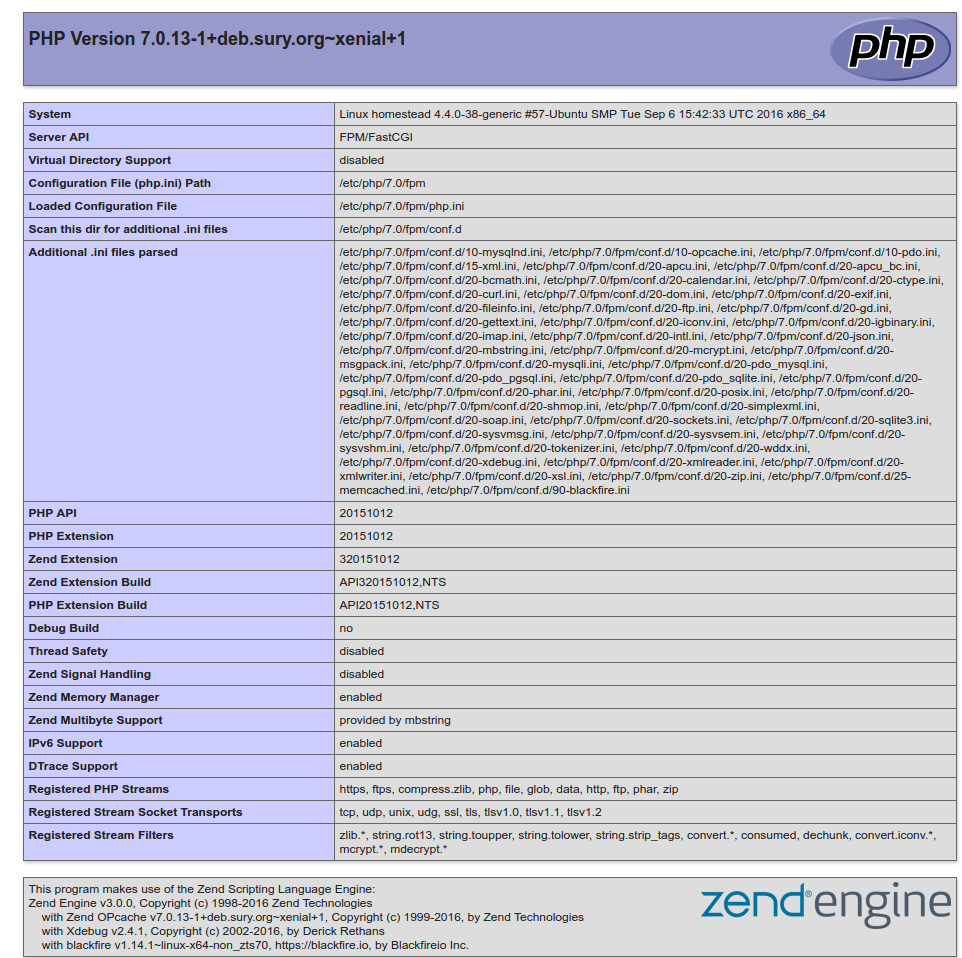 I can see I’m using NGINX as a webserver instead of Apache
HOW TO RUN MYSQL DATABASE???
SOLUTION:
REMEMBER: VAGRANT MUST BE IN ‘UP’ MODE FOR THIS SITUATION!
Login to ssh (‘vagrant ssh’) then check the mysql location with ‘which mysql’
1234567891011121314teddy@teddy-K43SJ:~/Homestead$ vagrant sshWelcome to Ubuntu 16.04.1 LTS (GNU/Linux 4.4.0-38-generic x86_64)* Documentation: https://help.ubuntu.com* Management: https://landscape.canonical.com* Support: https://ubuntu.com/advantage4 packages can be updated.0 updates are security updates.Last login: Wed Nov 23 07:27:28 2016 from 10.0.2.2vagrant@homestead:~$ which mysql/usr/bin/mysql
From ~/.homestead/Homestead.yaml, here is the databases:
12databases:- homestead
To connect to mysql server at VM, use default user:
12user: homesteadpassword: secret
12345678910111213141516vagrant@homestead:~$ mysql -uhomestead -psecretmysql: [Warning] Using a password on the command line interface can be insecure.Welcome to the MySQL monitor. Commands end with ; or \g.Your MySQL connection id is 11Server version: 5.7.16-0ubuntu0.16.04.1 (Ubuntu)Copyright (c) 2000, 2016, Oracle and/or its affiliates. All rights reserved.Oracle is a registered trademark of Oracle Corporation and/or itsaffiliates. Other names may be trademarks of their respectiveowners.Type 'help;' or '\h' for help. Type '\c' to clear the current input statement.mysql> quitBye
So MYSQL Server version is 5.7.16
For better for myself to connect to the mysql server, I tried to install the latest mysql client ‘MySQL Workbench’ from https://dev.mysql.com/downloads/workbench/.
<OLD>
Currently the version is 6.3.8. But when I installed it, I got dependenci error “Dependency is not satisfiable: libatkmm-1.6-1v5 (>=2.24.0)”. I checked again the downloaded file (mysql-workbench-community-6.3.8-1ubu1604-amd64.deb), IT’S APPARENTLY FOR UBUNTU 16.04!
</OLD>
<NEW>
Ref: http://elementaryos.stackexchange.com/questions/6779/cant-install-mysql-workbench-dependency-is-not-satisfiable
Download MySQL Workbench for Ubuntu 14.04 here http://cdn.mysql.com//archives/mysql-workbench/mysql-workbench-community-6.3.6-1ubu1404-amd64.deb THEN INSTALL. SUCCESS!
</NEW>
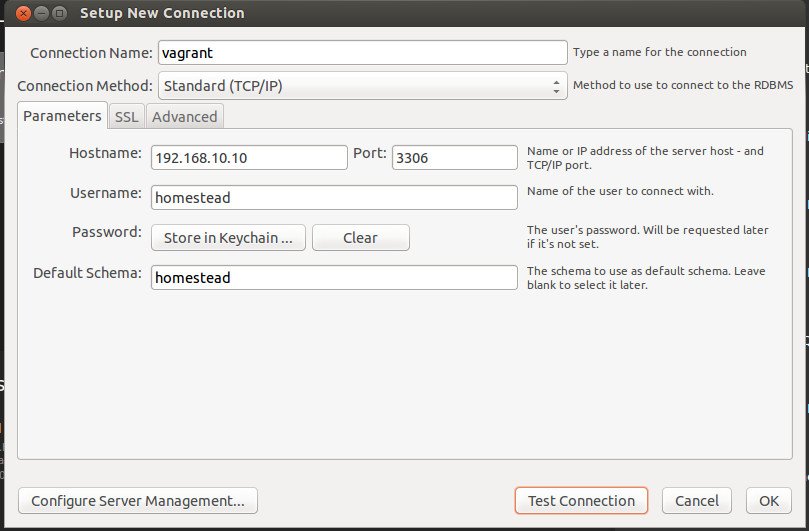
CONFIGURE MySQL Worbench TO CONNECT MySQL Server AT VM:
123456Connection Name: vagrantHostname: 192.168.10.10User: homesteadPassword: secretPort: 3306Default Schema: homestead
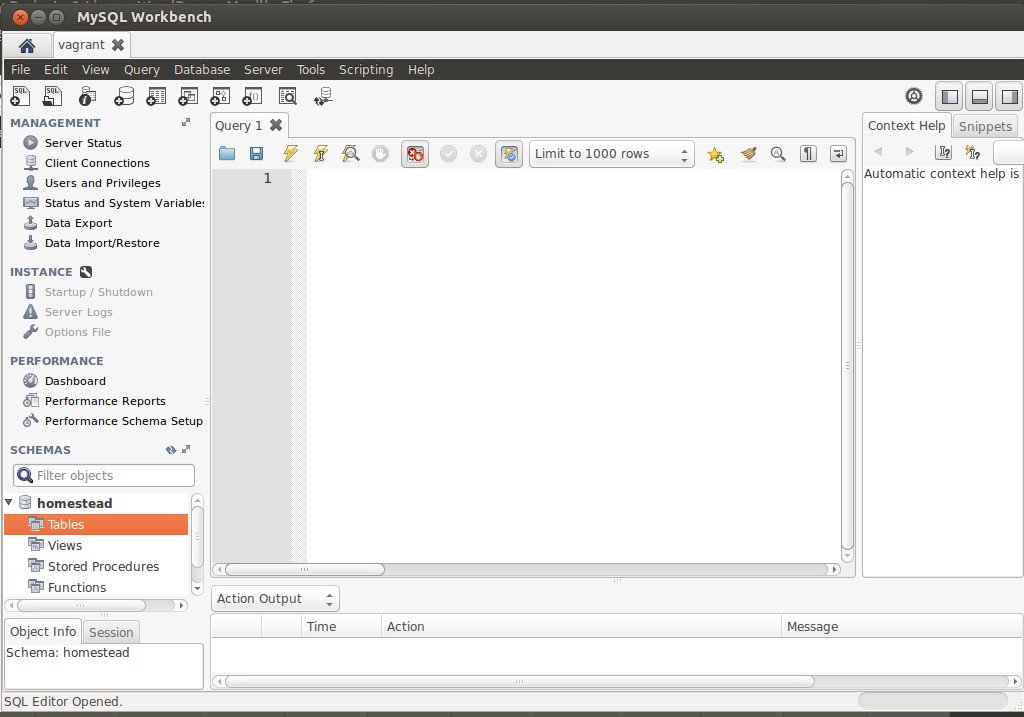
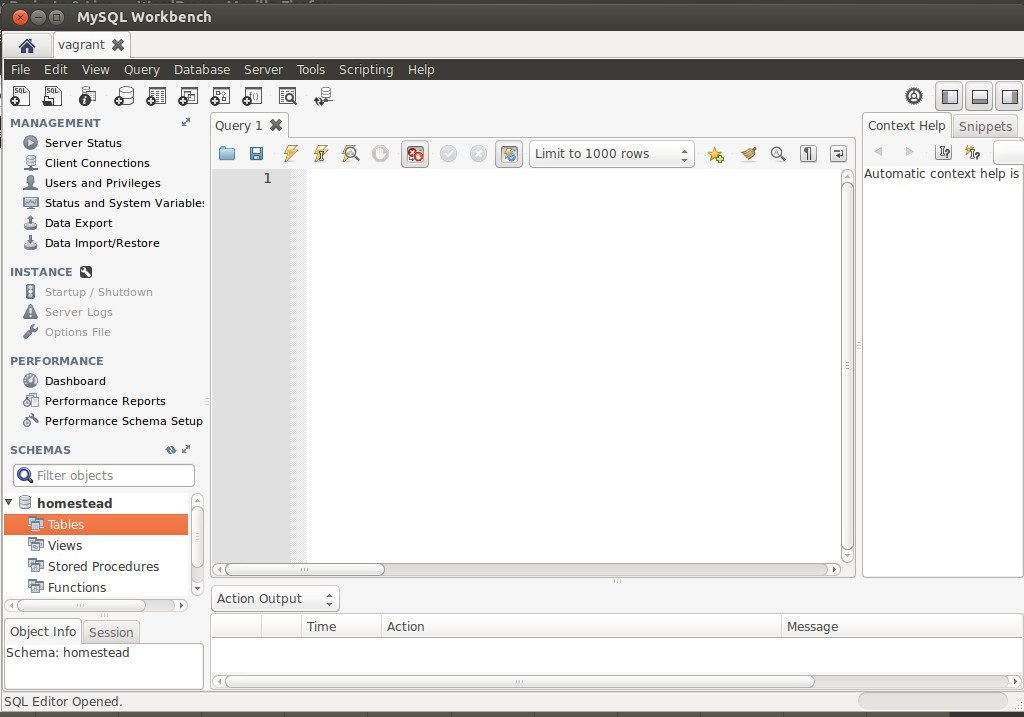 Now I can see the database ‘homestead’. I also can create any table!
WHERE IS NGINX CONFIGURATION FILE???
SOLUTION:
Use ‘vagrant ssh’ TO GET INTO THE HOME DIRECTORY OF VM. THEN GO TO THE ROOT DIRECTORY
1234567891011121314151617181920212223teddy@teddy-K43SJ:~/Homestead$ vagrant sshWelcome to Ubuntu 16.04.1 LTS (GNU/Linux 4.4.0-38-generic x86_64)* Documentation: https://help.ubuntu.com* Management: https://landscape.canonical.com* Support: https://ubuntu.com/advantage4 packages can be updated.0 updates are security updates.Last login: Wed Nov 23 07:51:16 2016 from 10.0.2.2vagrant@homestead:~$ lsCodevagrant@homestead:~$ cd ..vagrant@homestead:/home$ lsvagrantvagrant@homestead:/home$ cd ..vagrant@homestead:/$ lsbin home lib64 opt sbin tmp vmlinuzboot initrd.img lost+found proc snap usr vmlinuz.olddev initrd.img.old media root srv vagrantetc lib mnt run sys var
THE NGINX CONF FILE IN /etc/nginx/nginx.conf
1234567vagrant@homestead:/$ cd /etc/nginx/vagrant@homestead:/etc/nginx$ lsconf.d koi-win proxy_params sslfastcgi.conf mime.types scgi_params uwsgi_paramsfastcgi_params modules-available sites-available win-utfhhvm.conf modules-enabled sites-enabledkoi-utf nginx.conf snippets
USE ‘nano’ TO OPEN/EDIT THE FILE
1vagrant@homestead:/$ nano /etc/nginx/nginx.conf
Here is the file content:
1234567891011121314151617181920212223242526272829303132333435363738394041424344454647484950515253545556575859606162636465666768697071727374757677787980818283848586user vagrant;worker_processes auto;pid /run/nginx.pid;include /etc/nginx/modules-enabled/*.conf;events {worker_connections 768;# multi_accept on;}http {### Basic Settings##sendfile on;tcp_nopush on;tcp_nodelay on;keepalive_timeout 65;types_hash_max_size 2048;# server_tokens off;server_names_hash_bucket_size 64;# server_name_in_redirect off;include /etc/nginx/mime.types;default_type application/octet-stream;### SSL Settings##ssl_protocols TLSv1 TLSv1.1 TLSv1.2; # Dropping SSLv3, ref: POODLEssl_prefer_server_ciphers on;### Logging Settings##access_log /var/log/nginx/access.log;error_log /var/log/nginx/error.log;### Gzip Settings##gzip on;gzip_disable "msie6";# gzip_vary on;# gzip_proxied any;# gzip_comp_level 6;# gzip_buffers 16 8k;# gzip_http_version 1.1;# gzip_types text/plain text/css application/json application/javascrip$### Virtual Host Configs##include /etc/nginx/conf.d/*.conf;include /etc/nginx/sites-enabled/*;}#mail {# # See sample authentication script at:# # http://wiki.nginx.org/ImapAuthenticateWithApachePhpScript## # auth_http localhost/auth.php;# # pop3_capabilities "TOP" "USER";# # imap_capabilities "IMAP4rev1" "UIDPLUS";## server {# listen localhost:110;# protocol pop3;# proxy on;# }## server {# listen localhost:143;# protocol imap;# proxy on;# }#}
TIPS FOR USING NANO:
TO ‘COPY’ THE TEXT AT THE TERMINAL, JUST USE MOUSE & DRAG THEN Edit->Copy
TO ‘EXIT’ THE TERMINAL, PRESS ‘Ctrl+X’
use CTRL-O to Save/overwrite the changes then ENTER - HOW TO CREATE NEW PROJECT ON VAGRANT???
OK!. Make sure to run the VM (‘vagrant up’) and go to the ssh (‘vagrant ssh’). I want to clone the laravel 5 project here (Please read Install Laravel 5 On Ubuntu 14.04) For the first time, check our git and composer:
1234vagrant@homestead:~$ git --versiongit version 2.7.4vagrant@homestead:~$ composer --versionComposer version 1.2.2 2016-11-03 17:43:15
GO TO ‘/Code’ DIRECTORY FIRST!
1vagrant@homestead:~$ cd Code/
NOTE: THIS IS A REMAINDER! I MADE A MISTAKE FOR THE FIRST TIME SO I HAVE TO MOVE THE LARAVEL PROJECT INTO ‘/Code’ DIRECTORY!
1vagrant@homestead:~$ mv laravelvagrant/ Code/
OK. Create the Laravel project with name ‘laravelvagrant’
1234567vagrant@homestead:~/Code$ composer create-project --prefer-dist laravel/laravel laravelvagrantInstalling laravel/laravel (v5.3.16)- Installing laravel/laravel (v5.3.16)Downloading: 100%...> php artisan key:generateApplication key [base64:n13iBSiaaoRlpmuP9Mu1B4aL1SUSv2oCMEveVnY8NbQ=] set successfully.
CHECK THE NEW PROJECT ‘laravelvagrant’!
123vagrant@homestead:~/Code$ lsblog composer.lock Laravel latihan-crudcomposer.json crud-materialize laravelvagrant mylaravelproject
We want to run this new project, BUT we need to modify ‘Homestead.yaml’ file first to map ‘homestead.app’ to our new project ‘laravelvagrant’. Here is the modification:
123sites:- map: homestead.appto: /home/vagrant/Code/laravelvagrant/public
We changed from ‘/home/vagrant/Code/Laravel/public’ to ‘/home/vagrant/Code/laravelvagrant/public’
THEN WE NEED TO REFRESH OUR VM WITH ‘vagrant provision’! (exit from ssh first!). Then IT’S READY TO RUN homestead.app (http://homestead.app/) ON OUR BROWSER! HERE IS THE WELCOME SCREEN
- I have a test from interviewed.com (https://upwork.interviewed.com/candidate/interviews/905600) from upwork.com about my understanding for PHP things to go into the enterprise level!. Here is the description:
“This project assumes your computer is already set up with minimal development tools including Git, Vagrant, Composer, etc. If you don’t already have these installed, you may want to switch to the computer that you normally develop on or follow these instructions.This project uses Laravel 5.3, PHP 7.0, and SQLite (so that database is portable without seeds).Download the project and start your server:
https://github.com/prehire/php-23093023909ad09a09
View the project in your browser and click around: http://homestead.appMost people allocate about 1 hour to this project, but you can invest up to 4 hours if you want to. Because the project has a time limit, you can’t pause once you’ve started.”
OK! I already setup vagrant and virtualbox
Run the VM and go into the ssh
Then clone the project ‘https://github.com/prehire/php-23093023909ad09a09.git’
1234567891011vagrant@homestead:~/Code$ git clone https://github.com/prehire/php-23093023909ad09a09.gitCloning into 'php-23093023909ad09a09'...remote: Counting objects: 152, done.remote: Total 152 (delta 0), reused 0 (delta 0), pack-reused 152Receiving objects: 100% (152/152), 174.46 KiB | 191.00 KiB/s, done.Resolving deltas: 100% (30/30), done.Checking connectivity... done.vagrant@homestead:~/Code$ lsblog crud-materialize latihan-crudcomposer.json Laravel mylaravelprojectcomposer.lock laravelvagrant php-23093023909ad09a09
Go into the project ‘php-23093023909ad09a09’ then install the dependencies via composer
123456789101112vagrant@homestead:~/Code$ cd php-23093023909ad09a09/vagrant@homestead:~/Code/php-23093023909ad09a09$ composer installLoading composer repositories with package informationInstalling dependencies (including require-dev) from lock file- Installing nikic/php-parser (v2.1.1)Loading from cache...Generating autoload files> Illuminate\Foundation\ComposerScripts::postInstall> php artisan optimizeGenerating optimized class loaderThe compiled class file has been removed.
Now we want to test it on our browser BUT REMEMBER TO MODIFY ‘Homestead.yaml’ FIRST!
123sites:- map: homestead.appto: /home/vagrant/Code/php-23093023909ad09a09/public
THEN EXIT FROM SSH & REFRESH OUR VM WITH ‘vagrant provision’!
REFRESH OUR BROWSER (http://homestead.app/). HERE IS THE HOMEPAGE SCREEN! The App with 4 top menu: Homework (http://homestead.app/booking OR http://homestead.app/ –> HOMEPAGE), Booking (http://homestead.app/booking), Customer (http://homestead.app/customer) and Cleaner (http://homestead.app/cleaner). Here are the screens for each of them:
Booking Customer
 Cleaner
 OK. THE SETUP IS OKAY. WHAT IS THE TASK FOR THIS PROJECT???
USE PDO INSTEAD OF MYSQL!!! SETUP IT FIRST OR TRY THE AVAILABLE PROJECT IN http://myprojects.advchaweb.com/index.php/2017/01/11/cleaner-booking/ TO MAKE SURE PDO WORK IN HOMESTEAD!