Reference: http://dhaneshr.net/2016/11/09/upgrading-to-cuda-8-0-on-ubuntu-16-04/
https://developer.nvidia.com/cuda-downloads
https://developer.nvidia.com/rdp/cudnn-download
http://www.pyimagesearch.com/2016/07/04/how-to-install-cuda-toolkit-and-cudnn-for-deep-learning/
The NVIDIA CUDA Toolkit: A development environment for building GPU-accelerated applications. This toolkit includes a compiler specifically designed for NVIDIA GPUs and associated math libraries + optimization routines.
The cuDNN library: A GPU-accelerated library of primitives for deep neural networks. Using the cuDNN package, you can increase training speeds by upwards of 44%, with over 6x speedups in Torch and Caffe.
Currently My system Ubuntu 14.04 installed CUDA toolkit 7.5
|
1 2 3 4 5 |
teddy@teddy-K43SJ:~$ nvcc -V nvcc: NVIDIA (R) Cuda compiler driver Copyright (c) 2005-2015 NVIDIA Corporation Built on Tue_Aug_11_14:27:32_CDT_2015 Cuda compilation tools, release 7.5, V7.5.17 |
Now I want to upgrade it to CUDA toolkit 8.0:
- Download the .deb file of CUDA Toolkit 8 (I prefer local here to make the installation smooth) from https://developer.nvidia.com/cuda-downloads.
I need to select the correct file according to my system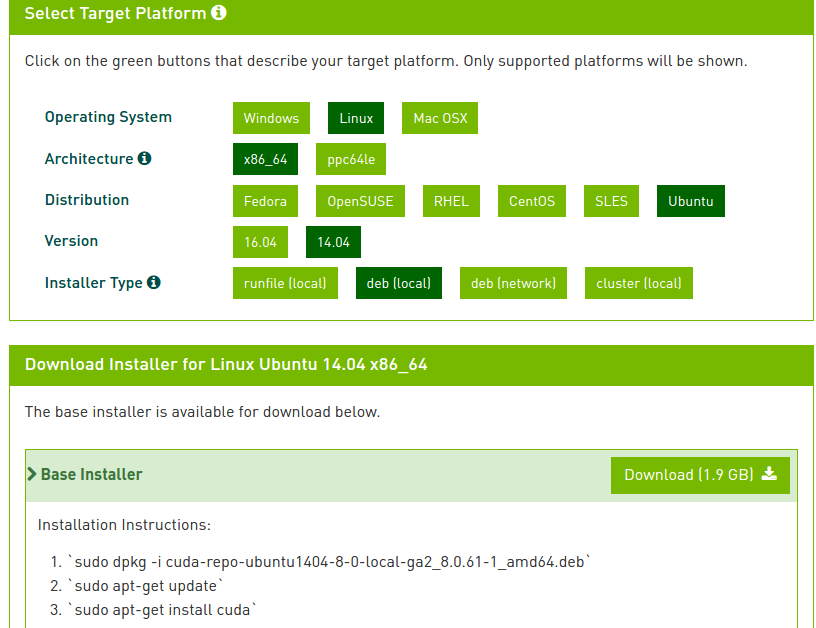 The file (https://developer.nvidia.com/compute/cuda/8.0/Prod2/local_installers/cuda-repo-ubuntu1404-8-0-local-ga2_8.0.61-1_amd64-deb) is BIG (1.9 GB)!!! IT TOOK ALMOST ONE HOUR TO COMPLETE THE DOWNLOADED FILE
 - Download cuDNN (NVIDIA CUDA Deep Neural Network library) from https://developer.nvidia.com/rdp/cudnn-download (You need to be a member first)
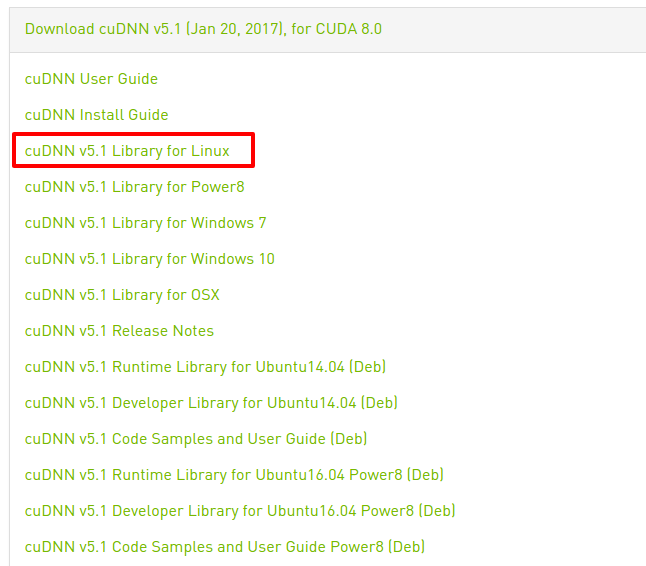 Download the ‘cuDNN v5.1 Library for Linux’ (https://developer.nvidia.com/compute/machine-learning/cudnn/secure/v5.1/prod_20161129/8.0/cudnn-8.0-linux-x64-v5.1-tgz). File size is just 98MB.
 - Remove CUDA 7.5 package first (NO???)
This is not working ‘sudo apt-get remove nvidia-cuda-toolkit’
1234567teddy@teddy-K43SJ:~$ sudo apt-get remove nvidia-cuda-toolkit[sudo] password for teddy:Reading package lists... DoneBuilding dependency treeReading state information... DonePackage 'nvidia-cuda-toolkit' is not installed, so not removed...
This is also no make sense ‘sudo apt-get purge cuda-7.5’
1234567891011121314151617181920212223242526272829teddy@teddy-K43SJ:~$ sudo apt-get purge cuda-7.5Reading package lists... DoneBuilding dependency treeReading state information... DoneNote, selecting 'libcuda-7.5-1' for regex 'cuda-7.5'Note, selecting 'cuda-7-5' for regex 'cuda-7.5'Note, selecting 'libcuda1-367' instead of 'libcuda-7.5-1'The following packages were automatically installed and are no longer required:cuda-command-line-tools-7-5 cuda-core-7-5 cuda-cublas-7-5cuda-cublas-dev-7-5 cuda-cudart-7-5 cuda-cudart-dev-7-5 cuda-cufft-7-5cuda-cufft-dev-7-5 cuda-curand-7-5 cuda-curand-dev-7-5 cuda-cusolver-7-5cuda-cusolver-dev-7-5 cuda-cusparse-7-5 cuda-cusparse-dev-7-5cuda-documentation-7-5 cuda-driver-dev-7-5 cuda-drivers cuda-license-7-5cuda-misc-headers-7-5 cuda-npp-7-5 cuda-npp-dev-7-5 cuda-nvrtc-7-5cuda-nvrtc-dev-7-5 cuda-runtime-7-5 cuda-samples-7-5 cuda-toolkit-7-5cuda-visual-tools-7-5 espeak freeglut3 freeglut3-dev libcuda1-352 libxmu-devlibxmu-headers linux-headers-3.13.0-76 linux-headers-3.19.0-25linux-headers-4.4.0-34 nvidia-352-dev nvidia-352-uvm nvidia-modprobenvidia-opencl-icd-352 python3-imaging-sane python3-pil python3-saneUse 'apt-get autoremove' to remove them.The following packages will be REMOVED:cuda* cuda-7-5*0 upgraded, 0 newly installed, 2 to remove and 15 not upgraded.1 not fully installed or removed.After this operation, 16,4 kB disk space will be freed.Do you want to continue? [Y/n] Y(Reading database ... 1124003 files and directories currently installed.)Removing cuda (7.5-18) ...Removing cuda-7-5 (7.5-18) ...
HOW THIS ‘purge’ ONLY REMOVE 16,4kB DATA??? - Install the .deb file (THIS INSTALLATION WOULD NOT REMOVE THE OLDER 7.5 VERSION. IT’D BE INSTALLED SIDE BY SIDE)
Then ‘sudo apt-get update’
Then
123456789101112131415161718192021222324252627282930313233343536373839404142434445464748495051525354555657585960616263646566676869707172737475767778798081828384858687888990919293949596979899100101102103104105106107108109110111112113114115116117118119120121122123124125126127128129130131132133134135136137138139140141142143144145146147148149150151152153154155156157158159160161162163164165166167168169170171172173174175176177178179180181182183184185186187188189190191192193194195196197198199200201202203204205206207208209210211212213214215216217218219220221222223224225226227228229230231232233234235236237238239240241242243244245246247248249250251252253254255256257258259260261262263264265266267268269270271272273274275276277278279280281282283284285286287288289290291292293294295296297298299300301302303304305306307308309310311312313314315316317318319320321322323324325326327328329330331332333334335336337338339340341342teddy@teddy-K43SJ:~$ sudo apt-get install cudaReading package lists... DoneBuilding dependency treeReading state information... DoneThe following packages were automatically installed and are no longer required:cuda-command-line-tools-7-5 cuda-core-7-5 cuda-cublas-7-5cuda-cublas-dev-7-5 cuda-cudart-7-5 cuda-cudart-dev-7-5 cuda-cufft-7-5cuda-cufft-dev-7-5 cuda-curand-7-5 cuda-curand-dev-7-5 cuda-cusolver-7-5cuda-cusolver-dev-7-5 cuda-cusparse-7-5 cuda-cusparse-dev-7-5cuda-documentation-7-5 cuda-driver-dev-7-5 cuda-license-7-5cuda-misc-headers-7-5 cuda-npp-7-5 cuda-npp-dev-7-5 cuda-nvrtc-7-5cuda-nvrtc-dev-7-5 cuda-runtime-7-5 cuda-samples-7-5 cuda-toolkit-7-5cuda-visual-tools-7-5 espeak libcuda1-352 linux-headers-3.13.0-76linux-headers-3.19.0-25 linux-headers-4.4.0-34 nvidia-352-dev nvidia-352-uvmnvidia-opencl-icd-352 python3-imaging-sane python3-pil python3-saneUse 'apt-get autoremove' to remove them.The following extra packages will be installed:cuda-8-0 cuda-command-line-tools-8-0 cuda-core-8-0 cuda-cublas-8-0cuda-cublas-dev-8-0 cuda-cudart-8-0 cuda-cudart-dev-8-0 cuda-cufft-8-0cuda-cufft-dev-8-0 cuda-curand-8-0 cuda-curand-dev-8-0 cuda-cusolver-8-0cuda-cusolver-dev-8-0 cuda-cusparse-8-0 cuda-cusparse-dev-8-0cuda-demo-suite-8-0 cuda-documentation-8-0 cuda-driver-dev-8-0 cuda-driverscuda-license-8-0 cuda-misc-headers-8-0 cuda-npp-8-0 cuda-npp-dev-8-0cuda-nvgraph-8-0 cuda-nvgraph-dev-8-0 cuda-nvml-dev-8-0 cuda-nvrtc-8-0cuda-nvrtc-dev-8-0 cuda-runtime-8-0 cuda-samples-8-0 cuda-toolkit-8-0cuda-visual-tools-8-0 libcuda1-352 libcuda1-375 nvidia-352 nvidia-352-devnvidia-375 nvidia-375-dev nvidia-modprobe nvidia-opencl-icd-352nvidia-opencl-icd-375 nvidia-settingsThe following packages will be REMOVED:libcuda1-367 nvidia-367 nvidia-367-dev nvidia-opencl-icd-367The following NEW packages will be installed:cuda cuda-8-0 cuda-command-line-tools-8-0 cuda-core-8-0 cuda-cublas-8-0cuda-cublas-dev-8-0 cuda-cudart-8-0 cuda-cudart-dev-8-0 cuda-cufft-8-0cuda-cufft-dev-8-0 cuda-curand-8-0 cuda-curand-dev-8-0 cuda-cusolver-8-0cuda-cusolver-dev-8-0 cuda-cusparse-8-0 cuda-cusparse-dev-8-0cuda-demo-suite-8-0 cuda-documentation-8-0 cuda-driver-dev-8-0cuda-license-8-0 cuda-misc-headers-8-0 cuda-npp-8-0 cuda-npp-dev-8-0cuda-nvgraph-8-0 cuda-nvgraph-dev-8-0 cuda-nvml-dev-8-0 cuda-nvrtc-8-0cuda-nvrtc-dev-8-0 cuda-runtime-8-0 cuda-samples-8-0 cuda-toolkit-8-0cuda-visual-tools-8-0 libcuda1-375 nvidia-375 nvidia-375-devnvidia-opencl-icd-375The following packages will be upgraded:cuda-drivers libcuda1-352 nvidia-352 nvidia-352-dev nvidia-modprobenvidia-opencl-icd-352 nvidia-settings7 upgraded, 36 newly installed, 4 to remove and 61 not upgraded.1 not fully installed or removed.Need to get 0 B/1.388 MB of archives.After this operation, 2.073 MB of additional disk space will be used.Do you want to continue? [Y/n] YExtracting templates from packages: 100%(Reading database ... 1124090 files and directories currently installed.)Preparing to unpack .../nvidia-opencl-icd-352_375.26-0ubuntu1_amd64.deb ...Unpacking nvidia-opencl-icd-352 (375.26-0ubuntu1) over (367.57-0ubuntu0.14.04.1) ...(Reading database ... 1124089 files and directories currently installed.)Removing nvidia-opencl-icd-367 (367.57-0ubuntu0.14.04.1) ...Processing triggers for libc-bin (2.19-0ubuntu6.9) ...Selecting previously unselected package nvidia-opencl-icd-375.(Reading database ... 1124083 files and directories currently installed.)Preparing to unpack .../nvidia-opencl-icd-375_375.26-0ubuntu1_amd64.deb ...Unpacking nvidia-opencl-icd-375 (375.26-0ubuntu1) ...Preparing to unpack .../nvidia-352-dev_375.26-0ubuntu1_amd64.deb ...Unpacking nvidia-352-dev (375.26-0ubuntu1) over (367.57-0ubuntu0.14.04.1) ...(Reading database ... 1124089 files and directories currently installed.)Removing nvidia-367-dev (367.57-0ubuntu0.14.04.1) ...dpkg: nvidia-367: dependency problems, but removing anyway as you requested:libcuda1-367 depends on nvidia-367.nvidia-352 depends on nvidia-367.xserver-xorg depends on xserver-xorg-video-all (>= 0~) | xorg-driver-video; however:Package xserver-xorg-video-all is not installed.Package xorg-driver-video is not installed.Package nvidia-367 which provides xorg-driver-video is to be removed.Package xserver-xorg-video-intel-lts-vivid which provides xorg-driver-video is not installed.Package xserver-xorg-video-vmware-lts-vivid which provides xorg-driver-video is not installed.Package xserver-xorg-video-openchrome-lts-vivid which provides xorg-driver-video is not installed.Removing nvidia-367 (367.57-0ubuntu0.14.04.1) .../var/lib/dpkg/info/nvidia-367.prerm: 19: /var/lib/dpkg/info/nvidia-367.prerm: /bin/systemctl: not foundRemoving all DKMS ModulesDone.update-alternatives: using /usr/lib/nvidia-367-prime/ld.so.conf to provide /etc/ld.so.conf.d/x86_64-linux-gnu_GL.conf (x86_64-linux-gnu_gl_conf) in auto modeupdate-alternatives: using /usr/lib/nvidia-367-prime/ld.so.conf to provide /etc/ld.so.conf.d/x86_64-linux-gnu_EGL.conf (x86_64-linux-gnu_egl_conf) in auto modeupdate-alternatives: using /usr/lib/nvidia-367-prime/alt_ld.so.conf to provide /etc/ld.so.conf.d/i386-linux-gnu_GL.conf (i386-linux-gnu_gl_conf) in auto modeupdate-alternatives: using /usr/lib/nvidia-367-prime/alt_ld.so.conf to provide /etc/ld.so.conf.d/i386-linux-gnu_EGL.conf (i386-linux-gnu_egl_conf) in auto modeupdate-alternatives: using /usr/lib/x86_64-linux-gnu/mesa/ld.so.conf to provide /etc/ld.so.conf.d/x86_64-linux-gnu_GL.conf (x86_64-linux-gnu_gl_conf) in auto modeupdate-alternatives: using /usr/lib/x86_64-linux-gnu/mesa-egl/ld.so.conf to provide /etc/ld.so.conf.d/x86_64-linux-gnu_EGL.conf (x86_64-linux-gnu_egl_conf) in auto modeupdate-alternatives: using /usr/lib/i386-linux-gnu/mesa/ld.so.conf to provide /etc/ld.so.conf.d/i386-linux-gnu_GL.conf (i386-linux-gnu_gl_conf) in auto modeINFO:Disable nvidia-367DEBUG:Parsing /usr/share/ubuntu-drivers-common/quirks/dell_latitudeDEBUG:Parsing /usr/share/ubuntu-drivers-common/quirks/put_your_quirks_hereDEBUG:Parsing /usr/share/ubuntu-drivers-common/quirks/lenovo_thinkpadupdate-initramfs: deferring update (trigger activated)Processing triggers for libc-bin (2.19-0ubuntu6.9) ...Processing triggers for man-db (2.6.7.1-1ubuntu1) ...Processing triggers for initramfs-tools (0.103ubuntu4.6) ...update-initramfs: Generating /boot/initrd.img-4.4.0-62-genericSelecting previously unselected package nvidia-375.(Reading database ... 1123507 files and directories currently installed.)Preparing to unpack .../nvidia-375_375.26-0ubuntu1_amd64.deb ...Unpacking nvidia-375 (375.26-0ubuntu1) ...Preparing to unpack .../libcuda1-352_375.26-0ubuntu1_amd64.deb ...Unpacking libcuda1-352 (375.26-0ubuntu1) over (367.57-0ubuntu0.14.04.1) ...Processing triggers for ureadahead (0.100.0-16) ...ureadahead will be reprofiled on next rebootProcessing triggers for man-db (2.6.7.1-1ubuntu1) ...(Reading database ... 1124075 files and directories currently installed.)Removing libcuda1-367 (367.57-0ubuntu0.14.04.1) ...Processing triggers for libc-bin (2.19-0ubuntu6.9) ...Selecting previously unselected package libcuda1-375.(Reading database ... 1124067 files and directories currently installed.)Preparing to unpack .../libcuda1-375_375.26-0ubuntu1_amd64.deb ...Unpacking libcuda1-375 (375.26-0ubuntu1) ...Selecting previously unselected package nvidia-375-dev.Preparing to unpack .../nvidia-375-dev_375.26-0ubuntu1_amd64.deb ...Unpacking nvidia-375-dev (375.26-0ubuntu1) ...Selecting previously unselected package cuda-license-8-0.Preparing to unpack .../cuda-license-8-0_8.0.61-1_amd64.deb ...Unpacking cuda-license-8-0 (8.0.61-1) ...Selecting previously unselected package cuda-misc-headers-8-0.Preparing to unpack .../cuda-misc-headers-8-0_8.0.61-1_amd64.deb ...Unpacking cuda-misc-headers-8-0 (8.0.61-1) ...Selecting previously unselected package cuda-core-8-0.Preparing to unpack .../cuda-core-8-0_8.0.61-1_amd64.deb ...Unpacking cuda-core-8-0 (8.0.61-1) ...Selecting previously unselected package cuda-cudart-8-0.Preparing to unpack .../cuda-cudart-8-0_8.0.61-1_amd64.deb ...Unpacking cuda-cudart-8-0 (8.0.61-1) ...Selecting previously unselected package cuda-driver-dev-8-0.Preparing to unpack .../cuda-driver-dev-8-0_8.0.61-1_amd64.deb ...Unpacking cuda-driver-dev-8-0 (8.0.61-1) ...Selecting previously unselected package cuda-cudart-dev-8-0.Preparing to unpack .../cuda-cudart-dev-8-0_8.0.61-1_amd64.deb ...Unpacking cuda-cudart-dev-8-0 (8.0.61-1) ...Selecting previously unselected package cuda-command-line-tools-8-0.Preparing to unpack .../cuda-command-line-tools-8-0_8.0.61-1_amd64.deb ...Unpacking cuda-command-line-tools-8-0 (8.0.61-1) ...Selecting previously unselected package cuda-nvrtc-8-0.Preparing to unpack .../cuda-nvrtc-8-0_8.0.61-1_amd64.deb ...Unpacking cuda-nvrtc-8-0 (8.0.61-1) ...Selecting previously unselected package cuda-nvrtc-dev-8-0.Preparing to unpack .../cuda-nvrtc-dev-8-0_8.0.61-1_amd64.deb ...Unpacking cuda-nvrtc-dev-8-0 (8.0.61-1) ...Selecting previously unselected package cuda-cusolver-8-0.Preparing to unpack .../cuda-cusolver-8-0_8.0.61-1_amd64.deb ...Unpacking cuda-cusolver-8-0 (8.0.61-1) ...Selecting previously unselected package cuda-cusolver-dev-8-0.Preparing to unpack .../cuda-cusolver-dev-8-0_8.0.61-1_amd64.deb ...Unpacking cuda-cusolver-dev-8-0 (8.0.61-1) ...Selecting previously unselected package cuda-cublas-8-0.Preparing to unpack .../cuda-cublas-8-0_8.0.61-1_amd64.deb ...Unpacking cuda-cublas-8-0 (8.0.61-1) ...Selecting previously unselected package cuda-cublas-dev-8-0.Preparing to unpack .../cuda-cublas-dev-8-0_8.0.61-1_amd64.deb ...Unpacking cuda-cublas-dev-8-0 (8.0.61-1) ...Selecting previously unselected package cuda-cufft-8-0.Preparing to unpack .../cuda-cufft-8-0_8.0.61-1_amd64.deb ...Unpacking cuda-cufft-8-0 (8.0.61-1) ...Selecting previously unselected package cuda-cufft-dev-8-0.Preparing to unpack .../cuda-cufft-dev-8-0_8.0.61-1_amd64.deb ...Unpacking cuda-cufft-dev-8-0 (8.0.61-1) ...Selecting previously unselected package cuda-curand-8-0.Preparing to unpack .../cuda-curand-8-0_8.0.61-1_amd64.deb ...Unpacking cuda-curand-8-0 (8.0.61-1) ...Selecting previously unselected package cuda-curand-dev-8-0.Preparing to unpack .../cuda-curand-dev-8-0_8.0.61-1_amd64.deb ...Unpacking cuda-curand-dev-8-0 (8.0.61-1) ...Selecting previously unselected package cuda-cusparse-8-0.Preparing to unpack .../cuda-cusparse-8-0_8.0.61-1_amd64.deb ...Unpacking cuda-cusparse-8-0 (8.0.61-1) ...Selecting previously unselected package cuda-cusparse-dev-8-0.Preparing to unpack .../cuda-cusparse-dev-8-0_8.0.61-1_amd64.deb ...Unpacking cuda-cusparse-dev-8-0 (8.0.61-1) ...Selecting previously unselected package cuda-npp-8-0.Preparing to unpack .../cuda-npp-8-0_8.0.61-1_amd64.deb ...Unpacking cuda-npp-8-0 (8.0.61-1) ...Selecting previously unselected package cuda-npp-dev-8-0.Preparing to unpack .../cuda-npp-dev-8-0_8.0.61-1_amd64.deb ...Unpacking cuda-npp-dev-8-0 (8.0.61-1) ...Selecting previously unselected package cuda-samples-8-0.Preparing to unpack .../cuda-samples-8-0_8.0.61-1_amd64.deb ...Unpacking cuda-samples-8-0 (8.0.61-1) ...Selecting previously unselected package cuda-documentation-8-0.Preparing to unpack .../cuda-documentation-8-0_8.0.61-1_amd64.deb ...Unpacking cuda-documentation-8-0 (8.0.61-1) ...Selecting previously unselected package cuda-nvml-dev-8-0.Preparing to unpack .../cuda-nvml-dev-8-0_8.0.61-1_amd64.deb ...Unpacking cuda-nvml-dev-8-0 (8.0.61-1) ...Selecting previously unselected package cuda-nvgraph-8-0.Preparing to unpack .../cuda-nvgraph-8-0_8.0.61-1_amd64.deb ...Unpacking cuda-nvgraph-8-0 (8.0.61-1) ...Selecting previously unselected package cuda-nvgraph-dev-8-0.Preparing to unpack .../cuda-nvgraph-dev-8-0_8.0.61-1_amd64.deb ...Unpacking cuda-nvgraph-dev-8-0 (8.0.61-1) ...Selecting previously unselected package cuda-visual-tools-8-0.Preparing to unpack .../cuda-visual-tools-8-0_8.0.61-1_amd64.deb ...Unpacking cuda-visual-tools-8-0 (8.0.61-1) ...Selecting previously unselected package cuda-toolkit-8-0.Preparing to unpack .../cuda-toolkit-8-0_8.0.61-1_amd64.deb ...Unpacking cuda-toolkit-8-0 (8.0.61-1) ...Preparing to unpack .../nvidia-modprobe_375.26-0ubuntu1_amd64.deb ...Unpacking nvidia-modprobe (375.26-0ubuntu1) over (352.39-0ubuntu1) ...Preparing to unpack .../nvidia-settings_375.26-0ubuntu1_amd64.deb ...Unpacking nvidia-settings (375.26-0ubuntu1) over (352.39-0ubuntu1) ...Preparing to unpack .../cuda-drivers_375.26-1_amd64.deb ...Unpacking cuda-drivers (375.26-1) over (352.39-1) ...Selecting previously unselected package cuda-runtime-8-0.Preparing to unpack .../cuda-runtime-8-0_8.0.61-1_amd64.deb ...Unpacking cuda-runtime-8-0 (8.0.61-1) ...Selecting previously unselected package cuda-demo-suite-8-0.Preparing to unpack .../cuda-demo-suite-8-0_8.0.61-1_amd64.deb ...Unpacking cuda-demo-suite-8-0 (8.0.61-1) ...Selecting previously unselected package cuda-8-0.Preparing to unpack ..././cuda-8-0_8.0.61-1_amd64.deb ...Unpacking cuda-8-0 (8.0.61-1) ...Selecting previously unselected package cuda.Preparing to unpack ..././cuda_8.0.61-1_amd64.deb ...Unpacking cuda (8.0.61-1) ...Preparing to unpack .../nvidia-352_375.26-0ubuntu1_amd64.deb ...Unpacking nvidia-352 (375.26-0ubuntu1) over (367.57-0ubuntu0.14.04.1) ...Processing triggers for man-db (2.6.7.1-1ubuntu1) ...Processing triggers for gnome-menus (3.10.1-0ubuntu2) ...Processing triggers for desktop-file-utils (0.22-1ubuntu1) ...Processing triggers for bamfdaemon (0.5.1+14.04.20140409-0ubuntu1) ...Rebuilding /usr/share/applications/bamf-2.index...Processing triggers for mime-support (3.54ubuntu1.1) ...Setting up php5-mapscript (6.4.1-2ubuntu0.1) .../var/lib/dpkg/info/php5-mapscript.postinst: 11: /var/lib/dpkg/info/php5-mapscript.postinst: php5enmod: not founddpkg: error processing package php5-mapscript (--configure):subprocess installed post-installation script returned error exit status 127Setting up nvidia-375 (375.26-0ubuntu1) ...update-alternatives: using /usr/lib/nvidia-375/ld.so.conf to provide /etc/ld.so.conf.d/x86_64-linux-gnu_GL.conf (x86_64-linux-gnu_gl_conf) in auto modeupdate-alternatives: using /usr/lib/nvidia-375/ld.so.conf to provide /etc/ld.so.conf.d/x86_64-linux-gnu_EGL.conf (x86_64-linux-gnu_egl_conf) in auto modeupdate-alternatives: using /usr/lib/nvidia-375/alt_ld.so.conf to provide /etc/ld.so.conf.d/i386-linux-gnu_GL.conf (i386-linux-gnu_gl_conf) in auto modeupdate-alternatives: using /usr/lib/nvidia-375/alt_ld.so.conf to provide /etc/ld.so.conf.d/i386-linux-gnu_EGL.conf (i386-linux-gnu_egl_conf) in auto modeupdate-alternatives: using /usr/share/nvidia-375/glamor.conf to provide /usr/share/X11/xorg.conf.d/glamoregl.conf (glamor_conf) in auto modeupdate-initramfs: deferring update (trigger activated)A modprobe blacklist file has been created at /etc/modprobe.d to prevent Nouveau from loading. This can be reverted by deleting /etc/modprobe.d/nvidia-graphics-drivers.conf.A new initrd image has also been created. To revert, please replace /boot/initrd-4.4.0-62-generic with /boot/initrd-$(uname -r)-backup.******************************************************************************** Reboot your computer and verify that the NVIDIA graphics driver can ****** be loaded. ********************************************************************************INFO:Enable nvidia-375DEBUG:Parsing /usr/share/ubuntu-drivers-common/quirks/dell_latitudeDEBUG:Parsing /usr/share/ubuntu-drivers-common/quirks/put_your_quirks_hereDEBUG:Parsing /usr/share/ubuntu-drivers-common/quirks/lenovo_thinkpadAdding system user `nvidia-persistenced' (UID 117) ...Adding new group `nvidia-persistenced' (GID 126) ...Adding new user `nvidia-persistenced' (UID 117) with group `nvidia-persistenced' ...Not creating home directory `/'.Loading new nvidia-375-375.26 DKMS files...First Installation: checking all kernels...Building only for 4.4.0-62-genericBuilding for architecture x86_64Building initial module for 4.4.0-62-genericDone.nvidia_375:Running module version sanity check.- Original module- No original module exists within this kernel- Installation- Installing to /lib/modules/4.4.0-62-generic/updates/dkms/nvidia_375_modeset.ko:Running module version sanity check.- Original module- No original module exists within this kernel- Installation- Installing to /lib/modules/4.4.0-62-generic/updates/dkms/nvidia_375_drm.ko:Running module version sanity check.- Original module- No original module exists within this kernel- Installation- Installing to /lib/modules/4.4.0-62-generic/updates/dkms/nvidia_375_uvm.ko:Running module version sanity check.- Original module- No original module exists within this kernel- Installation- Installing to /lib/modules/4.4.0-62-generic/updates/dkms/depmod....DKMS: install completed.Setting up nvidia-opencl-icd-375 (375.26-0ubuntu1) ...Setting up nvidia-opencl-icd-352 (375.26-0ubuntu1) ...Setting up nvidia-375-dev (375.26-0ubuntu1) ...Setting up nvidia-352-dev (375.26-0ubuntu1) ...Setting up libcuda1-375 (375.26-0ubuntu1) ...Setting up libcuda1-352 (375.26-0ubuntu1) ...Setting up cuda-license-8-0 (8.0.61-1) ...*** LICENSE AGREEMENT ***By using this software you agree to fully comply with the terms andconditions of the EULA (End User License Agreement). The EULA is locatedat /usr/local/cuda-8.0/doc/EULA.txt. The EULA can also be found athttp://docs.nvidia.com/cuda/eula/index.html. If you do not agree to theterms and conditions of the EULA, do not use the software.Setting up cuda-misc-headers-8-0 (8.0.61-1) ...Setting up cuda-core-8-0 (8.0.61-1) ...Setting up cuda-cudart-8-0 (8.0.61-1) ...Setting up cuda-driver-dev-8-0 (8.0.61-1) ...Setting up cuda-cudart-dev-8-0 (8.0.61-1) ...Setting up cuda-command-line-tools-8-0 (8.0.61-1) ...Setting up cuda-nvrtc-8-0 (8.0.61-1) ...Setting up cuda-nvrtc-dev-8-0 (8.0.61-1) ...Setting up cuda-cusolver-8-0 (8.0.61-1) ...Setting up cuda-cusolver-dev-8-0 (8.0.61-1) ...Setting up cuda-cublas-8-0 (8.0.61-1) ...Setting up cuda-cublas-dev-8-0 (8.0.61-1) ...Setting up cuda-cufft-8-0 (8.0.61-1) ...Setting up cuda-cufft-dev-8-0 (8.0.61-1) ...Setting up cuda-curand-8-0 (8.0.61-1) ...Setting up cuda-curand-dev-8-0 (8.0.61-1) ...Setting up cuda-cusparse-8-0 (8.0.61-1) ...Setting up cuda-cusparse-dev-8-0 (8.0.61-1) ...Setting up cuda-npp-8-0 (8.0.61-1) ...Setting up cuda-npp-dev-8-0 (8.0.61-1) ...Setting up cuda-samples-8-0 (8.0.61-1) ...Setting up cuda-documentation-8-0 (8.0.61-1) ...Setting up cuda-nvml-dev-8-0 (8.0.61-1) ...Setting up cuda-nvgraph-8-0 (8.0.61-1) ...Setting up cuda-nvgraph-dev-8-0 (8.0.61-1) ...Setting up cuda-visual-tools-8-0 (8.0.61-1) ...Setting up cuda-toolkit-8-0 (8.0.61-1) ...Setting up nvidia-modprobe (375.26-0ubuntu1) ...Setting up nvidia-settings (375.26-0ubuntu1) ...Setting up cuda-drivers (375.26-1) ...Setting up cuda-runtime-8-0 (8.0.61-1) ...Setting up cuda-demo-suite-8-0 (8.0.61-1) ...Setting up cuda-8-0 (8.0.61-1) ...Setting up cuda (8.0.61-1) ...Setting up nvidia-352 (375.26-0ubuntu1) ...Processing triggers for initramfs-tools (0.103ubuntu4.6) ...update-initramfs: Generating /boot/initrd.img-4.4.0-62-genericProcessing triggers for libc-bin (2.19-0ubuntu6.9) ...
OK. THEN RESTART YOUR COMPUTER TO SEE ANY WRONG HAPPENED! - The CUDA toolkit 8 is installed in /usr/local/cuda-8.0 (next to ‘cuda-7.5’ and the symlink ‘cuda’)
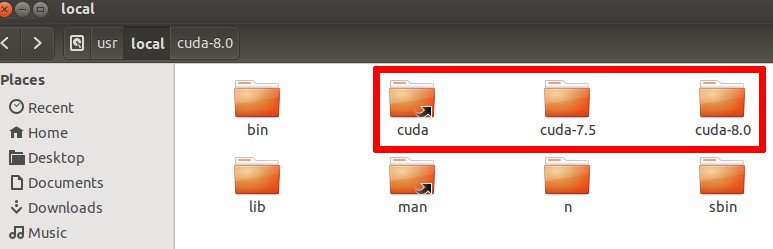 Then we need to modify the environment variables:
1teddy@teddy-K43SJ:~$ sudo gedit ~/.bashrc
Modify this line
1export CUDA_HOME=/usr/local/cuda-7.5
to
1export CUDA_HOME=/usr/local/cuda-8.0
Save and Close. Then make sure the system use the new changes
1teddy@teddy-K43SJ:~$ source ~/.bashrc
Read also: https://devtalk.nvidia.com/default/topic/971478/installing-cuda-7-5-next-to-cuda-8-0-on-ubuntu-14-04-so-i-can-keep-using-zed-driver-v1-1-0-/ - Check CUDA version and the driver
12345teddy@teddy-K43SJ:~$ nvcc -Vnvcc: NVIDIA (R) Cuda compiler driverCopyright (c) 2005-2016 NVIDIA CorporationBuilt on Tue_Jan_10_13:22:03_CST_2017Cuda compilation tools, release 8.0, V8.0.61
123teddy@teddy-K43SJ:~$ cat /proc/driver/nvidia/versionNVRM version: NVIDIA UNIX x86_64 Kernel Module 375.26 Thu Dec 8 18:36:43 PST 2016GCC version: gcc version 4.8.4 (Ubuntu 4.8.4-2ubuntu1~14.04.3)
Now I already use CUDA Toolkit 8.0. I CAN CHANGE ‘.bashrc’ TO BACK TO THE 7.5 VERSION IF IT’S NEEDED!
TRY THE CUDA 8.0 SAMPLES:
- Copy the samples into /home/teddy/Documents/
123teddy@teddy-K43SJ:~$ cuda-install-samples-8.0.sh /home/teddy/Documents/Copying samples to /home/teddy/Documents/NVIDIA_CUDA-8.0_Samples now...Finished copying samples.
the samples directory in /home/teddy/Documents/NVIDIA_CUDA-8.0_Samples/ - Go into the samples directory
12teddy@teddy-K43SJ:~$ cd Documents/NVIDIA_CUDA-8.0_Samples/teddy@teddy-K43SJ:~/Documents/NVIDIA_CUDA-8.0_Samples$ - Go into the deviceQuery directory THEN make:
1teddy@teddy-K43SJ:~/Documents/NVIDIA_CUDA-8.0_Samples$ cd 1_Utilities/deviceQuery
1234567teddy@teddy-K43SJ:~/Documents/NVIDIA_CUDA-8.0_Samples/1_Utilities/deviceQuery$ make/usr/local/cuda-8.0/bin/nvcc -ccbin g++ -I../../common/inc -m64 -gencode arch=compute_20,code=sm_20 -gencode arch=compute_30,code=sm_30 -gencode arch=compute_35,code=sm_35 -gencode arch=compute_37,code=sm_37 -gencode arch=compute_50,code=sm_50 -gencode arch=compute_52,code=sm_52 -gencode arch=compute_60,code=sm_60 -gencode arch=compute_60,code=compute_60 -o deviceQuery.o -c deviceQuery.cppnvcc warning : The 'compute_20', 'sm_20', and 'sm_21' architectures are deprecated, and may be removed in a future release (Use -Wno-deprecated-gpu-targets to suppress warning)./usr/local/cuda-8.0/bin/nvcc -ccbin g++ -m64 -gencode arch=compute_20,code=sm_20 -gencode arch=compute_30,code=sm_30 -gencode arch=compute_35,code=sm_35 -gencode arch=compute_37,code=sm_37 -gencode arch=compute_50,code=sm_50 -gencode arch=compute_52,code=sm_52 -gencode arch=compute_60,code=sm_60 -gencode arch=compute_60,code=compute_60 -o deviceQuery deviceQuery.onvcc warning : The 'compute_20', 'sm_20', and 'sm_21' architectures are deprecated, and may be removed in a future release (Use -Wno-deprecated-gpu-targets to suppress warning).mkdir -p ../../bin/x86_64/linux/releasecp deviceQuery ../../bin/x86_64/linux/release
- run the deviceQuery script to test if we can communicate with the GPU:
123456789101112131415161718192021222324252627282930313233343536373839404142teddy@teddy-K43SJ:~/Documents/NVIDIA_CUDA-8.0_Samples/1_Utilities/deviceQuery$ ./deviceQuery./deviceQuery Starting...CUDA Device Query (Runtime API) version (CUDART static linking)Detected 1 CUDA Capable device(s)Device 0: "GeForce GT 520M"CUDA Driver Version / Runtime Version 8.0 / 8.0CUDA Capability Major/Minor version number: 2.1Total amount of global memory: 964 MBytes (1010434048 bytes)( 1) Multiprocessors, ( 48) CUDA Cores/MP: 48 CUDA CoresGPU Max Clock rate: 1480 MHz (1.48 GHz)Memory Clock rate: 800 MhzMemory Bus Width: 64-bitL2 Cache Size: 65536 bytesMaximum Texture Dimension Size (x,y,z) 1D=(65536), 2D=(65536, 65535), 3D=(2048, 2048, 2048)Maximum Layered 1D Texture Size, (num) layers 1D=(16384), 2048 layersMaximum Layered 2D Texture Size, (num) layers 2D=(16384, 16384), 2048 layersTotal amount of constant memory: 65536 bytesTotal amount of shared memory per block: 49152 bytesTotal number of registers available per block: 32768Warp size: 32Maximum number of threads per multiprocessor: 1536Maximum number of threads per block: 1024Max dimension size of a thread block (x,y,z): (1024, 1024, 64)Max dimension size of a grid size (x,y,z): (65535, 65535, 65535)Maximum memory pitch: 2147483647 bytesTexture alignment: 512 bytesConcurrent copy and kernel execution: Yes with 1 copy engine(s)Run time limit on kernels: YesIntegrated GPU sharing Host Memory: NoSupport host page-locked memory mapping: YesAlignment requirement for Surfaces: YesDevice has ECC support: DisabledDevice supports Unified Addressing (UVA): YesDevice PCI Domain ID / Bus ID / location ID: 0 / 1 / 0Compute Mode:< Default (multiple host threads can use ::cudaSetDevice() with device simultaneously) >deviceQuery, CUDA Driver = CUDART, CUDA Driver Version = 8.0, CUDA Runtime Version = 8.0, NumDevs = 1, Device0 = GeForce GT 520MResult = PASS
- Go into the bandwidthTest (/NVIDIA_CUDA-8.0_Samples/1_Utilities/bandwidthTest) directory THEN make:
1234567teddy@teddy-K43SJ:~/Documents/NVIDIA_CUDA-8.0_Samples/1_Utilities/bandwidthTest$ make/usr/local/cuda-8.0/bin/nvcc -ccbin g++ -I../../common/inc -m64 -gencode arch=compute_20,code=sm_20 -gencode arch=compute_30,code=sm_30 -gencode arch=compute_35,code=sm_35 -gencode arch=compute_37,code=sm_37 -gencode arch=compute_50,code=sm_50 -gencode arch=compute_52,code=sm_52 -gencode arch=compute_60,code=sm_60 -gencode arch=compute_60,code=compute_60 -o bandwidthTest.o -c bandwidthTest.cunvcc warning : The 'compute_20', 'sm_20', and 'sm_21' architectures are deprecated, and may be removed in a future release (Use -Wno-deprecated-gpu-targets to suppress warning)./usr/local/cuda-8.0/bin/nvcc -ccbin g++ -m64 -gencode arch=compute_20,code=sm_20 -gencode arch=compute_30,code=sm_30 -gencode arch=compute_35,code=sm_35 -gencode arch=compute_37,code=sm_37 -gencode arch=compute_50,code=sm_50 -gencode arch=compute_52,code=sm_52 -gencode arch=compute_60,code=sm_60 -gencode arch=compute_60,code=compute_60 -o bandwidthTest bandwidthTest.onvcc warning : The 'compute_20', 'sm_20', and 'sm_21' architectures are deprecated, and may be removed in a future release (Use -Wno-deprecated-gpu-targets to suppress warning).mkdir -p ../../bin/x86_64/linux/releasecp bandwidthTest ../../bin/x86_64/linux/release
- run bandwidthTest:
12345678910111213141516171819202122232425teddy@teddy-K43SJ:~/Documents/NVIDIA_CUDA-8.0_Samples/1_Utilities/bandwidthTest$ ./bandwidthTest[CUDA Bandwidth Test] - Starting...Running on...Device 0: GeForce GT 520MQuick ModeHost to Device Bandwidth, 1 Device(s)PINNED Memory TransfersTransfer Size (Bytes) Bandwidth(MB/s)33554432 6491.1Device to Host Bandwidth, 1 Device(s)PINNED Memory TransfersTransfer Size (Bytes) Bandwidth(MB/s)33554432 6487.0Device to Device Bandwidth, 1 Device(s)PINNED Memory TransfersTransfer Size (Bytes) Bandwidth(MB/s)33554432 10926.3Result = PASSNOTE: The CUDA Samples are not meant for performance measurements. Results may vary when GPU Boost is enabled.
INSTALL cuDNN:
Installing cuDNN is quite simple — all we need to do is extract the .tgz file then copy the files in the lib64 and include directories to their appropriate locations on our machine:
|
1 2 3 4 |
teddy@teddy-K43SJ:/media/data/MASTER/CUDA$ tar -zxf cudnn-8.0-linux-x64-v5.1.tgz teddy@teddy-K43SJ:/media/data/MASTER/CUDA$ cd cuda teddy@teddy-K43SJ:/media/data/MASTER/CUDA/cuda$ sudo cp lib64/* /usr/local/cuda/lib64/ teddy@teddy-K43SJ:/media/data/MASTER/CUDA/cuda$ sudo cp include/* /usr/local/cuda/include/ |
Check cuDNN version (http://stackoverflow.com/questions/31326015/how-to-verify-cudnn-installation):
|
1 2 3 4 5 6 7 8 |
teddy@teddy-K43SJ:~$ cat /usr/local/cuda/include/cudnn.h | grep CUDNN_MAJOR -A 2 #define CUDNN_MAJOR 5 #define CUDNN_MINOR 1 #define CUDNN_PATCHLEVEL 10 -- #define CUDNN_VERSION (CUDNN_MAJOR * 1000 + CUDNN_MINOR * 100 + CUDNN_PATCHLEVEL) #include "driver_types.h" |