Reference: https://phalconphp.com/en/download
How To Install Phalcon PHP Framework on Ubuntu 14.10, 14.04 & 12.04
Phalcon is a C extension, so you need to download a binary for your platform or compile it from source code (SO INSTALL THE BINARY OR COMPILE! CHOOSE ONLY OF THEM!).
Installation on Ubuntu 14.04:
Install the binary (the easiest way but it don’t mean it’d be working!)
|
1 2 3 4 5 6 7 8 9 10 11 12 |
teddy@teddy-K43SJ:~$ curl -s https://packagecloud.io/install/repositories/phalcon/stable/script.deb.sh | sudo bash [sudo] password for teddy: Detected operating system as Ubuntu/trusty. Checking for curl... Detected curl... Running apt-get update... done. Installing apt-transport-https... done. Installing /etc/apt/sources.list.d/phalcon_stable.list...done. Importing packagecloud gpg key... done. Running apt-get update... done. The repository is setup! You can now install packages. |
Install the package
|
1 2 3 4 5 |
teddy@teddy-K43SJ:~$ sudo apt-get install php5-phalcon Reading package lists... Done Building dependency tree Reading state information... Done E: Unable to locate package php5-phalcon |
SO the installation is failed! I got the above error. May be because Ubuntu 14.04 has not been supported yet (https://forum.phalconphp.com/discussion/6217/ubuntu-cant-install-phalcon). SO IT’S TIME TO COMPILE THE SOURCE!
But before installing the source, we need some required packages. Check those packages if they haven’t been installed in your machine. My ubuntu 14.04 already has ‘python-software-properties’, ‘software-properties-common’, ‘php5-dev’, ‘php5-mysql’, ‘gcc’ and ‘libpcre3-dev’. So now I just need to compile the phalcon source code:
- Clone the phalcon code
12345678teddy@teddy-K43SJ:~/Documents/cpp$ git clone --depth=1 git://github.com/phalcon/cphalcon.gitCloning into 'cphalcon'...remote: Counting objects: 2304, done.remote: Compressing objects: 100% (1837/1837), done.remote: Total 2304 (delta 852), reused 1030 (delta 324), pack-reused 0Receiving objects: 100% (2304/2304), 3.50 MiB | 1.01 MiB/s, done.Resolving deltas: 100% (852/852), done.Checking connectivity... done. - Go into the ‘cphalcon/build’ directory
1teddy@teddy-K43SJ:~/Documents/cpp$ cd cphalcon/build/
- then install
123456789101112131415161718192021222324252627282930313233343536373839404142434445464748495051525354555657585960616263646566676869707172737475767778798081828384858687888990919293949596979899100101102103104105106107108109110111112113114115116117118119120121122123124125126127128129130teddy@teddy-K43SJ:~/Documents/cpp/cphalcon/build$ sudo ./installConfiguring for:PHP Api Version: 20131106Zend Module Api No: 20131226Zend Extension Api No: 220131226checking for grep that handles long lines and -e... /bin/grepchecking for egrep... /bin/grep -Echecking for a sed that does not truncate output... /bin/sedchecking whether the C compiler works... yeschecking for C compiler default output file name... a.outchecking for suffix of executables...checking whether we are cross compiling... nochecking for suffix of object files... ochecking whether we are using the GNU C compiler... yeschecking whether gcc accepts -g... yeschecking for gcc option to accept ISO C89... none neededchecking how to run the C preprocessor... gcc -Echecking for icc... nochecking for suncc... nochecking whether gcc and cc understand -c and -o together... yeschecking for system library directory... libchecking if compiler supports -R... nochecking if compiler supports -Wl,-rpath,... yeschecking build system type... x86_64-unknown-linux-gnuchecking host system type... x86_64-unknown-linux-gnuchecking target system type... x86_64-unknown-linux-gnuchecking for PHP prefix... /usrchecking for PHP includes... -I/usr/include/php/20131226 -I/usr/include/php/20131226/main -I/usr/include/php/20131226/TSRM -I/usr/include/php/20131226/Zend -I/usr/include/php/20131226/ext -I/usr/include/php/20131226/ext/date/libchecking for PHP extension directory... /usr/lib/php/20131226checking for PHP installed headers prefix... /usr/include/php/20131226checking if debug is enabled... nochecking if zts is enabled... nochecking for re2c... noconfigure: WARNING: You will need re2c 0.13.4 or later if you want to regenerate PHP parsers.checking for gawk... gawkchecking whether to enable phalcon... yes, sharedchecking whether HAVE_BUNDLED_PCRE is declared... nochecking whether HAVE_JSON is declared... nochecking how to print strings... printfchecking for a sed that does not truncate output... (cached) /bin/sedchecking for fgrep... /bin/grep -Fchecking for ld used by gcc... /usr/bin/ldchecking if the linker (/usr/bin/ld) is GNU ld... yeschecking for BSD- or MS-compatible name lister (nm)... /usr/bin/nm -Bchecking the name lister (/usr/bin/nm -B) interface... BSD nmchecking whether ln -s works... yeschecking the maximum length of command line arguments... 1572864checking whether the shell understands some XSI constructs... yeschecking whether the shell understands "+="... yeschecking how to convert x86_64-unknown-linux-gnu file names to x86_64-unknown-linux-gnu format... func_convert_file_noopchecking how to convert x86_64-unknown-linux-gnu file names to toolchain format... func_convert_file_noopchecking for /usr/bin/ld option to reload object files... -rchecking for objdump... objdumpchecking how to recognize dependent libraries... pass_allchecking for dlltool... nochecking how to associate runtime and link libraries... printf %s\nchecking for ar... archecking for archiver @FILE support... @checking for strip... stripchecking for ranlib... ranlibchecking for gawk... (cached) gawkchecking command to parse /usr/bin/nm -B output from gcc object... okchecking for sysroot... nochecking for mt... mtchecking if mt is a manifest tool... nochecking for ANSI C header files... yeschecking for sys/types.h... yeschecking for sys/stat.h... yeschecking for stdlib.h... yeschecking for string.h... yeschecking for memory.h... yeschecking for strings.h... yeschecking for inttypes.h... yeschecking for stdint.h... yeschecking for unistd.h... yeschecking for dlfcn.h... yeschecking for objdir... .libschecking if gcc supports -fno-rtti -fno-exceptions... nochecking for gcc option to produce PIC... -fPIC -DPICchecking if gcc PIC flag -fPIC -DPIC works... yeschecking if gcc static flag -static works... yeschecking if gcc supports -c -o file.o... yeschecking if gcc supports -c -o file.o... (cached) yeschecking whether the gcc linker (/usr/bin/ld -m elf_x86_64) supports shared libraries... yeschecking whether -lc should be explicitly linked in... nochecking dynamic linker characteristics... GNU/Linux ld.sochecking how to hardcode library paths into programs... immediatechecking whether stripping libraries is possible... yeschecking if libtool supports shared libraries... yeschecking whether to build shared libraries... yeschecking whether to build static libraries... noconfigure: creating ./config.statusconfig.status: creating config.hconfig.status: executing libtool commands/bin/bash /home/teddy/Documents/cpp/cphalcon/build/php5/64bits/libtool --mode=compile gcc -I. -I/home/teddy/Documents/cpp/cphalcon/build/php5/64bits -DPHP_ATOM_INC -I/home/teddy/Documents/cpp/cphalcon/build/php5/64bits/include -I/home/teddy/Documents/cpp/cphalcon/build/php5/64bits/main -I/home/teddy/Documents/cpp/cphalcon/build/php5/64bits -I/usr/include/php/20131226 -I/usr/include/php/20131226/main -I/usr/include/php/20131226/TSRM -I/usr/include/php/20131226/Zend -I/usr/include/php/20131226/ext -I/usr/include/php/20131226/ext/date/lib -DPHALCON_RELEASE -DHAVE_CONFIG_H -march=native -mtune=native -O2 -fomit-frame-pointer -fvisibility=hidden -c /home/teddy/Documents/cpp/cphalcon/build/php5/64bits/phalcon.zep.c -o phalcon.lolibtool: compile: gcc -I. -I/home/teddy/Documents/cpp/cphalcon/build/php5/64bits -DPHP_ATOM_INC -I/home/teddy/Documents/cpp/cphalcon/build/php5/64bits/include -I/home/teddy/Documents/cpp/cphalcon/build/php5/64bits/main -I/home/teddy/Documents/cpp/cphalcon/build/php5/64bits -I/usr/include/php/20131226 -I/usr/include/php/20131226/main -I/usr/include/php/20131226/TSRM -I/usr/include/php/20131226/Zend -I/usr/include/php/20131226/ext -I/usr/include/php/20131226/ext/date/lib -DPHALCON_RELEASE -DHAVE_CONFIG_H -march=native -mtune=native -O2 -fomit-frame-pointer -fvisibility=hidden -c /home/teddy/Documents/cpp/cphalcon/build/php5/64bits/phalcon.zep.c -fPIC -DPIC -o .libs/phalcon.o/bin/bash /home/teddy/Documents/cpp/cphalcon/build/php5/64bits/libtool --mode=link gcc -DPHP_ATOM_INC -I/home/teddy/Documents/cpp/cphalcon/build/php5/64bits/include -I/home/teddy/Documents/cpp/cphalcon/build/php5/64bits/main -I/home/teddy/Documents/cpp/cphalcon/build/php5/64bits -I/usr/include/php/20131226 -I/usr/include/php/20131226/main -I/usr/include/php/20131226/TSRM -I/usr/include/php/20131226/Zend -I/usr/include/php/20131226/ext -I/usr/include/php/20131226/ext/date/lib -DPHALCON_RELEASE -DHAVE_CONFIG_H -march=native -mtune=native -O2 -fomit-frame-pointer -fvisibility=hidden -o phalcon.la -export-dynamic -avoid-version -prefer-pic -module -rpath /home/teddy/Documents/cpp/cphalcon/build/php5/64bits/modules phalcon.lolibtool: link: gcc -shared -fPIC -DPIC .libs/phalcon.o -march=native -mtune=native -O2 -Wl,-soname -Wl,phalcon.so -o .libs/phalcon.solibtool: link: ( cd ".libs" && rm -f "phalcon.la" && ln -s "../phalcon.la" "phalcon.la" )/bin/bash /home/teddy/Documents/cpp/cphalcon/build/php5/64bits/libtool --mode=install cp ./phalcon.la /home/teddy/Documents/cpp/cphalcon/build/php5/64bits/moduleslibtool: install: cp ./.libs/phalcon.so /home/teddy/Documents/cpp/cphalcon/build/php5/64bits/modules/phalcon.solibtool: install: cp ./.libs/phalcon.lai /home/teddy/Documents/cpp/cphalcon/build/php5/64bits/modules/phalcon.lalibtool: finish: PATH="/usr/local/sbin:/usr/local/bin:/usr/sbin:/usr/bin:/sbin:/bin:/snap/bin:/sbin" ldconfig -n /home/teddy/Documents/cpp/cphalcon/build/php5/64bits/modules----------------------------------------------------------------------Libraries have been installed in:/home/teddy/Documents/cpp/cphalcon/build/php5/64bits/modulesIf you ever happen to want to link against installed librariesin a given directory, LIBDIR, you must either use libtool, andspecify the full pathname of the library, or use the `-LLIBDIR'flag during linking and do at least one of the following:- add LIBDIR to the `LD_LIBRARY_PATH' environment variableduring execution- add LIBDIR to the `LD_RUN_PATH' environment variableduring linking- use the `-Wl,-rpath -Wl,LIBDIR' linker flag- have your system administrator add LIBDIR to `/etc/ld.so.conf'See any operating system documentation about shared libraries formore information, such as the ld(1) and ld.so(8) manual pages.----------------------------------------------------------------------Build complete.Don't forget to run 'make test'.Installing shared extensions: /usr/lib/php/20131226/Installing header files: /usr/include/php/20131226/Thanks for compiling Phalcon!Build succeed: Please restart your web server to complete the installation
OK. It takes a while to install it. It recommended to install apache web server. - Then Create phalcon.ini file in /etc/php/5.6/mods-available/ directory (because I use php 5.6)
1teddy@teddy-K43SJ:~/Documents/cpp/cphalcon/build$ sudo gedit /etc/php/5.6/mods-available/phalcon.ini
Then type ‘extension=phalcon.so’ (WITHOUT QUOTE!)
That mean we can use ‘phalcon’ in PHP 5.6 ONLY! TO enable the mod in the others php version, we can use the same method!
No need to use command ‘sudo phpenmod phalcon’ anymore!
NOTE: Somehow I can’t use this command instead of the above
12teddy@teddy-K43SJ:~/Documents/cpp/cphalcon/build$ sudo echo "extension=phalcon.so" >> /etc/php/5.6/mods-available/phalcon.inibash: /etc/php/5.6/mods-available/phalcon.ini: Permission denied
I also tried to write the extension directly in ‘/etc/php/5.6/apache2/php.ini’ but apache showed error when trying to restart it! - Then restart the apache web server
123teddy@teddy-K43SJ:~/Documents/cpp/cphalcon/build$ sudo service apache2 restart* Restarting Apache httpd web server apache2 AH00558: apache2: Could not reliably determine the server's fully qualified domain name, using 127.0.1.1. Set the 'ServerName' directive globally to suppress this message[ OK ]
If there is no error, then check it on php_info()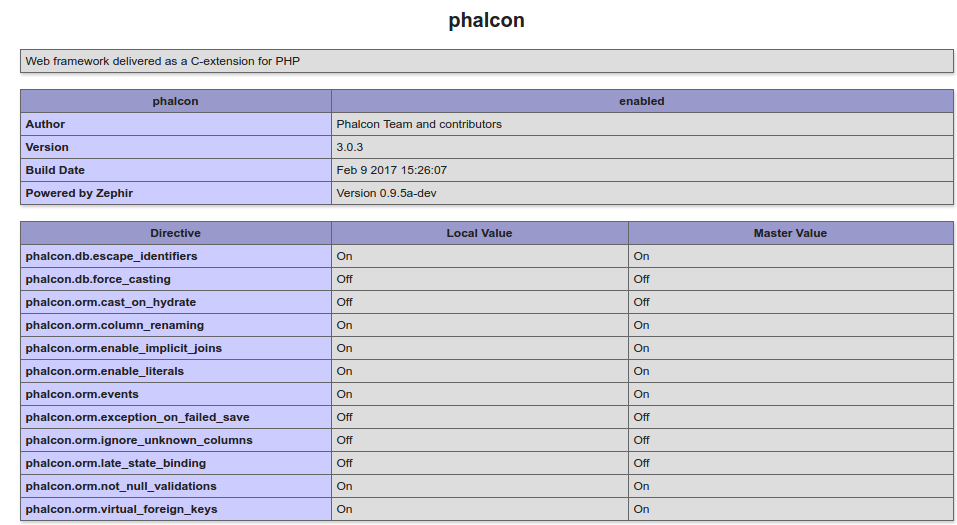 I CAN ALSO CHECK THE MODULES INSTALLED FROM COMMAND TERMINAL:
12345teddy@teddy-K43SJ:~/Documents/works/phalcon/phalcon-devtools$ php5.6 --modules[PHP Modules]...phalcon...
SO COMPILATION AND INSTALLATION SUCCESS!
TO TRY AND LEARN PHALCON DEEPER (CMS, BLOG, LOGIN, ETC), THIS IS A GOOD COMPILATION: https://github.com/sergeyklay/awesome-phalcon.