- Create a new laravel project:
1composer create-project --prefer-dist laravel/laravel laravel-blog-tutorial
123456789101112131415161718192021222324252627282930313233343536373839404142434445464748495051525354555657585960616263646566676869707172737475767778798081828384858687888990919293949596979899100101102103104105106107108109110111112113114115116117118119120121122123124125126127128129130131132133134135136137138139140141142143144145146147148149150151152153154155156157158159160161162163164165166167168169170171172173174175176177178179180181182183184185186187188189190191192193194195196197198199200201202203204205206207208209210211212213214215216217218219220221222223224225226227228229230231232233234235236237238239240241242243244245246247248249250251252253254255teddy@teddy-K43SJ:~/Documents/works/laravel$ composer create-project --prefer-dist laravel/laravel laravel-blog-tutorialYou are running composer with xdebug enabled. This has a major impact on runtime performance. See https://getcomposer.org/xdebugInstalling laravel/laravel (v5.3.16)- Installing laravel/laravel (v5.3.16)Loading from cacheCreated project in laravel-blog-tutorial> php -r "file_exists('.env') || copy('.env.example', '.env');"Loading composer repositories with package informationUpdating dependencies (including require-dev)- Installing vlucas/phpdotenv (v2.4.0)Loading from cache- Installing symfony/polyfill-mbstring (v1.3.0)Loading from cache- Installing symfony/var-dumper (v3.1.8)Downloading: 100%- Installing symfony/translation (v3.1.8)Downloading: 100%- Installing symfony/routing (v3.1.8)Downloading: 100%- Installing symfony/process (v3.1.8)Downloading: 100%- Installing psr/log (1.0.2)Loading from cache- Installing symfony/debug (v3.1.8)Downloading: 100%- Installing symfony/http-foundation (v3.1.8)Downloading: 100%- Installing symfony/event-dispatcher (v3.2.1)Loading from cache- Installing symfony/http-kernel (v3.1.8)Downloading: 100%- Installing symfony/finder (v3.1.8)Downloading: 100%- Installing symfony/console (v3.1.8)Downloading: 100%- Installing swiftmailer/swiftmailer (v5.4.4)Downloading: 100%- Installing paragonie/random_compat (v2.0.4)Downloading: 100%- Installing ramsey/uuid (3.5.2)Downloading: 100%- Installing jakub-onderka/php-console-color (0.1)Loading from cache- Installing jakub-onderka/php-console-highlighter (v0.3.2)Loading from cache- Installing dnoegel/php-xdg-base-dir (0.1)Loading from cache- Installing nikic/php-parser (v3.0.2)Downloading: 100%- Installing psy/psysh (v0.8.0)Downloading: 100%- Installing nesbot/carbon (1.21.0)Loading from cache- Installing mtdowling/cron-expression (v1.1.0)Loading from cache- Installing monolog/monolog (1.22.0)Downloading: 100%- Installing league/flysystem (1.0.32)Loading from cache- Installing symfony/polyfill-util (v1.3.0)Downloading: 100%- Installing symfony/polyfill-php56 (v1.3.0)Downloading: 100%- Installing jeremeamia/superclosure (2.3.0)Downloading: 100%- Installing doctrine/inflector (v1.1.0)Loading from cache- Installing classpreloader/classpreloader (3.1.0)Downloading: 100%- Installing laravel/framework (v5.3.28)Downloading: 100%- Installing fzaninotto/faker (v1.6.0)Loading from cache- Installing hamcrest/hamcrest-php (v1.2.2)Loading from cache- Installing mockery/mockery (0.9.7)Downloading: 100%- Installing symfony/yaml (v3.2.1)Downloading: 100%- Installing sebastian/version (2.0.1)Loading from cache- Installing sebastian/resource-operations (1.0.0)Loading from cache- Installing sebastian/recursion-context (2.0.0)Downloading: 100%- Installing sebastian/object-enumerator (2.0.0)Downloading: 100%- Installing sebastian/global-state (1.1.1)Loading from cache- Installing sebastian/exporter (2.0.0)Downloading: 100%- Installing sebastian/environment (2.0.0)Downloading: 100%- Installing sebastian/diff (1.4.1)Loading from cache- Installing sebastian/comparator (1.2.2)Downloading: 100%- Installing doctrine/instantiator (1.0.5)Loading from cache- Installing phpunit/php-text-template (1.2.1)Loading from cache- Installing phpunit/phpunit-mock-objects (3.4.3)Downloading: 100%- Installing phpunit/php-timer (1.0.8)Loading from cache- Installing phpunit/php-file-iterator (1.4.2)Downloading: 100%- Installing sebastian/code-unit-reverse-lookup (1.0.0)Loading from cache- Installing phpunit/php-token-stream (1.4.9)Downloading: 100%- Installing phpunit/php-code-coverage (4.0.4)Downloading: 100%- Installing webmozart/assert (1.2.0)Downloading: 100%- Installing phpdocumentor/reflection-common (1.0)Loading from cache- Installing phpdocumentor/type-resolver (0.2.1)Downloading: 100%- Installing phpdocumentor/reflection-docblock (3.1.1)Loading from cache- Installing phpspec/prophecy (v1.6.2)Downloading: 100%- Installing myclabs/deep-copy (1.5.5)Downloading: 100%- Installing phpunit/phpunit (5.7.4)Downloading: 100%- Installing symfony/css-selector (v3.1.8)Downloading: 100%- Installing symfony/dom-crawler (v3.1.8)Downloading: 100%symfony/var-dumper suggests installing ext-symfony_debug ()symfony/translation suggests installing symfony/config ()symfony/routing suggests installing doctrine/annotations (For using the annotation loader)symfony/routing suggests installing symfony/config (For using the all-in-one router or any loader)symfony/routing suggests installing symfony/dependency-injection (For loading routes from a service)symfony/routing suggests installing symfony/expression-language (For using expression matching)symfony/event-dispatcher suggests installing symfony/dependency-injection ()symfony/http-kernel suggests installing symfony/browser-kit ()symfony/http-kernel suggests installing symfony/class-loader ()symfony/http-kernel suggests installing symfony/config ()symfony/http-kernel suggests installing symfony/dependency-injection ()paragonie/random_compat suggests installing ext-libsodium (Provides a modern crypto API that can be used to generate random bytes.)ramsey/uuid suggests installing ircmaxell/random-lib (Provides RandomLib for use with the RandomLibAdapter)ramsey/uuid suggests installing ext-libsodium (Provides the PECL libsodium extension for use with the SodiumRandomGenerator)ramsey/uuid suggests installing ext-uuid (Provides the PECL UUID extension for use with the PeclUuidTimeGenerator and PeclUuidRandomGenerator)ramsey/uuid suggests installing moontoast/math (Provides support for converting UUID to 128-bit integer (in string form).)ramsey/uuid suggests installing ramsey/uuid-doctrine (Allows the use of Ramsey\Uuid\Uuid as Doctrine field type.)ramsey/uuid suggests installing ramsey/uuid-console (A console application for generating UUIDs with ramsey/uuid)psy/psysh suggests installing ext-pdo-sqlite (The doc command requires SQLite to work.)psy/psysh suggests installing hoa/console (A pure PHP readline implementation. You'll want this if your PHP install doesn't already support readline or libedit.)monolog/monolog suggests installing aws/aws-sdk-php (Allow sending log messages to AWS services like DynamoDB)monolog/monolog suggests installing doctrine/couchdb (Allow sending log messages to a CouchDB server)monolog/monolog suggests installing ext-amqp (Allow sending log messages to an AMQP server (1.0+ required))monolog/monolog suggests installing ext-mongo (Allow sending log messages to a MongoDB server)monolog/monolog suggests installing graylog2/gelf-php (Allow sending log messages to a GrayLog2 server)monolog/monolog suggests installing mongodb/mongodb (Allow sending log messages to a MongoDB server via PHP Driver)monolog/monolog suggests installing php-amqplib/php-amqplib (Allow sending log messages to an AMQP server using php-amqplib)monolog/monolog suggests installing php-console/php-console (Allow sending log messages to Google Chrome)monolog/monolog suggests installing rollbar/rollbar (Allow sending log messages to Rollbar)monolog/monolog suggests installing ruflin/elastica (Allow sending log messages to an Elastic Search server)monolog/monolog suggests installing sentry/sentry (Allow sending log messages to a Sentry server)league/flysystem suggests installing league/flysystem-aws-s3-v2 (Allows you to use S3 storage with AWS SDK v2)league/flysystem suggests installing league/flysystem-aws-s3-v3 (Allows you to use S3 storage with AWS SDK v3)league/flysystem suggests installing league/flysystem-azure (Allows you to use Windows Azure Blob storage)league/flysystem suggests installing league/flysystem-cached-adapter (Flysystem adapter decorator for metadata caching)league/flysystem suggests installing league/flysystem-copy (Allows you to use Copy.com storage)league/flysystem suggests installing league/flysystem-dropbox (Allows you to use Dropbox storage)league/flysystem suggests installing league/flysystem-eventable-filesystem (Allows you to use EventableFilesystem)league/flysystem suggests installing league/flysystem-rackspace (Allows you to use Rackspace Cloud Files)league/flysystem suggests installing league/flysystem-sftp (Allows you to use SFTP server storage via phpseclib)league/flysystem suggests installing league/flysystem-webdav (Allows you to use WebDAV storage)league/flysystem suggests installing league/flysystem-ziparchive (Allows you to use ZipArchive adapter)laravel/framework suggests installing aws/aws-sdk-php (Required to use the SQS queue driver and SES mail driver (~3.0).)laravel/framework suggests installing doctrine/dbal (Required to rename columns and drop SQLite columns (~2.4).)laravel/framework suggests installing guzzlehttp/guzzle (Required to use the Mailgun and Mandrill mail drivers and the ping methods on schedules (~5.3|~6.0).)laravel/framework suggests installing league/flysystem-aws-s3-v3 (Required to use the Flysystem S3 driver (~1.0).)laravel/framework suggests installing league/flysystem-rackspace (Required to use the Flysystem Rackspace driver (~1.0).)laravel/framework suggests installing pda/pheanstalk (Required to use the beanstalk queue driver (~3.0).)laravel/framework suggests installing predis/predis (Required to use the redis cache and queue drivers (~1.0).)laravel/framework suggests installing pusher/pusher-php-server (Required to use the Pusher broadcast driver (~2.0).)laravel/framework suggests installing symfony/psr-http-message-bridge (Required to use psr7 bridging features (0.2.*).)sebastian/global-state suggests installing ext-uopz (*)phpunit/phpunit-mock-objects suggests installing ext-soap (*)phpunit/phpunit suggests installing phpunit/php-invoker (~1.1)Writing lock fileGenerating autoload files> Illuminate\Foundation\ComposerScripts::postUpdate> php artisan optimizeGenerating optimized class loaderThe compiled class file has been removed.> php artisan key:generateApplication key [base64:rjLfe49t/UHcv74aIu3XHobSXw23qcKpUranTPa2Das=] set successfully.
- Download the ready made laravel blog app from https://github.com/jacurtis/laravel-blog-tutorial. It’s better to donwload in zip file then extract the content in /works/laravel/laravel-blog-tutorial/ directory. Overwrite the existing files and directories.
- Install the laravel component required:
1composer install
123456789101112131415161718192021222324252627282930313233343536373839404142434445464748495051525354555657585960616263646566676869707172737475767778798081828384858687888990919293949596979899100101102103104105106107108109110111112113114115116117118119120121122123124125126127128129130131132133134135136137138139140141142143144145146147148149150151152153154155156157158159160161162163164165166167168169170171172173174175176177178179180181182183184185186187188189190191192193194195196197198199200201202203204205206207208209210211212213214215216217218219220221222teddy@teddy-K43SJ:~/Documents/works/laravel/laravel-blog-tutorial$ composer installYou are running composer with xdebug enabled. This has a major impact on runtime performance. See https://getcomposer.org/xdebugLoading composer repositories with package informationInstalling dependencies (including require-dev) from lock file- Removing myclabs/deep-copy (1.5.5)- Removing phpdocumentor/type-resolver (0.2.1)- Removing phpdocumentor/reflection-common (1.0)- Removing webmozart/assert (1.2.0)- Removing sebastian/code-unit-reverse-lookup (1.0.0)- Removing sebastian/resource-operations (1.0.0)- Removing ramsey/uuid (3.5.2)- Removing sebastian/object-enumerator (2.0.0)- Removing nikic/php-parser (v3.0.2)- Installing nikic/php-parser (v2.0.1)Downloading: 100%- Removing classpreloader/classpreloader (3.1.0)- Installing classpreloader/classpreloader (3.0.0)Loading from cache- Removing symfony/polyfill-util (v1.3.0)- Installing symfony/polyfill-util (v1.1.1)Loading from cache- Removing symfony/polyfill-php56 (v1.3.0)- Installing symfony/polyfill-php56 (v1.1.1)Loading from cache- Removing jeremeamia/superclosure (2.3.0)- Installing jeremeamia/superclosure (2.2.0)Loading from cache- Removing league/flysystem (1.0.32)- Installing league/flysystem (1.0.20)Downloading: 100%- Removing psr/log (1.0.2)- Installing psr/log (1.0.0)Loading from cache- Removing monolog/monolog (1.22.0)- Installing monolog/monolog (1.18.1)Downloading: 100%- Removing paragonie/random_compat (v2.0.4)- Installing paragonie/random_compat (v1.4.1)Loading from cache- Removing symfony/polyfill-mbstring (v1.3.0)- Installing symfony/polyfill-mbstring (v1.1.1)Loading from cache- Removing symfony/var-dumper (v3.1.8)- Installing symfony/var-dumper (v3.0.3)Downloading: 100%- Removing symfony/console (v3.1.8)- Installing symfony/console (v3.0.3)Downloading: 100%- Removing psy/psysh (v0.8.0)- Installing psy/psysh (v0.7.2)Loading from cache- Removing swiftmailer/swiftmailer (v5.4.4)- Installing swiftmailer/swiftmailer (v5.4.1)Loading from cache- Removing symfony/finder (v3.1.8)- Installing symfony/finder (v3.0.3)Downloading: 100%- Removing symfony/http-foundation (v3.1.8)- Installing symfony/http-foundation (v3.0.3)Downloading: 100%- Removing symfony/event-dispatcher (v3.2.1)- Installing symfony/event-dispatcher (v3.0.3)Downloading: 100%- Removing symfony/debug (v3.1.8)- Installing symfony/debug (v3.0.3)Downloading: 100%- Removing symfony/http-kernel (v3.1.8)- Installing symfony/http-kernel (v3.0.3)Downloading: 100%- Removing symfony/process (v3.1.8)- Installing symfony/process (v3.0.3)Downloading: 100%- Removing symfony/routing (v3.1.8)- Installing symfony/routing (v3.0.3)Downloading: 100%- Removing symfony/translation (v3.1.8)- Installing symfony/translation (v3.0.3)Downloading: 100%- Removing vlucas/phpdotenv (v2.4.0)- Installing vlucas/phpdotenv (v2.2.0)Downloading: 100%- Removing fzaninotto/faker (v1.6.0)- Installing fzaninotto/faker (v1.5.0)Downloading: 100%- Removing mockery/mockery (0.9.7)- Installing mockery/mockery (0.9.4)Downloading: 100%- Removing phpdocumentor/reflection-docblock (3.1.1)- Installing phpdocumentor/reflection-docblock (2.0.4)Downloading: 100%- Removing phpunit/php-token-stream (1.4.9)- Installing phpunit/php-token-stream (1.4.8)Loading from cache- Removing symfony/yaml (v3.2.1)- Installing symfony/yaml (v3.0.3)Downloading: 100%- Removing sebastian/version (2.0.1)- Installing sebastian/version (1.0.6)Loading from cache- Removing sebastian/recursion-context (2.0.0)- Installing sebastian/recursion-context (1.0.2)Loading from cache- Removing sebastian/exporter (2.0.0)- Installing sebastian/exporter (1.2.1)Downloading: 100%- Removing sebastian/environment (2.0.0)- Installing sebastian/environment (1.3.5)Downloading: 100%- Removing sebastian/comparator (1.2.2)- Installing sebastian/comparator (1.2.0)Loading from cache- Removing phpunit/phpunit-mock-objects (3.4.3)- Installing phpunit/phpunit-mock-objects (2.3.8)Loading from cache- Removing phpunit/php-timer (1.0.8)- Installing phpunit/php-timer (1.0.7)Downloading: 100%- Removing phpunit/php-file-iterator (1.4.2)- Installing phpunit/php-file-iterator (1.4.1)Loading from cache- Removing phpunit/php-code-coverage (4.0.4)- Installing phpunit/php-code-coverage (2.2.4)Loading from cache- Removing phpspec/prophecy (v1.6.2)- Installing phpspec/prophecy (v1.6.0)Downloading: 100%- Removing phpunit/phpunit (5.7.4)- Installing phpunit/phpunit (4.8.24)Downloading: 100%- Removing symfony/css-selector (v3.1.8)- Installing symfony/css-selector (v3.0.3)Downloading: 100%- Removing symfony/dom-crawler (v3.1.8)- Installing symfony/dom-crawler (v3.0.3)Downloading: 100%- Installing psr/http-message (1.0.1)Downloading: 100%- Installing guzzlehttp/psr7 (1.3.1)Downloading: 100%- Installing intervention/image (2.3.7)Downloading: 100%- Removing laravel/framework (v5.3.28)- Installing laravel/framework (v5.2.23)Downloading: 100%- Installing laravelcollective/html (v5.2.4)Downloading: 100%- Installing ezyang/htmlpurifier (v4.8.0)Downloading: 100%- Installing mews/purifier (2.0.6)Downloading: 100%- Installing doctrine/lexer (v1.0.1)Loading from cache- Installing doctrine/annotations (v1.2.7)Loading from cache- Installing doctrine/cache (v1.6.0)Loading from cache- Installing doctrine/collections (v1.3.0)Loading from cache- Installing doctrine/common (v2.6.1)Loading from cache- Installing doctrine/dbal (v2.5.4)Loading from cacheintervention/image suggests installing intervention/imagecache (Caching extension for the Intervention Image library)mews/purifier suggests installing laravel/lumen-framework (To test the Lumen bindings)Generating autoload files> php artisan clear-compiled> php artisan optimizeGenerating optimized class loader
- edit .env file and fill the database account (DB name is laravel_blog)
- Create authentication scaffolding (login, register, forgot password, etc)
123456789101112teddy@teddy-K43SJ:~/Documents/works/laravel/laravel-blog-tutorial$ php artisan make:authCreated View: /home/teddy/Documents/works/laravel/laravel-blog-tutorial/resources/views/auth/login.blade.phpCreated View: /home/teddy/Documents/works/laravel/laravel-blog-tutorial/resources/views/auth/register.blade.phpCreated View: /home/teddy/Documents/works/laravel/laravel-blog-tutorial/resources/views/auth/passwords/email.blade.phpCreated View: /home/teddy/Documents/works/laravel/laravel-blog-tutorial/resources/views/auth/passwords/reset.blade.phpCreated View: /home/teddy/Documents/works/laravel/laravel-blog-tutorial/resources/views/auth/emails/password.blade.phpCreated View: /home/teddy/Documents/works/laravel/laravel-blog-tutorial/resources/views/layouts/app.blade.phpCreated View: /home/teddy/Documents/works/laravel/laravel-blog-tutorial/resources/views/home.blade.phpCreated View: /home/teddy/Documents/works/laravel/laravel-blog-tutorial/resources/views/welcome.blade.phpInstalled HomeController.Updated Routes File.Authentication scaffolding generated successfully! - Use ‘migration’ to add some new tables into the new database
123456789101112teddy@teddy-K43SJ:~/Documents/works/laravel/laravel-blog-tutorial$ php artisan migrateMigration table created successfully.Migrated: 2014_10_12_000000_create_users_tableMigrated: 2014_10_12_100000_create_password_resets_tableMigrated: 2016_02_06_175142_create_posts_tableMigrated: 2016_03_20_162017_add_slug_to_usersMigrated: 2016_04_28_021908_create_categories_tableMigrated: 2016_04_28_022255_add_category_id_to_postsMigrated: 2016_05_30_153615_create_tags_tableMigrated: 2016_05_30_155417_create_post_tag_tableMigrated: 2016_07_16_173641_create_comments_tableMigrated: 2016_08_15_000718_add_image_col_to_posts
It should be ready to test the website. - Dont forget to set the file permission in /public/ directory if we want to upload an image into it
1teddy@teddy-K43SJ:~/Documents/works/laravel/laravel-blog-tutorial$ sudo chmod -R 777 public/ - Test the website: http://localhost:8000/
12teddy@teddy-K43SJ:~/Documents/works/laravel/laravel-blog-tutorial$ php artisan serveLaravel development server started on http://localhost:8000/
If i found an error like:
12RuntimeException in EncryptionServiceProvider.php line 31:No supported encrypter found. The cipher and / or key length are invalid.
Just stop the server then generate the new key:
1teddy@teddy-K43SJ:~/Documents/works/laravel/laravel-blog-tutorial$ php artisan key:generate
It’d create a new key in .env like
1APP_KEY=SRicGuQPSaDDLOlnYCNvz7F2zdYIhXHQ
ref: http://laravel.io/forum/08-25-2016-no-supported-encrypter-found-the-cipher-and-or-key-length-are-invalid-when-i-run-keygenerate.
Then start the server back. If everything is okay, here is the screen look like: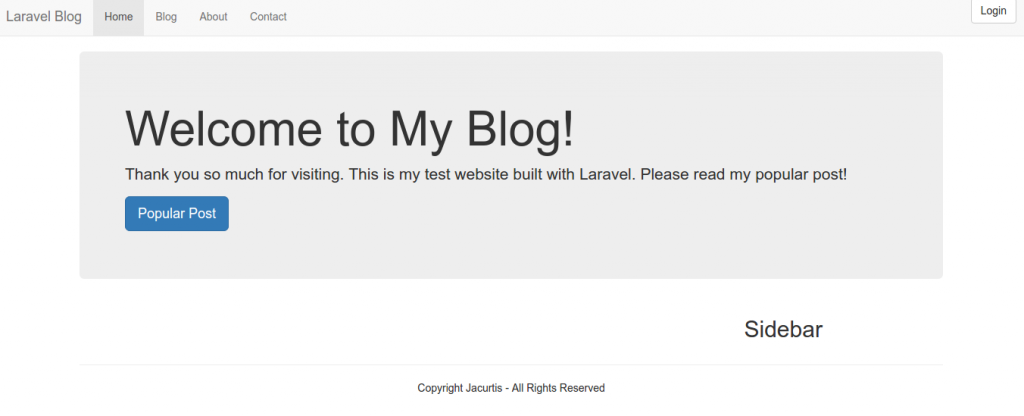 Sometimes you got an error about the file permission writeable or not like this
12NotWritableException in Image.php line 143:Can't write image data to path (/home/teddy/Documents/works/laravel/laravel-blog-tutorial/public/images/1482895274.jpg)
Then you need to set the file permission in /public/ directory to 777
1teddy@teddy-K43SJ:~/Documents/works/laravel/laravel-blog-tutorial$ sudo chmod -R 777 public/
Explore the Laravel Blog!!! (Add/edit users, add/edit posts, categories, tags, comments, send contact, login, register)
If you have enough time to learn the nitty-gritty about laravel and how to create this blog step by step, then please watch this 47 youtube videos in How to Build a Blog with Laravel. - NOTES about this app:
The route file DONT lay in /routes/web.app BUT in /app/Http/routes.php. It used Route::group.
1234567891011121314151617181920212223242526272829303132333435363738394041Route::group(['middleware' => ['web']], function () {// Authentication RoutesRoute::get('auth/login', ['as' => 'login', 'uses' => 'Auth\AuthController@getLogin']);Route::post('auth/login', 'Auth\AuthController@postLogin');Route::get('auth/logout', ['as' => 'logout', 'uses' => 'Auth\AuthController@getLogout']);// Registration RoutesRoute::get('auth/register', 'Auth\AuthController@getRegister');Route::post('auth/register', 'Auth\AuthController@postRegister');// Password Reset RoutesRoute::get('password/reset/{token?}', 'Auth\PasswordController@showResetForm');Route::post('password/email', 'Auth\PasswordController@sendResetLinkEmail');Route::post('password/reset', 'Auth\PasswordController@reset');// CategoriesRoute::resource('categories', 'CategoryController', ['except' => ['create']]);Route::resource('tags', 'TagController', ['except' => ['create']]);// CommentsRoute::post('comments/{post_id}', ['uses' => 'CommentsController@store', 'as' => 'comments.store']);Route::get('comments/{id}/edit', ['uses' => 'CommentsController@edit', 'as' => 'comments.edit']);Route::put('comments/{id}', ['uses' => 'CommentsController@update', 'as' => 'comments.update']);Route::delete('comments/{id}', ['uses' => 'CommentsController@destroy', 'as' => 'comments.destroy']);Route::get('comments/{id}/delete', ['uses' => 'CommentsController@delete', 'as' => 'comments.delete']);Route::get('blog/{slug}', ['as' => 'blog.single', 'uses' => 'BlogController@getSingle'])->where('slug', '[\w\d\-\_]+');Route::get('blog', ['uses' => 'BlogController@getIndex', 'as' => 'blog.index']);Route::get('contact', 'PagesController@getContact');Route::post('contact', 'PagesController@postContact');Route::get('about', 'PagesController@getAbout');Route::get('/', 'PagesController@getIndex');Route::resource('posts', 'PostController');});Route::group(['middleware' => 'web'], function () {Route::auth();Route::get('/home', 'HomeController@index');});
The route for the root website (/) is pointing to ‘PagesController.php’ in /app/Http/Controllers/
1234public function getIndex() {$posts = Post::orderBy('created_at', 'desc')->limit(4)->get();return view('pages.welcome')->withPosts($posts);}
The ‘Post’ data is retrieved with a help from ‘Post’ model in /app/Post.php. The data then would be rendered by welcome.blade.php in /resources/views/pages/